

Right now I’m building the Australian side of Expert SEO.
Same business, same service, same structure. The Auckland page becomes a Sydney page. “SEO agency in New Zealand” becomes “SEO agency in Australia.”
The bones don’t change — the specifics do.
Which leaves me with two pages that look almost identical to a search engine, and one job: make sure a Kiwi searching from Hamilton lands on the New Zealand version, and someone in Brisbane lands on the Australian one.
That’s what hreflang is for.
(And before you ask — it’s said “href lang,” two words, like the HTML attribute it’s named after. Nobody says it out loud confidently the first time. I certainly didn’t.)
Hreflang has a reputation for being the fiddliest thing in technical SEO, and most guides earn that reputation by teaching it in French and German. Fine if you’re Nike. Less useful if you’re a Hamilton business opening in Australia.
So this one’s written from the New Zealand side of the Tasman. What hreflang is, whether you actually need it (most NZ businesses don’t), and the exact tags and clicks if you do.
For the decade I’ve been doing SEO — mostly against US competition, which is a different sport — hreflang has been the thing clients hear about, panic about, and then implement backwards. Let’s fix that.
Key Takeaways
- What it is: hreflang is an HTML attribute that tells search engines which language and country version of a page to show — so an Australian searcher gets your Australian page, and a New Zealander gets yours.
- If you serve one country in one language, hreflang does nothing for you — which covers the large majority of New Zealand businesses.
- You need it when you have near-identical pages aimed at different countries or languages, and you want both to rank.
- Two rules break more implementations than everything else combined: every page must link to itself, and every page must link back to the others.
- Ahrefs studied 374,756 domains using hreflang and found 67% had at least one issue — the most common being a missing x-default, at 56.3%.
- Hreflang is a signal, not a directive. Google can ignore it, and it is not a direct ranking factor.
- You can check your own implementation free in about three minutes: view the page source and search for “hreflang.”
What Are Hreflang Tags?
Hreflang tags are HTML attributes that tell search engines which language and regional version of a page to serve to which users.
One line of code, three moving parts:
<link rel="alternate" hreflang="en-nz" href="https://example.co.nz/services/" />Here’s what each bit does:
rel="alternate"— this link points at an alternate version of the page you’re on.hreflang="en-nz"— that version is in English, for New Zealand.href="..."— and here’s where it lives.
That’s the whole thing. It’s not complicated on its own; it gets complicated because you need a set of them, on every page, all pointing at each other correctly.
Two things worth knowing before we go further.
Hreflang is a signal, not a directive. You’re making a suggestion to Google, not issuing an order. Google’s own documentation treats these as hints it uses alongside everything else it knows about your site.
It’s not a ranking factor. Adding hreflang won’t lift you a single position. What it does is make sure the right page ranks in the right market, which is a different and often more valuable thing.
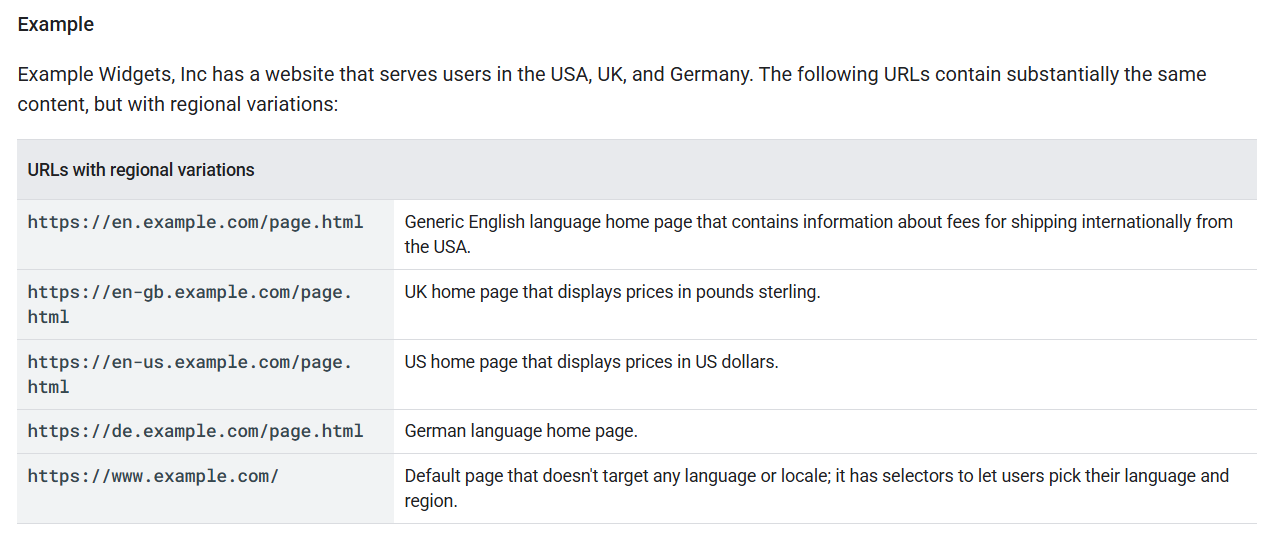
Worth noting what Google reaches for in its own example: en, en-gb and en-us — one language, three regional variations. Same shape as the New Zealand and Australia problem, and a long way from the French-and-German framing most guides lead with.
One quick bit of housekeeping.
You may have seen hreflang used inside an <a> tag, as in <a href="..." hreflang="fr">. That’s a different, mostly ignored use of the same attribute name — it just describes the language of a link’s destination.
It’s not what anyone means when they say “hreflang tags,” and it’s not what this guide is about.
Why Are Hreflang Tags Important?
Hreflang tags do three jobs: they put the right regional page in front of the right searcher, they stop Google treating your near-identical country pages as duplicates, and they keep people from landing on a page quoting the wrong currency.
Take the duplicate content problem first, because it’s the one people underestimate.
Say I publish an Australian version of my services page. Same structure, same headings, ninety percent the same words. To a crawler, those two pages are close to identical.
Without hreflang, Google has to work out whether that’s two legitimate market versions or duplicate content it should ignore. Sometimes it gets that right. Sometimes it picks one, indexes it, and quietly drops the other.
Hreflang removes the guess. It says: these are the same content, deliberately, for different markets — here’s which is which.
The second job is the market-matching one, and for anyone trading across the Tasman it’s the whole point.
Australia is New Zealand’s second-largest trading partner — NZ exports to Australia were US$5.87 billion in 2025, on UN COMTRADE figures.
A lot of Kiwi businesses end up with two markets whether they planned to or not; that’s the moment international SEO stops being someone else’s problem.

The third job is the boring one that costs the most money: someone lands on your NZ page, sees prices in NZD, an 0800 number, and delivery to Christchurch, and leaves. That’s a bounce you paid for.
Do You Need Hreflang Tags?
Probably not.
You need hreflang tags if you have two or more versions of the same page aimed at different countries or different languages, and you want both to rank. If you serve one country in one language, you don’t need them, and adding them will do exactly nothing.
I want to be blunt about that because most guides won’t be. There’s an entire genre of SEO content that treats every technical feature as something you’re negligent for not having. Hreflang isn’t a checkbox. It’s a fix for a specific problem.
Here’s the test. Two questions:
- Do you have near-identical pages for more than one country or language?
- Do you want both of them to rank, in their own markets?
Two yeses means you need it. Anything else means you don’t.
Some real versions of that:
An Auckland e-commerce brand shipping to Australia. They’ve built /au/ versions of their product pages — same products, AUD pricing, Australian shipping info. Two markets, near-identical pages, both need to rank. Yes, they need hreflang. They also need ecommerce SEO doing properly on both, but that’s a separate conversation.
A Wellington SaaS company on a .co.nz and a .com.au. Two separate domains, same product, localised pricing pages. Hreflang works across domains just fine — this is a textbook case. Yes.
A Queenstown tourism operator with an English site and one Chinese-language landing page. Different languages, same content. Yes — but only on the pages that have a counterpart. You don’t need hreflang across the whole site, just on the pairs that exist. Partial rollouts are completely normal, and no one tells you that.
A Christchurch law firm serving Christchurch, in English, full stop. One market, one language, no alternate versions. No. Not “not yet.” No. Their time is better spent on almost anything else.
One thing hreflang will not do: make you competitive in a market you have no business being in.
If your Australian pages are thin, unlinked and unloved, hreflang will faithfully deliver Australian searchers to a page that doesn’t deserve them.
Everything that earned that Auckland brand its rankings at home — the content, the links, the technical housekeeping — has to be done again in Sydney.
Hreflang decides which door people walk through; it doesn’t furnish the room.
Put another way: the work of ranking in Auckland doesn’t transfer across the Tasman just because you copied the template.
What Happens If You Skip Hreflang Tags?
Google will still make a reasonable guess. Hreflang tags just remove the guessing.
This is the part the other guides leave out, and it’s worth understanding before you spend a weekend on this.
Without hreflang, Google works out which version to show using everything else it knows: your domain (a .co.nz is a strong New Zealand signal), your links, your content, your currency and contact details, and the user’s own location and language settings. On a .co.nz versus a .com.au, it usually lands right.
Where the guess actually falls over is the case I’m in — and probably you, if you’re reading this.
Same language. Same structure. Same domain. The /australia/ page and the New Zealand page are separated by not much more than the word “Australia.”
That’s when Google’s signals thin out, because there aren’t many left to read. Two pages in English, on one domain, saying nearly the same thing. It has to pick, and it may pick the one with more links and history — which will always be the home-market page.
So the honest read: hreflang isn’t a rescue, it’s a tightening. On separate ccTLDs you’d probably survive without it. On a subfolder rollout in the same language, it’s doing real work.
Know what you’re buying before you build it.
What Do Hreflang Tags Look Like?
A complete hreflang setup is a set of tags — one per version, on every page in the set, including the page you’re on.
Let’s build one properly, using the NZ/AU case.
The language and region codes
The language code comes first and it’s mandatory. It’s ISO 639-1 — two letters. en for English, fr for French, zh for Chinese.
The region code comes second and it’s optional. It’s ISO 3166-1 alpha-2 — also two letters. NZ, AU, GB, US.
So en-nz is English for New Zealand. en-au is English for Australia. Simple enough.
Three traps live in here.
A region code on its own doesn’t work. hreflang="nz" looks sensible and does nothing useful — Google reads the first code as a language, and there is no “nz” language. You must lead with the language.
Getting the code wrong is more common than you’d think. Ahrefs found 4.6% of domains had incorrect hreflang values — typos, three-letter codes, country codes in the language slot, or invented ones like “la” for Latin America.

The uk versus gb thing. The correct code for the United Kingdom is gb. But as Patrick Stox notes in that same study, uk is a specially reserved code and Google accepts it anyway. Use gb — but don’t lose sleep if you inherit a site using uk.
Don’t be too specific
This is the sharpest bit of advice in the whole topic and it comes from Joost de Valk at Yoast: don’t over-target.
If you only ever write en-nz and en-au, you’ve told Google what to do with New Zealanders and Australians and nothing else. An English speaker in Singapore matches neither.
So add a plain en as your catch-all, pointing at whichever version should be the default for the rest of the English-speaking world.
The rule underneath it: the most specific match wins. An Australian gets en-au because it’s more specific than en. Everyone else falls back. Order in the code doesn’t matter — Google sorts it out.
Self-referencing and return links
These are the two rules that break more implementations than everything else put together.
Every page must include a tag pointing at itself. Sounds pointless. Isn’t. Google’s guidelines state that each version must list itself as well as all other versions.
Every page must link back to every other page in the set. If your NZ page points at the AU page, the AU page must point back. These tags work in pairs — one-way is broken.
The practical upshot is that every page in a set carries the identical block of hreflang tags. The block doesn’t change from page to page; only the URLs inside it do, once per page-pair.
What x-default does
x-default is your fallback. It’s where you send someone whose language and location match none of your versions.
Google introduced it back in 2013 for international landing pages — those “choose your country” splash screens — but in practice it works as a general catch-all.
It’s not mandatory, which is presumably why 56.3% of domains are missing it — the single most common hreflang issue there is.
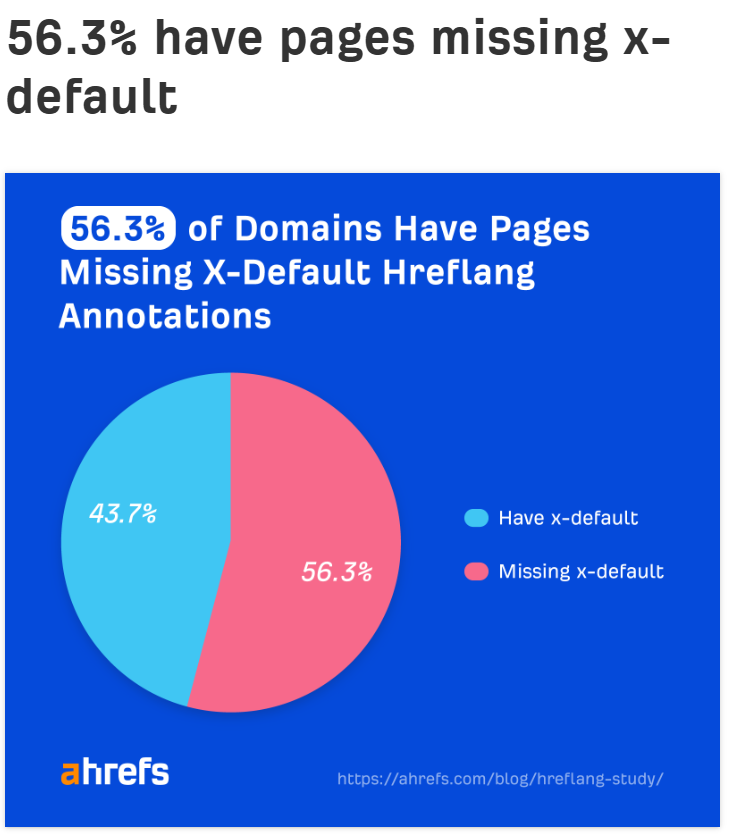
If you’ve already got a plain en catch-all doing that job for English speakers, an x-default pointing at the same URL is a belt-and-braces move. Cheap to add.
The copy-paste block
Here’s a complete, valid NZ/AU set. Swap the two URLs and it’s yours:
<link rel="alternate" hreflang="en-nz" href="https://example.co.nz/services/" />
<link rel="alternate" hreflang="en-au" href="https://example.co.nz/australia/services/" />
<link rel="alternate" hreflang="en" href="https://example.co.nz/services/" />
<link rel="alternate" hreflang="x-default" href="https://example.co.nz/services/" />
That exact block goes in the <head> of both pages — the New Zealand one and the Australian one. Identical on both. That’s the return-link rule handled.
Use absolute URLs, always, including the https://. Relative paths get ignored.
Hreflang Tags vs the Lang Attribute
The lang attribute says what language this page is written in. Hreflang tags say what other versions exist. Different jobs, and you want both.
You’ll find lang at the top of your HTML:
<html lang="en-NZ">That’s for browsers, screen readers and translation tools — accessibility plumbing, mostly. It describes the page you’re on and says nothing about alternates.
Here’s the part that surprises people: Google doesn’t use either one to work out what language a page is in. It reads the actual content and decides for itself.
So why keep them consistent? Because audit tools flag mismatches, and a mismatch usually means something genuinely is wrong.
Ahrefs found 3.2% of domains had inconsistent language attributes — a page declaring itself German in one place and English in another. That’s not a penalty; it’s a smell.
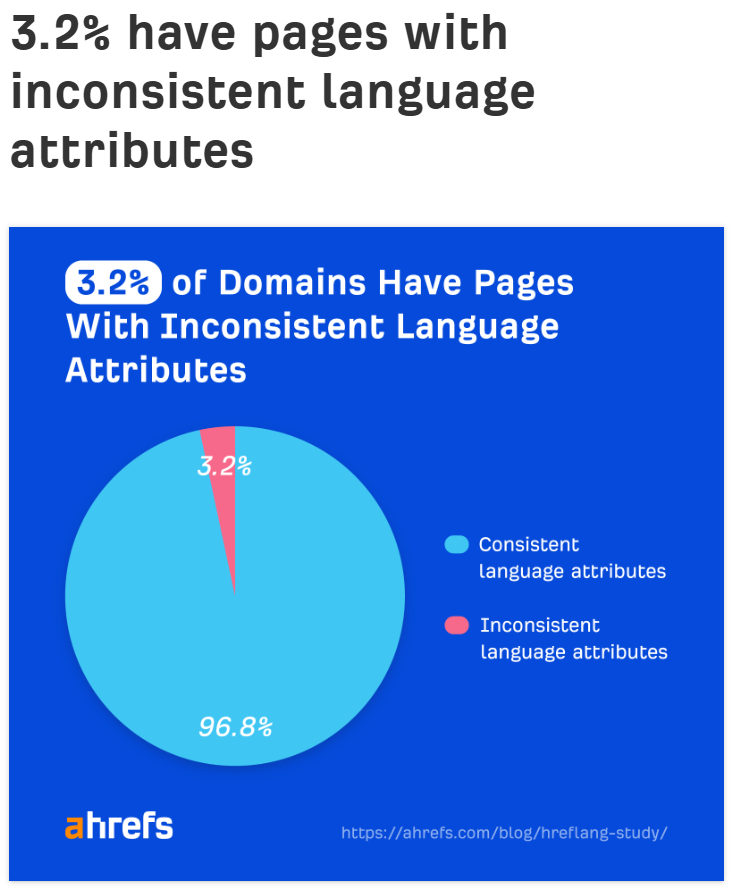
Set your lang to match the page. Then let hreflang handle the alternates.
How to Add Hreflang Tags to Your Site
There are three places hreflang tags can live: the page’s <head>, your XML sitemap, or HTTP headers. For most New Zealand sites, the <head> is the right answer.
In the HTML head
You drop the link elements inside <head> on every page in the set. That’s the copy-paste block from above.
It’s the most common method and the easiest to verify — you can right-click, view source, and see it. The downside only shows up at scale: twenty language versions means twenty lines on every page, downloaded by every visitor, used by none of them.
For a NZ/AU rollout with a handful of tags? Non-issue.
In your XML sitemap
Instead of putting the tags on the pages, you declare the relationships in your sitemap using xhtml:link entries:
<url>
  <loc>https://example.co.nz/services/</loc>
  <xhtml:link rel="alternate" hreflang="en-nz" href="https://example.co.nz/services/" />
  <xhtml:link rel="alternate" hreflang="en-au" href="https://example.co.nz/australia/services/" />
</url>
Every URL in the set needs its own <url> block with the full list repeated. Verbose, but it keeps the weight off your pages, and it’s usually far easier to regenerate a sitemap than to edit a thousand page templates.
In HTTP headers
This one exists for non-HTML files — PDFs, mostly. You can’t put a <link> element inside a PDF, so the alternates ride along in the server response instead.
If you’re not serving translated PDFs, you can safely forget this method exists.
Which one should you use?
Plain version:
- Under about a hundred page pairs, on one CMS: use the
<head>. Easiest to build, easiest to check. - Large catalogue, or versions spread across several domains or systems: use the sitemap. One file to manage instead of thousands of templates.
- PDFs and other non-HTML files: HTTP headers, and only for those.
Pick one and commit. Running the same set through two methods at once is how you end up with the page-versus-sitemap conflicts that show up in audits.
How to Add Hreflang Tags in WordPress, Shopify and Webflow
On WordPress the fastest reliable route is a dedicated hreflang plugin. On Shopify and Webflow you’re either using the platform’s built-in international features or editing the theme’s head code directly.
This is the part almost every hreflang guide skips, which has always struck me as odd — it’s the only part most readers actually need.
WordPress
Skip the translation plugins. WPML, Polylang and TranslatePress all emit hreflang, but they’re built to run a multilingual site, and en-nz versus en-au isn’t a translation problem. You’d be installing a lot of machinery to output four lines of HTML.
What you want is a plugin that does hreflang and nothing else. I’m using Hreflang Manager by DAEXT on Expert SEO.
Here’s the actual click path:
- Plugins → Add New, search “Hreflang Manager,” install and activate.
- In the left-hand menu you’ll now have a Hreflang item. Go to Hreflang → Connections.
- Add a connection. A connection is one page-pair: this URL, that URL, and the language-region code for each. For me that’s the NZ services page and the
/australia/services/page, taggeden-nzanden-au. - Or do it from the post editor instead. There’s a Hreflang Manager panel inside the editor itself — Block or Classic, both work. If you’d rather set the alternates while you’re writing the page than manage a separate list, do it here. Same result.
- Repeat per page-pair. This is the tedious bit and there’s no way around it: hreflang is a page-level relationship, not a site-level setting.
- Verify. Go to Hreflang → Options and switch on the Tag Inspector. It shows you the tags the plugin is actually outputting, which is not always the set you thought you configured.

That empty Connections screen is where every hreflang setup starts, and it’s worth sitting with for a second: nothing here happens automatically. The plugin outputs exactly the relationships you tell it about, and no others.
The plugin also handles alternates that sit on a completely separate WordPress install, and works across a multisite network — which covers the .co.nz plus .com.au setup if you’ve gone that way.
Shopify
If you’re using Shopify Markets with international domains or subfolders, Shopify generates the hreflang tags for you. Set your markets up properly and the tags follow. Check them, don’t build them.
If you’re hand-rolling it — say your Australian store is a separate Shopify store rather than a market — you’ll be editing the theme. Online Store → Themes → Edit code → theme.liquid, and add your link elements inside the <head>.
The catch: theme.liquid is site-wide, so a hardcoded block puts the same tags on every page. That’s fine if you’re only linking your two homepages. For page-level pairs you need Liquid logic that builds the URLs per template, and that’s a developer job. Worth knowing before you promise it to someone.
Webflow
Webflow’s Localization add-on generates hreflang automatically across locales. If you’re on it, you’re done — verify and move on.
Without it, you’re in Project Settings → Custom Code → Head Code for site-wide tags, or the per-page Custom Code panel for page-level ones.
Be honest with yourself about the second option. Pasting a bespoke hreflang block into every page’s custom code panel by hand is fine for five pages and miserable for fifty. If you’re above that, either buy Localization or move the whole job into your sitemap.
Hreflang Tags and Canonical Tags
Every regional page should have a canonical tag pointing at itself, plus hreflang tags pointing at all the other versions. Canonicalising your Australian page to your New Zealand page breaks the whole thing.
These two tags say different things, and people mix them up constantly.
A canonical tag says: this is the version to index.
Hreflang says: here are the other versions, for other people.
They work together. Here’s what correct looks like on the Australian page:
<link rel="canonical" href="https://example.co.nz/australia/services/" />
<link rel="alternate" hreflang="en-nz" href="https://example.co.nz/services/" />
<link rel="alternate" hreflang="en-au" href="https://example.co.nz/australia/services/" />
The canonical points at itself. The hreflang tags cover both.
And here’s the mistake, which I see constantly on sites that have half-migrated something:
<!-- On the Australian page — broken -->
<link rel="canonical" href="https://example.co.nz/services/" />
That says “don’t index this page, index the New Zealand one” while the hreflang tags are busy saying “please show this page to Australians.” Two contradictory instructions. Google resolves it by ignoring something, and you don’t get to choose what.
Ahrefs found 8% of domains had hreflang tags pointing at non-canonical URLs — and interestingly, in the cases Patrick Stox examined, the canonical was often the one that lost.

Same rule applies to noindex. A page you’ve told Google not to index has no business being a hreflang target.
Common Hreflang Tag Mistakes
Nearly every broken hreflang setup comes down to one of seven mistakes — and most of them are one-line fixes.
Rather than list these in the usual arbitrary order, here they are ranked by how often they actually happen, using Ahrefs’ study of 374,756 domains running hreflang. They found 67% had at least one issue, which tells you something about how easy this is to get wrong.
1. Missing x-default — 56.3% of domains. No fallback for users who match none of your versions. Not fatal, and not required, but it’s free to add and it’s the most widespread gap by a mile.
2. Missing self-referencing tags — 18%. The page doesn’t include a tag pointing at itself. Fix: add the page’s own URL to the block. Worth noting Ahrefs flags this as best practice rather than a hard requirement — but since every page carries the identical block anyway, leaving yourself out is more effort than including yourself.
3. Hreflang pointing at redirected or broken pages — 16.9%. You’re telling Google to serve a URL that 404s or bounces through a redirect. Usually the fallout from a page being moved or deleted without anyone updating the tags that referenced it.
4. Missing reciprocal tags — 15.3%. The famous “no return tags” error. A points at B, B doesn’t point back, the pair never forms. This is the one that shows up in your crawler and sends you looking for a guide like this one.
5. Pointing at non-canonical URLs — 8%. Covered above. Contradictory signals, unpredictable outcome.
6. Incorrect hreflang values — 4.6%. Wrong codes, typos, three-letter codes, region codes in the language position.
7. Inconsistent language attributes — 3.2%. Your lang attribute and your hreflang disagree about what language the page is in.
There’s an eighth that no study catches, because it isn’t technically an error: using hreflang between pages that aren’t actually the same content.
Linking your English service page to a French blog post on the same topic isn’t a language pair. It’s two different pages, and Google will work that out and start ignoring your annotations.
How to Check Your Hreflang Tags
You can check hreflang for free in about three minutes, and you should do that before you go anywhere near a paid crawler.
Check it free in three minutes
Open the page. Right-click, View Page Source. Then Ctrl+F (or Cmd+F) and search for hreflang.
What you want to see: one line per version, absolute URLs, the page’s own URL among them, and the same block on the counterpart page.
Then do the single most useful check there is — open the other page and run the same search. If the tags don’t match, you’ve found your return-link problem. That’s the fix for the most-reported hreflang error in existence, and it costs you thirty seconds.
Free validators
Three worth having:
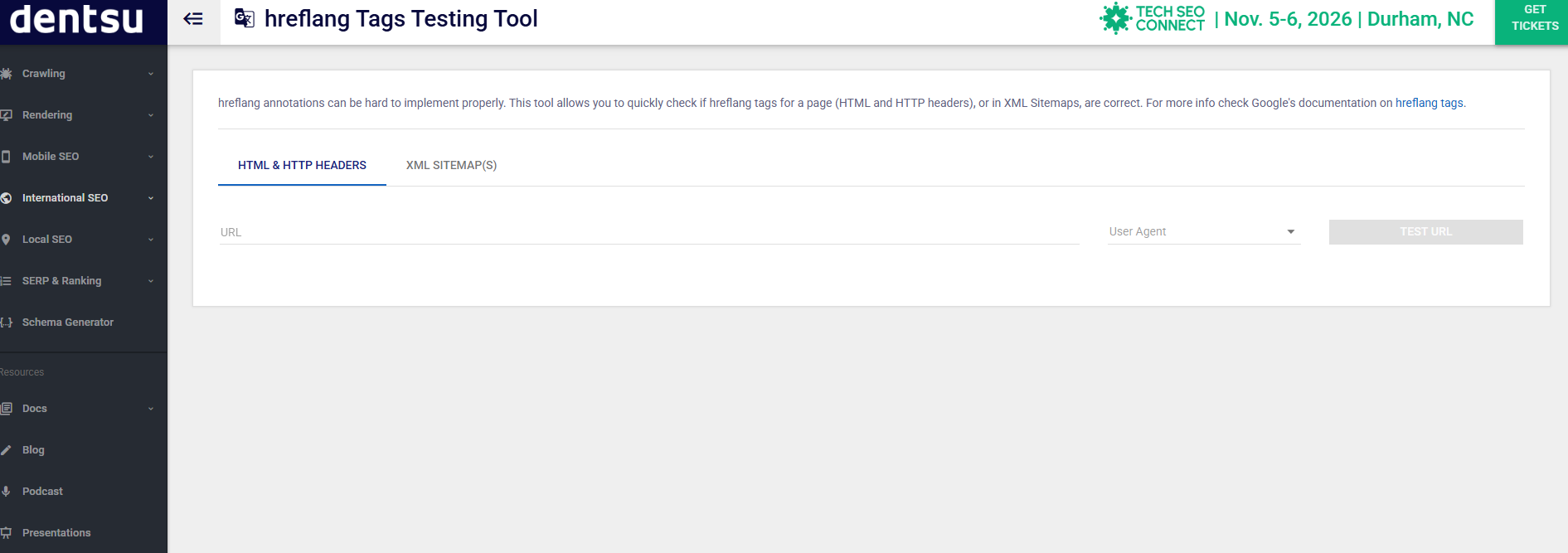
The hreflang Tags Testing Tool at technicalseo.com/tools/hreflang — originally Merkle’s, now under dentsu. Paste a URL, pick a user agent, hit Test URL. It checks the HTML, the HTTP headers and your XML sitemaps in one go. Free, no account.
The Hreflang Tag Checker Chrome extension. Reads the tags on whatever page you’re looking at and checks whether they reference back. Handy while you’re actually working.
Hreflang Manager’s built-in Tag Inspector, if you’re on WordPress with that plugin — Hreflang → Options, switch it on.
Crawlers, once you’ve got a few pages
Screaming Frog has a dedicated hreflang tab that crawls your whole site and reports missing return links, inconsistencies and non-canonical targets in one view. The free version covers 500 URLs, which is plenty for most NZ sites. It’s the same crawl you’d run for a full site audit, just filtered to one tab.
Google Search Console used to have an International Targeting report; it’s been retired, so Search Console is now mostly useful for confirming the right pages are indexed in the first place.
Keeping your hreflang tags working when pages change
Hreflang tags aren’t a set-and-forget job, and this is where most implementations quietly rot.
Two events break it:
You delete a page. Every counterpart still pointing at it now references a 404. That’s mistake #3 on the list above, and it’s how 16.9% of domains got there.
You redirect a page. Same problem, softer edges — the tags still resolve, but through a redirect, which isn’t what hreflang expects.
The habit that prevents both: when you delete or move a page, check its counterparts in the same sitting. Add it to whatever checklist you use for content changes. Then re-crawl every few months to catch what slipped through.
How I’m Setting Up Hreflang Tags for Expert SEO’s Australian Expansion
Expert SEO is expanding into Australia on an /australia/ subfolder — same site, same structure, New Zealand specifics swapped for Australian ones. Here’s exactly how the hreflang tags are set up.
Fair warning: this is a build in progress, not a case study with a results graph on the end. I’d rather show you the working than wait a year to show you a chart.
The situation. My New Zealand pages and my Australian pages are near-identical in format. Same structure, same argument, same layout — the market specifics change and not much else. Two pages, one language, one domain, and very little for a crawler to tell apart. Textbook hreflang, and textbook hard hreflang, because there are so few other signals for Google to lean on.
The structural call: subfolder, not a .com.au. I went with /australia/ on expertseo.co.nz rather than buying a separate Australian domain.
The reasoning is straightforward. A subfolder inherits the authority the main domain has already built — and in roughly eight months the Expert SEO domain went from brand new to ranking for 233 keywords, with about $3,500 a month in traffic value. A fresh .com.au starts from zero with none of that.
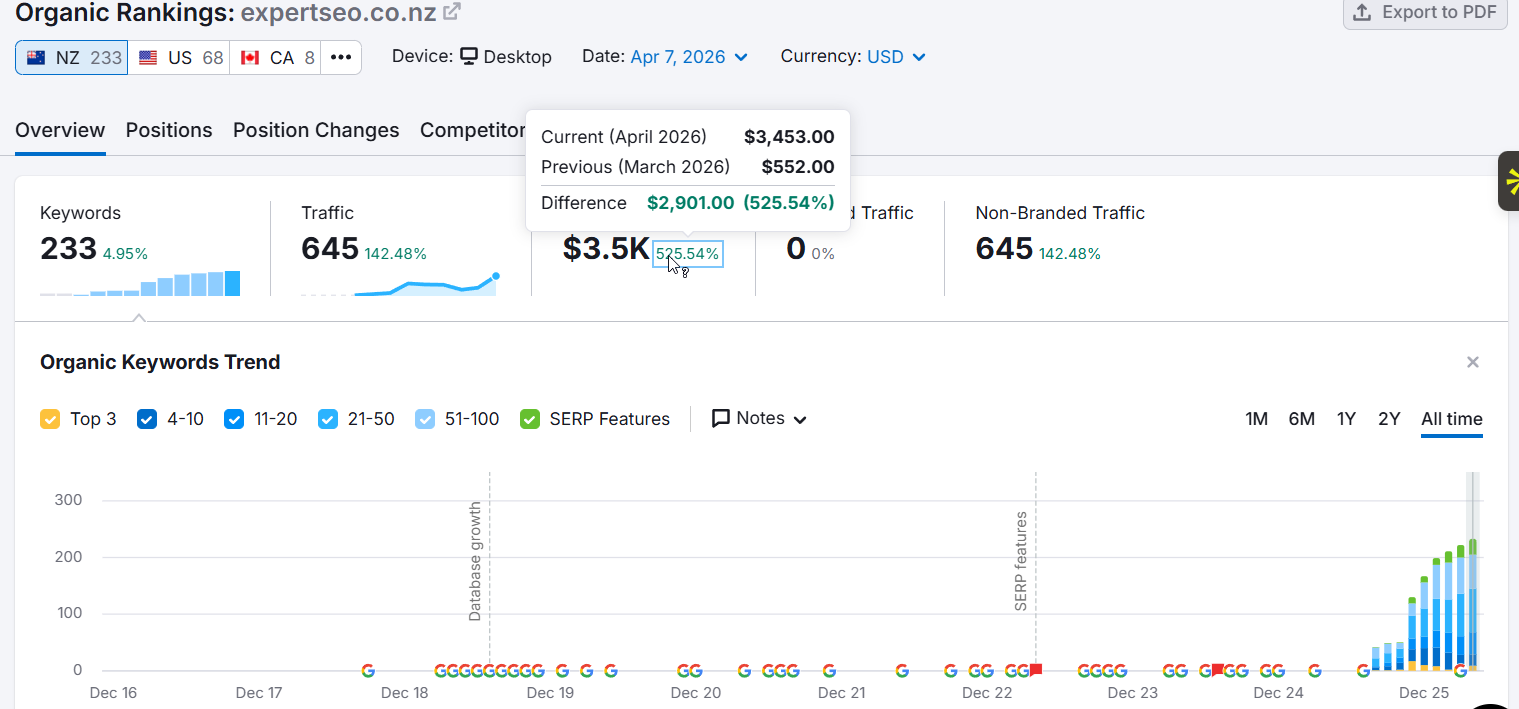
The trade-off is real, though: a .co.nz domain is a loud New Zealand signal, and I’m asking Google to rank pages on it in Australia. That’s swimming slightly upstream.
So the ccTLD decision is deferred until I’ve got city-level data telling me the Australian market is genuinely winnable. Moving later is a migration I’d rather do once, with evidence, than guess at now.
The Australian page is live. Same layout, same proof, same structure as the New Zealand one — the argument is just aimed at a different market: “An SEO agency for Australian businesses who want the specialist, not a sales team.”

Look at that page and the New Zealand one side by side and you’ll see the problem in miniature. Same template, same photo, same offer, same language. To me they’re two markets; to a crawler they’re one page with the nouns swapped.
The tags. Each page-pair carries the same four lines, identical on both sides:
<link rel="alternate" hreflang="en-nz" href="https://expertseo.co.nz/services/" />
<link rel="alternate" hreflang="en-au" href="https://expertseo.co.nz/australia/services/" />
<link rel="alternate" hreflang="en" href="https://expertseo.co.nz/services/" />
<link rel="alternate" hreflang="x-default" href="https://expertseo.co.nz/services/" />
New Zealand takes both the plain en and the x-default, because it’s the established market and the better default for anyone who matches neither country.
The tooling. Hreflang Manager, one connection per page-pair, built as each Australian page goes live. I’m not pre-building connections for pages that don’t exist yet — that’s how you end up in the 16.9% pointing at broken URLs.
What I’m watching. Whether the Australian pages get indexed separately rather than folded into the NZ versions, and whether Australian impressions show up in Search Console against the /australia/ URLs specifically. That’s the real test of whether the annotations are landing.
The tags are only half of it, mind. The other half is building links in the new market so the Australian pages have something behind them — because a perfectly annotated page with no authority is still a perfectly annotated page nobody sees.
Do Hreflang Tags Still Matter in AI Search?
Yes — because AI answers still resolve to a URL, and hreflang tags are one of the signals deciding which regional version gets picked.
When an AI Overview or ChatGPT cites a source, it cites a specific page. Same problem as before, higher stakes: ten blue links give a searcher a chance to notice they’re on the wrong country’s page and pick another. A single cited answer doesn’t.
I have some skin in this one. Expert SEO’s local SEO guide has been cited in Google’s AI Mode inside the site’s first year.

And ChatGPT names us when someone asks it for the best SEO agency in Cambridge.

Which is exactly why I care which version of a page gets picked up, not just whether one does.
The honest limit: there’s no public data yet on how heavily LLM-driven surfaces weight hreflang specifically. Anyone telling you they know the exact mechanics is guessing with confidence. What we can say is that these systems still crawl, still index, and still choose a canonical URL — and hreflang is an input to that choice.
Nothing about AI search makes regional targeting matter less. If anything, a world of single-answer results makes picking the right page more important, not less.
Final Thoughts
The thing I’d tell you if you only read one paragraph: hreflang is a small job that people turn into a big one by starting in the wrong place.
They read a 5,000-word guide about French and German, panic, install a translation plugin they don’t need, and end up with a half-configured multilingual system on a site that sells to two English-speaking countries.
Start with the two-question test instead. Most of you will get a “no” and can close this tab with your weekend intact. The rest of you need four lines of HTML on each of a handful of page-pairs, and a habit of checking them when pages move.
If you do need it, do the homepage first. Joost de Valk’s advice and it’s still the best in the topic — your brand searches are where the wrong-country result hurts most, and it’s one pair to get right instead of five hundred.
And if you’d rather not spend your Saturday reading page source, our SEO services cover the technical side properly.
If it’s the bigger expansion question you’re weighing up rather than the tags themselves, that’s a conversation worth having with an SEO consultant before you commit to a domain structure you’ll be living with for years.
Hreflang Tags: FAQ
What are hreflang tags?
Hreflang tags are HTML attributes that tell search engines which language and regional version of a page to show a given user. They sit in the page's <head>, your XML sitemap or your HTTP headers, and they stop near-identical country versions of a page being treated as duplicate content.
Do hreflang tags need a canonical tag?
They work alongside one. Every regional page should carry a canonical tag pointing at itself, plus hreflang tags pointing at all the other versions. Canonicalising your Australian page to your New Zealand page sends two contradictory instructions and breaks the implementation.
Is hreflang a ranking factor?
No. Hreflang is a signal, not a directive, and Google doesn't use it to rank pages higher. What it does is make sure the right regional version of a page ranks in the right market, which usually matters more than a position or two.
Do hreflang tags need to be on every page?
Only on pages that have an alternate version. If just your homepage and three service pages exist in both New Zealand and Australian versions, only those four pairs need hreflang. Partial rollouts are completely normal.
Do I need hreflang if both pages are in English?
Yes, and this is the case where it matters most. Two English pages on one domain give Google very little to tell them apart, so it may index one and drop the other. Use en-nz and en-au to make the distinction explicit.
How do you pronounce hreflang?
"Href lang" — two words, the same way you'd say the HTML href attribute it's named after. Not "h-ref-lang" as one run-on word.
Recommended Reading
 Technical SEO Checklist
The eight technical checks every NZ website should pass before chasing rankings.
 Keyword Cannibalisation
What happens when two of your own pages compete for the same query — and how to fix it.
 How to Do an SEO Audit
The full step-by-step audit that catches hreflang errors and everything around them.