

You run a crawl on your website. The tool spits back 434 “issues.” Broken links, missing meta descriptions, redirect chains, some acronym you’ve never heard of flashing red.
So you stare at it. Then you close the tab.

That’s where most SEO audits die.
Not because the person couldn’t run the tool, but because a list of 434 problems tells you nothing about which five actually matter.
Here’s the thing an SEO audit is really for: it finds where the money is, then finds what’s blocking you from getting it.
Every other guide out there skips the first half and drowns you in the second.
So this one’s different.
I’ll walk you through the exact seven-step audit I run — starting with the opportunity in real dollars, then working through every layer of the site, then how to decide what to fix first.
Free tools where they’ll do the job. Real New Zealand examples throughout.
And at the end, a full audit I ran for a real Auckland dental practice, start to finish, so you can see the whole thing working on one actual site.
Let’s get into it.
What Is an SEO Audit
An SEO audit is a structured health-check of your website that shows you what’s holding your rankings back — and what fixing it is worth to your business.
Put plainly: the whole point of an audit is to make your business more money. You do that by finding the SEO opportunities your website is missing — the rankings, traffic and leads sitting just out of reach — then clearing whatever’s blocking them.
That’s the whole job. You’re looking at three things:
- Technical health — can Google find, crawl, index, and load your pages?
- Content and on-page — does each page clearly answer what someone searched for?
- Authority — do enough trusted sites link to you to make Google take you seriously?
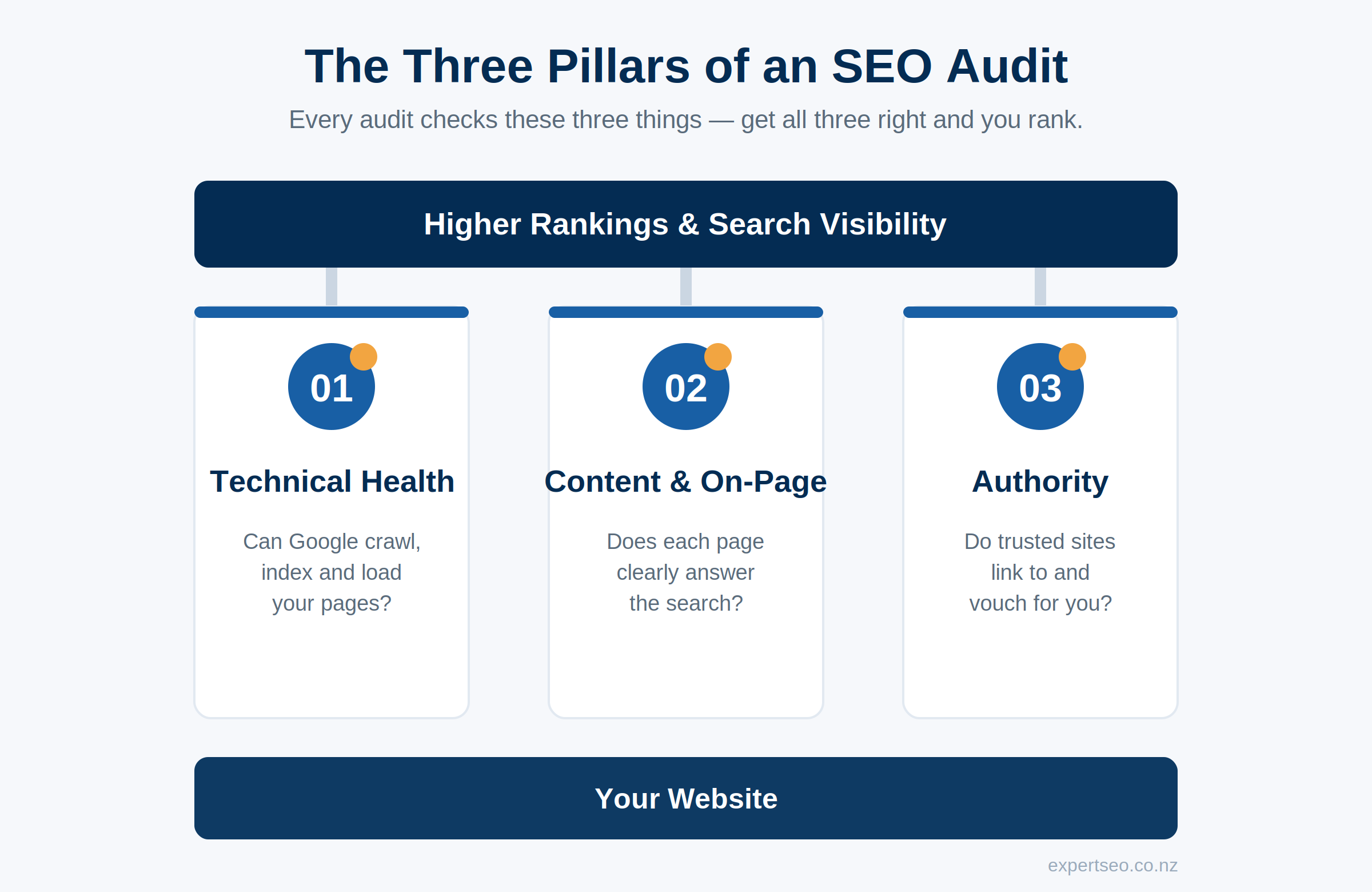
Those three line up with how Google’s own AI Overview breaks the topic down, which is a decent sign we’re covering the right ground.
An audit is not just running a crawler and reading the red numbers. The crawler is one tool in one part of the process. A real audit turns all of it into a prioritised list of what to do next — ordered by what’ll actually move the needle, not by what the tool flagged loudest.
Here’s the exact seven-step process I run, in order. And it starts somewhere almost nobody does: with the money.
Step 1 — Audit Your Rankings and Size the Opportunity
The most valuable part of an audit is the least technical one: working out which keywords could make you money, where you rank for them now, and what you’re leaving on the table by not ranking higher.
Do this first and everything after it has a purpose. You’re not fixing errors for the sake of a tidy report. You’re fixing the specific things standing between you and the searches worth real revenue.
Here’s how I run it.
Pull What You Already Rank For
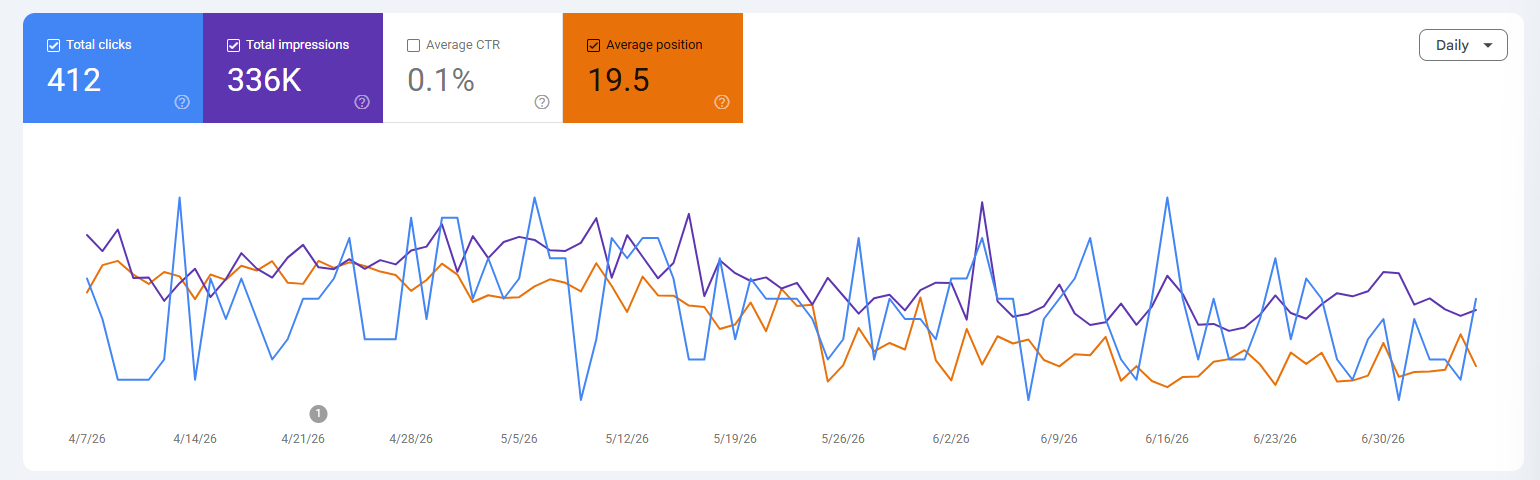
Open Google Search Console, go to Performance → Search results, and switch on Average Position. Sort your queries by position.
The gold is sitting in positions 4 to 15 — you’re already on page one or two, which means Google already trusts the page. A nudge up to the top three is far easier than ranking something from scratch.
Find the High-Value Keywords You Should Rank For
Now look beyond what you’ve already got.
Use a keyword tool — Ahrefs, Semrush, even the free Google Keyword Planner — and pull the search terms that match what you actually sell, in the areas you actually serve. You’re after commercial intent: “family lawyer auckland,” not “what does a family lawyer do.”
Turn Rankings Into Revenue
This is the step that changes how a business owner sees SEO. A ranking is a tap you can turn on. Here’s the maths.
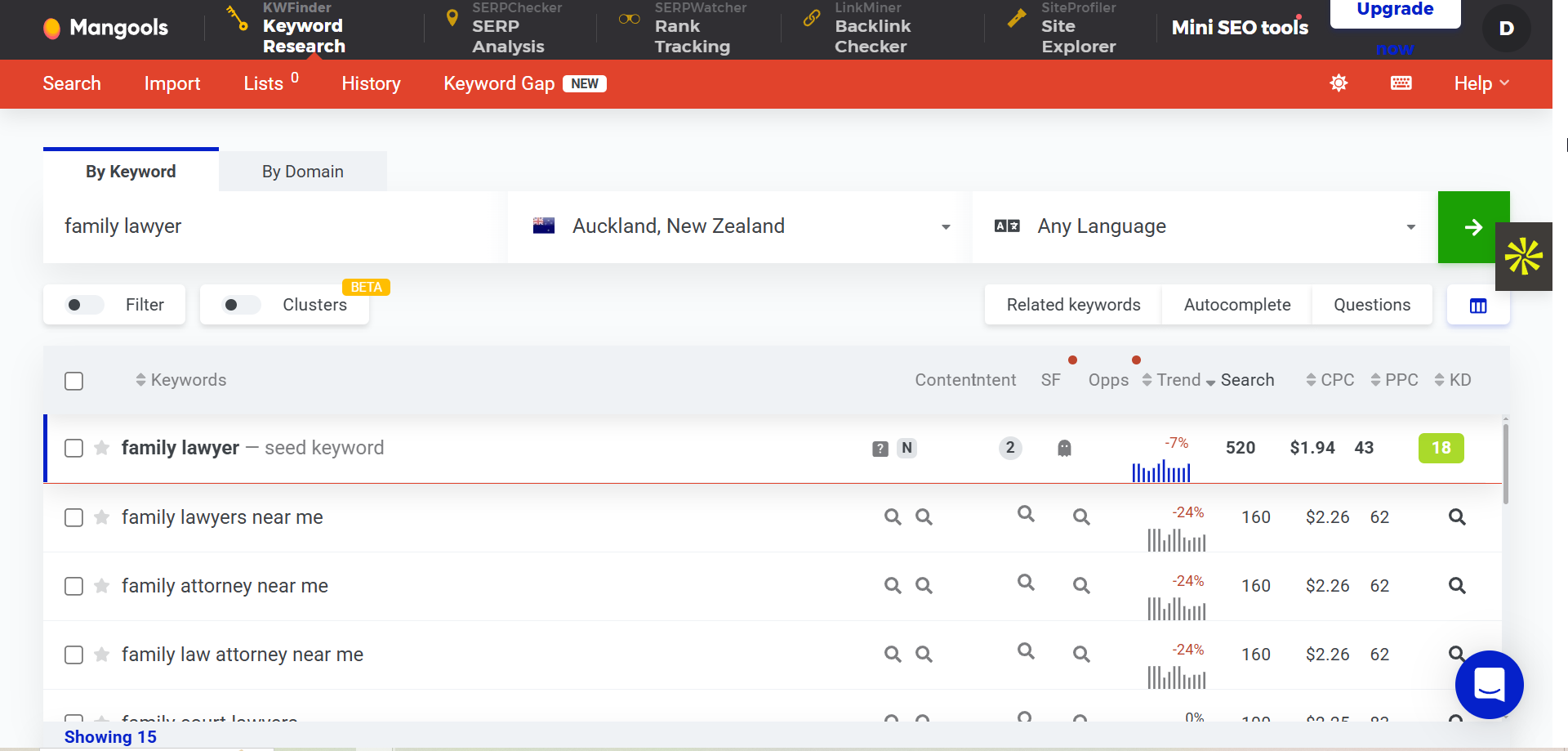
Say you’re a family law firm in Auckland targeting “family lawyer auckland.” That term gets 520 searches a month.
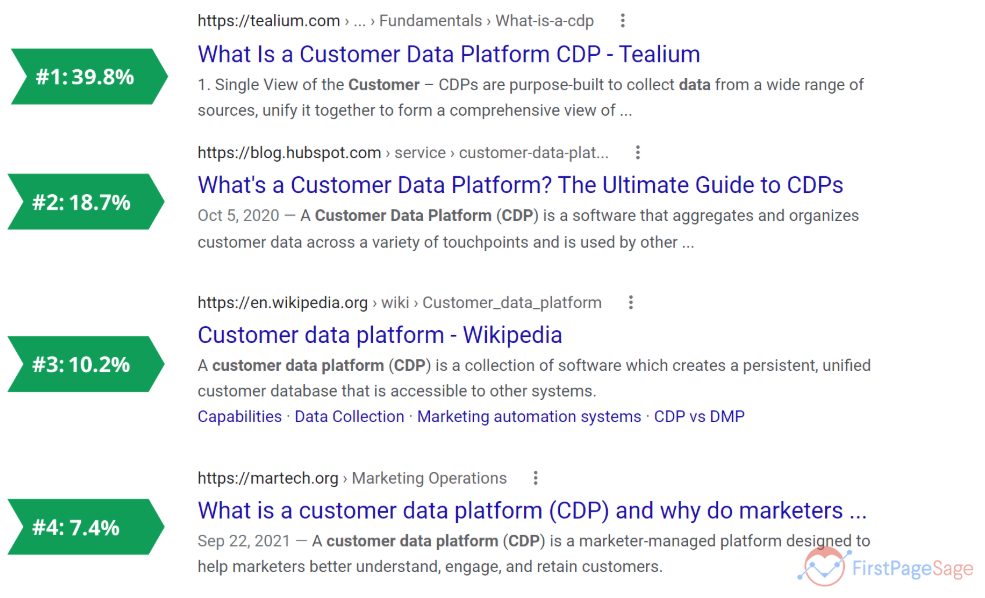
Rank number one on a clean search page and you’d capture roughly 30–40% of those clicks — First Page Sage’s 2026 data puts the top spot near 40% on a clean SERP, so 30% is the cautious end. On 520 searches, that’s around 150 visitors a month landing on your page.
Now walk it down the funnel:
- 150 visitors a month to a solid, trust-building page
- A local service page converting at even 4% → roughly 6 genuine enquiries a month
- Close 1 in 3 of those warm enquiries → about 2 new clients a month
Two clients. From one keyword. And a family law matter in New Zealand isn’t small money — an uncontested dissolution runs $1,500 to $3,000 on a fixed fee, while contested parenting or relationship-property matters routinely push past $10,000 over the life of the case.
Call the average matter a conservative $3,000.
Two new clients a month at $3,000 is $72,000 a year. From a single keyword. Ranking cautiously. Closing conservatively.
And here’s the kicker: that’s the floor.
A law firm doesn’t rank for one keyword — it ranks for “divorce lawyer auckland,” “custody lawyer,” “relationship property lawyer,” each with its own pool of searches and its own five-figure clients behind it.
Stack those and you’re not auditing a website anymore. You’re auditing a pipeline.

That’s why I start every audit here. Once you’ve priced the opportunity, the rest of the audit stops being a chore and starts being a treasure map. Every problem you find is now measured against real revenue, which tells you exactly what’s worth fixing first.
The keyword side of this deserves its own deep dive — proper keyword research is how you build the full target list — but for the audit, sizing the opportunity is enough to point everything that follows.
Now let’s find what’s blocking it.
Step 2 — Run a Technical SEO Audit
If Google can’t crawl, index, or load your pages, nothing else in this audit matters. You can have the best content in Auckland and it’ll rank nowhere if the door’s jammed shut.
A technical audit checks the foundation: can search engines find your pages, understand them, and serve them fast enough that people don’t bounce. Think of it like the wiring and plumbing behind the walls — invisible when it works, and the reason nothing else functions when it doesn’t.
Here’s the run-through.
1. Crawl Your Whole Site
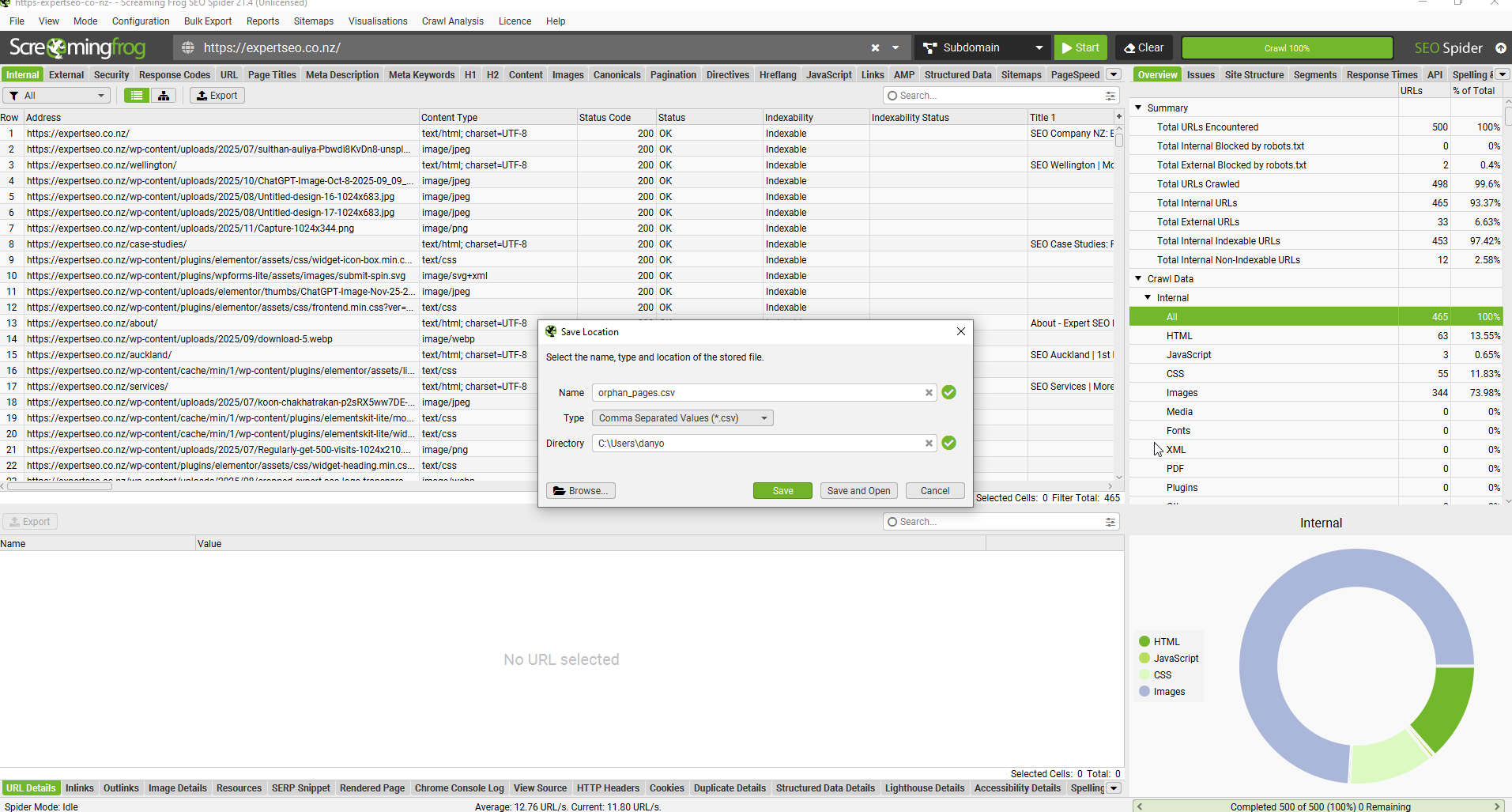
Download Screaming Frog (the free version crawls up to 500 URLs, which covers most small NZ business sites), enter your domain, and let it run.
It maps every page the way a search engine would and flags broken links, redirect chains, missing titles, and duplicate content in one pass.
2. Check What Google Has Indexed
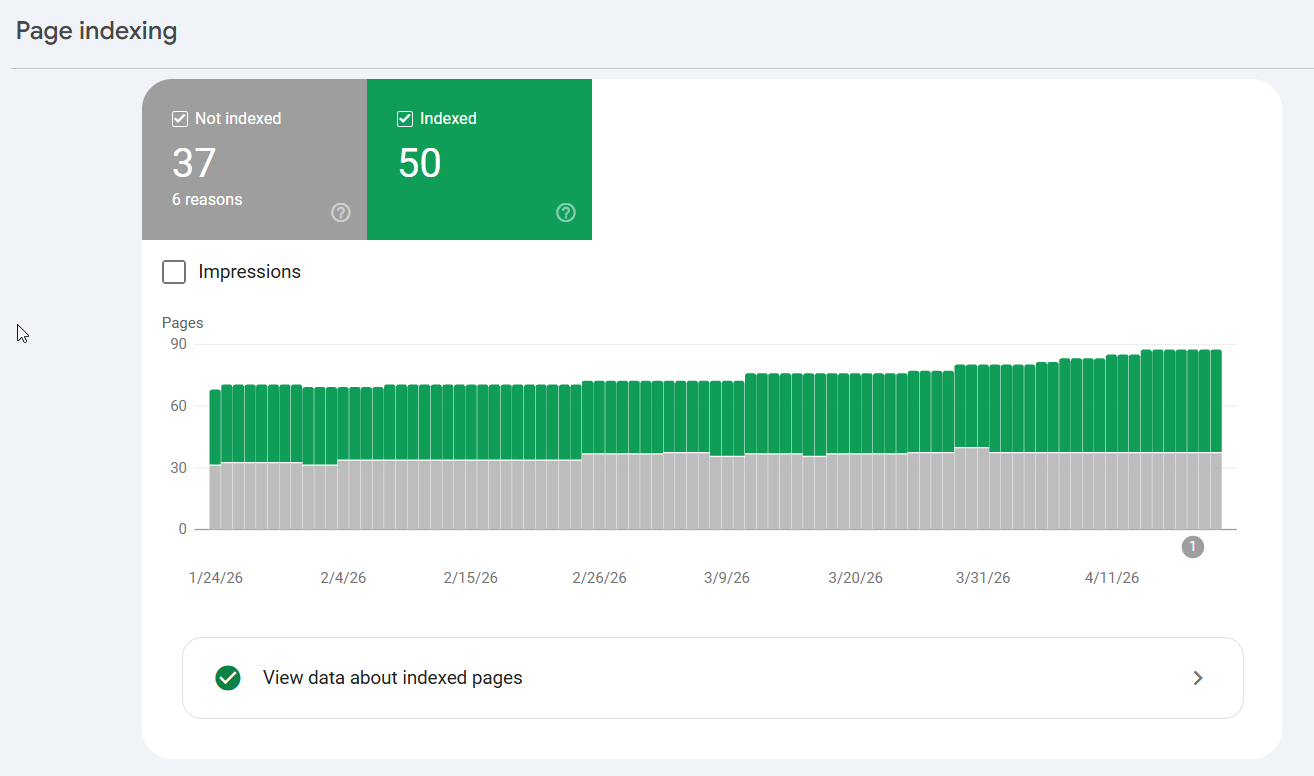
In Google Search Console, open the Page Indexing report.
This is the one that matters most. It tells you which pages Google has indexed and — more importantly — which it hasn’t, and why.
Look for “Crawled – currently not indexed,” 404s, server errors (5xx), and anything sitting under a noindex tag it shouldn’t be. A page Google won’t index is a page that can never rank.
3. Check Your Robots.txt and Sitemap
Your robots.txt file tells crawlers where they can and can’t go — and every so often it’s quietly blocking something important (I’ve seen a whole blog folder disallowed by a leftover line from a site rebuild).
Check yours at yoursite.co.nz/robots.txt. Then make sure your XML sitemap exists and is submitted in Search Console, so Google has a clean map of every page you want found.
4. Check for Duplicate Versions of Your Site
Your site should live at one address. Type in the www and non-www versions, and the http and https versions — they should all redirect to a single one.
If Google can reach your homepage at four different URLs, it splits your ranking power four ways and can’t decide which to trust.
5. Test Speed and Core Web Vitals
Run your key pages through Google PageSpeed Insights. It scores your Core Web Vitals — how fast the main content loads (LCP), how stable the layout is while loading (CLS), and how quickly the page responds (INP).
This isn’t a nice-to-have: roughly half of all websites still fail Core Web Vitals on mobile (source: HTTP Archive — worth linking the current Web Almanac figure at publish), and most of your NZ traffic is on a phone.

What it looks like in practice: take that Wellington dental site above.
The SEO in Wellington work started with a crawl that turned up the usual suspects — a batch of pages marked “crawled – not indexed” because the content was too thin, a handful of 404s from an old menu, and a mobile LCP of six seconds because nobody had compressed the hero images.
Unglamorous. Also the difference between ranking and not. The full technical side goes deeper than one audit section can — this is the entry point to technical SEO proper — but nail these five and your foundation is sound.
Step 3 — Audit Your On-Page SEO
On-page issues are the fastest wins in any audit. Small changes, quick movement. You’re checking whether each page sends clear signals about what it’s for.
An on-page audit reviews the elements on the page itself — title tags, meta descriptions, headings, internal links — that tell Google (and the reader) what the page is about and whether it deserves to rank for a given search.
Here’s what to check.
Title Tags
This is the single most important on-page signal, and the most commonly wasted.
Every page needs a unique title, with the main keyword near the front, under about 60 characters so it doesn’t get cut off in the results. “Home | Smith & Co” is a wasted title. “Family Lawyer Auckland | Smith & Co Legal” tells Google exactly what to rank it for.
Meta Descriptions
These don’t directly affect rankings, but they’re your ad copy in the search results.
A flat or missing description means a lower click-through rate, which quietly costs you traffic even when you rank. Write one for every important page: clear, specific, with a reason to click.
Heading Structure
One H1 per page, describing the page’s main topic, followed by H2s and H3s that break the content into a logical order.
This is the five-minute check the SEO crowd on Reddit swears by: does the homepage have an H1, and only one? Messy or missing headings make it harder for Google to understand your page — and harder for AI systems to pull an answer from it.
Keyword and Intent Match
Look at the page against the search it’s targeting. If someone searching “family lawyer auckland” lands on a generic “our services” page with no mention of family law or Auckland, the intent’s off and it won’t rank.
The page has to match the search.
Internal Links
Check that your important pages are linked to from other relevant pages on your site. Internal links pass authority around and help Google understand which pages matter.
A money page with no internal links pointing at it is a page you’ve hidden from your own site.
To check all of this at scale rather than page by page, your crawl does the heavy lifting — in Screaming Frog or your site-audit tool, filter for missing titles, duplicate meta tags, and multiple H1s, and you’ll have the full list in seconds.

What it looks like in practice: the most common on-page win I find is a service page ranking on page two with a title tag that never mentions the service.
Rewrite the title to lead with the keyword, tighten the H1 to match, and it’s not unusual to see that page climb within a couple of weeks.
That’s the whole appeal of on-page — the wins are fast and mostly free. It’s core on-page SEO, and usually the quickest win on any Christchurch SEO audit I run.
Step 4 — Run a Content Audit
Most sites are carrying dead weight. Old pages, thin pages, three blog posts all chasing the same keyword and none of them winning. A content audit finds what to keep, improve, merge, or bin.
The goal is simple: every page on your site should earn its place. Pages that don’t aren’t neutral — they can actively drag down how Google sees the rest of your site.
Here’s the process.
1. Inventory Every Page
Pull a full list of your URLs from your crawl or from GSC.
You want to see everything you’ve published in one place, because most business owners genuinely forget half of what’s on their own site.
2. Tag Each Page — Keep, Update, Consolidate, or Remove
Go through the list with performance data next to it (clicks and impressions from Search Console). Every page gets one of four labels.
Winners you keep. Near-misses you update. Overlapping pages you consolidate. Genuinely dead pages you remove or redirect.
3. Hunt Down Thin and Outdated Content
These are the pages with almost no traffic and no purpose — the “Summer Sale 2019” post, the service you stopped offering, the 200-word page that answers nothing.
They dilute your site’s focus. Seasonal businesses are the worst culprits: a Queenstown SEO audit will often surface dozens of dead end-of-season and old-event pages from years back. Cutting them (with a redirect where it makes sense) often lifts the pages that are left.
4. Find Keyword Cannibalisation
This is the sneaky one. It’s when two or more of your pages compete for the same search, so Google can’t tell which to rank and often ranks neither well.
To spot it, go to GSC → Performance → click a query you care about → open the Pages tab. If several of your URLs are picking up impressions for the same query, you’ve got cannibalisation. Merge them into one strong page.
What it looks like in practice: this is exactly the process behind one of my own results. Back in 2017 I started a health site, HealthVI, with my former business partner and SEO mentor Ian Pribyl.
A big part of growing it from zero to over 20,000 organic visitors a month was ruthless content work — cutting the dead pages, merging the overlapping ones, and pouring everything into the pages that actually answered the question. Good content compounds. Dead content quietly rots.

A content audit is where a lot of that compounding starts — it’s the cleanup that makes room for the SEO content that ranks.
Step 5 — Audit Your Backlinks
Backlinks are why a weaker-looking site outranks you. A backlink is just another website linking to yours, and Google treats each one like a vote of trust.
A backlink audit checks the quality of the votes you’ve got — then reverse-engineers the ones your competitors have that you don’t.
Two halves to this: your profile, and theirs.
Audit Your Own Backlinks
Plug your domain into Ahrefs or Semrush (both have free tiers that’ll do the basics) and look at your referring domains — the number of unique websites linking to you, which matters far more than the raw link count.
Then scan for anything toxic: spammy directories, dodgy foreign sites, link networks. A handful of junk links won’t sink you, but a pile of them can.

Audit Your Competitors’ Backlinks
This is where the opportunity lives. Take whoever’s outranking you for your money keyword, drop their URL into the same tool, and look at who links to them.
Every quality site linking to your competitor but not to you is a target on a plate — a directory you should be in, a local publication that covers your industry, an association you could join. You’re not guessing where links come from anymore. You’re copying a proven list.
The quality of a link is everything. One genuinely earned link from a site people actually read beats fifty from directories nobody visits.
That’s a lesson I keep relearning the hard way — the links that have moved the needle for my own site, like an editorial mention from Content Marketing Institute, were earned by doing something worth linking to, not by chasing volume.

Doing this properly is its own discipline — link building is a whole strategy on top of the audit — but even a one-off competitor gap analysis will hand you a month of link targets.
When the gap between you and a competitor is authority rather than content, this is often the single most valuable thing a good SEO consultant will find in your audit.
Step 6 — Audit Your AI Search Visibility
Here’s the layer almost every audit still ignores. In 2026, ranking on Google isn’t the only game — you also need to know whether ChatGPT, Google’s AI Overviews, and Perplexity can read, understand, and cite your content.
This matters more every month. When an AI Overview appears, it eats clicks: Ahrefs’ February 2026 study of 300,000 keywords found AI Overviews are linked to a meaningful drop in click-through rate.
But there’s a flip side that’s pure opportunity — Seer Interactive found pages cited inside an AI Overview earn roughly 120% more organic clicks per impression than pages that aren’t cited on the same queries. Get cited and you win twice.

So a modern audit adds a few checks.
Direct-Answer Formatting
AI systems pull answers from content that states them plainly. Does each page lead with a clear, one-or-two-sentence answer to the question it’s targeting, before the waffle? That structure is what gets you quoted.
Schema Markup
Structured data (Article, FAQ, LocalBusiness) spells out to machines exactly what your content is.
It removes ambiguity, and in AI search, clarity is what gets you surfaced. Rank Math or Yoast will add most of it for you.
Can AI Bots Even Reach You?
Check your robots.txt isn’t blocking AI crawlers like GPTBot if you want to be cited. You can’t be quoted by a system you’ve locked out.
The Prompt Test
The simplest check of all: go ask. Type your target query into ChatGPT and Google’s AI mode and see who gets named. If it’s your competitors, you know exactly who you’re chasing.
I don’t say any of this as theory. My own SEO company, Expert SEO, is on a domain less than a year old, competing against agencies with a decade’s head start — and it’s already being cited in Google’s AI Mode and in ChatGPT for real search terms.

That didn’t happen by accident. It happened by auditing for exactly the things above and building the site to be quotable.
This is the whole discipline of AI SEO, and it’s the fastest-moving part of any audit right now.
Step 7 — Turn Your Findings Into an Action Plan
Now back to that list of 434 problems. A pile of issues is useless. The entire skill of auditing is knowing which handful actually move rankings and ignoring the rest.
There’s an 80/20 to this. A small number of fixes drive most of the result, and a long tail of “notices” drive almost none. Your job is to sort them.
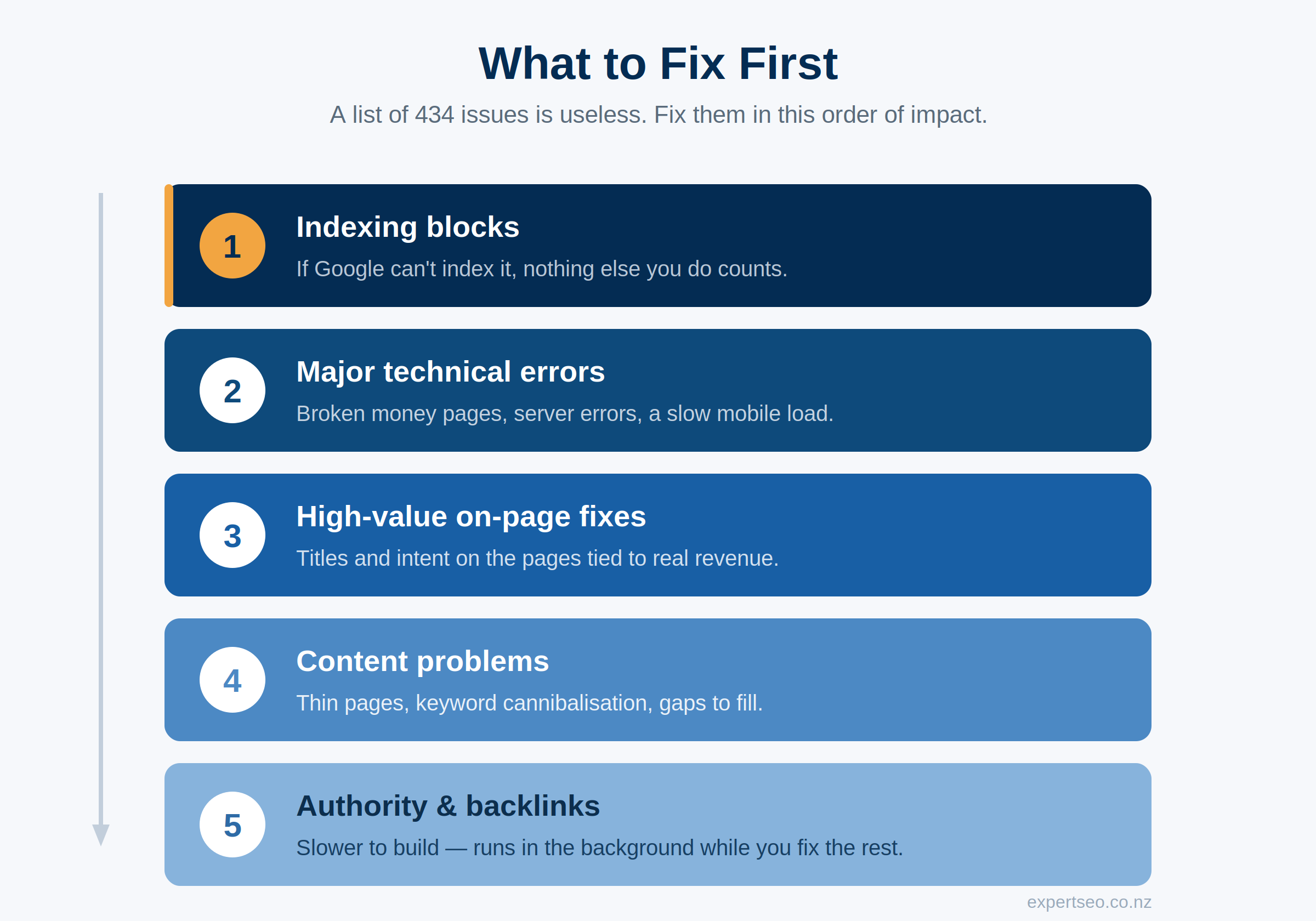
Here’s the order I fix things in, top to bottom:
- Indexing blocks first. Anything stopping Google from indexing a valuable page — a stray noindex, a page blocked in robots.txt, a “crawled – not indexed” on a money page. If Google can’t index it, nothing else you do to it counts.
- Major technical errors. Broken money pages, server errors, redirect chains on important URLs, a mobile site that loads at a crawl.
- High-value on-page fixes. Title tags and intent mismatches on the pages tied to the revenue you sized at the start.
- Content problems. Thin pages, cannibalisation, gaps against what searchers want.
- Authority. The backlink gaps — slower to close, so they run in the background while you fix the rest.
The trick that ties it together: measure every fix against the money section. Fix what unblocks your valuable keywords first.
A broken meta tag on a page nobody searches for can wait forever. A weak title on the page targeting your $72,000-a-year keyword gets fixed today.
Then dump the low-priority “notices” — the alt-text suggestions, the tiny cosmetic flags. They pad the report and change nothing.
Chasing a site-health score from 78 to 91 while your best landing page has a redirect chain is how people waste weeks.
The output of a real audit is one page: the ten or so things to fix, in order, each tied to why it matters. Not 434 red rows. Ten priorities. That one page is the entire point of the exercise.
A Real SEO Audit I Ran for Aevitas Newmarket Dentist
Everything above is the method. Here’s the whole thing run on one real site, so you can see how the layers come together.
I recently audited Aevitas Newmarket Dentist, a dental practice in Newmarket, Auckland. Good practice, real reviews, a website that looked perfectly fine on the surface.
Overall SEO score: 58 out of 100 — the kind of site whose owner assumes SEO is “sorted” because the site exists and loads.
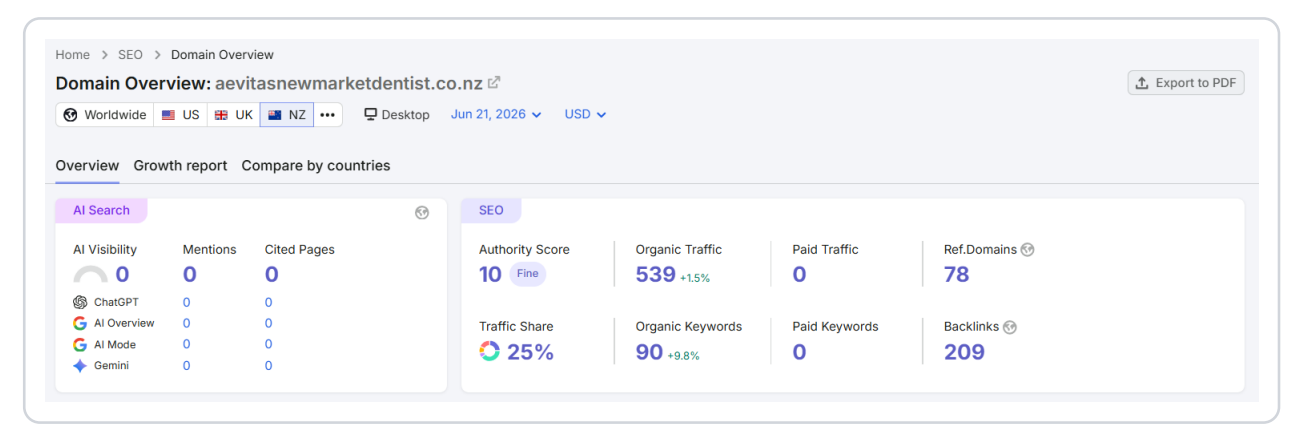
On paper it looked healthy enough: 539 organic visitors a month, 78 sites linking in. But that traffic had sat flat around 500 to 700 a month for two full years — a solid base going nowhere.

Here’s what the audit actually found.
First, the money: invisible for the keyword that matters most.
I always start by sizing the opportunity. This practice ranks number one for “cosmetic dentist newmarket” — 50 searches a month, a genuinely strong position on a high-value term.
But their most important keyword, “dentists newmarket auckland” — 110 searches a month, more than double the volume — sits at positions 83, 87 and 91. That’s page nine. Nobody scrolls to page nine. For the single most valuable search in their market, they may as well not exist.

Put dollars on it. In Auckland dentistry a new patient is never a small sale — a routine exam, X-ray and clean runs about $559, a crown $1,800 to $2,500, an implant $5,000 to $8,000, and patients come back every six months for years.
Move that one keyword from page nine into the top three and you’d pull roughly 30 new visitors a month for that term alone — a handful of new patients, each worth hundreds up front and potentially thousands over a lifetime.
That’s the business case for the entire project, made in dollars before I’ve touched a single fix.
Page speed: the silent killer.
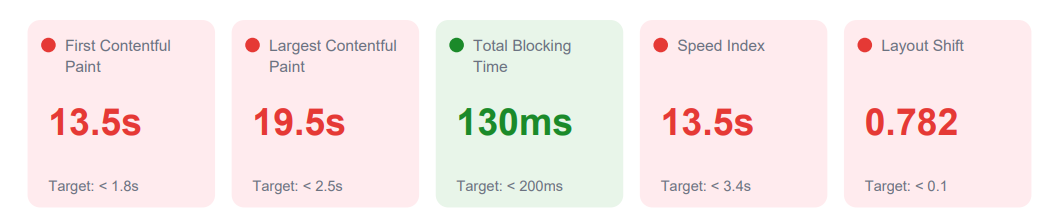
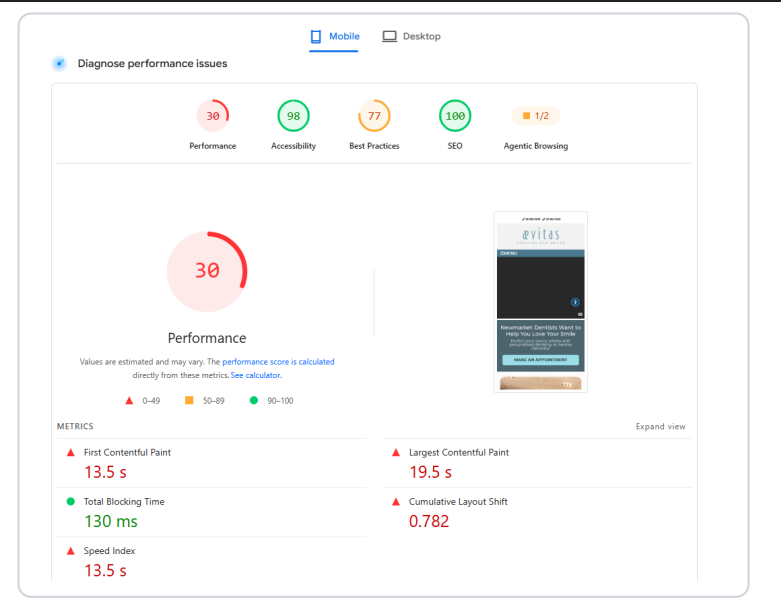
Then the technical, and this was the headline. Their mobile performance score was 30 out of 100.
The largest piece of content on the page took 19.5 seconds to load, against a target of 2.5. Read that again — nearly twenty seconds.
On top of that, a layout-shift score of 0.782 (target: under 0.1), which means the page visibly jumps around as it loads, buttons sliding away as you go to tap them.
Here’s the cruel part: their technical SEO score was a perfect 100 and accessibility was 98. The site was built right.
It was just painfully, patience-testingly slow on the exact device most of their patients search from. Every one of those rankings has a twenty-second load time hanging off its ankle.
Keyword cannibalisation: pages fighting themselves.
The rankings told a second story. That “cosmetic dentist newmarket” term they rank #1 for? They also rank 17th, 47th and 66th for it, on different pages.
Same pattern on the big “dentists newmarket auckland” term, spread across three URLs at positions 83, 87 and 91.
This is cannibalisation: multiple pages chasing the same search, splitting the authority between them so none wins cleanly. Google gets stuck choosing between your own pages, and it often chooses badly.
The fix is consolidation — one strong page per term instead of three weak ones tripping over each other.

The content gap.
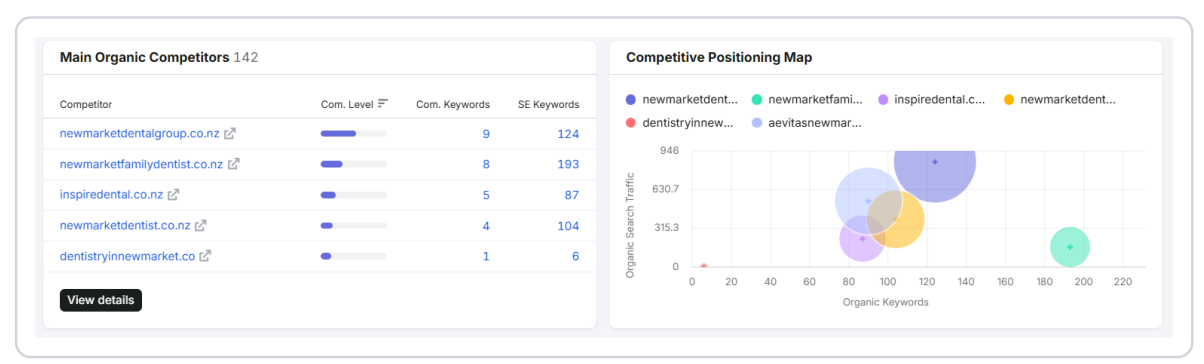
Zoom out to the competitors and the pattern’s plain. Newmarket Family Dentist ranks for 193 keywords. Newmarket Dental Group, 124. Newmarket Dentist, 104. Aevitas: 90.
The competitors simply cover more of what patients search for, so they show up more often, for more terms, on page one. This isn’t a mysterious algorithm problem — it’s a content-volume problem with a content solution.
Authority and AI visibility.
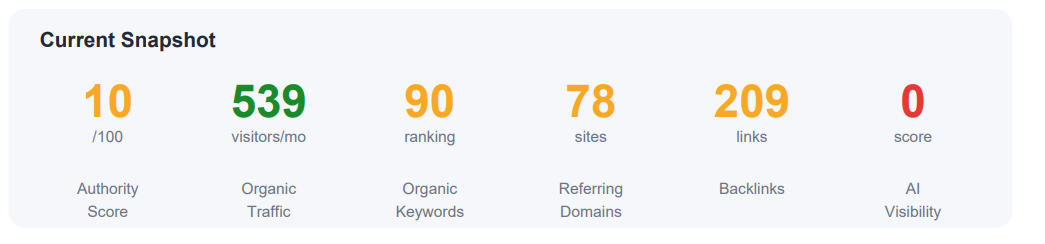
Their backlink profile was a decent base — 78 referring domains, 209 backlinks — which is why they rank at all.
But the authority score sat at 10, and AI visibility was a flat zero: no presence in ChatGPT, Google’s AI Overviews, AI Mode, or Gemini. As more patients ask AI tools “who’s a good dentist in Newmarket,” a practice with zero AI visibility isn’t even in the room.
The verdict — the one page I’d hand them.
Here’s the whole audit boiled down to what I’d fix, in order:
- Fix the page speed. Compress the images, sort the twenty-second load. Nothing else works until the site loads.
- Consolidate the cannibalising pages. One page each for “dentists newmarket auckland” and “cosmetic dentist newmarket,” instead of three fighting for each.
- Rewrite the on-page targeting on those consolidated pages to finally win the page-nine term.
- Build content to close the keyword gap on the competitors.
- Earn AI visibility off the back of that content.
That’s it. Not a report full of red — five moves, in order, each tied to the patients and the revenue on the table. A site sitting at 58 out of 100, with a proven #1 ranking already in the bank, has a solid foundation — just a few specific, fixable things standing between it and page one.
That’s what a real audit gives you: not a problem list, a plan.
This is the exact work behind our SEO for dentists projects and the wider SEO in Auckland campaigns we run — every one of them starts with an audit just like this.
Can ChatGPT or AI Just Do the Audit for You?
Short answer: it can do parts of it brilliantly and other parts not at all — and knowing the difference is what separates a useful AI-assisted audit from a confident, wrong one.
Where AI genuinely helps: spotting patterns in a big export, explaining what a technical error means and how to fix it, drafting the rewritten title tags, turning a messy list of findings into a readable plan.
As a second pair of eyes on data you’ve already pulled, it’s fast and sharp.
Where it falls over: it can’t crawl your live site, it can’t see your Search Console, and it can’t judge what matters for your business.
Ask ChatGPT to “audit my website” cold and it’ll give you a generic checklist dressed up as insight — the same surface-level list you could’ve written yourself. It doesn’t know your rankings, your revenue, or your competitors.
The way I actually use it: I do the crawl and pull the real data myself, then use AI to speed up the interpretation and the write-up. The judgement — what matters, what to fix first, what it’s worth — stays human. AI is the assistant, not the auditor.
Get an SEO Audit From the SEO Experts
Everything in this guide is DIY-able. But if you’d rather have it run properly — the full crawl, the opportunity priced in real dollars, and a prioritised plan handed straight to you — that’s what we do.
We don’t just audit sites; we rank our own. Expert SEO sat at number one in New Zealand for “local SEO,” above Ahrefs and Semrush, on a domain less than a year old.

Get a professional SEO audit of your website, or explore the full range of SEO services we run for New Zealand businesses.
Either way, it starts the same place this guide does: by finding the money your site is leaving on the table.
How To Do An SEO Audit: FAQ
Can I do my own SEO audit?
How much does an SEO audit cost in New Zealand?
Can ChatGPT do an SEO audit?
What are the best SEO audit tools?
How long does an SEO audit take?
How often should you do an SEO audit?
Recommended Reading
The step-by-step checklist to work through once your audit shows you what to fix.

The free and paid tools that make every part of an audit faster and sharper.
What to actually do with the opportunities your audit uncovers, start to finish.