

You type your keyword into Google Keyword Planner, hit search, and Google hands you back a number.
0 – 10.
Cool. Cheers for that.

Is that a dead keyword nobody’s searching? Or a quiet little goldmine your competitors have all walked straight past?
Google won’t tell you. And in a market the size of New Zealand, where plenty of genuinely valuable keywords sit in those low ranges, guessing wrong costs you real money.
And the stakes are higher than they look.
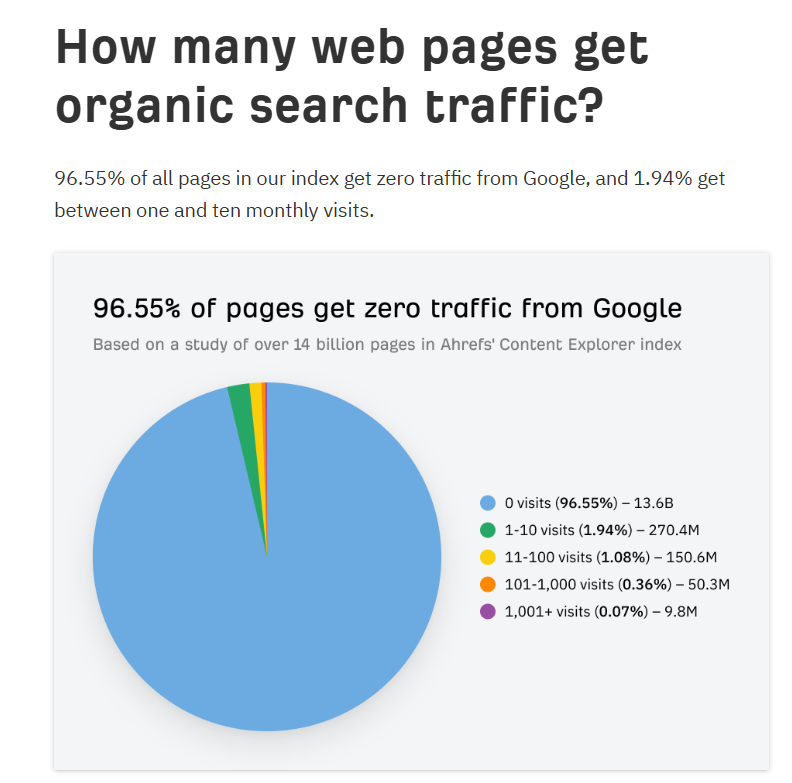
Around 90% of all pages get zero organic traffic from Google, and a big chunk of them for one reason: nobody was searching for what they were about. Keyword research is how you stay out of that pile — and Keyword Planner is where most people start.
I’ll be straight with you: Keyword Planner is one of my favourite tools in all of SEO, and I use it just about every day running SEO services for my own site and for clients.
Not because it’s clever — it’s the opposite of clever. It’s free, it pulls straight from Google’s own search data, and everything you need is sitting right there on the screen the second you log in.
By the end of this guide you’ll get into it for free, generate a proper list of keyword ideas, read those annoying volume ranges the right way, and walk away knowing exactly which keywords are worth your time.
I’ll also show you a real example: how I used it to decide which New Zealand locations to target for my own SEO agency.
What Is Google Keyword Planner?
Google Keyword Planner is a free keyword research tool built into Google Ads that shows you what people are typing into Google, how often, and how much advertisers pay for those clicks.
It was built for one job: helping advertisers pick keywords to bid on.
But it doubles as a genuinely good SEO tool, and here’s why that matters: the data comes from the source.
Most keyword tools you’ve heard of — Semrush, Ahrefs, Moz — pull a chunk of their data from Google in the first place, then layer their own estimates on top. Keyword Planner is the source. No middleman.
So what can you actually use it for?
- Find keyword ideas you’d never have thought of yourself
- Get a rough idea of how many people search each one every month
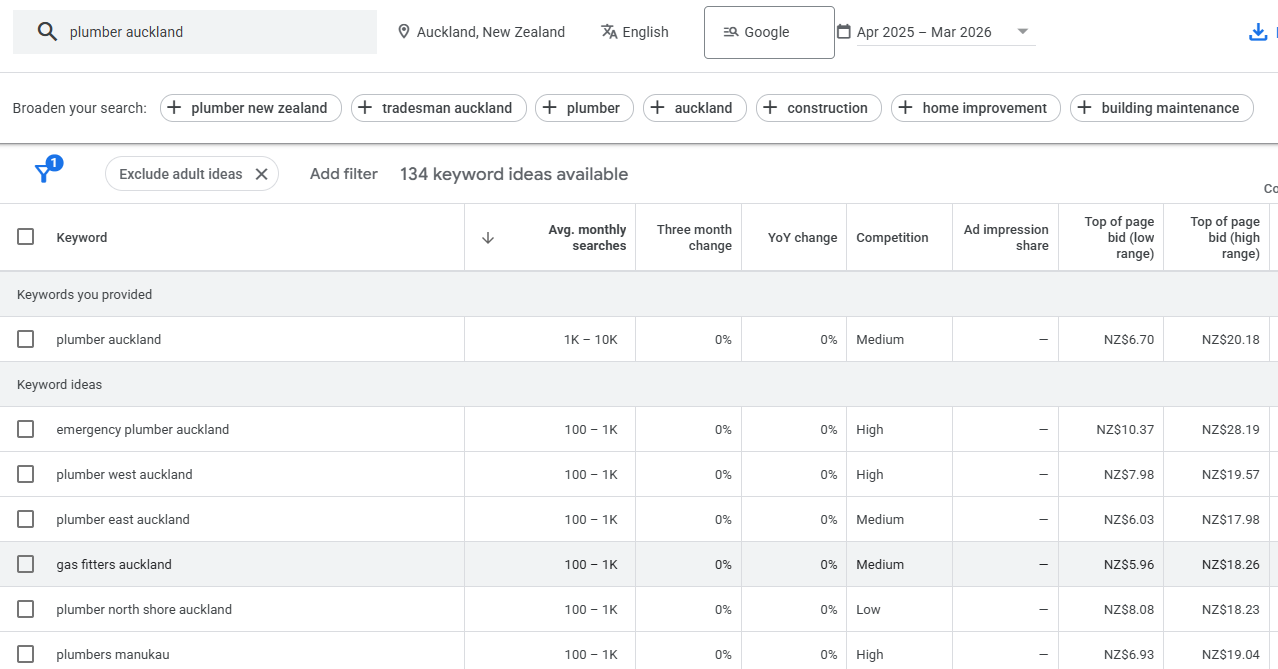
- Read commercial intent — how much advertisers are willing to pay tells you how much money is behind a keyword
- Spot what to build: a blog post, a service page, or nothing at all
- Pull the exact keywords a competitor’s page is ranking for (more on that trick later)
For a free tool, that’s a lot.
It’s the difference between publishing content based on what you reckon people search for, and publishing based on what they actually do.
Is Google Keyword Planner Free? (And Will It Charge You?)
Yes, Google Keyword Planner is 100% free, forever, with no usage limits. You need a Google Ads account to use it, but you never have to run an ad or spend a cent.
The fear is understandable.
To get to Keyword Planner you sign up for Google Ads, and Google Ads is very keen to get you spending. The whole signup nudges you toward launching a campaign, and somewhere in the back of your mind is that story about someone who got stung with a surprise bill.
Here’s the calm version: you only ever get charged if you actually launch a live campaign with a budget attached.
Google’s own documentation is clear that the tool is free to use for keyword research on its own.

The trick is knowing how to get in without ever hitting that launch button. Which is the next section.
How to Access Google Keyword Planner Without Running Ads
You do need a Google Ads account. You do not need to run ads. The move is simple: go through the normal signup, follow the steps right up until Google asks you to launch your campaign, and then don’t. You stop at the ad. No live campaign, no charge, full access to the tool.
Here’s the path, step by step:
- Head to ads.google.com and sign in with your Google account (or create one — it’s free).
- Google will try to walk you straight into creating a campaign. Go along with it. Enter a business name and website if it asks.
- When you reach the point where it wants you to set a budget and launch the ad — stop. Look for the option to switch to Expert Mode, or “create an account without a campaign.” If you don’t see it, just don’t confirm the campaign; back out of the launch step.
- Once your account exists, click the Tools icon in the top menu, go to Planning, and select Keyword Planner.
- You’re in. Choose Discover new keywords or Get search volume and forecasts to start.

One thing worth knowing: Google has changed this interface a few times over the years (that’s why you’ll find old tutorials that no longer match your screen).
The menu names shift, but the logic doesn’t — you’re always looking for Tools, then Planning, then Keyword Planner.
The Two Tools Inside Google Keyword Planner
Keyword Planner is really two tools in one: Discover New Keywords finds you fresh ideas, and Get Search Volume and Forecasts checks the numbers on a list you already have.
Most SEO work lives in the first one.
Discover New Keywords is where you start from scratch. You feed it a seed — a word or phrase related to your business — and it hands back a pile of related ideas with their search volumes.
You can also feed it a website URL instead of a keyword, which is the sneaky-good move I’ll cover shortly.
Get Search Volume and Forecasts is for when you already have a list. You paste in your keywords, or upload a CSV, and it tells you the volume and forecast for each one.
Handy for checking a list you built somewhere else, less useful for discovery.

For SEO, you’ll live in Discover New Keywords about 90% of the time. So that’s where we’ll spend ours.
How to Use Google Keyword Planner for SEO
The workflow is: enter a seed keyword, generate ideas, filter down to what’s relevant, read the metrics that matter for SEO, then match each keyword to what you’d build for it. Let me walk it with a real one.
Say you’re a mortgage broker in Auckland. Your seed keyword is mortgage broker.
Step 1 — Enter the seed. In Discover New Keywords, type “mortgage broker,” set the location to New Zealand, and hit Get results.
Step 2 — Read what comes back. You’ll get a list of related terms: “mortgage broker Auckland,” “first home buyer mortgage,” “mortgage adviser,” “how much can I borrow,” and so on. Each with a monthly search range next to it.

Step 3 — Filter the noise. Use the filters up top to strip out anything irrelevant. Exclude brand names (competitor company names you don’t want cluttering the list), drop keywords with zero volume, and sort by average monthly searches so the big ones float to the top.
Step 4 — Read the columns that matter. For SEO, three columns do the work:
- Avg. monthly searches — how much demand there is (in a range, which we’ll fix in a bit).
- Competition — Low / Medium / High. Careful here: this measures advertiser competition, not how hard it is to rank organically. It’s a loose hint, not gospel.
- Top of page bid — how much advertisers pay per click. This one’s gold. A high bid means there’s money behind the keyword, which usually means strong commercial intent.
Step 5 — Match each keyword to what you’d build. This is where keyword research turns into a plan. Every keyword carries an intent, and the intent decides the page:
| Keyword | Intent | What to create |
|---|---|---|
| how does a mortgage broker work | Informational | Blog post |
| best mortgage broker Auckland | Commercial | Service / location page |
| mortgage broker near me | Commercial | Service / location page |
| mortgage repayment calculator | Informational (tool) | Interactive tool or guide |
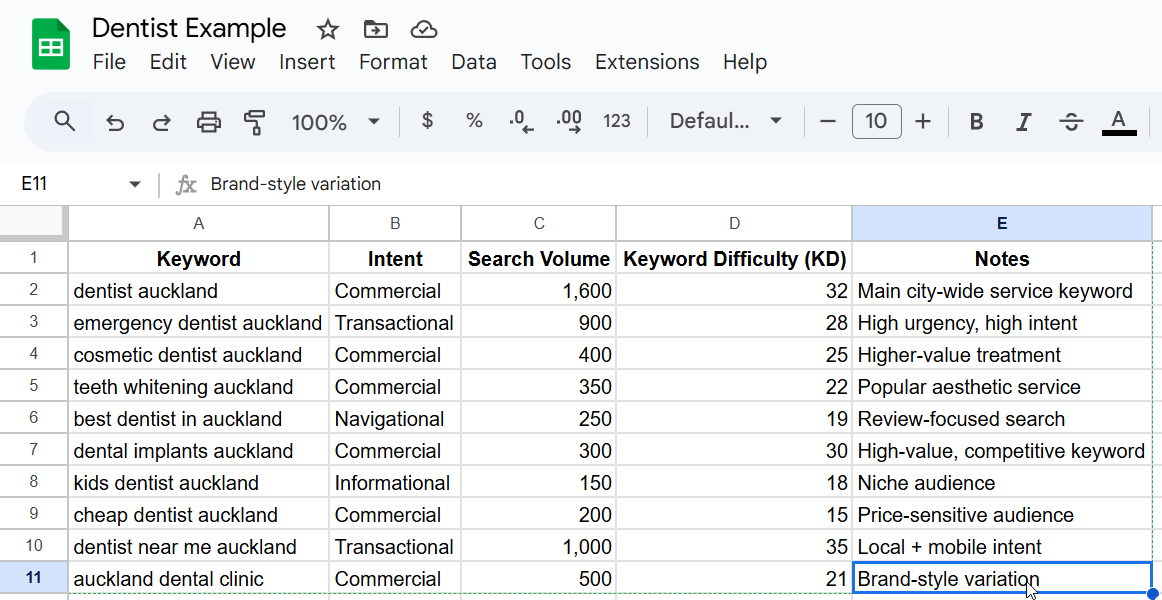
Get the intent right and you stop making the classic mistake: writing a blog post for a keyword that needed a service page, then wondering why it never converts.
If you want to go deeper on reading intent, it’s the backbone of how to do SEO properly, and I’ve broken it down fully in this guide to search intent.
The informational keywords become blog content that builds your authority. The commercial ones become the pages that actually sell.
And if you’re in a specific trade — say you’re one of the mortgage brokers chasing local leads — the location-based commercial terms are the ones worth fighting hardest for.
The Competitor URL Trick (Start With a Website)
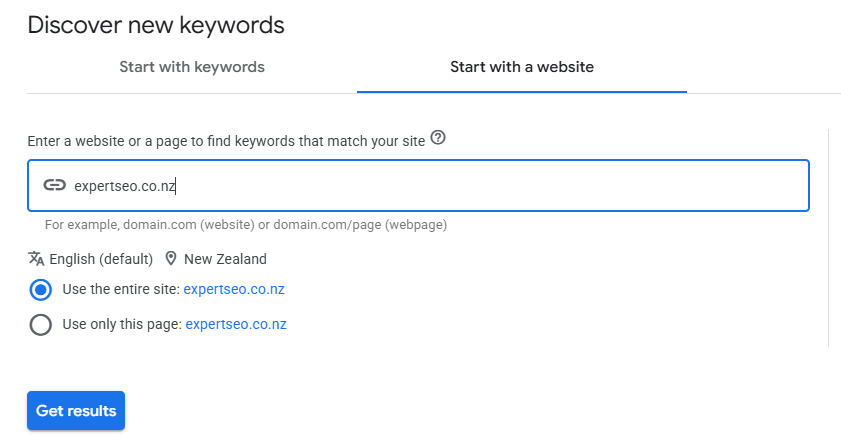
Instead of feeding Keyword Planner a keyword, feed it a competitor’s URL — and it’ll hand you the keywords their page is built around, including ones you’d never have typed yourself. This is the most underrated feature in the whole tool.
Here’s why it works. When you enter a seed keyword, GKP only gives you close variations of that word — type “mortgage broker” and you get “mortgage brokers,” “mortgage broker near me,” the obvious stuff. Useful, but everyone else sees those exact same keywords too.
When you enter a URL, Google reads the whole page and pulls keyword ideas from its actual content. So you get the terms your competitor is quietly ranking for that never show up in a normal seed search.
The steps:
- In Discover New Keywords, click Start with a website.
- Paste in a competitor’s page URL — say the services page of a rival broker.
- Choose whether to use the whole site or just that page (just the page is usually cleaner).
- Hit Get results and watch a fresh batch of keywords roll in.
Any page with real content on it is fair game. Run it across three or four competitors and you’ll end up with a keyword list most of your market never sees.
How to Read Google Keyword Planner’s Search Volume Ranges
Keyword Planner shows volume as a range — like 10–100 or 100–1K — instead of an exact number, unless you’re actively spending on ads.
The fix is to stop treating the range as a verdict and start treating it as a starting point. This is the single thing that trips up nearly every beginner, so let’s actually solve it.
First, why the ranges exist. Google reserves the precise numbers for people spending money on ads. Everyone else gets buckets.
Semrush’s own breakdown confirms non-advertisers see ranges while advertisers with real spend see tighter figures. It’s Google gently reminding you it’d love your ad budget.

Second — and this is the New Zealand part nobody writes about — a low range is not a dead keyword here.
In a market our size, a keyword sitting at 10–100 searches a month can be a proper money-maker. “Mortgage broker Remuera” isn’t going to pull 5,000 searches.
But the handful of people searching it are ready to talk to a broker today. Volume isn’t the point; intent is. Dismiss every 10–100 keyword and you’ll skip past the exact terms your best customers use.
Third, here’s how to actually tighten a range when you need a real number:
- Add the keyword to a plan. Inside Keyword Planner, add a keyword to a plan and check the forecast — the impressions figure gives you a far tighter estimate than the raw range.
- Cross-check with a free tool. Drop the same keyword into a free ChatGPT prompt or Google Trends to sanity-check whether interest is rising or fading.
- Trust the intent over the volume. A commercial keyword with a high top-of-page bid and a low search range still deserves a page.
One honest caveat: the numbers themselves aren’t perfect either. An Ahrefs study of over 72,000 keywords found that 91% of Keyword Planner’s search volumes were overestimates. So read the ranges as direction, not truth.
As Semrush puts it, lean on the ranges alone and you’ll end up prioritising the wrong keywords.

Google Keyword Planner in Action: How I Use It for My Own SEO Agency
Let me show you this working on a real decision, not a made-up one.
When I was building out Expert SEO, I had to decide which New Zealand cities to create dedicated local SEO pages for.
I couldn’t build a page for every town in the country — that’s a waste of time and effort. So before I wrote a single word, I ran the locations through Keyword Planner to see where the actual demand was.
I entered seeds like “SEO Auckland,” “SEO Wellington,” “SEO Christchurch,” “SEO Queenstown,” set the location to New Zealand, and pulled the list.

Here’s roughly what it showed:
- SEO Auckland — 1K–10K. The biggest market by a clear margin.
- SEO Wellington — 100–1K. Smaller, but a capital city with real business demand.
- SEO Christchurch — 100–1K. Solid South Island market.
- SEO Queenstown — 100–1K. Smaller again on paper, but full of high-value tourism and hospitality businesses.
Now, apply everything from the last section. Auckland’s the obvious one. But the other three sit at 100–1K — smaller, sure, yet every person typing “SEO Wellington” into Google is a business owner actively looking to hire someone. That’s about as commercial as intent gets. Every one of these was worth a page.
So I built them. If you look at the site now, SEO in Auckland is the flagship, but Christchurch SEO and Queenstown SEO all have their own dedicated pages — each one mapped from a keyword the planner surfaced, each one targeting people ready to buy.
This is the same process that took HealthVI from 0 to over 20,000 monthly organic visitors — a health site I co-built with my mentor Ian Pribyl.

And it’s the same thinking behind Expert SEO ranking #1 in New Zealand for “local SEO,” above Ahrefs and Semrush.

That’s on a domain less than a year old — one that already sits at a Domain Rating of 36 with real authority behind it.

And those same guides are getting cited directly in Google’s AI results — the exact payoff this kind of content is built for.

The whole location strategy started with a free tool and twenty minutes. That’s the point I keep coming back to:
You don’t need an expensive stack to make a smart decision. You need the data and the sense to read it.
Common Google Keyword Planner Mistakes to Avoid
Most of the value in Keyword Planner gets lost to a handful of avoidable mistakes. Dodge these and you’re already ahead of most people using the tool.
Treating the ranges as exact numbers. We’ve covered this, but it’s the big one. The ranges are a starting point, not a final answer. Read them as direction and cross-check the ones that matter.
Only ever using seed keywords. If you only type words into the tool, you get the same obvious keywords everyone else has. Use the Start with a Website trick to find the ones they’ve missed.
Using the Competition column as SEO difficulty. That column measures how many advertisers are bidding, not how hard a keyword is to rank for organically. A keyword can say “Low” competition and still be brutal to rank for. Judge organic difficulty by looking at who’s actually ranking on page one.
Chasing volume and ignoring intent. A high-volume keyword you can’t convert is worse than a low-volume one that brings you ready-to-buy customers. Especially in New Zealand, where the money often sits in the low-volume, high-intent terms.
Stopping at the tool. Keyword Planner is the start of keyword research, not the whole thing. The best keyword lists come from pairing it with a couple of free tools — which is the next section.
The Limitations of Google Keyword Planner (And the Free Tools That Fix Them)
Keyword Planner has two real weaknesses: the vague volume ranges, and its habit of only suggesting keywords that are near-identical to what you typed. Both are fixable, for free.
The ranges we’ve handled. The second flaw is more subtle. Type “mortgage broker” and the tool gives you variations of “mortgage broker” — it won’t suggest a genuinely different angle like “how much deposit do I need for a first home.”
It’s a great expander of a topic you already know, and a poor discoverer of topics you don’t.
Here’s the free stack that fills the gaps:
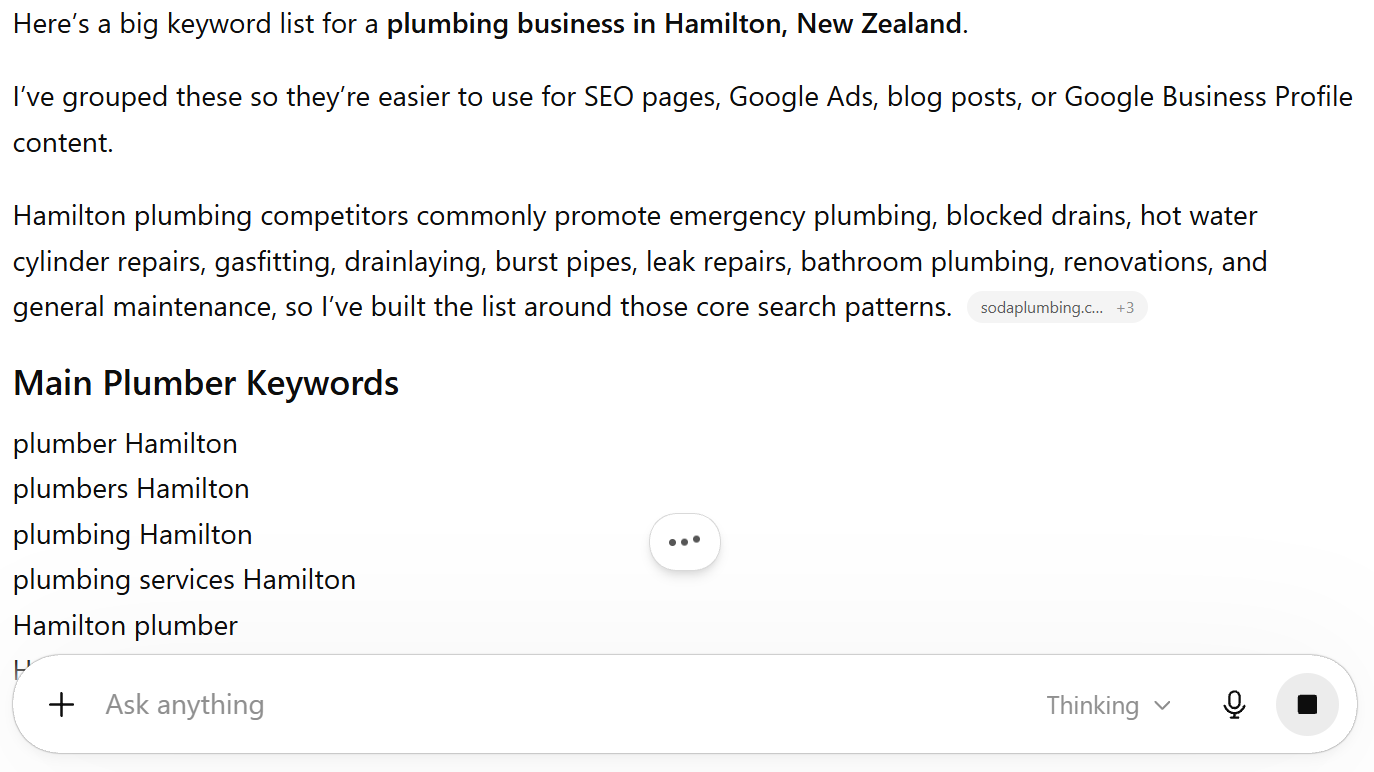
- Free ChatGPT — brilliant for generating seed keywords and angles the planner would never surface. Ask it for the questions your customers ask, then feed those back into Keyword Planner.
- Google autocomplete — start typing your keyword into Google and read the suggestions. Those are real searches, straight from the source.
- Google Trends — shows you whether a keyword is climbing or fading, which the planner’s static ranges can’t.
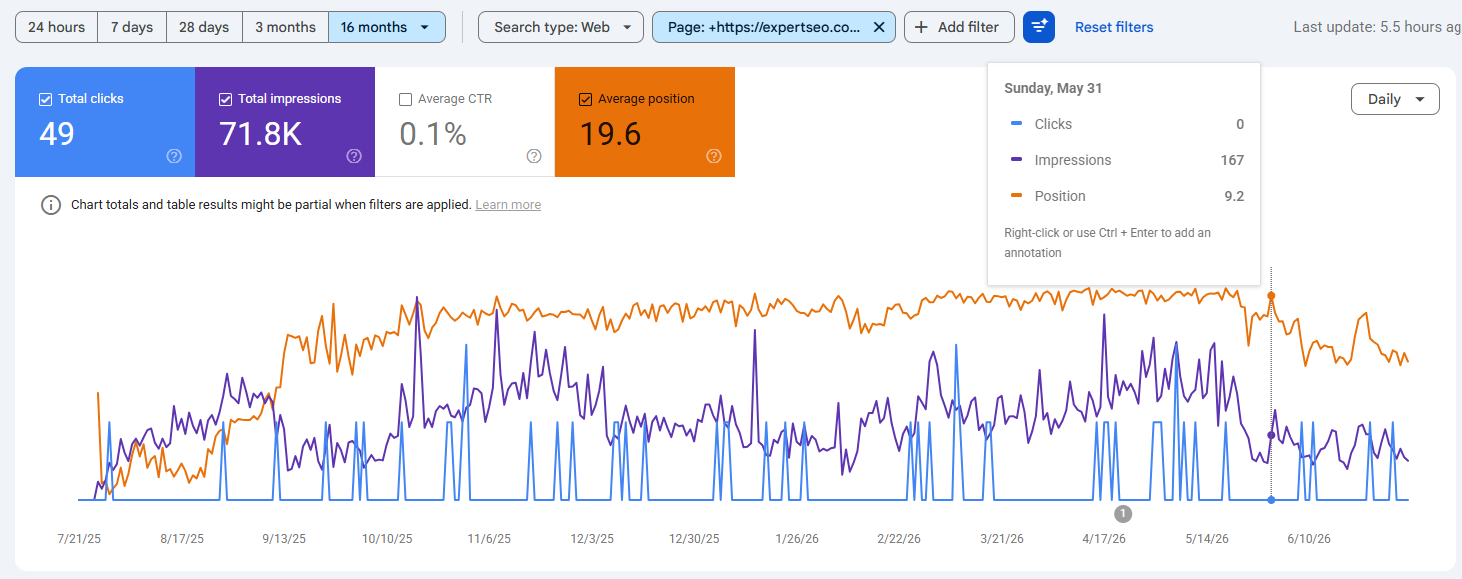
- Google Search Console — once your site’s live, it shows the exact keywords you’re already getting impressions for.
Search Console is the one I’d check first once you’re live. It’s the only tool here showing keywords you’re already half-ranking for — a page sitting at position 15 with thousands of impressions and barely any clicks is a fast win hiding in plain sight.
Run Keyword Planner as the core, and lean on these when it comes up short. For most New Zealand businesses starting out, that combination is genuinely all you need.
It’s the same free toolkit I use before reaching for anything paid — and worth building out alongside the wider set of AI-era SEO tools as you grow.
Google Keyword Planner vs Paid Tools: When Free Is Enough
For most small NZ businesses getting started, Keyword Planner plus a couple of free tools is enough.
You upgrade to a paid tool when you need exact volumes, real keyword difficulty scores, and competitor tracking at scale.
Here’s the honest comparison:
| Google Keyword Planner (free) | Paid tools (Semrush / Ahrefs) | |
|---|---|---|
| Cost | Free forever | ~$150–200+ USD/month |
| Search volume | Ranges (exact only with ad spend) | Exact estimates |
| Keyword difficulty | None (only ad competition) | Proper 0–100 organic scores |
| Competitor data | Basic (via URL trick) | Deep — every keyword a rival ranks for |
| Keyword ideas | Close variations only | Thousands, across angles |
Paid tools are excellent, and I use them every day. But I won’t pretend you need one on day one, because you don’t.
When you’re starting keyword research for your own business, Keyword Planner gives you the ideas, the rough volume, the intent signal, and the competitor peek — all on one screen, all for nothing.
You reach for the paid stuff when guesswork starts costing you more than the subscription would: when you’re producing content at volume and need exact numbers, or when you’re seriously sizing up competitors. Until then, free does the job.
When to Do Your Own Keyword Research vs Hire an SEO Expert
You can run your own keyword research with Keyword Planner — the process here is the same one I use. Pair it with a free ChatGPT account to expand your ideas, and you’ve got everything you need to get started.
The hard part is what comes after: turning that list into pages that actually rank, month after month, while you’re busy running your business.
That’s where we come in. Book a site audit to see exactly where you stand, hand the whole thing over as done-for-you SEO, or work one-on-one with an SEO consultant for expert direction.
Either way — open Keyword Planner and have a crack. Twenty minutes in, you’ll understand your market better than most of your competitors understand theirs.
Google Keyword Planner: FAQ
Why can't I access Google Keyword Planner?
The most common reason is that your Google Ads account isn't fully set up — you have to finish creating the account (even without running an ad) before Keyword Planner unlocks. If it's still greyed out, switch the account to Expert Mode and make sure your billing country and time zone are set. Brand-new accounts can also take a short while before Google gives full tool access.
Why did Google Ads charge me $500?
If you were charged, a live campaign was launched and racked up ad spend — Keyword Planner itself never costs anything. It usually happens when someone follows the signup flow all the way through and publishes a campaign by accident. To make sure it can't happen, stop before launching any campaign, or pause and remove any campaign so nothing is able to spend.
Is Google Keyword Planner still free?
Yes, Google Keyword Planner is still completely free, and there's no sign of that changing. You only ever pay if you choose to run Google Ads campaigns. Using the tool for keyword research costs nothing, no matter how often you use it.
What happened to Google Keyword Planner?
Nothing — it's still here. Google has just redesigned the interface several times, which is why older tutorials no longer match your screen. The tool now lives under Tools → Planning → Keyword Planner inside Google Ads, and the two core features (Discover new keywords and Get search volume and forecasts) work the same as they always have.
Can Google Keyword Planner help with SEO?
Yes. Although it was built for Google Ads, Keyword Planner is a genuinely useful SEO tool — it surfaces keyword ideas, rough search volumes, and commercial intent (through the top-of-page bid) straight from Google's own data. Pair it with a free tool like ChatGPT or Google Search Console and it's enough to run real keyword research for most NZ businesses.
Recommended Reading
 Advanced Keyword Research
Eight strategies to push your research past the basics once Keyword Planner alone isn't enough.
 Long-Tail Keywords
How to find and use the low-volume, high-intent terms where NZ money often hides.
 Local Keyword Research
The full process for finding the location keywords that bring nearby customers to your door.