Here’s something that trips up nearly every business owner doing their own keyword research in New Zealand.
You think of a keyword you’re sure people are searching for. You plug it into a tool to check the volume. And it comes back: 0 searches.
So you bin the idea and move on.
That’s a mistake. And it’s the exact moment most keyword research advice falls apart, because almost all of it is written for the US market, where volume is never the problem.
This is the keyword research checklist I actually use. The same one I’ve run to grow real sites from a standing start, including a health site (HealthVI) that went from 0 to over 20,000 organic visitors a month.

It’s built for a small market: one where half your best keywords look dead in the tools, and you have to know how to read past that.
Every step is here, in the order I do them. The tool I reach for at each one. And a free copy-paste version at the end you can steal and reuse on every page you ever build.
Let’s get into it.
What Is a Keyword Research Checklist
A keyword research checklist is a repeatable set of steps you run every time you plan a new page, so you go from a single idea to a list of keywords worth targeting without missing anything or guessing.
That’s the what. Here’s why it beats doing it off the top of your head.
Keyword research done on the fly leaves you with a messy pile of 200 phrases and no clue which one to build first.
A checklist turns that pile into decisions: which keyword to chase, which to skip, which ones belong on the same page, and what to build now versus later.
Same steps, every time. Nothing slips through the cracks.
The version I’ll walk you through has ten steps, running from a single seed keyword all the way to a finished content plan you can actually work from.
And because it’s the same process each time, you can hand it to anyone on your team and get the same result, instead of it living only in your head.
Why Keyword Research Matters More in a Small Market
Skip keyword research and you’re publishing on a hunch. The numbers on that are brutal.
Ahrefs studied around 14 billion pages and found that 96.55% of them get zero traffic from Google.
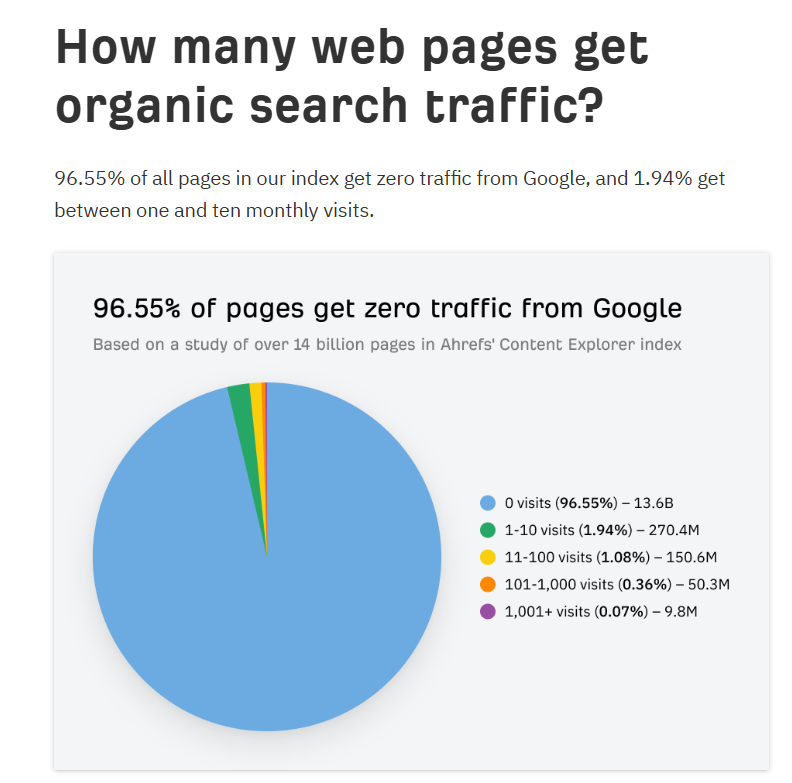
Most of those pages aren’t badly written. They’re just aimed at something nobody’s searching for, or something the site had no chance of ranking for. Keyword research is how you stay out of that 96.55%.
Now here’s where New Zealand flips the script.
Most keyword advice tells you to chase search volume: find the big numbers, prioritise them, ignore the small stuff.
That works fine in a market of 330 million people. It falls apart in a market of five million.
In NZ, loads of genuinely valuable keywords show low or even zero volume in the tools. That doesn’t mean nobody’s searching. It means the search numbers are too small for the tools to report reliably.
The data backs this up. Around 93% of keywords get ten or fewer searches a month, and roughly 15% of all daily Google searches have never been searched before, a figure Google has reconfirmed even as AI-style conversational searches have grown.

So a big chunk of real demand is effectively invisible in the tools, everywhere. In a small market, that chunk is most of your opportunity.
A tradie getting found in Tauranga might see just a handful of monthly searches for their main service — but every one of those is a job worth hundreds, sometimes thousands.
That’s how HealthVI grew: off keywords that looked thin or empty in the tools, targeted because the intent behind them was real and the competition was soft.
In a market this size, chasing the biggest keywords is a trap. The money sits in the specific, high-intent ones you can actually rank for.
The Keyword Research Checklist
Right, here’s the process, start to finish. Work through it in order. Each step feeds the next, so by the time you hit step ten you’ve got a full content plan instead of a keyword dump.
1. Brainstorm Your Seed Keywords
Seed keywords are the broad, obvious terms tied to what you sell. They’re the starting point for everything else.
Here’s the thing to understand about them: they’re the hardest keywords in your whole list to rank for, so you’re not really targeting them yet.
Early on, you’re using them as a launchpad to find better, easier keywords further down the track. Once you’ve built up enough authority, you’ll come back and rank for them too.
So don’t overthink this step. Just write down the core terms a customer would type to find a business like yours.
Say you’re a dentist in Hamilton. Your seeds might be: dentist, teeth whitening, dental implants, teeth cleaning. Four words, thirty seconds of thinking.
The quickest way to squeeze more out of it: type each seed into Google and watch what autocomplete suggests. Those suggestions are real searches people are making, straight from Google’s mouth.
2. Expand Into Long-Tail Keywords
Long-tail keywords are the longer, more specific phrases that branch off your seeds. “Dental implants” is a seed. “Affordable dental implants in Auckland” is a long-tail.
These are what you target first, and here’s why: they’re less competitive, the intent behind them is crystal clear, and the person searching is usually much closer to booking.
Someone Googling “dentist” might be doing a school project. Someone Googling “emergency dentist Hamilton open Saturday” wants a chair this weekend.
They also make up the bulk of all search activity, which is exactly why they’re where most of the real traffic quietly lives.
To find them, take each seed and expand it. Type it into Google Keyword Planner (free, straight from Google, and my first stop every time), or run it through AnswerThePublic to pull the questions people ask around it.
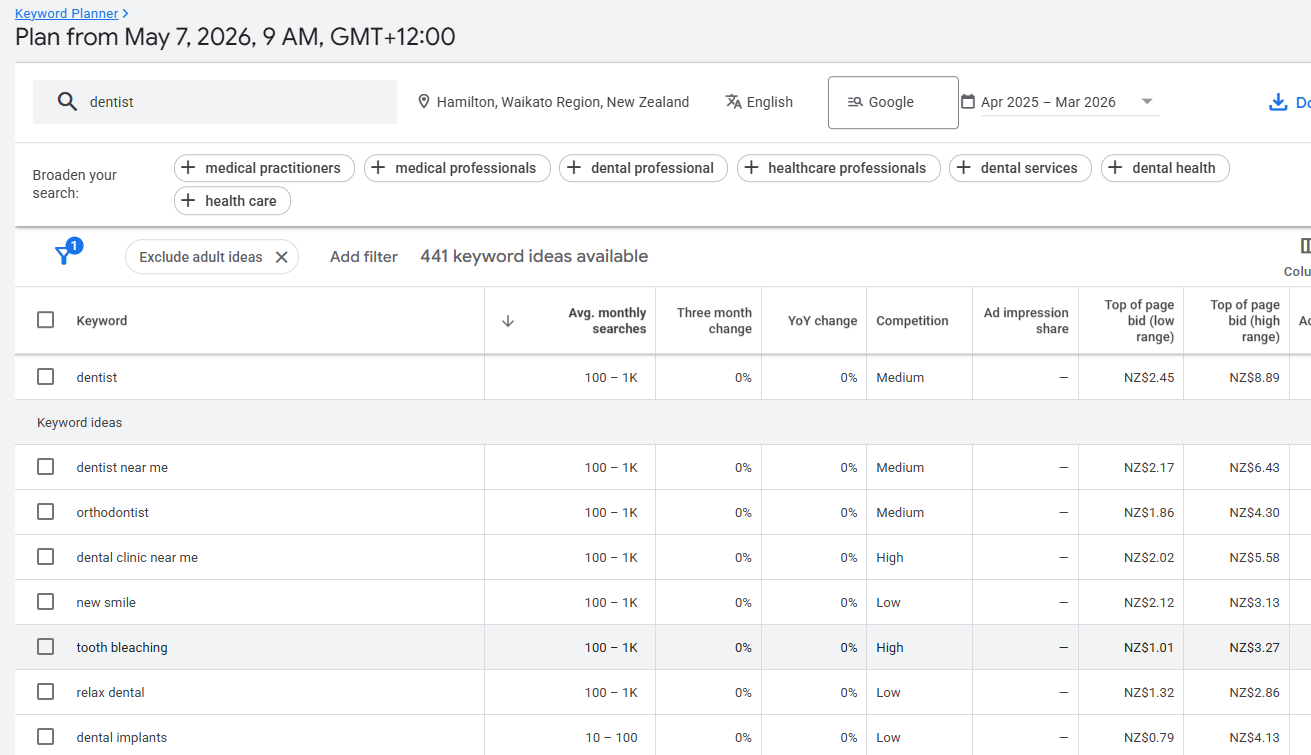
Watch how one seed unpacks:
- dental implants
- dental implants Auckland
- affordable dental implants Auckland
- how much do dental implants cost NZ
Each one is a page you could write, aimed at someone further along and easier to win.
3. Pull Keywords From Your Competitors
Your competitors have already done a pile of keyword research. There’s no rule that says you can’t take it.
Whoever’s ranking above you is sitting on a list of terms that are proven to bring in traffic for your exact type of business. Two ways to lift it:
First, the free way: open Google Keyword Planner, choose “Start with a website,” and paste a competitor’s URL instead of a keyword. Google hands you the terms that site is associated with.
Second, the deeper way: run a Keyword Gap report in a tool like Semrush. You drop in your site and up to four competitors, and it shows you every keyword they rank for that you don’t. That “missing” list is a ready-made target sheet.
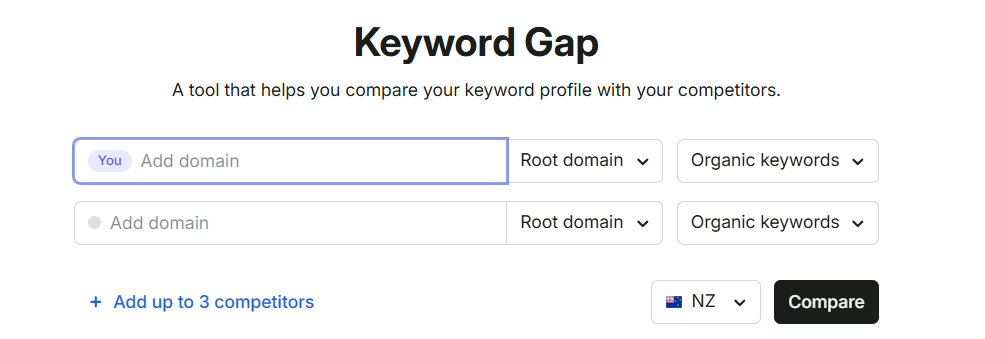
Say you’re that Hamilton dentist. Drop in the two practices ranking above you, hit compare, and you’ll usually surface a dozen keywords you’d never have thought of, all with proof they already work in your market.
4. Check the Search Volume, and What to Do When It’s Zero
Search volume is the estimated number of monthly searches for a keyword. It gives you a rough read on demand, and it’s where most people either give up or make their worst call.
Here’s the trap. You find a great keyword, check the volume, see a low number or a flat zero, and delete it.
Look at the keyword this whole article targets: “keyword research checklist.” In New Zealand, Semrush reports the volume as a flat 0, with the 2.1K of global demand sitting almost entirely offshore.
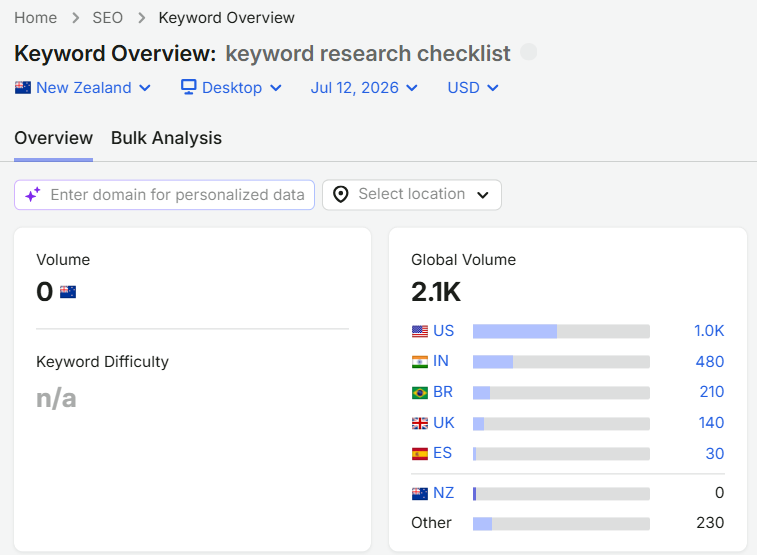
Zero. And yet here we are, writing a full guide on it, because the intent is real, the topic builds authority, and people absolutely search it, just not in numbers the tools bother to report for a market our size.
So in NZ, treat volume as one signal, not gospel. When it reads low or zero, do this instead:
Check the global volume. If a keyword pulls decent numbers in the US, the intent exists here too, scaled down. This one shows around 1,500 to 2,100 globally while sitting at zero locally.
Weigh the intent over the number. A keyword with “0” volume but obvious buying intent beats a vanity keyword with big numbers and no buyers.
Validate from the SERP itself. Say you’re ranking a Wellington business and a keyword looks empty — search it anyway.
If page one is full of polished, dedicated pages, businesses are clearly finding it worth targeting, whatever the tool says.
That’s exactly how HealthVI was built: on keywords that looked dead in the tools but had real people behind them.
5. Weigh Up the Keyword Difficulty
Keyword difficulty (KD) is a score, usually out of 100, estimating how hard it’ll be to crack the first page for a term. Low KD means easier; high KD means you’ll need more authority and more time.
For a young NZ site, read KD relative to where you’re at. But don’t be scared of the high-difficulty ones. I like them.
Here’s why: a high KD tells you the market’s there and worth money, which is why everyone’s fighting over it. You just need a longer runway to win it.
Take a term like “dentist Christchurch” — every practice in the city is chasing it, which is exactly why it’s hard.
That competition is proof the demand’s real; you just plan for SEO in Christchurch on a term like that to take months, not weeks.
When Expert SEO was barely a year old, it ranked number one in NZ for “local SEO,” above Ahrefs and Semrush, on a domain younger than most of my competitors’ coffee machines.
That’s a brutally hard keyword. It didn’t happen fast, and it came from stacking authority over time, not from luck.

So bake difficulty into your plan rather than fearing it. You’ve got two ways to play it:
Build your core, high-difficulty content first and accept it’ll rank slowly. Because it’s been live longer, it’s quietly ageing and gaining authority while you work on everything else.
Or go the other way: rank the easy long-tail pages first to build up site authority, then publish the hard core page once you’ve earned the weight to rank it faster.
Both work. The only wrong move is expecting a brand-new page to win a high-KD keyword next week.
6. Work Out the Search Intent
Search intent is the reason behind the search. It’s the single most important thing on this list to get right, because if your page type doesn’t match what the searcher wants, you won’t rank, no matter how good the content is.
There are four flavours:
- Informational: they want to learn. “How do dental implants work.”
- Commercial: they’re comparing. “Best dentist in Hamilton.”
- Transactional: they’re ready to act. “Book dental implant consultation Auckland.”
- Navigational: they want a specific site. “Lumino dentist login.”
The mistake is guessing. Don’t. Google the keyword and read the page one results, because Google has already decided what intent wins for that term.
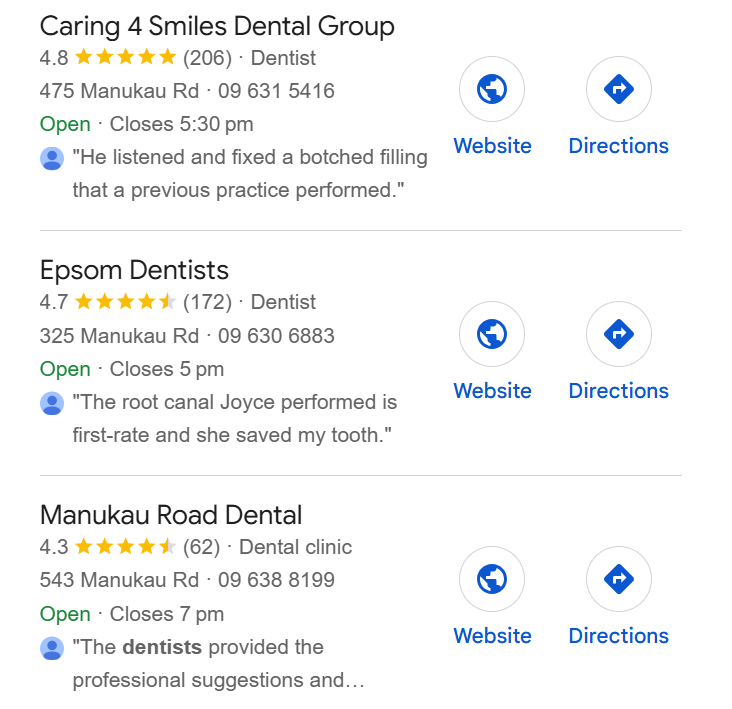
If “dental implants Auckland” shows a page of service pages, Google wants a service page there, and your 2,000-word history-of-implants blog post will never rank for it.
Match what you see.
Get this right and everything downstream gets easier, because you’re building the exact type of page the keyword is asking for.
7. Size Up Who’s Already Ranking
Before you write a single word, look at who’s already on page one and work out why they’re there.
Open the SERP for your target keyword and scan the top few results. How deep is their content? How many other sites link to that page? Are they a big brand or a beatable local outfit?
From there you decide your play: beat them with better, more useful content, beat them with stronger backlinks pointing at your page, or both.
Often, for a local keyword — say you’re chasing SEO for an Auckland business — better content alone does it, because the page ranking there is thin and nobody’s really tried.
There’s a second thing to check now, and most guides skip it entirely: the AI Overview.
Read the AI-generated answer Google shows at the top, and note which sites it pulls from. Those are the pages you need to displace or sit alongside to get cited yourself.
It matters more every month, because AI Overviews are linked to a 58% lower click-through rate for the top organic result: if you’re not in the answer, you’re losing clicks you used to own.
This is worth doing properly. Expert SEO now gets cited in Google’s AI Mode and in ChatGPT answers, and that started with reading what those systems already surface and writing something clearly better.

8. Group Your Keywords Into Clusters
Clustering is grouping the related keywords in that list into themes, so instead of a wall of 200 phrases you’ve got a handful of tidy buckets.
It does two jobs. It organises your website, showing you which pages to build and how they connect.
And, just as usefully, it organises your head: a list of 200 keywords is overwhelming and breeds procrastination, while eight clean clusters feels like a plan you can actually start on Monday.
Back to the dentist. The raw list might be a jumble, but cluster it and it snaps into shape:
- Implants cluster: dental implants, dental implants Auckland, affordable dental implants Auckland, dental implant cost NZ
- Whitening cluster: teeth whitening, professional teeth whitening Hamilton, teeth whitening cost
- Cleaning cluster: teeth cleaning, affordable teeth cleaning, dental scale and polish
Each cluster becomes a topic on your site, with one main page and a few supporting ones feeding it. That grouping is also the backbone of your internal linking later, since the pages in a cluster naturally link to each other.

9. Map Each Keyword to a Page
Mapping means assigning each keyword to a specific page, so nothing’s left floating and no two pages fight over the same term.
The rule I follow: one primary keyword per page, plus two or three closely related secondaries it can rank for at the same time.
“Dental implants Auckland” as the primary, with “cost of dental implants Auckland” and “best dental implants Auckland” folded into the same page.
Drop it all into a simple spreadsheet. A row per page, with columns for the primary keyword, the secondaries, the intent, and the page type.
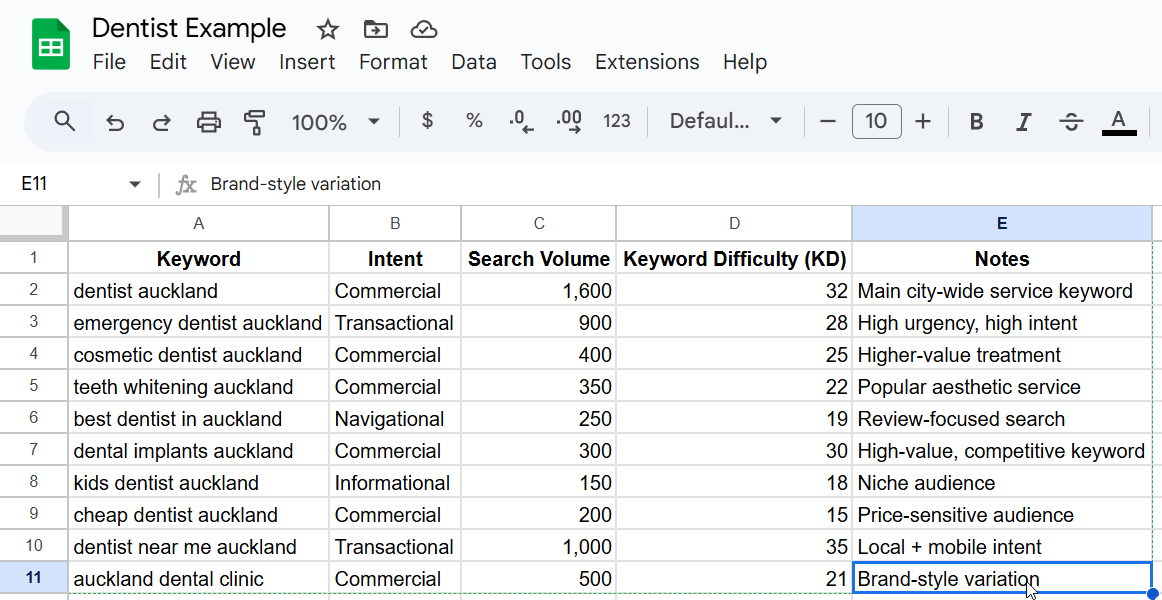
That sheet is the whole point of the exercise. It’s your content plan: open it any day and you know exactly what to build next, instead of staring at a keyword list wondering where to start.
10. Track Your Rankings and Refresh
Keyword research isn’t a one-and-done job. Search changes, competitors publish, and pages that ranked last year quietly slide.
So once your pages are live, track them. Set up Google Search Console (free) and watch which keywords each page ranks for, where it sits, and whether it’s climbing or slipping.
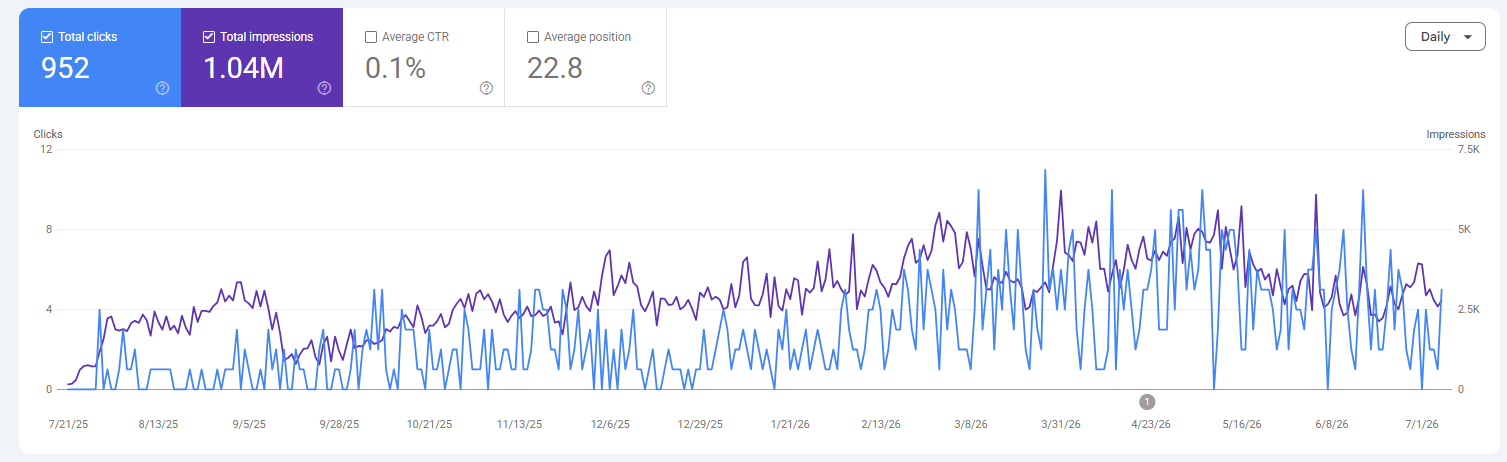
Then refresh. When a page starts to fade, update it: fresh data, new sections, a better answer to the query. This matters because SEO rewards age and upkeep. 72.9% of pages ranking in Google’s top ten are more than three years old, so the win goes to the pages you keep alive, not the ones you publish and forget.
The Checklist in One Place
Here’s the whole process to copy, print, or paste into your project doc:
- Brainstorm your seed keywords.
- Expand them into long-tail keywords.
- Pull keywords from your competitors.
- Check the search volume, and don’t bin the zeros.
- Weigh up the keyword difficulty.
- Work out the search intent behind each term.
- Size up who’s already ranking.
- Group your keywords into clusters.
- Map each keyword to a single page.
- Track your rankings and refresh.
When to Do It Yourself vs Bring in Help
You can absolutely run this yourself. Everything above is doable with free tools and a spare afternoon, and plenty of NZ businesses do exactly that.
Where it gets even better is when you pair the process with professional SEO, because the research is only as good as the content and links you build on top of it.
So if you’d rather have it handled, we can help with our professional SEO services, or work through your strategy together with SEO consultancy. Either way, you’ve now got the exact checklist to do it right.
Keyword Research Checklist: FAQ
What are the steps in a keyword research checklist?
The core steps are: brainstorm seed keywords, expand them into long-tail terms, pull keywords from competitors, check search volume, weigh keyword difficulty, work out search intent, size up who's ranking, group keywords into clusters, map each keyword to a page, then track and refresh. Run them in that order every time and you go from one idea to a full content plan.
How do I do keyword research for free?
You can run the whole process without paying for anything. Use Google Keyword Planner for volume and ideas, Google autocomplete and AnswerThePublic for long-tail terms and questions, the live Google SERP to read intent and competition, and Google Search Console to track what you already rank for.
What do I do if a keyword shows zero search volume in NZ?
Don't bin it. In a market New Zealand's size, plenty of valuable keywords report zero simply because the numbers are too small for the tools to measure. Check the global volume as a proxy, weigh the buying intent behind the term, and confirm from the SERP whether businesses are already building pages for it.
What's the best keyword research tool for a small NZ business?
Start with Google Keyword Planner — it's free, pulls straight from Google, and covers most of what a small business needs. If you want deeper competitor data and difficulty scores, Semrush or Ahrefs are the natural step up once you've outgrown the basics.
How many keywords should one page target?
One primary keyword per page, plus two or three closely related secondaries the same page can naturally rank for. Trying to target lots of unrelated keywords on a single page usually means it ranks well for none of them.
How long does keyword research take to pay off?
The research itself takes an afternoon; the ranking takes longer. Easy long-tail pages can move within weeks, while competitive head terms often need several months of content and authority-building before they climb. Plan for the long game on the hard ones.
Recommended Reading
 Advanced Keyword Research
Eight deeper strategies for finding keywords once you've got the basics down.
 The 6 Best Keyword Research Tools
The exact tools I use every day to find and validate keywords in NZ.