

Most guides make on-page SEO sound like a 20-step ordeal. Something you hunch over before every publish, ticking boxes, chasing a perfect score, second-guessing whether your keyword appears enough times.
It isn’t that.
Done right, on-page SEO is a sub-five-minute job. Spending longer than that is almost always wasted effort — time you should be putting into your actual content or your links.
This guide covers the fundamentals properly — what on-page SEO is, why it matters, and how the pieces fit.
But the whole point is to show you the handful of things that actually move rankings, the tools that automate the rest, and how to get the job done in five minutes flat. Learn it once here. Then never think hard about it again.
Key Takeaways
- What it is: On-page SEO is optimising a single page — its title, headings, content and URL — so Google understands it and ranks it. It’s the part of SEO you fully control.
- The four that matter: Get your target keyword into the meta title, the URL slug, the meta description and the H1. That covers most of what on-page SEO can do for a page.
- The one that matters most: Content that actually answers the search. No tag saves a page that doesn’t match what the searcher wanted.
- Use tools to systematise it: Rank Math (or Yoast) checks every element as you write; ChatGPT drafts your meta and audits the finished page.
- Don’t over-optimise: Publish at a healthy green score (around 80+). Chasing 100/100 means keyword-stuffing — and that hurts more than it helps.
- It’s a five-minute job: Learn it once and every page after takes a couple of minutes. Time beyond that is better spent on content and links.
- It still matters for AI search: Clean structure and direct answers are exactly what get your page cited in AI Overviews and ChatGPT.
What Is On-Page SEO?
On-page SEO is the practice of optimising the content and HTML of a single web page — the title, the headings, the words on the page, the URL — so search engines understand what it’s about and rank it for the right searches.
It’s one slice of the broader practice of SEO — the slice you do on the page itself. Everything sits under your control, on your own website.
There are three buckets of stuff on any page you can optimise:
Your content — the actual words, and how well they answer what the searcher wanted. Your HTML elements — the title tag, meta description, and header tags that tell Google (and the person scrolling results) what the page covers. And your on-page structure — the URL, your internal links, and your images.
The reason this matters more than it sounds: on-page SEO is the one part of search you own outright. You can’t force another website to link to you.
You can’t always fix a slow server overnight. But you can rewrite a title tag right now, for free, in thirty seconds. It’s the most controllable lever you have, which is exactly why you should pull it properly and move on.
On-Page vs Off-Page vs Technical SEO
People muddle these three constantly. SEO has three jobs, and on-page is only one of them.
| SEO type | What it covers | Who controls it |
|---|---|---|
| On-page SEO | Titles, headings, content, meta descriptions, URLs, internal links, images — everything on the page | You, completely |
| Off-page SEO | Backlinks, brand mentions, reputation — signals from other websites | Mostly others |
| Technical SEO | Crawling, indexing, site speed, mobile-friendliness, site structure | You, but it’s more involved |
On-page is what’s on your page. Off-page is your reputation off it — mainly the links pointing back to you from other sites. Technical SEO is the plumbing that lets Google reach and read your site in the first place.
You need all three. But they’re not equal in effort. On-page is the one you can knock over today by yourself. Off-page takes months of relationship-building and content people want to link to. Technical usually needs a developer at some point.
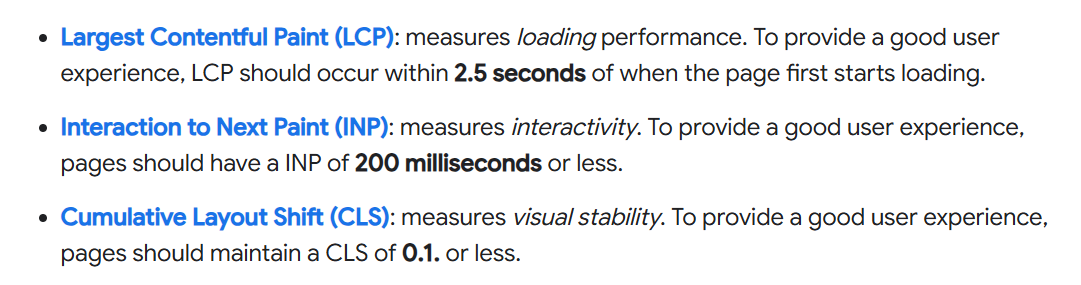
The line between on-page and technical gets blurry around page speed and Core Web Vitals — some people file those under on-page, some under technical.
Don’t get hung up on the label. Just know they matter, and they’re a job for another day. (If your site loads like treacle, that’s a technical fix, and it’s worth doing separately.)
And if you’ve ever been asked “what are the four types of SEO?” — it’s these three plus local SEO, which is on-page and off-page tuned specifically for map-pack and “near me” searches.
Why On-Page SEO Matters
On-page SEO matters because it’s how you tell Google what your page is about and who it’s for. Get it right and you’ve done the single cheapest, fastest thing that helps a page rank — and you’ve made your result more clickable in the search listing at the same time.
But here’s what almost nobody says out loud: on-page SEO is table stakes, not the whole game.
It’s necessary. It’s not sufficient. A perfectly optimised title tag won’t rescue thin, unhelpful content, and it won’t beat a far stronger, more trusted website on its own.
On-page SEO clears the bar so you’re eligible to rank. What actually wins is the quality of your content and, for competitive terms, the strength of your links.
So the smart way to think about it is this: on-page is the 20% you control 100%. Do it right, do it fast, and pour your real hours into the two things that are genuinely hard — writing content people actually want, and earning links.
Spending forty minutes agonising over a page’s on-page SEO is time stolen from the work that moves the needle.
Nail it, systematise it, stop thinking about it.
The Most Important On-Page SEO Elements
This is where every other guide leads you astray. They give you a checklist of twenty items and imply they’re all equally important. They’re not.
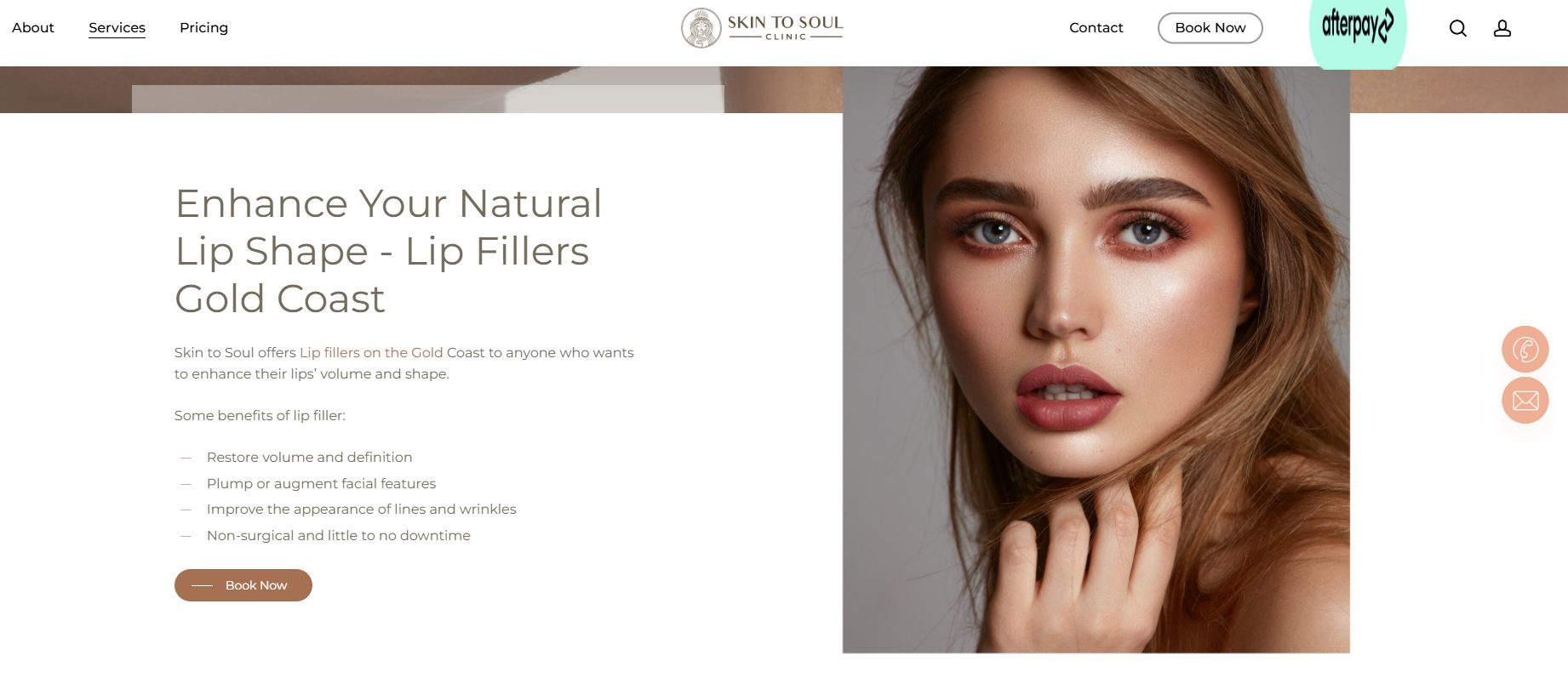
Here’s the honest version, sorted by how much each thing actually affects your rankings (below is an example of on-page SEO targeting the keyword “lip fillers Gold Coast”).
Tier 1: The things that matter
Get your target keyword into these four places, and make your content genuinely useful. Do that and you’ve covered roughly 90% of what on-page SEO can do for you.
The meta title (title tag). This is the biggest single on-page element. It’s the clickable headline that shows in search results, and it’s a strong ranking signal. Put your target keyword near the front, and keep it to about 50–60 characters so Google doesn’t rewrite or chop it off.
The URL slug. The readable part of your web address. Keep it short, include your keyword, and separate words with hyphens. So /when-to-plant-tomatoes-brisbane, not /blog/post-id-4471.
The meta description. The grey summary text under your title in search results. It’s not a direct ranking factor, but it heavily influences whether people click — and clicks matter. Write it for a human, include your keyword, and keep it around 155–160 characters. Google doesn’t always use the one you write, but a strong, relevant description gives you the best shot.
The H1 tag. Your main on-page headline. You get one per page, and it should contain your target keyword. In most website builders, the page or post title automatically becomes the H1, so this often sorts itself out — just check.
Now the fifth thing, and it’s the most important of all:
The content actually matching what the searcher wanted. No amount of keyword placement saves a page that doesn’t answer the question. If someone searches “when to plant tomatoes in Brisbane,” they want a month.
Give them the month early. Search intent beats every tag on this page. Get this wrong and the other four don’t matter.
Same four placements, any business. A page doing SEO for a dental clinic and targeting “dentist Sydney” leads its title, slug, meta and H1 with that phrase.
A tradie in Perth chasing “emergency electrician Perth” does exactly the same. The business changes; the four spots don’t.
Tier 2: Nice to have, do them once you’re set
These help. They’re worth doing. But they’re not where the ranking power lives, so don’t sweat them:
A logical heading structure (H2s and H3s that break the page into scannable sections). Descriptive internal links to your other relevant pages. Alt text on your images that describes what they show.
Your keyword appearing naturally in the first 100 words or so. And genuine signals of experience and expertise — a real author, real knowledge on the page.
Tier 3: Minor or situational — don’t lose sleep
This is the stuff over-optimisers obsess over while their content sits unpublished:
Schema markup, external links to other sites, exact keyword density, cramming your phrase into every subheading.
Some of it has niche uses. None of it will make or break a normal business page. If a guide has you fussing over keyword density percentages, close the tab.
The takeaway: four placements, useful content, done. Everything below Tier 1 is a bonus, not a requirement.
How to Do On-Page SEO in Under 5 Minutes
Here’s the whole process. Learn it once, run it a few times, and it becomes muscle memory — under two minutes a page.
Step 1 — Know your target keyword before you write. This is the only prerequisite, and it comes from your keyword research, not from on-page SEO itself.
One page, one primary keyword. For a cosmetic surgeon that might be “rhinoplasty Sydney”; for a Melbourne business it might be “emergency plumber Melbourne.” If you don’t have this nailed, sort it first — on-page SEO is pointless if you don’t know what you’re optimising for.
Step 2 — Put the keyword in the four places. Meta title, URL slug, meta description, H1. That’s Tier 1 from above, now as actions. Thirty seconds each.
Step 3 — Write for the reader and the search intent. This is the part that actually earns the ranking, and it’s the bulk of your real work — but it’s writing, not on-page SEO. Answer the question clearly and early.
Mention your keyword naturally in the opening lines because it reads well, not because you’re stuffing it.
Step 4 — Let your SEO plugin check it as you go. Rank Math or Yoast sits inside your page editor and ticks off the elements in real time. You’re not doing this from memory — the tool is your checklist. More on this next.
Step 5 — Optional 60-second audit, then publish. If you want a second opinion, paste your content and target keyword into ChatGPT and ask it to audit the on-page SEO. It’ll catch anything you missed. Then hit publish.
The first few times, this takes about five minutes. After that, it’s a habit you barely notice — well under two minutes per page.
An Australian On-Page SEO Example
Theory’s fine, but let’s do it for real so you can see there’s genuinely nothing to it.
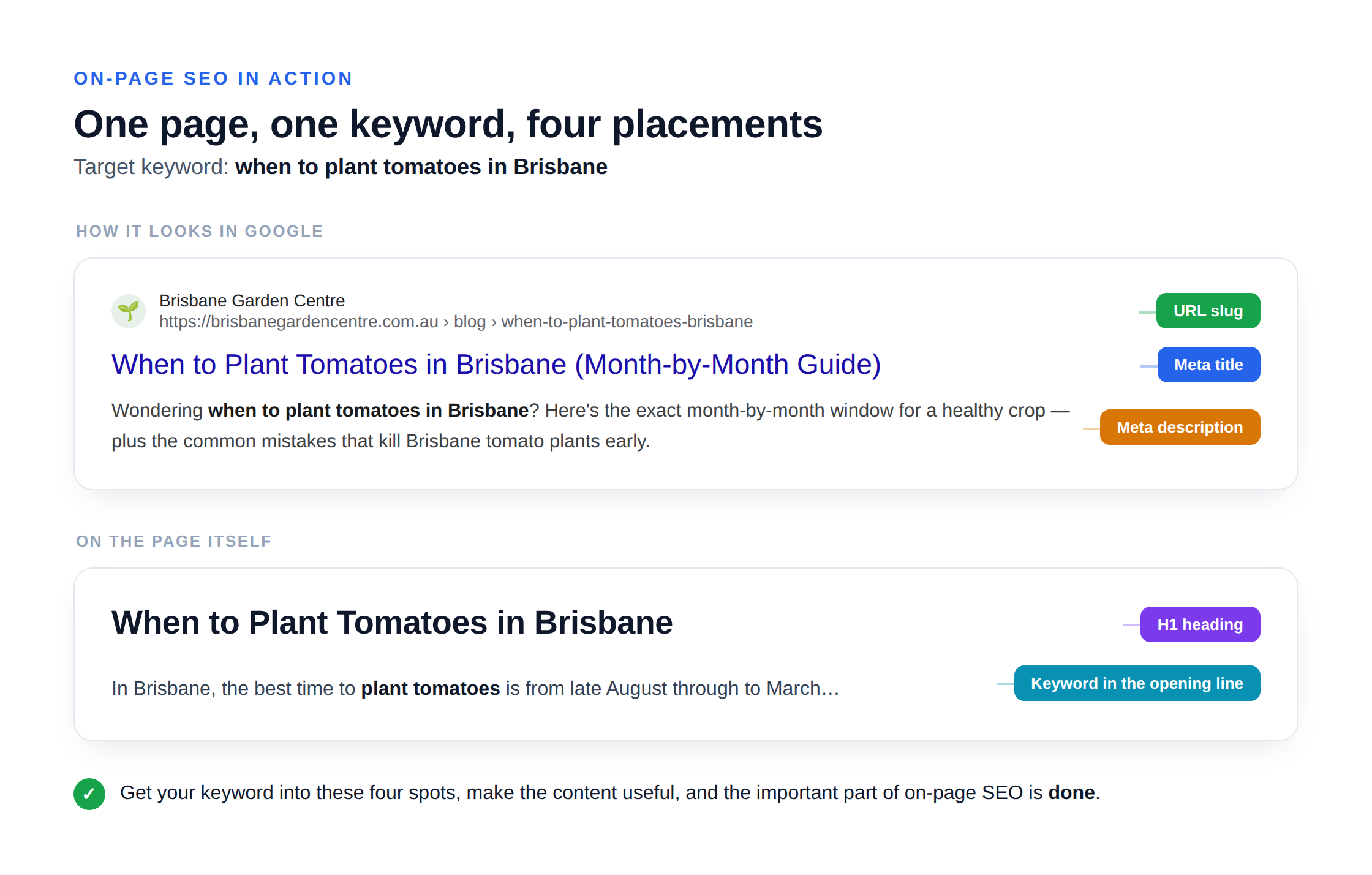
Say I’ve written a blog post for a Brisbane garden centre. The target keyword — decided before I wrote a word — is when to plant tomatoes in Brisbane. Right now the page is unoptimised. Here’s exactly what I change, in order.
Meta title. Right now it just says “Tomato Planting Tips.” Useless. I change it to:
When to Plant Tomatoes in Brisbane (Month-by-Month Guide)
Keyword’s at the front, it’s 55 characters, and the “month-by-month” bit earns the click.
URL slug. It’s currently /blog/2026/03/post-4471. I change it to:
/when-to-plant-tomatoes-brisbane
Short, keyword in it, hyphens between words.
Meta description. There isn’t one, so Google’s guessing. I write:
Wondering when to plant tomatoes in Brisbane? Here’s the exact month-by-month window for a healthy crop — plus the common mistakes that kill Brisbane tomato plants early.
Keyword’s in there, it reads like a human wrote it, and it’s around 160 characters.
Stuck on what to write for either the title or the description? Ask ChatGPT.
A prompt like “Give me five meta title and meta description options for a blog post targeting ‘when to plant tomatoes in Brisbane'” hands you a shortlist in seconds — pick the closest one and tweak it. It makes the fiddliest part of the job effortless.
H1. The headline on the page says “Our Planting Guide.” I change it to match the search:
When to Plant Tomatoes in Brisbane
The opening lines. I check the first paragraph actually answers the question fast. It now opens: “In Brisbane, the best time to plant tomatoes is from late August through to March…” The keyword’s in the first sentence, and — more importantly — the answer is right there.
I glance at the Rank Math panel in the sidebar. It’s climbed from a red 40-something to a green 85. Every Tier 1 box is ticked.
Optional audit. I paste the post into ChatGPT with: “Here’s my article targeting ‘when to plant tomatoes in Brisbane.’ Audit the on-page SEO and flag anything missing.” It confirms the basics are covered and suggests I add an internal link to my “Brisbane vegetable planting calendar” page. Good call — I add it.
Publish.
That’s the whole job. No density calculators, no chasing a perfect score, no agonising. Four placements, a useful opening, a quick check, done.
The Best On-Page SEO Tools
You shouldn’t be doing any of this from memory, and you don’t have to. The right tools turn on-page SEO from a memory test into a near-automatic step.
Rank Math (or Yoast). If you’re on WordPress, install one of these. They add a live on-page checklist right inside your editor — it watches your title, meta, headings, keyword placement and more, and scores the page out of 100 as you type.
You’re not guessing whether you’ve covered the basics; the plugin tells you. Rank Math is my pick, but Yoast does the same job. Pick one, don’t run both.
Aim for a comfortable green — around 80 or above — and publish. (Why not 100? See the next section. That number is a trap.)
ChatGPT — two jobs. First, it’ll help you draft: write and refine your meta title, tighten your meta description, suggest a cleaner heading structure.
Second, and more useful, it’ll audit a finished page. Paste in your content and your target keyword, and ask it to check the on-page SEO. Something like:
“Here’s my article targeting the keyword ‘[your keyword].’ Audit the on-page SEO — check the title, meta description, URL, H1, keyword usage and structure, and tell me anything that’s missing or could be stronger.”
It’s genuinely good at catching the thing you overlooked — a missing keyword in the H1, a meta description that’s too long, an intro that buries the answer. It’s a free second set of eyes.
Not on WordPress? No problem. On Shopify, Wix or Squarespace the same four fields live in each page’s SEO settings — the title, description, URL and heading are all editable, they’re just in a different menu. The elements don’t change. Nobody’s locked out of on-page SEO because of their platform.
Don’t Over-Optimise: Why 80 Beats Chasing 100
Here’s the mistake that eats more time than any other: chasing a perfect score.
The moment your Rank Math score is comfortably green — 80 or above — publish. Do not chase 100 out of 100.
That last stretch almost always means forcing your keyword into places it doesn’t belong: every subheading, the alt text, the first word of every paragraph. And that reads as spam. To Google, and to the human trying to read your page.
A perfect plugin score is not the same as better rankings. The plugin is a helpful checklist, not the judge. Google doesn’t see your Rank Math number — it sees a page that either reads naturally and answers the question, or one that’s been stuffed to hit an arbitrary target.
The last 20 points cost the most effort and return the least. Often they return negative, because over-optimisation can actively hurt you.
So the rule is simple. Hit the four Tier 1 elements. Get a healthy green score. Make sure it reads like a human wrote it for a human. Ship it. Move on to work that matters.
Does On-Page SEO Still Matter for AI Search?
Short answer: yes — arguably more than ever.

The worry is understandable. If ChatGPT and Google’s AI Overviews are answering questions directly, why bother optimising a page?
Because those AI answers are built from pages. And the pages they pull from and cite are the ones that are clearly structured and directly answer the question — which is exactly what good on-page SEO produces.
A clean title, a sensible heading structure, and a direct answer near the top don’t just help Google’s traditional rankings. They make your page easy for an AI to read, extract, and quote. When you structure a section as a clear question followed by a clear, direct answer, you’re making yourself citable.
The good news is you don’t need a separate ritual for this. Doing on-page SEO well is doing AI-search optimisation well.
The same four basics, plus a structure that leads with answers instead of burying them, covers both. If you want to go deeper on the AI side specifically, that’s its own topic — but your on-page fundamentals are already doing the heavy lifting.
How to Audit a Page You’ve Already Published
Everything so far assumes you’re optimising new content. But what about the pages you published before you knew any of this?
The audit is the same four things, in reverse. And it takes about two minutes a page.
The 90-second manual pass. Open the page and check the Tier 1 elements. Is your target keyword in the meta title? The URL slug? The meta description? The H1? If any are missing, fix them. That alone is often the whole job.
The plugin pass. Re-open the page in Rank Math or Yoast and read the score. It’ll flag anything the manual pass missed.
The ChatGPT pass. Paste the page in with the same audit prompt from earlier. This is especially good at catching the thing a checklist can’t — a page that technically ticks the boxes but doesn’t actually match what people are searching for.
That’s the most valuable fix of all.
One judgement call: not every old page is worth updating. Prioritise the ones that already get some traffic or sit close to page one — Google Search Console shows you both. A page ranking in positions 5 to 20 can often jump with a five-minute on-page tidy-up.
Final Thoughts
The people who win at SEO aren’t the ones with 100 out of 100 on every page. They’re the ones who nailed the basics once, systematised them, and spent their real hours on the two hard things — content people actually want, and links worth earning.
On-page SEO is a five-minute habit. Get your keyword into four places, make the content genuinely useful, let a plugin and ChatGPT check your work, and publish.
That’s the entire discipline. The moment it starts eating more than a few minutes of your day, you’ve turned an easy win into a hiding place — a way to feel productive while avoiding the work that actually grows a business.
And if you’d rather hand the whole lot to someone else — the five-minute stuff and the hard parts — that’s what an Australian SEO team is for.
Learn it once. Do it fast. Then go do the hard part.