

A while back, I audited a dental practice’s website.
They had a page for dental implants — one of the highest-value services in all of dentistry, a single case worth thousands of dollars. It was well written, and sitting right there on their site.
But it wasn’t indexed. Google had never added it to search.
So when someone searched for dental implants, that page didn’t exist as far as Google was concerned. They weren’t losing the race for those high-value patients — they weren’t even in it. And the only reason I found it was a technical SEO audit.
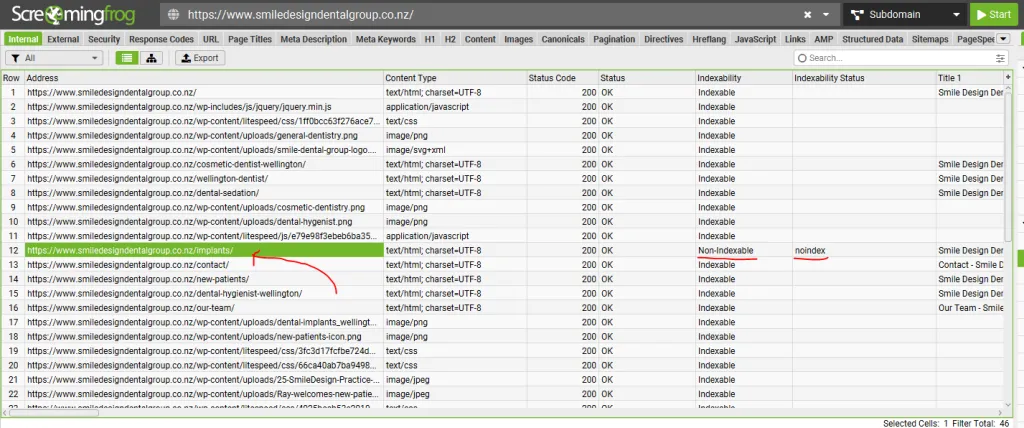
That’s what technical SEO does. It makes sure search engines can find, read and index your website — so your best pages get a fair shot at ranking instead of sitting invisible.
Get it wrong and it doesn’t matter how good your content is or how much you spend on ads. Get it right and everything else you do in SEO finally has a foundation to stand on.
This is technical SEO in plain English, for an Australian business: what it is, why it decides whether your content ever ranks, the handful of things worth fixing first, how to find your problems, and how to tell when it’s time to hand it off.
Key Takeaways
- What it is: Technical SEO is the work of setting up your website so search engines and AI can crawl, render and index it — making sure your content can be reached and read, not just written.
- Why it matters: It’s the foundation everything else stands on. Google can only rank content it can reach — a brilliant page it can’t index earns nothing, like that dental implants page.
- The five that matter most: for a small site, focus on crawlability, indexability, site speed, mobile-friendliness and HTTPS before anything advanced.
- How to find problems: run a site audit tool (SEMrush Site Audit is the one I use), then cross-check indexing in Google Search Console. Both surface most issues fast.
- The Australian angle: hosting location and load speed for local customers, .com.au and geo-targeting, and mobile-first indexing all matter more than the generic guides admit.
- AI search counts now: the same foundation that lets Google index you lets ChatGPT and Perplexity read and cite you — but AI crawlers are fussier, so a JavaScript-heavy site can be invisible to them.
- Don’t over-engineer it: most Australian businesses need five things done properly, not fifty done badly. Fix what’s broken and ignore the enterprise noise.
What Is Technical SEO?
Technical SEO is the practice of setting up your website so search engines and AI systems can crawl, render, index and understand it. It’s not about the words on the page. It’s about making sure those words can be reached and read in the first place.
Think of it as the plumbing behind your website. Your content is what customers read. Your technical SEO is what makes that content reachable, fast, and understandable to the machines deciding whether to show it to anyone.
Here are the core elements at a glance — the whole discipline breaks down into these:
- Crawlability — can search engines find all your pages?
- Indexability — will they store those pages so they can appear in results?
- Site speed — do your pages load fast enough (Core Web Vitals)?
- Mobile-friendliness — does the site work properly on a phone?
- HTTPS and security — is the connection secure?
- Site structure — are your important pages easy to reach?
- Structured data — can engines (and AI) understand the context of your content?
A simple example of technical SEO: submitting an XML sitemap so Google can find every page on your site, or fixing a page that loads too slowly on mobile. Small, invisible fixes that decide whether your content gets a fair shot.
The rest of this guide explains what these elements mean, which ones matter most for a site your size, and how to check them yourself.
Why Is Technical SEO Important for Australian Businesses?
Technical SEO is the floor everything else stands on. Google can only rank content it can reach and read.
If your site is slow, half-blocked, or a mess to crawl, your best pages stay invisible — no matter how good they are or how many links point at them.
That’s the lesson from the dental practice at the top. Their most profitable service page earned nothing — not because the content was worse than a competitor’s, but because a single technical setting hid it from Google.
If you run a practice like that, catching this early is a core part of SEO for dental clinics — the fanciest website in town is worthless if your money pages aren’t in the index. It’s the same for any high-value service: the procedure pages a cosmetic surgery clinic depends on are just as easy to hide by accident, and just as costly when they disappear.
This is what “broken” quietly costs an Australian business: money pages missing from the index, slow load times losing mobile customers, rankings capped below competitors with worse content but cleaner sites.
You don’t see it happening. The traffic just never arrives.
Here’s the upside. Fix the foundation once and every future page benefits. It’s not a monthly cost like ads that stops working the day you stop paying — it’s an asset that compounds.
I’ve watched this play out. I grew a health site, HealthVI, from zero to over 20,000 monthly organic visitors once the foundation was solid and the content could do its job.

One honest note before we go further: not every site has a technical problem. Plenty of small Australian websites are technically fine, and their real issue is thin content or no backlinks.
Technical SEO matters most when something is genuinely broken or capping you — like that implants page. We’ll cover how to tell the difference.
Technical SEO vs On-Page and Off-Page SEO
SEO breaks into three jobs, and technical SEO is the one that makes the other two possible. Here’s how they fit together:
- Technical SEO — can search engines reach, read and index your site? (The foundation.)
- On-page SEO — is each page relevant, useful and well-optimised for what people search? (The content.)
- Off-page SEO — do other websites trust and link to yours? (The reputation.)
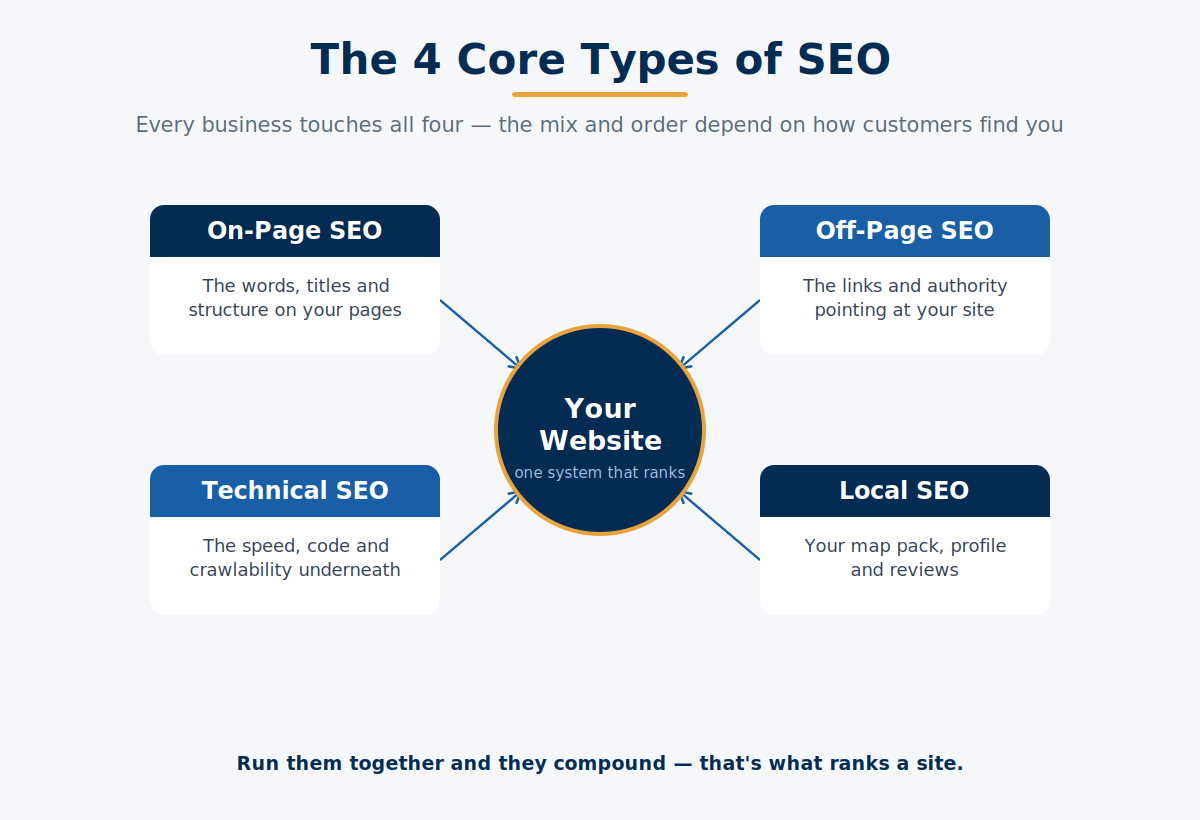
You’ll sometimes see people talk about “four types of SEO.” That’s usually the three above with local SEO counted separately — the work of ranking in map results and “near me” searches. But the working model is these three, and technical comes first.
Why first? Because the other two don’t count if your pages can’t be crawled. The best content in the world and a pile of quality backlinks are both wasted if Google can’t reach the page.
That’s the difference between technical SEO and the rest of SEO: it isn’t a separate thing you do instead of SEO — it’s one part of SEO as a whole, the part that makes the rest work.
Get the order right: technical foundation first, then great content, then the links and reputation to push it up the rankings.
How Google Crawls, Renders and Indexes Your Site
Before a page can rank, Google has to do three things: crawl it, render it, and index it. Break any one of them and the page never shows up.
Most technical SEO problems are a failure at one of these three stages, so they’re worth understanding in plain English.
Picture a librarian deciding whether to shelve a book. First they have to find the book. Then they have to actually read it. Then they file it under the right subject so people can find it later. Google does the same three things with your pages.
Crawling — finding the page. Googlebot moves around the web following links, and reads two files to work out what to look at: your robots.txt (which tells it where it can and can’t go) and your XML sitemap (a list of your pages).
Crawling breaks when a page is accidentally blocked in robots.txt, or when a page has no internal links pointing to it, so Google never discovers it. Those unlinked pages are called orphan pages — usually published outside the menu, or old pages everyone forgot about.
Rendering — reading the page. Google doesn’t just read raw code. It loads the page like a browser would, running the JavaScript, so it sees the full content a human sees.
Rendering breaks when your important content only appears after heavy JavaScript runs, or when scripts block the page from loading properly. (Hold that thought — it matters even more for AI crawlers.)
Indexing — filing the page. Once Google has read the page, it decides whether to store it in the index. No index, no ranking, no traffic.
Indexing breaks when a page has a stray “noindex” tag telling Google to skip it (exactly what happened to that dental implants page), when duplicate versions confuse Google about which to keep, or when a page is so thin Google decides it’s not worth storing.
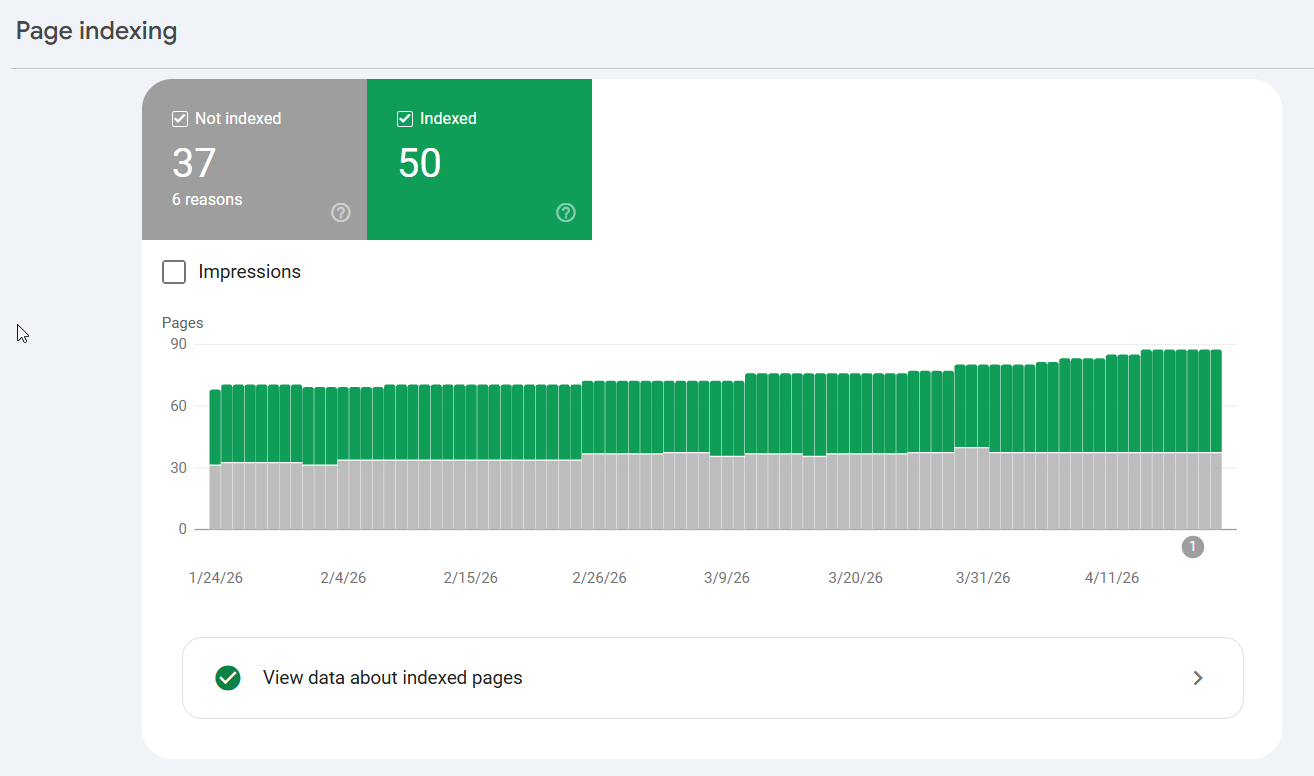
You’ll also hear the term crawl budget — how many pages Google will bother to crawl on your site in a given period. For a site with hundreds of thousands of pages, that matters. For a clinic or a law firm with thirty pages, it doesn’t. Don’t lose sleep over it.
The Technical SEO Elements That Matter Most
You don’t need to master every technical tactic on the internet. For most Australian businesses, a handful of elements decide whether your site is healthy.
Here are the ones that matter, what each does, and how it breaks — with the five that matter most for a small site flagged first.
1. Crawlability. Can Google find every page? This comes down to a clean robots.txt, an up-to-date XML sitemap, and solid internal linking so every page is reachable. If Google can’t find a page, nothing else about it matters.
2. Indexability. Will Google keep the page once it finds it? This is where stray “noindex” tags, duplicate content, and missing canonical tags cause damage. A page can be perfect and still be excluded from search by a single wrong setting.
3. Site speed and Core Web Vitals. How fast does the page load and settle? Google measures this with three Core Web Vitals: Largest Contentful Paint (how fast the main content loads — aim for 2.5 seconds or less), Interaction to Next Paint (how fast the page responds to a tap — aim for 200 milliseconds or less), and Cumulative Layout Shift (how much the page jumps around as it loads — aim for 0.1 or less).
Speed breaks from oversized images, bloated code, and slow hosting. It’s the element your mobile customers feel most — Google’s own research found that as page load time goes from one second to three seconds, the probability of a bounce increases 32%.

4. Mobile-friendliness. Google now uses mobile-first indexing for the whole web — meaning it ranks the mobile version of your site, not the desktop one. If your site is clunky on a phone, that’s the version being judged. Responsive design, readable text, tappable buttons, and no blocked resources are the basics.
5. HTTPS and security. The padlock in the browser bar. HTTPS encrypts the connection between your site and your visitor, and it’s a baseline trust signal for Google. A site still on plain HTTP looks broken and untrustworthy in 2026. Non-negotiable.
Those five are where most Australian small businesses should focus. Get them right and you’ve handled the vast majority of what matters.
The next three are worth knowing, but lower priority until you grow:
6. Site architecture and internal linking. A flat, logical structure where important pages are reachable within a few clicks. Good internal linking helps Google understand which pages matter and spreads ranking strength around your site.
7. Structured data (schema markup). Code that spells out what your content is — a service, a review, an FAQ, a local business — so search engines and AI can understand it and sometimes show rich results. We’ll come back to why this matters for AI.
8. Duplicate content and canonicalisation. When the same content lives on several URLs, Google doesn’t know which to rank. Canonical tags tell it which version is the “real” one. Duplication usually happens by accident — URL parameters, http and https versions, www and non-www, trailing slashes.
A quick note on platforms, since it’s a common question: the principles are identical everywhere, but the common failure points differ. WordPress sites usually stumble on speed (plugin bloat, unoptimised images). Shopify sites often generate duplicate URLs from product variants and filters. Same rules, different traps.
Technical SEO for AI Search
In 2026, search isn’t just Google. People ask ChatGPT, Perplexity and Google’s AI Overviews — and those tools crawl your site to decide what to cite.
The good news: it’s the same technical foundation. The catch: AI crawlers are fussier than Google, so a site that’s fine for Google can still be invisible to them.
Here’s the single most important thing to understand. Google renders JavaScript — it loads your page fully, runs the scripts, and sees the finished content. Many AI crawlers don’t. They read the raw HTML and stop.
So if your core content only appears after JavaScript runs, an AI tool may see a blank or half-empty page and skip you entirely, even though Google sees you fine.
The fix is to make sure your important content — your headings, your text, your key information — is present in the HTML, not painted on later by scripts. If you can view your page’s source code and see your actual content in there, you’re in good shape.
The other pieces follow the same logic as the rest of technical SEO:
- Render-blocking and slow loading hurt AI visibility the same way they hurt crawlability. If it’s hard to load, it’s hard to read.
- Structured data helps. Clean schema spells out what your content means, which makes it easier for an AI system to understand and quote you accurately.
- The llms.txt question. You may have heard about llms.txt — a proposed file (like robots.txt) that tells AI tools how to use your content. Some sites publish one. It’s early, and the major AI platforms haven’t committed to it, so I wouldn’t rush. Get your content readable in plain HTML first — that does far more.
The through-line is simple: a technically sound site is legible to search and AI. A broken one is invisible to both. This is where getting the foundation right pays off twice.
My own new site is already cited by Google’s AI Mode and ChatGPT — not because of any AI trick, but because the technical foundation lets both read it cleanly.
A sleep-niche site I worked on grew to hundreds of thousands of monthly visits on the same principle, and years later it’s still being pulled into AI answers.
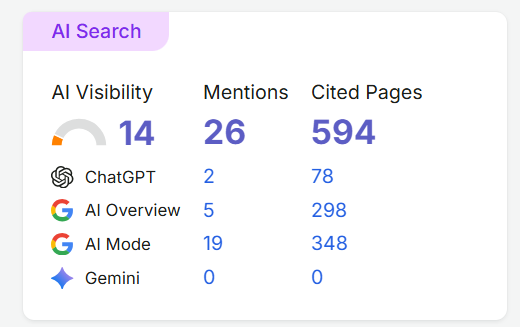
Sound foundations don’t just rank — they get quoted.
Technical SEO for Australian Websites
Most technical SEO advice ignores where your site is hosted and who it serves. For an Australian business chasing Australian customers, a few things matter more than the generic guides let on — starting with how far your website has to travel to load.
Hosting and server location. This is the big one, and almost nobody mentions it. If your website is hosted on a cheap server in the United States, every visit from a customer in Sydney or Perth has to travel across the Pacific and back before the page even starts loading.
That delay — the time to first byte — is dead time your visitor feels as sluggishness. Hosting on an Australian-based server, or using a content delivery network (CDN) with Australian edge locations, cuts that delay dramatically. It’s the clearest speed win available, and it directly improves the Core Web Vitals we talked about.
If your customers are in Melbourne, your site shouldn’t be phoning Ohio every time one of them clicks.
.com.au and geo-targeting. A .com.au domain sends a clear signal to Google that your business is Australian, which helps you rank for local searches. If you’re on a .com, that’s fine — but use Google Search Console to confirm Google understands you’re targeting Australia, so you’re not competing globally when your customers are all local.
Mobile-first, the Australian way. Australians search heavily on mobile, and remember: Google ranks the mobile version of your site. A site that’s fast and clean on a phone isn’t a nice-to-have here — it’s the version being judged. Worth double-checking if your site was built years ago with desktop in mind.
HTTPS as standard. Quick reinforcement: every Australian business site should be on HTTPS. It’s free through most hosts now, and there’s no excuse to run an insecure site that browsers flag with a warning.
How to Find Your Technical SEO Problems
The easiest way to find your technical problems is to let a tool do the hunting. Point a site audit crawler at your website and it checks every page against a few hundred technical rules, then hands you a ranked list of what’s broken and how serious it is.
Here’s how to run one, and what to look at first.
Start with SEMrush Site Audit — it’s the tool I use. Set up a project, run the crawl, and it scores your site’s overall technical health, then groups every issue by severity: Errors, Warnings and Notices.
Broken links, redirect chains, duplicate or missing titles, slow pages, pages blocked from crawling, missing alt text — each comes with a plain-English “why this matters” and “how to fix it.” One crawl replaces hours of checking pages by hand.
It’s a paid tool, but a free SEMrush account lets you audit a small site (up to around 100 URLs per crawl), which is enough for most Australian small businesses to find the big problems. If you do one thing from this guide, do this.

Then Google Search Console — free, and essential. This is the one every site should have connected, because it’s Google telling you directly what it can and can’t do with your site.
Check the Pages (indexing) report to see what’s indexed versus excluded and why — this is where you’d catch a page like that dental implants one. Check the Core Web Vitals report for speed issues, and the Crawl Stats to see how Google is moving through your site.
PageSpeed Insights — free. Run your key page types (homepage, a service page, a blog post) through it. It gives you the Core Web Vitals pass or fail and a prioritised list of what’s slowing the page down — usually oversized images and render-blocking scripts.
Screaming Frog — free up to 500 URLs. This tool crawls your site the way Google does and surfaces the technical detail: broken links, redirect chains, missing page titles, stray noindex tags, and orphan pages. The free version covers most small Australian sites comfortably.
The order to work in: run the SEMrush audit for the full picture, cross-check your indexing in Search Console, then fix in priority order. Indexing blocks and accidental noindex tags first (they hide pages completely), then speed, then everything else.
Save your audit — this doubles as your checklist. Re-run it every few months to catch new issues before they cost you.
Common Technical SEO Problems on Australian Websites
After looking at enough Australian websites, you start seeing the same technical problems again and again. They’re not exotic — they’re the same handful of issues quietly capping rankings on dental clinics, law firms, trades and online stores.
Here are the ones that keep coming up, why they happen, and how to fix each.
1. Pages left out of the index. The classic “why did we suddenly vanish” — a stray noindex tag, often carried over from when the site was in development, or a page Google simply never added. This is exactly what happened to the dental implants page above. Fix: check the Pages report in Search Console or your SEMrush audit, remove any noindex tag, and request indexing.
2. Slow sites on cheap or overseas hosting. The most common Australian problem: a site on a budget US host that loads slowly for local customers — your visitors in Sydney feel every extra second. Fix: move to Australian-based hosting or add a CDN with Australian edge nodes, compress your images, and cut plugin bloat.
3. Blocking CSS and JavaScript in robots.txt. An old habit that stops Google (and AI crawlers) from rendering the page properly, so they see a broken version. Fix: unblock those resources in robots.txt and confirm with the URL Inspection tool in Search Console that Google can render the page.
4. Duplicate URLs with no canonical tag. WordPress tag and category pages, Shopify variant URLs, and http/https or www/non-www versions all creating multiple addresses for the same content. Fix: set canonical tags to point at the main version, pick one domain version, and redirect the rest.
5. Redirect chains and broken links. These pile up over years of site changes — a redirect pointing to another redirect, or links to pages that no longer exist. They bleed crawl efficiency and waste link value. Fix: map redirects to a single hop and fix or redirect the broken links. Your SEMrush audit or Screaming Frog will list them all.
6. Orphan pages. Pages published outside your menu or internal-link structure, so neither Google nor your visitors can find them. Fix: link to them from relevant pages and make sure they’re in your sitemap.
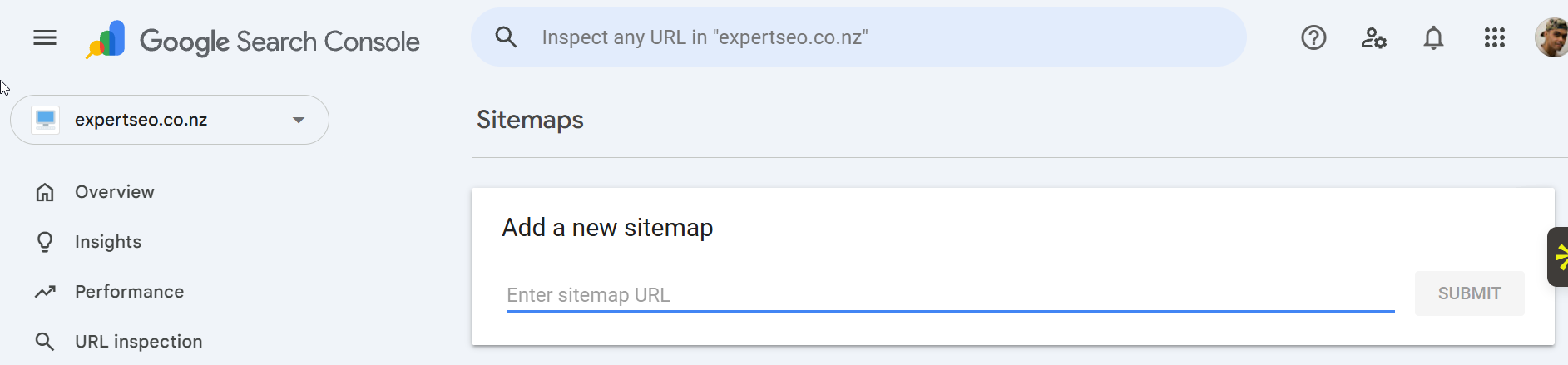
7. A missing or outdated XML sitemap. Without one, you’re leaving Google to guess your list of pages. Fix: generate a sitemap (Yoast or Rank Math do this automatically on WordPress) and submit it in Search Console.
If a few of these are on your site and you’d rather have someone find and fix them properly than wade through it yourself, that’s exactly what a technical audit and cleanup is for — take a look at our SEO services.
What Small Websites Can Skip
A lot of technical SEO advice is written for sites with millions of pages. If you run a clinic, a law firm or a trades business with thirty pages, you can skip most of it.
Here’s what you don’t need to lose sleep over — and why.
- Crawl-budget optimisation. This matters when you have hundreds of thousands of URLs. On a thirty-page site, Google crawls everything easily. Skip it.
- Log-file analysis. Digging through server logs to see how bots move through your site is enterprise-level diagnostics. Overkill for a small business.
- Edge SEO and reverse proxies. Advanced tooling for making changes at the network level. You don’t need it.
- Over-engineered schema. A few core types (local business, service, FAQ) earn their keep. You don’t need to mark up every last element.
Knowing what to ignore is as valuable as knowing what to fix. It stops you spending money and energy on problems you don’t have.
The operator who tells you to skip something is usually the honest one — plenty of agencies would happily bill you for log-file analysis you’ll never benefit from.
Final Thoughts
Technical SEO isn’t the exciting part of marketing. Nobody gets into business to think about robots.txt files and canonical tags.
But it’s the floor everything else stands on — and I’ve watched too many businesses pour money into content and ads while a broken foundation quietly wasted all of it.
Get it wrong, and your best pages sit invisible, like that dental implants page earning nothing while patients went elsewhere. Get it right, and it compounds: every new page you publish inherits a site that’s fast, crawlable, and readable by both Google and AI.
Here’s the thing to hold onto. You don’t need everything on the internet’s technical checklist. Most Australian businesses need five things done properly — crawlability, indexability, speed, mobile, and HTTPS — not fifty done badly.
Run an audit, fix what’s genuinely broken, ignore the enterprise noise, and you’ve done more than most of your competitors ever will.
Do the five. Ignore the rest.