

You wrote a title for your page. Google’s showing something completely different.
Or maybe you’ve spent twenty minutes wrestling with the “perfect” title while your content sits thin and barely any links point to your site.
Either way, the title tag gets more attention than it deserves — and not enough of the right kind.
So here’s the honest version, from someone who’s been doing this for over a decade:
Title tags matter, but it’s not where SEO is won. Its real job is to earn the click.
It’s also a small signal that helps Google understand what your page is about. That’s it.
In this guide I’ll show you what a title tag is, how to write one that gets clicked, exactly how much it matters (spoiler: less than you think), and how it now feeds AI search — with real NZ examples and real results.
What is a title tag?
A title tag is the HTML element that sets the title of a web page. It’s the clickable headline you see in Google’s search results, the text in your browser tab, and the title other sites pull in when someone shares your link.
In the code, it looks like this:
<title>Emergency Plumber Hamilton | Fast 24/7 Callouts</title>
That one line does three jobs at once:
- In Google’s results — it’s the clickable blue headline people decide whether to tap.
- In the browser tab — it’s the little label up the top of the window.
- On social and other sites — it’s the text that shows when your page gets shared or linked.
So when someone Googles “emergency plumber Hamilton” and your listing appears, that bold headline they’re deciding whether to click? That’s your title tag.

Is a title tag mandatory? Technically no. Leave it blank and Google will just grab text from your page — often your H1 — and use that instead.
But that’s handing the most valuable piece of real estate in search over to an algorithm. Write it yourself.
Title tags vs H1 vs meta title
These three get mixed up constantly, so let’s clear it up fast.
Your title tag is what shows in Google’s search results. Your H1 is the big headline at the top of the actual page, once someone lands on it. And “meta title” is just another name for the title tag — same thing, different name.
| Title tag | H1 heading | |
|---|---|---|
| Where it appears | Google results, browser tab, shared links | At the top of the page itself |
| Main job | Earn the click and signal the topic to Google | Orient the visitor who’s already landed |
| Who sees it | People deciding whether to click in search | People already reading your page |
| Where you edit it | Your SEO plugin (e.g. Rank Math) | Your page builder or content editor |
Should your title tag and H1 match? They can, and often they’re close. But they don’t have to be identical.
The title tag is written for the search results, so it needs the keyword and a reason to click. The H1 is written for the person already on your page.
One practical tip: keeping them roughly aligned actually makes Google less likely to rewrite your title — more on that shortly.
How much do title tags actually matter?
Here’s where most guides oversell the title tag, so I’ll be straight with you.
A good title tag won’t keep anyone on your page. It just makes them click in the first place. And it’s a small signal that helps Google understand what the page is about. Google’s confirmed the title is a ranking factor — but a minor one.
So the whole role is this: get the click, give Google a hint about the topic.
The click is only half the job, though. The title gets them in the door.
Your content is what keeps them there. A killer title on a weak page just means they click, glance, and bounce straight back to Google — and that bounce tells Google your page wasn’t the answer. You lose the ranking anyway.
That’s why a title tag is just one piece of on-page SEO, and honestly one of the smaller pieces.
If I were a New Zealand business owner doing my own SEO, I’d spend no longer than five minutes on it.
I’d get ChatGPT to draft me a few click-worthy options, pick the best one, tweak it, and move on. Then I’d spend the rest of my time on the two things that actually move rankings: building links and writing content that actually ranks.
That’s not a hunch. It’s how I rank.

My local SEO guide sat at #1 in New Zealand — above Ahrefs and Semrush, two of the biggest SEO sites on the planet.
I didn’t win that spot with a clever title. I won it with better content and the authority behind it.
Title earns the click. Content earns the stay. Get that order right and you stop wasting time polishing the smallest lever on the page.
How long should a title tag be?
Aim for roughly 50 to 60 characters. That’s the safe zone.
But here’s the part a lot of NZ websites still get wrong. They’ll tell you to “keep it under 70 characters.” That advice is outdated.
Google doesn’t actually cut your title off at a fixed number of characters. It truncates based on pixel width — around 600 pixels. A title full of wide letters (W, M, capitals) hits the limit sooner than one full of narrow letters (i, l, t).
So character count is a rough guide, not a hard rule. Fifty-five characters of skinny text might fit fine; fifty-five characters of wide text might get chopped.
Two things matter more than the exact count:
- Put your keyword in the first 30 characters or so. If Google trims the end, your most important words still survive.
- Check it on mobile. Most NZ searches happen on a phone, where titles get cut shorter than on desktop.
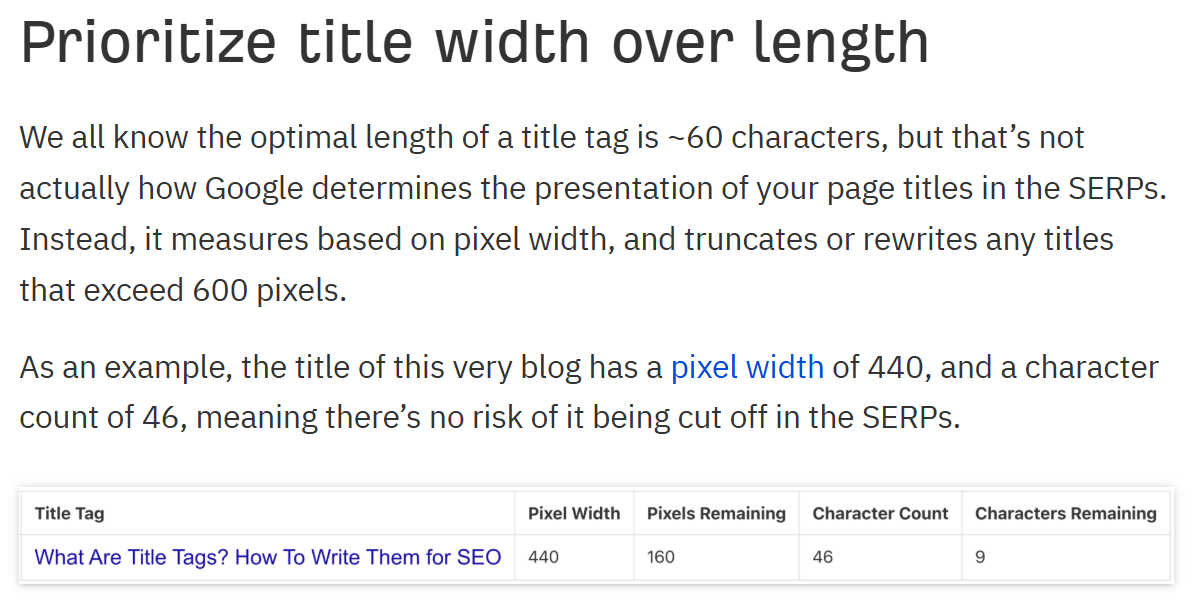
There’s also a sweet spot worth knowing: titles between 51 and 60 characters get rewritten by Google the least. Go too long and it chops them; go too short and it pads them out.
How to write a good title tag
A good title tag does three things: it puts the keyword near the front, it reads like a human wrote it, and it gives one clear reason to click.
Now here’s how to actually hit that without burning half your afternoon.
Start with the keyword. You already did your keyword research, so you know the main phrase this page is targeting. Put it near the front. Google reads left to right, and so do people skimming a results page.
Then add a reason to click. A benefit, a number, a location, a “free”, a guarantee — whatever genuinely applies.
“Auckland Dentist” is accurate but flat. “Auckland Dentist | Same-Day Appointments, No Wait” gives someone a reason to pick you over the listing above and below.
Put your brand name at the back, almost always.
Unless you’re a name people already search for — a Kathmandu, an ANZ — your brand at the front wastes the most valuable space in the title. Lead with the keyword, park the brand at the end after a separator.
The five-minute ChatGPT method
This is exactly what I’d do. Open ChatGPT and give it enough context to write something good:
- Tell it the page and the keyword. “I’m writing a title tag for a service page targeting ‘dental implants Auckland’.”
- Give it the intent and the brand. “It’s a commercial page for a clinic called Bright Smile. Keep it under 60 characters.”
- Tell it what’s ranking. Paste the current top three titles from Google so it can beat them, not copy them.
- Ask for options. “Give me 5 click-worthy title tag options, keyword near the front, brand at the end.”
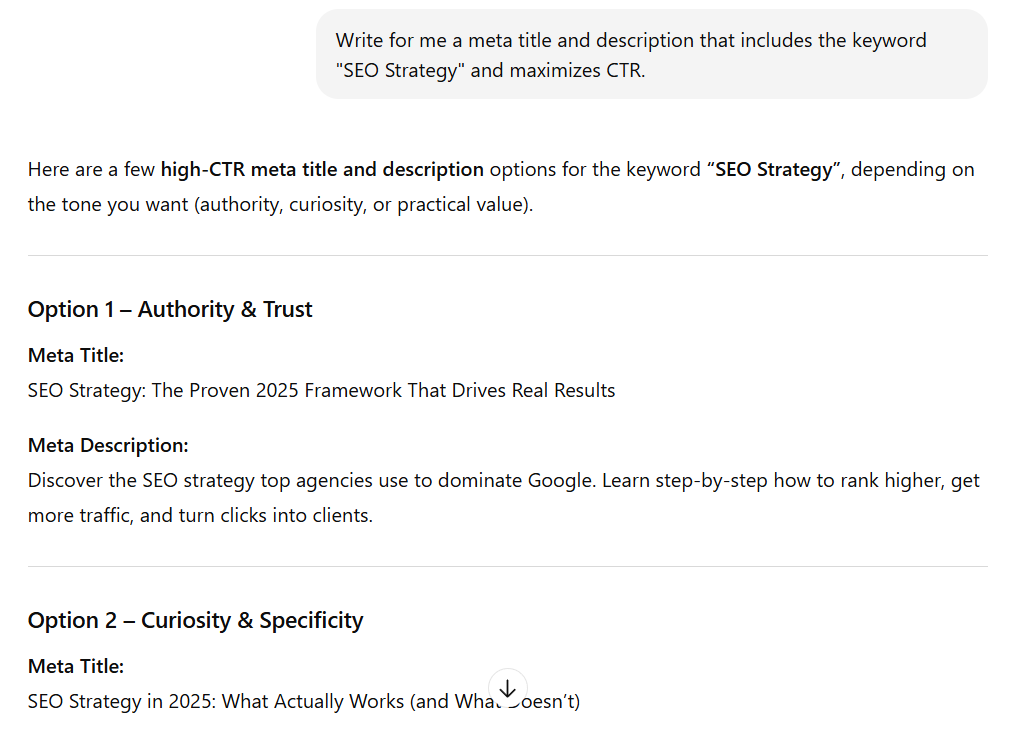
ChatGPT fires back a list in seconds. But here’s the bit people skip — you don’t paste what it gives you raw.
AI loves to overstuff and over-promise. It’ll cram in three keywords, slap on “Best”, “Top” and “#1”, and blow past your character limit. Your job is to be the editor:
- Pick the one option that matches the search intent best.
- Trim it to fit, and check the length.
- Strip out anything that promises more than the page actually delivers.
You’ve now got a solid title tag in about five minutes. Then you go spend real time on the work that ranks it.
Title tag examples for NZ businesses
The fastest way to write a good title is to start from a format that works. Here are the ones I use for each page type, with real NZ examples.
| Page type | Formula | NZ example |
|---|---|---|
| Homepage | Brand – What You Do | City | Bright Smile – Implants & Invisalign | Auckland |
| Service page | Service + Location | Benefit | Emergency Plumber Hamilton | Fast 24/7 Callouts |
| Location page | Service + Location | Brand | SEO Auckland | Expert SEO |
| Blog post | The question or topic, plainly | How Much Do Dental Implants Cost in NZ? |
| Product page | Product + Key Detail | Brand | Merino Hoodie – Charcoal, Unisex | Store |
For service and location pages, the service-plus-location combo does the heavy lifting. A dental practice doing SEO for dentists wants “Dentist Hamilton” in the title; an Auckland law firm wants “Family Lawyer Auckland”. That’s the phrase people actually type.
Notice the SEO Auckland example leads with the service and city, not the brand — because almost nobody’s searching the brand yet.
Blog titles are different. Don’t dress them up. “How Much Do Dental Implants Cost in NZ?” beats a clever play-on-words every time, because it matches the exact question someone typed — and that plain phrasing is also what gets you pulled into AI answers.
Why Google rewrites your title tags
Write the perfect title, hit publish, search for your page… and Google’s showing something else. Frustrating. Also completely normal.
Google rewrites around 61% of the titles it shows in search results, and more recent studies put it even higher. So if Google’s overriding yours, you’re in the majority.
It does this when it reckons your title doesn’t match the search well enough, or it’s too long, too short, or stuffed with keywords.
Google’s trying to show searchers the most relevant, clickable version — and sometimes it decides it can write that better than you did.
You can’t stop it completely. But you can make a rewrite far less likely:
- Keep it the right length. The 51–60 character range gets rewritten least — long enough to be clear, short enough not to get chopped.
- Match the title to the page. If your title promises something the content doesn’t clearly deliver, Google swaps it. Keep it honest and relevant.
- Don’t keyword-stuff. The same keyword jammed in twice is a classic rewrite trigger.
- Use a dash, not a pipe, between sections. Small thing, real effect — Google swaps pipes far more often than dashes.
- Keep your title and H1 roughly aligned. When they say the same thing, Google has less reason to reach for the H1 instead.
Even with all that, Google will still rewrite some. Don’t lose sleep over it. Write a clear, honest, well-sized title and move on.
Do title tags matter for AI search?
Short answer: yes. Title tags still matter, and arguably more than before.
AI Overviews and tools like ChatGPT scan your page to work out what it’s about and whether it’s worth citing.
Your title tag is one of the first things they read. A clear, direct title that plainly states the topic makes it easier for AI to understand your page and pull it into an answer.
It’s the same principle as ranking in AI search generally: clarity wins. A vague, clever title confuses both Google and the machine reading it.

I know this works because it’s happening to my own pages. Expert SEO gets cited in Google’s AI answers and pulled into ChatGPT responses — for a site that’s barely a year old, competing with agencies that have a decade’s head start. Clear titles and clear content are a big part of why.
The takeaway: don’t write a separate title for AI. Write a clear one for humans, and the AI follows.
Common title tag mistakes
Most title tag problems come down to the same handful of mistakes. Here’s what to avoid:
- Duplicate titles across pages. Two pages with the same title confuse Google about which to rank. Every page gets its own.
- Brand name first when nobody knows your brand. You’re spending your best space on a word no one’s searching. Keyword first, brand last.
- Keyword stuffing. “Plumber Auckland | Auckland Plumber | Best Plumbing Auckland” reads like a robot and triggers a rewrite. Once is enough.
- Vague, generic titles. “Home”, “Services” or “Welcome to Our Website” tell Google and searchers nothing.
- Titles that don’t match the page. Promise something the page doesn’t deliver and you lose the click and the trust behind it.
If you’ve got more than a handful of pages, you won’t catch all of these by eye. A quick site audit flags duplicate and missing titles across your whole site in one pass.
When to DIY vs hire an SEO expert
Title tags are genuinely a DIY job. Five minutes, ChatGPT, a bit of editing — you’ve got this. Most of the on-page basics are doable yourself if you’ve got the time and patience.
Where it gets harder is everything underneath the title: deep content, earning quality links, the technical foundations, and a strategy that ties it all together so your pages actually compound.
That’s the work that takes years to get a feel for, and it’s the work that decides whether you rank at all.
If you’d rather not spend those years learning it the hard way, that’s where professional SEO services come in.
We’ve taken sites from zero to thousands of daily visitors in some of the most competitive markets on earth, and we bring that same approach to New Zealand businesses.
Write your own title tags. Bring in help for the heavy lifting. That’s the smart split.
Title Tags: FAQ
What is a title tag?
A title tag is the HTML element that sets a page's title. It appears as the clickable headline in Google's search results, the label in your browser tab, and the link text when your page is shared.
What should a title tag include?
Your main keyword near the front, one clear reason to click, and your brand name at the end. Keep it to roughly 50–60 characters so it doesn't get cut off in search results.
How long should a title tag be?
Aim for around 50–60 characters. Google truncates based on pixel width (about 600 pixels), not a fixed character count, so the width of your letters matters more than the exact number.
Is a title tag mandatory?
No. If you leave it blank, Google pulls text from your page — usually your H1 — and uses that instead. You should always write your own so you control how your listing looks in search.
Should the title tag and H1 be the same?
They don't have to be identical, but keeping them closely aligned helps. When your title and H1 say the same thing, Google is less likely to rewrite your title in search results.
Are title tags a ranking factor?
Yes, but a minor one. Google has confirmed title tags influence rankings, though their bigger job is earning the click. Content quality and links carry far more weight.
Recommended Reading
The full step-by-step process, from keyword research to ranking.

How to link your pages so Google — and AI — sees what you're an authority on.
Every on-page and technical box to tick before you hit publish.