

Two plumbers in Auckland. Same suburb, same service, same Google search. One has a page sitting at yoursite.co.nz/emergency-plumber-auckland/. The other’s lives at yoursite.co.nz/?page_id=482.
Guess which one Google understands at a glance, and which one a customer actually trusts enough to click.
That second URL isn’t broken. The page loads, the phone still rings now and then. But it’s quietly leaking clicks and making Google work harder than it should to figure out what the page is even about.
URL structure is the part of SEO almost everyone ignores until a site migration goes sideways. It’s not glamorous. But getting it right is cheap, and getting it wrong, then trying to fix it later, is where it gets expensive.
This guide walks through what a URL actually is, what a good one looks like for SEO, how to set it up on WordPress or Shopify, and how to change a messy structure without watching your rankings fall off a cliff. By the end you’ll know exactly what to do with your own.
What Is a URL?
A URL (uniform resource locator) is the full web address that points to one specific page or file on the internet. It’s what sits in your browser’s address bar right now.
Think of it like a street address for a page. Just as “12 Victoria Street, Hamilton” tells a courier exactly where to drop a parcel, expertseo.co.nz/seo-audit/ tells a browser exactly which page to fetch and show you.
“URL structure” just means how you organise those addresses across your whole site: which folders sit where, how pages are named, and how the whole thing fits together.
Get it right and your site reads like a well-signposted building. Get it wrong and it reads like a car park with no level numbers.
The Anatomy of a URL: Every Part Explained
Every URL is built from the same handful of parts. Once you can name them, every best practice later in this guide makes sense.
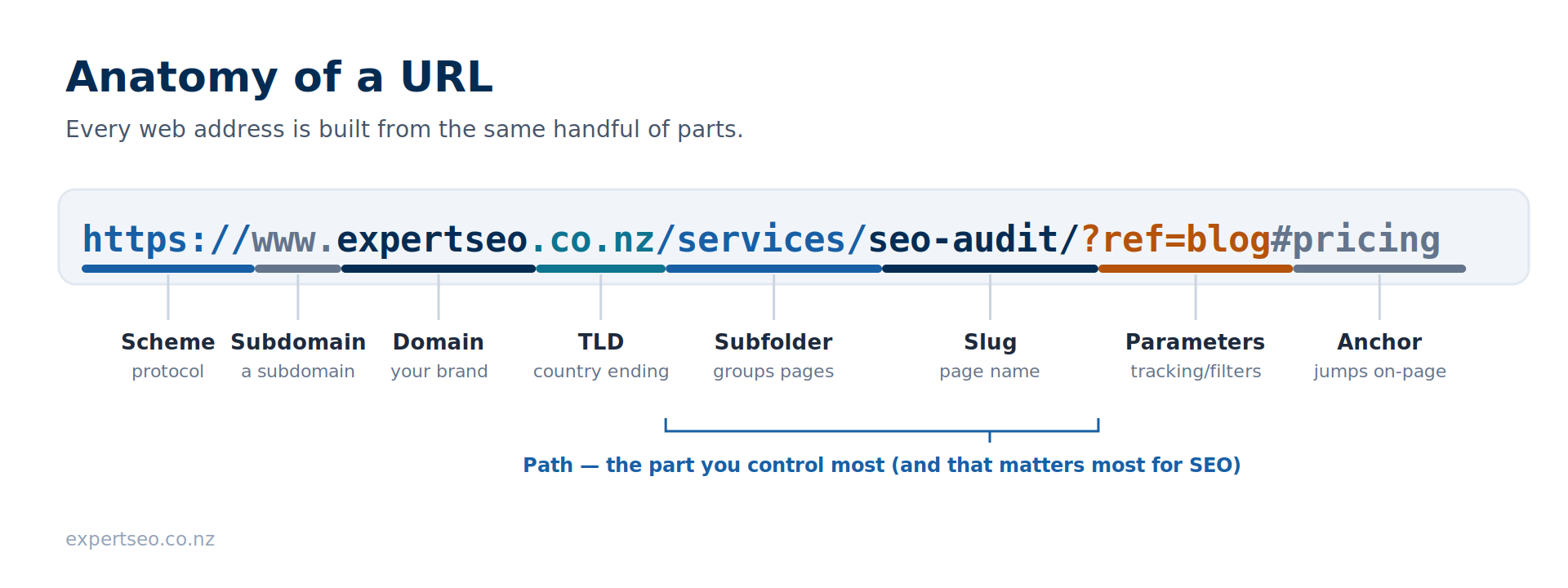
Here’s a full URL with every component labelled, using a real page on this site:
https://www.expertseo.co.nz/services/seo-audit/?ref=blog#pricing
Scheme
The scheme (https://) is the protocol your browser uses to fetch the page. You’ll almost always see https today, which is the secure, encrypted version. More on why that matters shortly.
Subdomain
The subdomain (www) sits in front of the main domain. www is the most common one, but subdomains can also carve off whole sections of a site, like help.example.com. Technically, www is itself a subdomain.
Domain Name
The domain name (expertseo) is the core of your address, like the name of your business. It’s the bit people remember and type in.
Top-Level Domain (TLD)
The TLD (.co.nz) is the ending. A country-code ending like .co.nz quietly tells Google and customers you’re a New Zealand business. We’ll come back to the .co.nz versus .com call later, because it’s a real decision.
Path: Subfolder and Slug
The path (/services/seo-audit/) shows where the page lives on your site. It’s usually made of a subfolder (/services/) that groups related pages, and a slug (seo-audit) that names the specific page. This is the part you control most, and the part that matters most for SEO.
Parameters
Parameters (?ref=blog) are extra values tacked onto the end after a question mark. They’re handy for tracking and filtering, but left unmanaged they can spawn duplicate versions of a page that confuse Google.
Anchor
The anchor or fragment (#pricing) jumps the reader to a specific spot on the page. It’s the “skip to this section” part. Google generally ignores everything after the #, so anchors don’t create separate pages.
Why URL Structure Matters for SEO
Your URL structure won’t rocket you to number one on its own. What it does is quieter: it helps people trust your link enough to click, helps Google crawl and understand your site, and stops you tripping over technical problems down the track.
Four things a clean structure actually does:
It earns clicks. Your URL shows up in the search results, right under the title. A readable, keyword-matching URL gets clicked more often than a string of gibberish.
Backlinko’s data found that URLs containing terms close to the search query earn a 45% higher click-through rate than URLs that don’t.

It helps Google understand the page. Plain words in the URL give Google an extra clue about the topic. /deck-building/ says what the page is. /p=92 says nothing.
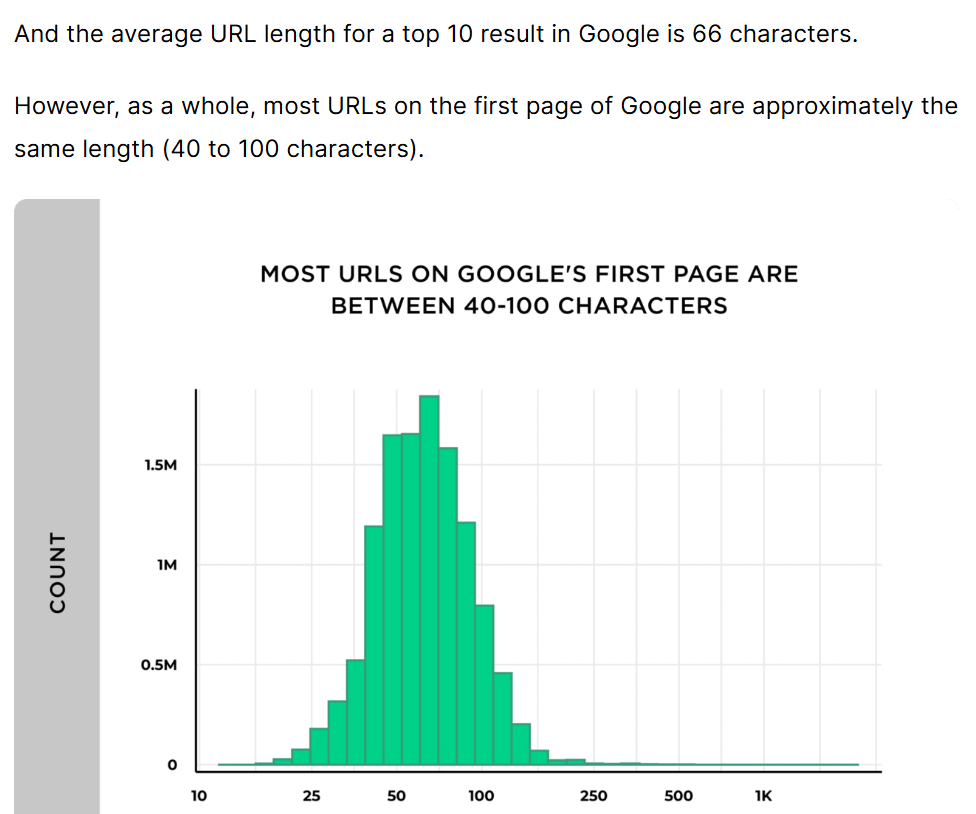
It’s a small direct ranking signal. Words in the URL are a minor relevance signal, and shorter URLs correlate with better positions.
In Backlinko’s study of 11.8 million results, the URLs ranking at position one were on average 9.2 characters shorter than those at position ten, with the typical top-ten URL sitting around 66 characters. Serving over HTTPS is a confirmed signal too, though Google calls it a lightweight one.
It keeps crawling clean. A logical structure with no duplicate or junk URLs means Google spends its time on your real pages instead of wandering through dead ends.
URL structure is one slice of on-page optimisation, the on-page signals you fully control. It won’t win the race on its own. It just makes sure you’re not running it with your shoelaces tied together.
If you’re an Auckland business fighting for a competitive term, every cheap signal counts, which is part of why SEO for Auckland businesses leans so hard on getting the on-page basics right.
What Makes a URL SEO-Friendly
If you remember nothing else from this guide, remember two things: put your main keyword in the URL, written in plain words, and keep it short and simple. Nearly every other rule is just a detail that supports those two.
1. Get Your Keyword In There
Your URL should contain the main term the page is targeting, written as readable words. A mortgage broker targeting “mortgage broker Tauranga” wants /mortgage-broker-tauranga/, not /services/page2/.
That’s mortgage broker SEO working right down at the URL level: the address itself tells Google and the customer exactly what they’re getting.
The keyword comes straight out of finding the right keywords, the actual term you’re trying to rank for. Put that in the slug, once, in plain words.
The trap is going greedy. Something like /mortgage-broker-tauranga-best-broker-cheap-mortgages-nz/ crams the term in over and over and reads like spam to both Google and a human.
Keep it to one clean mention: keyword-focused, not keyword-stuffed.
2. Keep It Short and Simple
Shorter URLs win. They’re easier to read, easier to share, easier for Google to understand, and they tend to rank better. So trim anything that isn’t pulling its weight: extra folders, dates, filler words, repeated terms.
Compare site.co.nz/blog/category/posts/2024/08/how-to-build-a-deck-in-your-backyard/ with site.co.nz/build-a-deck/. Same page. One of them you can read out loud over the phone.
3. The Supporting Rules
Get the two big ones right, then clean up with these:
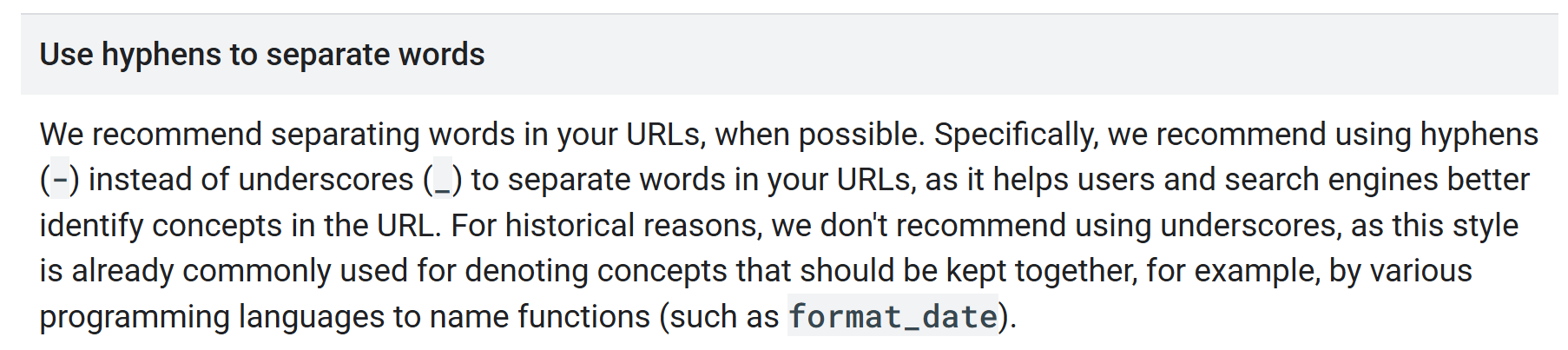
Use hyphens, not underscores. Separate words with hyphens (build-a-deck), never underscores (build_a_deck). Google recommends hyphens because underscores are commonly used to join words that belong together, so it reads build_a_deck as one clump rather than three words.
Stick to lowercase. URLs are case-sensitive. Google treats /Plumbing and /plumbing as two different pages, which can split your content in two. Keep everything lowercase and you sidestep the problem entirely.
Serve over HTTPS. Get an SSL certificate (most hosts include one free) so your URLs start with https. Browsers now flag plain http pages as “Not Secure”, which scares off customers before they’ve read a word.
Drop dates and stop words. Skip filler like “the”, “and” and “a” where you can, and keep dates out of evergreen pages, so you’re not stuck with /best-deck-tips-2024/ looking stale by February.
Keep folders shallow. Group pages logically, but don’t bury them. Two folders deep is plenty for most sites.
Here’s the difference laid out:
| Bad URL | Why it’s bad | Better URL |
|---|---|---|
site.co.nz/?p=92 | No words, no meaning | site.co.nz/deck-building-hamilton/ |
site.co.nz/Services/Our_Best_Builders_2024/ | Uppercase, underscores, stop words, a date | site.co.nz/builders-hamilton/ |
site.co.nz/blog/category/post/12/8/24/how-to/ | Buried five folders deep | site.co.nz/blog/deck-maintenance/ |
Take a builder. The bad column makes Google guess; the good column spells it out. That clarity is half of what SEO for builders comes down to at the page level.
Subfolder vs Subdomain: Which Is Better for SEO?
For almost every NZ business, the answer is simple: keep everything in subfolders on one domain.
A subfolder (yoursite.co.nz/blog/) keeps all your authority pulling in one direction.
A subdomain (blog.yoursite.co.nz) can get treated by Google as a semi-separate site, so the authority you build on your blog doesn’t fully flow back to the pages that actually make you money.
There are real cases for a subdomain: a help centre running on different software, a web app, a store on a totally separate platform.
But for a normal business site, splitting your blog or service pages onto a subdomain just divides the trust you’re working to build.
Here’s a live example from my own site. We’re expanding Expert SEO into the Australian market. The textbook move would be to spin up a separate .com.au domain or an au.expertseo subdomain and start fresh.
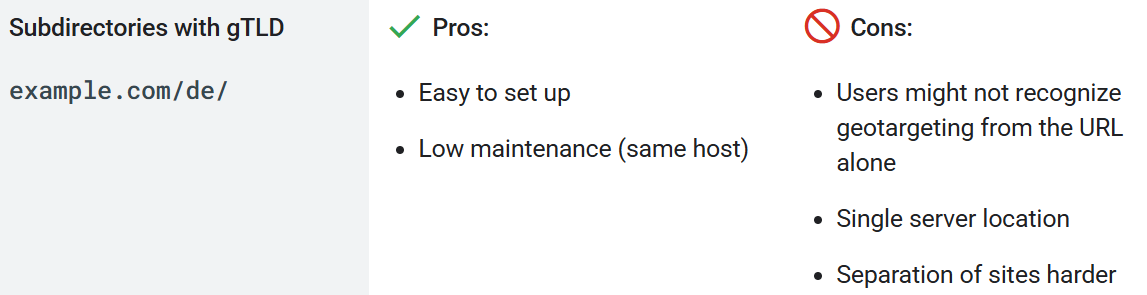
We’re not. We’re running the Australian pages as a subfolder, expertseo.co.nz/au/, on the domain that already has authority built up.
The reason is straightforward. A brand-new domain or subdomain starts from zero.
A subfolder inherits the trust the main site has already earned, so the Australian pages get a running start instead of a standing one.
Google’s own guidance backs this up: for sites targeting more than one region, it lists a country subfolder on a normal domain as a perfectly valid way to geotarget.
The plan is to prove the market in the subfolder first. If it takes off and genuinely warrants its own domain later, that’s a deliberate call made with data, not a guess made on day one. Subdomain versus subfolder is one of those calls on the technical side of SEO that’s easy to make at the start and painful to undo later, so it’s worth getting right early.
www vs non-www, and .co.nz vs .com
Two domain choices trip people up because they look like they should matter for rankings. One barely does. One does, a little.
www vs non-www. www.yoursite.co.nz and yoursite.co.nz are technically different URLs (remember, www is a subdomain). There’s no ranking difference between them.
The only rule is: pick one, 301 redirect the other to it, and stay consistent. Running both live is how you end up with Google indexing two versions of every page.
.co.nz vs .com. This one carries a signal. For a business serving New Zealand, a .co.nz ending tells Google and customers you’re local, which helps for searches like “plumber Hamilton”.
A .com is the better call if you’re selling to the world. For a Hamilton business serving the Waikato, that local cue is exactly the kind of edge SEO in Hamilton is built on.
It’s the same logic behind running our Australian expansion as a subfolder rather than rushing out to buy .com.au: you only split off a new domain when the market genuinely justifies it.
URL Structure on WordPress and Shopify
Your platform makes a lot of these decisions for you. On WordPress you set the URL format yourself, and the default is one of the worst options going. On Shopify, big chunks of the structure are locked, so you optimise the part you can control.
WordPress
Out of the box, some WordPress setups serve URLs like yoursite.co.nz/?p=123. Useless: no words, no meaning, nothing for Google or a human to grab onto.
The fix takes about 30 seconds. Go to Settings → Permalinks and choose Post name. That switches you to clean URLs like yoursite.co.nz/deck-building-hamilton/.
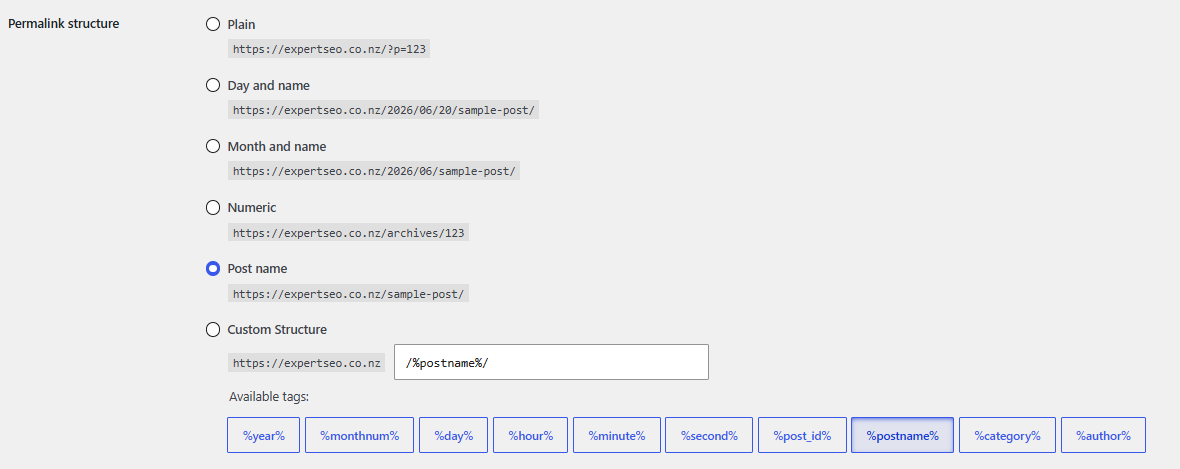
One warning. If your site is already live and indexed, changing this setting changes every URL at once, which is a migration and needs redirects (covered in the next section).
On a brand-new site, set it before you publish anything and you’ll never think about it again. The rest of getting SEO on WordPress right builds on top of that clean foundation.
Shopify
Shopify is stricter. It forces fixed prefixes into your URLs that you can’t remove: /products/, /collections/, /pages/ and /blogs/. A product URL will always look something like yourstore.co.nz/products/merino-jumper.
You can’t fight that, so don’t try. What you do control is the handle, the slug on the end. Make it short and descriptive (merino-jumper, not product-copy-2-final) and you’ve done the 90% that matters.
There’s more to SEO on Shopify than the URL, but a clean product handle is the easy win.
How to Change Your URL Structure Without Losing Rankings
Changing URLs is safe. What’s not safe is changing them and leaving the old ones to die, taking all their ranking history and backlinks down with them.
That’s the real fear behind every “how do I change my URLs” search, and it’s a fair one. But the fix is mechanical. Here’s the safe process, in order:
- Audit every existing URL. You can’t redirect what you haven’t listed. A crawl tool gives you the full map of what’s currently live. This is also a good moment for a proper SEO audit to see what’s worth keeping and what’s quietly broken already.
- Map old to new. Every old URL gets matched to its new home, one to one. No orphans.
- Set up 301 redirects. A 301 is a permanent redirect, and it passes the old page’s ranking history and link value to the new URL. A 302 is temporary and doesn’t pass that value the same way, so never use a 302 for a permanent move. Google’s own guidance on redirects spells out the difference.
- Update your internal links. Point them straight at the new URLs instead of bouncing readers through a redirect.
- Resubmit your sitemap in Google Search Console and watch the index update.
- Monitor for a few weeks. Expect a small wobble while Google recrawls, then recovery.

This is the same process our SEO company runs whenever we move a client to a new structure.
When we cleaned up and restructured URLs during the growth of HealthVI, the health site I built from zero to over 1,000 visitors a day, the redirects were the difference between keeping that traffic and torching it.
Done right, a migration is a non-event for your rankings. Skipped, it’s a self-inflicted wound.

One more thing. If your URLs aren’t perfect but they aren’t hurting you, leave them.
A messy-but-working structure on an established site is rarely worth the migration risk. Change it when it’s genuinely causing problems, not because a checklist told you to.
Common URL Structure Mistakes
Most URL problems come down to the same short list. Avoid these and you’ve avoided nearly all of them:
- Dates in evergreen URLs.
/2024/deck-tips/either looks stale within months or forces a migration later. Leave dates out unless the page is genuinely time-bound. - Keyword-stuffed slugs.
/plumber-auckland-best-cheap-plumber-nz/reads as spam. One keyword, plain words. - Burying pages too deep. Five folders down and both users and Google lose the thread.
- Changing URLs with no redirects. The cardinal sin. Covered above, worth repeating.
- Uppercase and underscores. Both create avoidable problems. Lowercase, hyphens, every time.
- Indexed tracking URLs. Letting parameter-laden tracking URLs get crawled and indexed creates duplicate clutter.
- Duplicate URLs from filters. Sorting and filtering options can spawn dozens of near-identical URLs. Manage them with canonical tags.
Doing This Yourself vs Getting Help
For a brand-new site, URL structure is a do-it-yourself job. Set your permalinks to a clean format, name your pages in plain words with the keyword in them, and you’ve handled 90% of it before you’ve published a thing.
Where it gets risky is changing the structure on a site that already has traffic and rankings. One missed redirect and you can undo years of work in an afternoon.
That’s the point where a second set of eyes earns its keep, whether that’s professional SEO help to run the migration for you, or SEO consulting to sanity-check your redirect map before you flip the switch.
A clean URL is the cheapest SEO win there is. A botched migration is one of the most expensive mistakes. Know which side of that line you’re on, and if you’re not sure, that’s where we come in.
URL Structure: FAQ
What is the structure of a URL?
A URL is built from up to seven parts: the scheme (https://), an optional subdomain (www), the domain name, the top-level domain (.co.nz), the path (the folder and slug, like /services/seo-audit/), optional parameters (?ref=blog), and an optional anchor (#pricing).
What is the best URL structure for SEO?
Short, readable, lowercase, hyphen-separated and served over HTTPS, with your primary keyword written in plain words and pages organised into shallow, logical folders. Keyword-focused and simple covers most of it.
What are some examples of good and bad URLs?
A good URL: site.co.nz/builders-hamilton/. Bad ones: site.co.nz/?p=92 or site.co.nz/Services/Our_Builders_2024/. The good one is readable, keyword-led and clean; the bad ones hide the topic behind IDs, uppercase, underscores and dates.
How long should a URL be?
As short as it can be while still describing the page. Top-ranking pages average around 66 characters, and shorter URLs tend to edge out longer ones, so trim anything that isn't doing a job.
Should I put keywords in my URL?
Yes. A URL that matches the search term is easier for people and Google to understand, and keyword-matching URLs earn a higher click-through rate. Just don't repeat the keyword or pile on extras: keyword-focused, not keyword-stuffed.
Do I need to fix my URLs if they aren't perfect?
Only if they're causing problems. On an established site, a messy-but-working structure is usually safer left alone than risked in a migration. Fix it when it's genuinely holding you back, and always with 301 redirects in place.
Recommended Reading

Internal Links: The Complete Guide for NZ Websites
How linking your pages together shapes the way Google crawls your site.
How to Rank Higher on Google in NZ
The broader playbook once your URL foundations are clean.

SEO Content: How to Write Content That Ranks
How to write the pages those clean URLs point to.