You upload an image to your website and a little warning pops up: “This image is missing alt text.”
You click into the box, the cursor blinks, and you’ve got no idea what to actually type. A keyword? A description? Does it even matter?
That box is image alt text, and it’s one of the most misunderstood fields in SEO.
Half the advice online treats it as a keyword slot to stuff. The other half says it’s purely an accessibility feature and to ignore SEO entirely.
Both get it wrong, and both produce alt text that helps no one.
Here’s the honest version, written from a young New Zealand site that’s ranking and getting cited by AI despite competing against pages a decade older.
Alt text matters most for accessibility, helps a little with SEO, and takes about ten seconds to get right once you know the rules.
This guide covers exactly what to type, how much it really moves rankings, how to add it on WordPress, Squarespace, Shopify and Wix, and how to fix a whole site’s worth of missing alt text without losing your weekend.
What Image Alt Text Is
Image alt text (alternative text) is a short written description of an image, added in the HTML alt attribute, that tells people and search engines what the image shows.
In the code, it looks like this:
<img src="flat-white-cambridge-cafe.jpg" alt="Barista pouring a flat white at a Cambridge café">You almost never touch raw HTML to add it.
Every decent website builder gives you a plain text box labelled “alt text” or “alternative text,” and whatever you type drops into that alt attribute behind the scenes.
It’s part of on-page SEO, sitting quietly in your code where visitors don’t normally see it.
You’ll hear it called a few things: alt text, alt tag, alt attribute, alt description. They all point to the same field. “Alt tag” is technically wrong (it’s an attribute, not a tag), but it’s so common that everyone knows what you mean.
What Alt Text Actually Does (Three Jobs, In Order)
Alt text does three things, and the order of importance matters: it describes images to people using screen readers, it shows on the page when an image fails to load, and it gives search engines context about the image.
Accessibility is the main job. SEO is a real but secondary benefit.
Accessibility comes first. When someone who is blind or has low vision browses your site, a screen reader reads the page aloud.
When it hits an image with no alt text, it reads out the file name instead, so the user hears something like “I-M-G underscore four-five-two-three dot jpg.”
That’s useless. With good alt text, they hear “Barista pouring a flat white at a Cambridge café” and they actually understand what’s on the page.
Globally, at least 2.2 billion people have a near or distance vision impairment, so this isn’t a tiny edge case.
Second, it’s your fallback when images break. If an image fails to load because of a slow connection, a broken file path, or a dropped CDN, the browser shows the alt text in its place. The reader still gets the gist instead of staring at a blank box.
Third, it gives search engines context. Google can’t see a photo the way you can, so it leans on the surrounding text and the alt attribute to work out what an image depicts.
Google’s own documentation calls alt text the most important attribute for describing an image, because it improves both accessibility and the chance of showing up in image search.

Get the order right and good alt text writes itself. Write for the person using a screen reader first, and the SEO benefit comes along for free. Write purely for Google and you usually end up with keyword soup that helps neither.
This stuff is widely skipped. The 2026 WebAIM Million report, which scans the top million home pages every year, found that 16.2% of all home page images still have missing alt text, and the top six accessibility errors (missing alt text among them) account for 96% of everything detected.

Doing this properly is a genuine point of difference for an NZ business, because most sites don’t.
Does Image Alt Text Actually Help SEO?
Yes, but in specific, limited ways. Alt text is a genuine ranking factor for Google Images and it adds relevance context to your page. It will not rescue a thin page or move your rankings on its own.
Here’s where it actually helps:
- Google Images and visual search. Alt text is one of the main signals Google uses to decide which images to show for a search. If you sell products, run a recipe blog, or do anything visual, image search is a real source of traffic that most NZ businesses ignore.
- Page relevance. When your alt text matches what the page is about, it reinforces the topic. An article about flat whites with images described as “flat white latte art” backs up the subject. It’s a small signal, but small signals stack.
- Accessibility as a quality signal. A site that’s genuinely accessible tends to be cleaner, clearer, and better structured, and those are the things search engines reward anyway.
Here’s where it doesn’t help: alt text is not a magic lever. One alt attribute won’t outrank anyone. Stuffing keywords into it won’t either, and it can backfire (more on that shortly).
The NZ angle matters here. For the keyword “image alt text,” the pages ranking on page one include W3Schools, HubSpot, and Harvard, all with domain ratings in the 90s.
A young Kiwi site doesn’t beat those on raw authority. It competes by being more relevant, more complete, and more useful to the actual searcher than the global giants sitting above it.
Take a Christchurch law firm going after a head term like “family lawyer Christchurch.”
It’s never going to outgun a national directory on domain power, so it wins the way law firms competing in search always do: by being the most relevant, most useful result for a Christchurch searcher specifically.
Alt text is a small part of that relevance.
That’s the same reason our NZ SEO team gets cited in Google’s AI Overviews on a sub-one-year-old domain while DR 90 sites sit above us, and the approach behind a real client result where we grew a site from zero to over 20,000 monthly visitors.

Relevance beats authority more often than people think.
Alt Text vs Title Text vs Caption vs Filename
Alt text, title text, captions, and the filename are four separate image fields, and people constantly mix them up. Only alt text describes the image for screen readers, and they should not all say the same thing.
| Field | What it’s for | Who sees it | SEO weight |
|---|---|---|---|
| Alt text | Describes the image for screen readers and when it fails to load | Screen reader users; everyone if the image breaks | Real (especially image search) |
| Title text | A tooltip that shows on mouse hover | Sighted users hovering, sometimes | Negligible |
| Caption | Visible text under the image | Everyone | Indirect (it’s on-page text) |
| Filename | The name of the image file | Nobody reads it; Google sees it | Light signal |
The most common mistake is copying your alt text straight into the title attribute. Don’t bother.
Title text shows on hover, doesn’t work on touchscreens or for keyboard users, and adds nothing for SEO. Screen readers often read both, so duplicating them means the user hears the same description twice in a row.
The filename is the small bonus. flat-white-cambridge-cafe.jpg gives Google a light clue about the subject. IMG_4523.jpg gives it nothing. Use short, descriptive, hyphenated filenames, and describe the thing clearly in plain words.
How to Write Good Alt Text
Good alt text describes the meaning of an image in context, in roughly a sentence, and the right description depends on the job the image is doing. Match the description to the image type, keep it concise, and you’re done.
There are four types of images, and each one needs a different approach.
Informative images
These carry information: a product photo, a team headshot, a photo illustrating a point. Describe the meaning, not every pixel.
- Weak:
alt="photo" - Better:
alt="Dentist checking a patient's teeth during a routine check-up"
You’re answering “what does this show, and why is it here?” not cataloguing the colour of the walls.
That second version is the kind of detail that helps a dental practice’s SEO: it tells Google the page is about check-ups and tells a screen reader user exactly what’s happening.
Functional images
These do something: a logo that links home, a magnifying-glass search icon, an image used as a button. Describe the action, not the look.
- Weak:
alt="magnifying glass" - Better:
alt="Search"
For a logo that links to your homepage, the alt text should be your business name, not “logo.”
Decorative images
These are pure decoration: a background texture, a divider line, a stock photo that adds nothing. Give them empty alt text: alt="".
This is the bit people get wrong, so it’s worth being clear. Empty alt text (alt="") is not the same as missing alt text.
Empty alt tells a screen reader “skip this, it’s decoration,” and the reader moves on smoothly.
Missing alt (no alt attribute at all) forces the screen reader to fall back to reading the file name aloud. One is correct and intentional; the other is a bug.
Most website builders only let you leave the box blank, which produces alt="" for you, so just leave decorative images empty rather than describing them.
Complex images
Charts, graphs, infographics, and maps hold more information than a sentence can carry. Give a short summary in the alt text and put the full detail in the surrounding text or a caption.
alt="Bar chart showing organic traffic growing from 200 to 4,000 visits over six months"— then the actual numbers live in the text near the chart, where everyone (and Google) can read them.
The universal rules
Whatever the image type, four rules always apply:
- Keep it concise. Around 125 characters is the practical ceiling. Many screen readers cut off longer descriptions, and a paragraph-long alt attribute is exhausting to listen to.
- Skip “image of” and “picture of.” The screen reader already announces it’s an image. “Image of a barista” becomes “image, image of a barista.” Just write “Barista pouring a flat white.”
- Write for context. The same photo can need different alt text on different pages. A photo of a tap means something different on a plumber’s services page than in an article about water pressure. Describe what matters here.
- Match the page. If a relevant keyword fits naturally, great. If you have to force it, leave it out.
Good vs Bad Alt Text Examples
The fastest way to learn this is to see good and bad side by side on real images. These are the kind of photos a Hamilton trades business or a small NZ store actually puts on its site.
| Image | Bad alt text | Why it’s bad | Good alt text |
|---|---|---|---|
| Flat white at a Cambridge café | alt="coffee" | Too vague, no context | alt="Flat white with fern latte art on a wooden café table" |
| Plumber’s van in Hamilton | alt="plumber Hamilton plumbing services best plumber" | Keyword stuffed, reads as spam | alt="Signwritten plumbing van parked outside a Hamilton home" |
| Product shot for an NZ store | alt="IMG_2231" | File name, describes nothing | alt="Merino wool jumper in charcoal grey, front view" |
| Business logo (links to homepage) | alt="logo" | Doesn’t say whose, or that it’s a link | alt="Take Back Time" |
| Traffic growth chart | alt="graph" | No information at all | alt="Line chart showing site traffic rising from 0 to 1,000 daily visitors over 12 months" |
| Decorative background texture | alt="background pattern blue texture image" | Describes decoration nobody needs | alt="" |
Notice the pattern. The good column reads like a person describing the image to a friend over the phone.
The bad column is either lazy or trying too hard for SEO.
Across the web, the WebAIM Million found that nearly a third of images on popular home pages have alt text that’s missing, questionable, or repetitive, things like “image,” “graphic,” a file name, or the same description copied across photos. Clearing that bar puts you ahead of most sites instantly.
The Keyword-Stuffing Trap (and Other Mistakes)
The single most common alt text mistake is treating it as a keyword slot. Stuffing keywords hurts accessibility, reads as spam to Google, and does nothing for your rankings.
Picture a screen reader user landing on alt="builder best builder new home construction renovations licensed builder near me".
That’s a wall of noise that describes nothing useful, and Google has been ignoring this kind of stuffing for years. It’s the same over-optimisation instinct that lands builders doing their own SEO in trouble elsewhere; the alt text just makes it visible.
The other mistakes worth avoiding:
- “Image of…” and “picture of…” — redundant, because the screen reader already says it’s an image.
- Describing decorative images — leave them empty (
alt="") instead. - Identical alt text across many images — five product photos shouldn’t all say “product.” Describe the differentiator: angle, colour, feature.
- Leaving informative images blank — this is the original sin the “missing alt text” warning is trying to stop. If the image carries meaning, describe it.
How to Add Alt Text on Your Platform
Every major platform has an alt text field. Here’s exactly where to find it and how to fill it in.
WordPress (Gutenberg)
In WordPress, you add alt text in two places. The cleanest is the Media Library: click an image, and the “Alternative Text” box sits in the panel on the right.
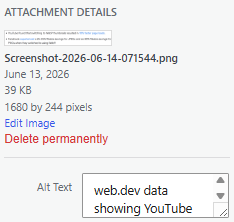
Whatever you type there becomes the default alt text everywhere that image is used. You can also set it per-image inside a post by selecting the image block and using the “Alt text (alternative text)” field in the block settings on the right.
Elementor
If you build pages with Elementor, watch this gotcha: the alt text doesn’t live in the Elementor image widget.
It pulls from the Media Library. So select your image, click “Edit” to open the media settings, and fill in the alt text there. Set it once in the library and it follows the image wherever you drop it. This trips up a lot of WordPress SEO setups because people hunt for the field in the widget and can’t find it.
Rank Math
Rank Math (the SEO plugin) doesn’t write your alt text for you, and you wouldn’t want it to.
What it does do is flag images missing alt text in its on-page analysis, and some versions can auto-insert the image title or a set variable as alt text.
Be careful with that auto-fill: it tends to produce generic, repetitive descriptions. Use it as a backstop to catch blanks, then write proper alt text on the images that matter.
Squarespace, Shopify and Wix
- Squarespace: alt text comes from the image caption field in older setups, or from a dedicated “Alt text” field in newer ones. Click the image, open image settings, and add the description there.
- Shopify: in the product editor, click an image, then “Add alt text” (or the “Edit alt text” option). For Shopify SEO, product image alt text is worth doing properly because it feeds straight into Google Images and Shopping.
- Wix: click the image, open settings, and find the “What’s in the image? Tell Google” field, which is Wix’s plain-English label for alt text. That field is exactly where your description goes.
If your catalogue is huge and the thought of doing this by hand is painful, that’s a fair point, and it’s where done-for-you SEO or a bulk approach earns its keep. More on bulk options below.
How to Check and Fix Alt Text Across Your Whole Site
To audit a whole site, crawl it for missing alt attributes, then fix the highest-value images first. You don’t need to do every image at once, and you shouldn’t try to.
Check a single image fast
Right-click the image, choose “Inspect,” and look at the <img> tag for the alt attribute.
If there’s no alt or it’s empty on an informative image, that’s a gap. For a quicker option, browser extensions like the WAVE evaluation tool (from WebAIM) or an alt-text viewer highlight missing and weak alt text right on the page, no code-reading required.
Crawl the whole site
For more than a handful of pages, crawl the site. Screaming Frog’s SEO Spider (free up to 500 URLs) crawls your whole site and gives you a clean list of every image with missing or oversized alt text under its Images tab.
Export that list and you’ve got your to-do list. Plenty of the other SEO crawlers run a similar check, and a full site audit will flag alt text alongside the other on-page issues that usually travel with it.
Fix in priority order
Don’t fix alphabetically. Fix by value:
- Informative images on high-traffic pages first, because they do the most for both users and search.
- Product images next, since they feed image search and shopping results.
- Logos and functional images, so navigation makes sense to screen reader users.
- Decorative images last, and most of those just need
alt="".
A site with hundreds of missing alt attributes can feel overwhelming. Clear the top 20 pages first and you’ve handled the bulk of the real impact.
Should You Use an AI Alt Text Generator?
AI alt text generators are useful for bulk first drafts on large sites, but they miss context. Treat them as a starting point on the images that matter, not a set-and-forget fix.
Where they win: a 5,000-product store with empty alt fields, or a years-old blog with a backlog of undescribed images. Writing those by hand could take weeks, and an AI tool clears the backlog in an afternoon.
Where they fail: context. An AI tool looking at a photo of a tap will write “a chrome tap.” It doesn’t know whether the point of the image is the tap, the leak under it, or the plumber’s hands fixing it.
For a tradie in Auckland trying to get product and job photos showing up in image search, that missing context is the difference between a description that helps and one that wastes the slot.
It also can’t tell which images are decorative and should be left empty, so it cheerfully describes things screen readers should skip.
The workflow that actually works: generate drafts in bulk, then review and fix the images on your important pages.
Let the tool clear the long tail of low-priority images, and write the alt text yourself for anything that earns real traffic or carries real meaning.
Where Alt Text Fits the Bigger Picture
Alt text is one part of image SEO, not the whole thing. Filename, compression, captions, and the text surrounding an image all matter too, and they’re increasingly read by AI systems as well as search engines.
The other image SEO levers worth knowing:
- Descriptive filenames —
merino-jumper-charcoal.jpg, notIMG_2231.jpg. - Compression and file size — large images slow your page down, and speed is part of your technical SEO foundations.
- Surrounding context — placing an image near relevant text helps Google understand it.
- Captions — visible text that both readers and search engines can use.
The AI angle is becoming more important. AI Overviews and tools like ChatGPT lean heavily on the text around images (alt text included) to understand and describe what they’re looking at.
As the web gets more visual (the average home page now carries 66.6 images, up sharply in just one year), clean, honest alt text becomes more valuable, not less.
It’s part of the same shift behind getting cited by AI: give the machines clear, accurate text and they reward you with visibility.
The Bottom Line
Write your alt text for the person using a screen reader first. Keep it concise, describe what the image means in context, skip the “image of” padding, and don’t stuff keywords. Leave decorative images empty.
Add it on your platform in the alt text box, then crawl your site and clear the gaps on your most important pages first.
Do that and the SEO benefit follows for free, because good alt text and search-friendly alt text are the same thing. Most NZ sites get this wrong, which makes it a quiet, easy edge.
Start this week. Run a crawl, find your missing alt text, and fix the top few pages first. If the alt text turns out to be the tip of a bigger image or on-page mess, that’s the kind of thing an SEO consultant sorts in an afternoon.