Type “thin content” into Google and have a look at what’s ranking.
The number one result is around 740 words of actual body copy. The sixth result is 85 words — a definition, a bullet list, and that’s the page.
Both of them are teaching you about pages that don’t give the reader enough.
I’m not pointing that out to be clever. I’m pointing it out because it’s the fastest way to understand what thin content actually is: those pages rank because Google trusts the domains they sit on, not because they answered the question properly.
Length and quality are two different things. Almost every guide on this topic blurs them.
About 85% of the businesses that walk into my SEO company have been burnt by a previous web design or SEO agency. Increasingly, what they were sold was volume — forty blog posts that all say the same nothing.
So here’s the whole thing. What thin content actually is, how to find yours using real numbers instead of a gut feel, exactly one decision for every page you flag, and how to stop producing it in the first place.
Key Takeaways
- What it is: thin content is any page that gives the reader little or no value. It’s measured by what the page delivers, not how long it is.
- Google has never had a preferred word count and has said so in its own documentation. A 200-word page can be excellent; a 2,000-word page can be thin.
- The biggest source of thin content in 2026 is low-effort AI copy — fluent, correct, and empty. Google’s rater guidelines apply the Lowest rating to low-effort content whether a human or an AI wrote it.
- You almost never get a penalty for thin content. You get quietly outranked. A true penalty is a manual action, it’s rare, and Google tells you about it in Search Console.
- Don’t flag a page on word count alone. Flag it when it fails on four counts at once: thin, ignored, unlinked, and doing no job.
- There are only six things you can do with a thin page — improve, consolidate, rewrite, noindex, redirect, or delete — and the evidence from your audit picks which one.
- On a small site, consolidating beats deleting almost every time. Most pruning advice online is written for sites with thousands of pages.
What Is Thin Content
Thin content is any page that gives the reader little or no value.
Google’s own framing is content made primarily for search engines rather than for people — pages that exist to catch a query rather than to answer it.
The term came from Panda, the 2011 algorithm update that went after content farms churning out cheap articles at scale. Back then thin content mostly meant short and useless. Fifteen years on, the useless part has stayed and the short part has fallen away completely.
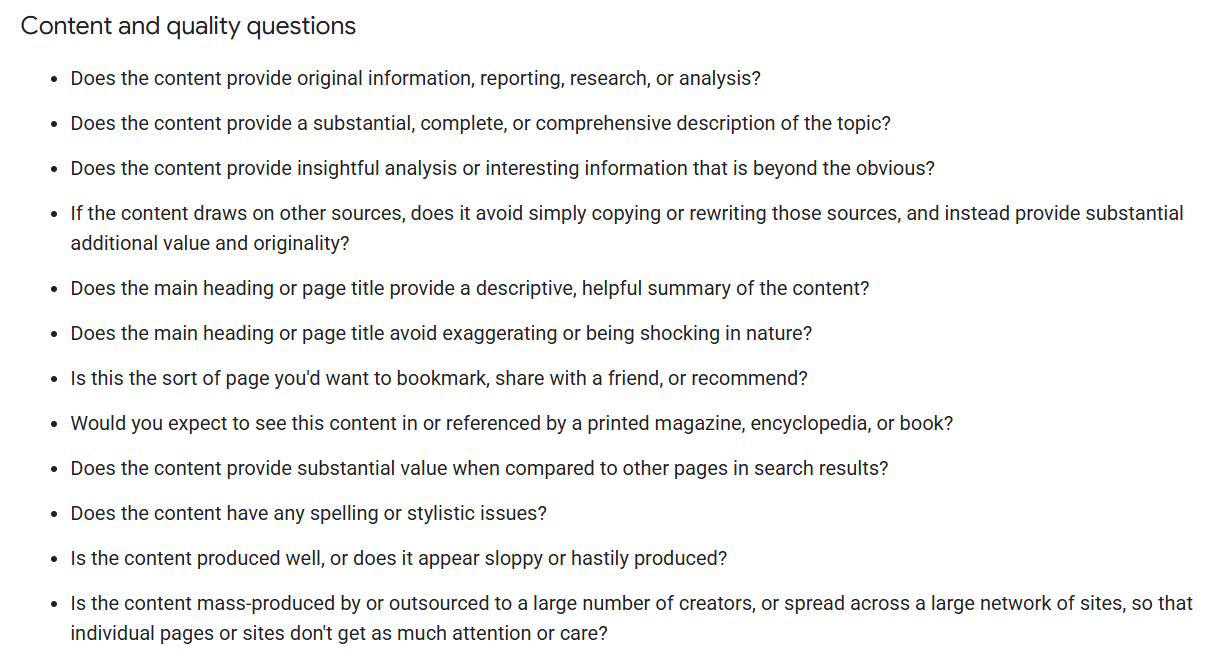
Google publishes a list of self-assessment questions for judging your own content, and one of them settles most arguments on its own:
“Is the content mass-produced by or outsourced to a large number of creators, or spread across a large network of sites, so that individual pages or sites don’t get as much attention or care?”
Read that again with AI in mind. Google wrote it about content mills. It describes a ChatGPT workflow perfectly.
Thin Content vs Short Content
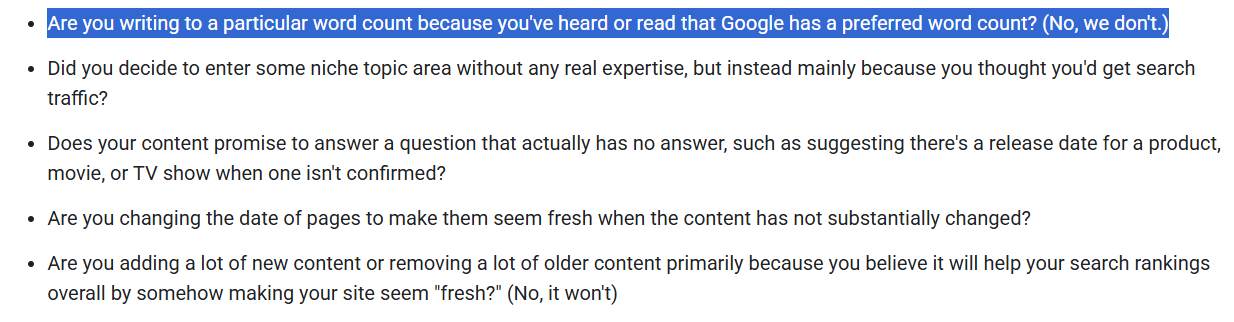
Google has never had a preferred word count, and it says so directly:
“Are you writing to a particular word count because you’ve heard or read that Google has a preferred word count? (No, we don’t.)”
That’s straight out of Google’s documentation, and it kills the most common misunderstanding about this whole topic.
Think about what a short-but-excellent page looks like.
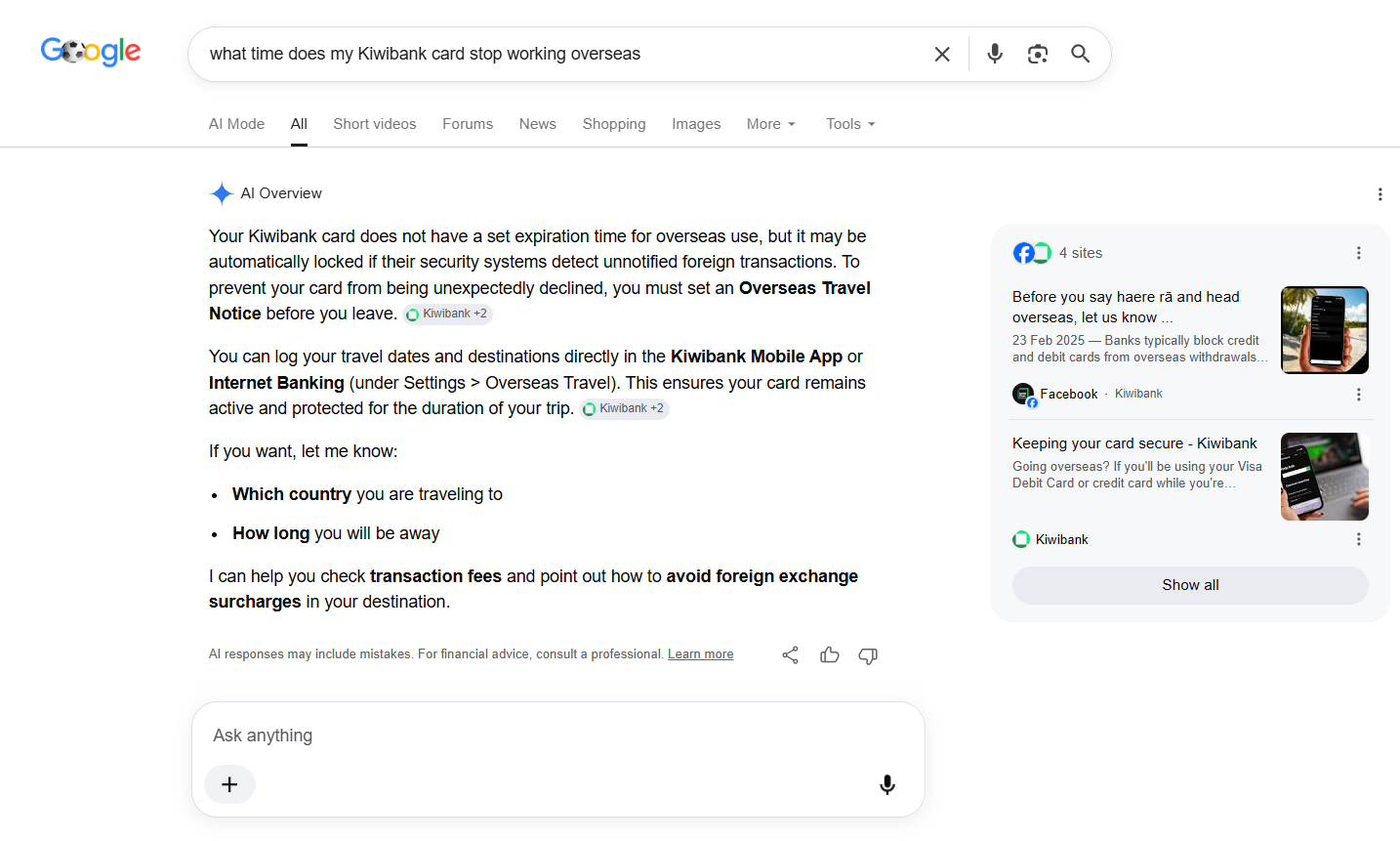
Someone searches “what time does my Kiwibank card stop working overseas.” A 150-word support page that answers it exactly, in plain English, with the number to call — that page is perfect. Adding 900 words to it would make it worse.
Google agrees, by the way. Search that exact query and the AI Overview pulls its answer straight from Kiwibank’s short help pages: set an overseas travel notice, here’s where to do it in the app. Short, specific, cited.
Now think about the other side.
A 1,800-word article that opens with two paragraphs restating the title, spends 400 words defining a term everybody already understands, lists five points that are the same point, and closes by telling you to “stay consistent.”
Long, polished, and thin as tissue paper.
The word count myth survives because length is the only thing tools can measure cheaply.
A crawler can count words in milliseconds. It cannot read your page and decide whether it was worth writing.
So it flags what it can count, and thousands of people end up padding pages that were fine while leaving the pages that weren’t.
Which brings us back to that SERP.
The top-ranking page for “thin content” is roughly 740 words. The one at position six is 85.
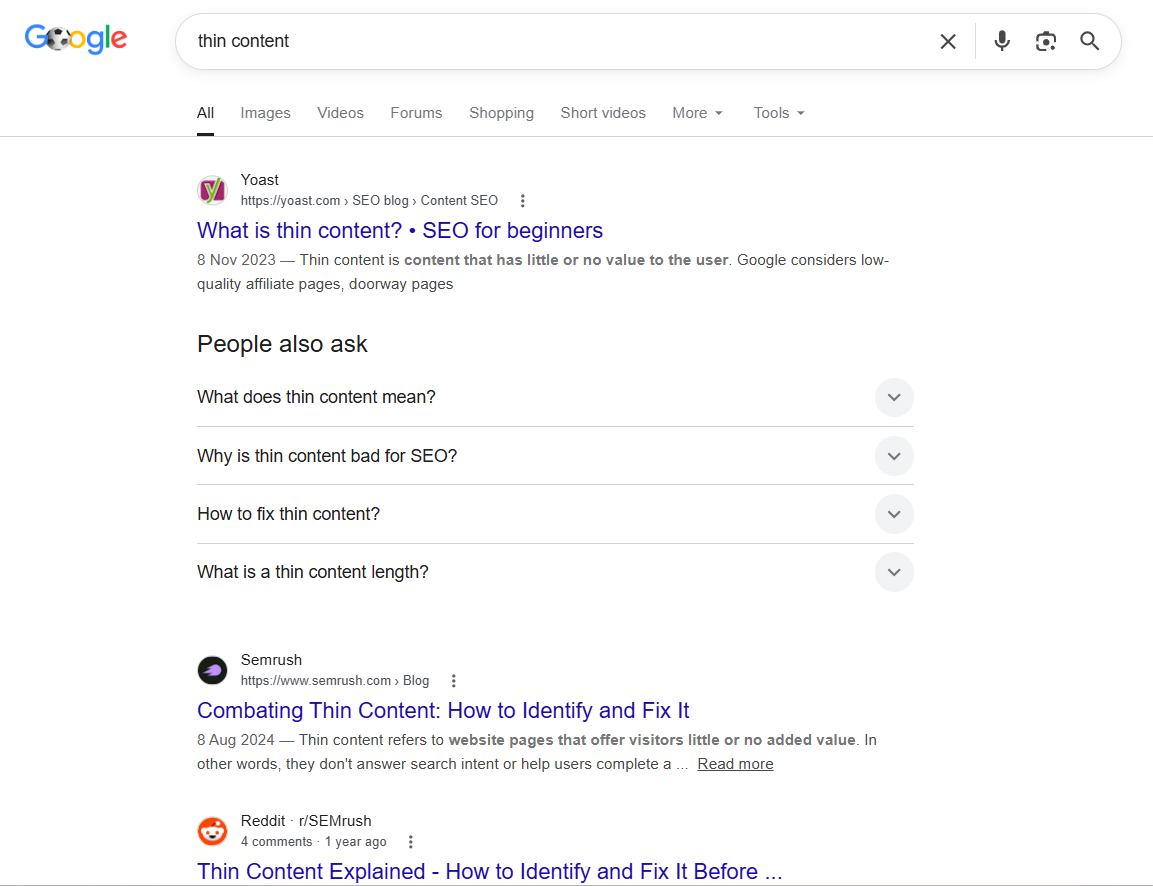
Both sit on domains with enormous authority, so they rank regardless. That’s the clearest available proof that length and quality run on separate tracks — and that a big enough domain props up pages that would sink anywhere else.
You don’t have that authority. So your pages have to actually earn it.

Types of Thin Content
Most thin content falls into six buckets. I’ve put them in the order they actually cause damage in 2026, which is not the order you’ll find anywhere else.
Low-effort AI content
This is the big one now, and it’s the one most guides skip entirely.
AI made content easy to produce. It did not make content good, and the gap between those two things is why “AI slop” became a phrase people use.
A model will happily give you 1,200 words on any topic you name. The words will be grammatical, the structure will be sensible, the tone will be professional. And there will be nothing in it that the reader couldn’t have guessed before they arrived.
Google’s position is clear. Its Search Quality Rater Guidelines apply the Lowest quality rating to content made with little effort, originality or added value — whether a human or an AI wrote it.
Google is judging the effort, not the tool.
Then in March 2024, Google rolled out a core update aimed squarely at this, expecting to cut low-quality, unoriginal content in results by 40%. Six weeks later they reported the actual figure at 45%.

They also introduced a spam policy called scaled content abuse, which covers producing low-value content at scale to manipulate rankings — by automation, by humans, or by any combination.
The wording is deliberately tool-agnostic. It doesn’t matter how you made it.
Duplicate and near-duplicate pages
Ten location pages where the only difference is the city name. Product variants with identical copy across every size and colour. The same page served on both http:// and https://, or on both www and non-www.
It’s one of the most common patterns on NZ service sites: a dozen service-area pages identical except for the city name, with Google indexing two of them and quietly ignoring the rest.
If you want SEO for Hamilton businesses to work, the Hamilton page has to say something a Tauranga reader wouldn’t need — the suburbs, the local jobs, the actual difference.
Scraped or syndicated content
Manufacturer descriptions pasted straight onto product pages, so your listing reads word-for-word like the four hundred other retailers selling the same thing. Google has to pick one page to show. It rarely picks the smallest site.
Low-value affiliate pages
“Best 10 X” round-ups written by someone who has never touched a single product. No photos of the thing in use, no measurements, no opinion about which one is actually annoying to live with.
Affiliate content written from other people’s affiliate content is thin by construction — nobody in the chain ever saw the product.
Doorway pages
Near-identical pages built for keyword variants, all funnelling to the same destination. “Plumber Ponsonby,” “plumber Grey Lynn,” “plumber Herne Bay” — twelve pages, one actual business, no distinct content on any of them.
One caveat worth stating, because tools get this wrong constantly: a genuine location page is not a doorway page. If the page has real local content, real service detail and a real reason to exist, it’s a location page. The line is whether the page would be useful if search engines didn’t exist.
Ad-heavy and interstitial-heavy pages
Content buried under so much monetisation that finding the answer is a chore. Two ad blocks before the first paragraph, a newsletter modal at 20% scroll, a sticky video that follows you down. The content might be fine. The experience is thin.
Is Thin Content Penalised by Google
In almost every case, no. You don’t get penalised for thin content — you get quietly outranked.
This distinction matters more than any other point in this article, because “penalty” and “demotion” are two completely different mechanisms and nearly everyone using the word means the second one.
A manual action is a real penalty. A human reviewer at Google looked at your site, decided it breaches the spam policies, and applied a sanction. You’ll know, because it appears in Search Console under Security & Manual Actions. You fix the problem, then submit a reconsideration request and wait.
These are rare. Most sites will never see one.
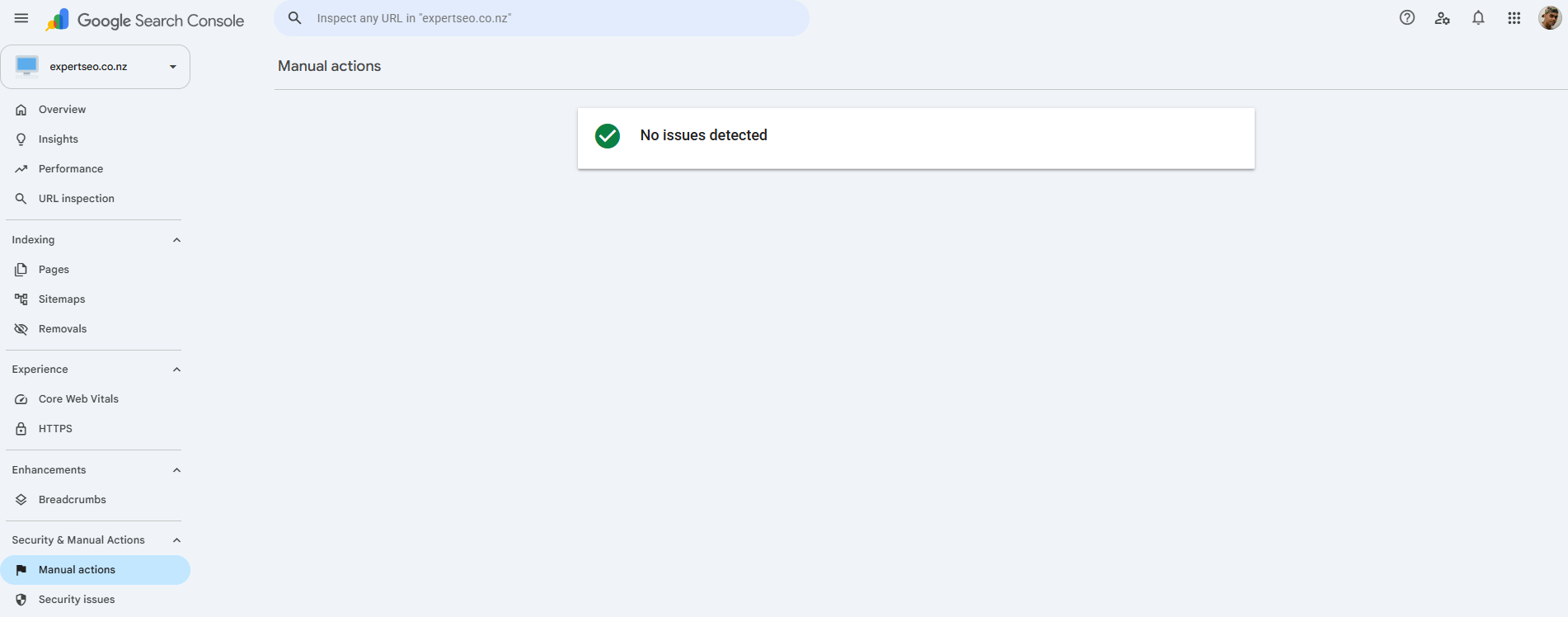
Algorithmic demotion is what actually happens to almost everybody. No notice, no message, no email. Your pages just gradually stop showing up for things they used to show up for, and one day you notice the traffic graph has been sliding for eight months.
The Helpful Content system — which was a standalone update in 2022 — is now folded into Google’s core ranking systems. That’s why “recovery” no longer arrives on a schedule. There’s no separate update to wait for; the assessment is running continuously.
It’s the same logic as a manual link penalty versus a link-based demotion: one is a sanction with paperwork, the other is just the algorithm changing its mind about you.
Why nobody agrees on whether this is a penalty
Go looking on r/SEO and you’ll find long-running threads arguing about whether Google really “blocks” thin content at all.
One camp says they’ve published thin pages for years with no consequence. The other says thin content wrecked their site.
Both are describing something real. They’re just describing different mechanisms.
The first group is right that no penalty arrived — because a manual action was never coming. The second group is right that it cost them — because demotion doesn’t announce itself, so the damage looks like a mystery rather than a consequence.
Once you separate the two, the argument dissolves.
How Thin Content Hurts Your Rankings
A thin page rarely ranks, and that’s the small problem.
The bigger problem is what a pile of them does to the pages you actually care about.
Crawl budget waste. Googlebot only gives your site so much attention.
Every visit it spends on a page that will never rank is a visit it didn’t spend on the page you published last week. On a 40-page site that barely registers; on a 4,000-page ecommerce site it’s a genuine tax.
Index bloat. Hundreds of low-value URLs sitting in Google’s index dilute what your site appears to be about.
You want to look like a business that knows one thing deeply. You end up looking like a business with two hundred pages of nothing in particular.
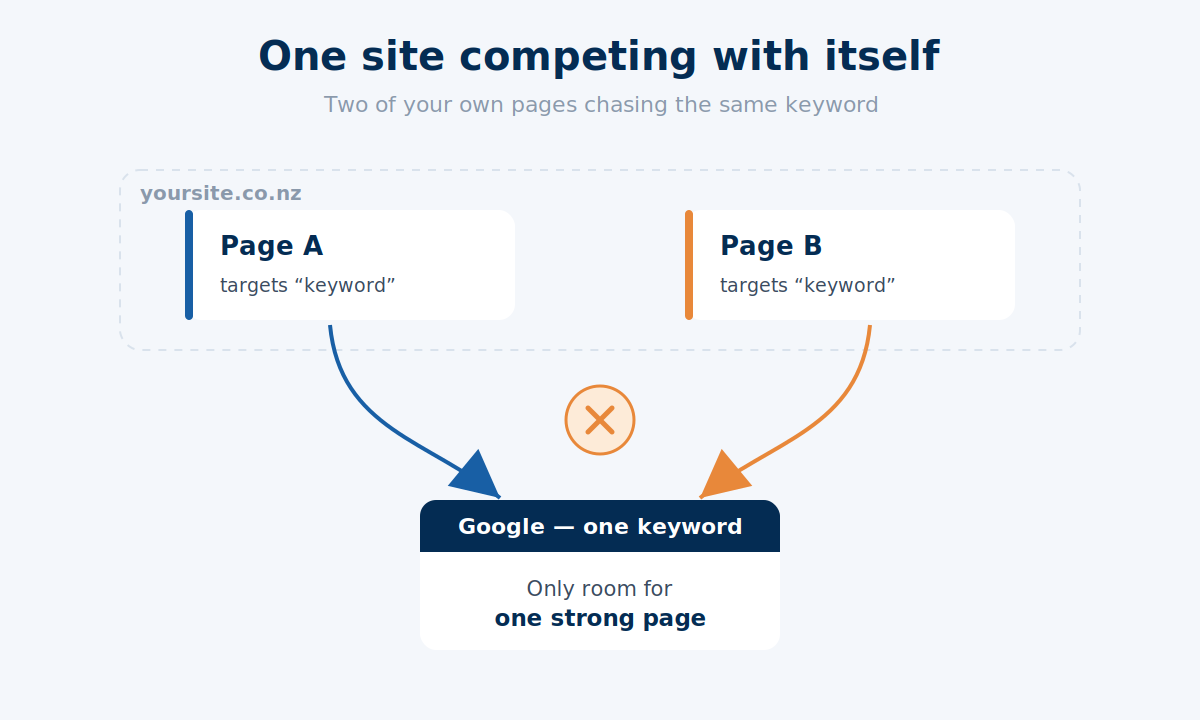
Keyword cannibalisation. This is the expensive one.
Four thin pages circling the same topic split a signal that one strong page needed. Google has to guess which one you meant, guesses wrong, and none of them rank properly.
I’ve watched a site merge five weak posts into one and jump from position 20-something to page one on the surviving URL. No new links, no technical work — just stopping the internal competition.
The user side. Someone clicks your result, sees nothing useful, and hits back to try the next one.
That’s pogo-sticking. Google’s people have been careful about how much weight it carries as a direct ranking signal, but the underlying fact holds: a page nobody stays on is not a page that survives long term.
Does one thin page drag down the whole site
This is the question every business owner actually asks, and almost nobody answers it.
One thin page: no. A single lightweight page on an otherwise solid site is not going to hurt you. Every site has a privacy policy.
A pattern of thin pages: yes. Site-level quality assessment is real. If a meaningful chunk of your site is low-value, that shapes how Google treats the whole domain — which is precisely why pruning works, and why fixing one page while ignoring the other sixty doesn’t.
The thing to look for isn’t a bad page. It’s a habit.
How to Find Thin Content on Your Site
You find thin content by looking for pages that fail on four counts at once — thin and ignored and unlinked and doing no job on the site. Any one of those alone means nothing.
That’s the bit most advice skips. “Run a site audit,” it says, and leaves you with a tool flagging 200 pages as thin purely because they’re under 300 words.
Here’s the process I run instead. On a normal site it takes an afternoon; past a few thousand pages it becomes a project, and that’s usually the point where people hand it over to done-for-you SEO rather than lose a fortnight to spreadsheets.
Step 1 — Check for a manual action first
Open Search Console. In the left menu, go to Security & Manual Actions → Manual actions.
Thirty seconds, and it changes everything downstream. If there’s a manual action sitting there, that’s your emergency and the rest of this audit waits. If it says “No issues detected” — which it will, for almost everyone — you’re dealing with demotion, and you can work methodically.
Step 2 — Pull the pages Google is already ignoring
Still in Search Console: Indexing → Pages. Scroll to the “Why pages aren’t indexed” table.
Four states matter here:
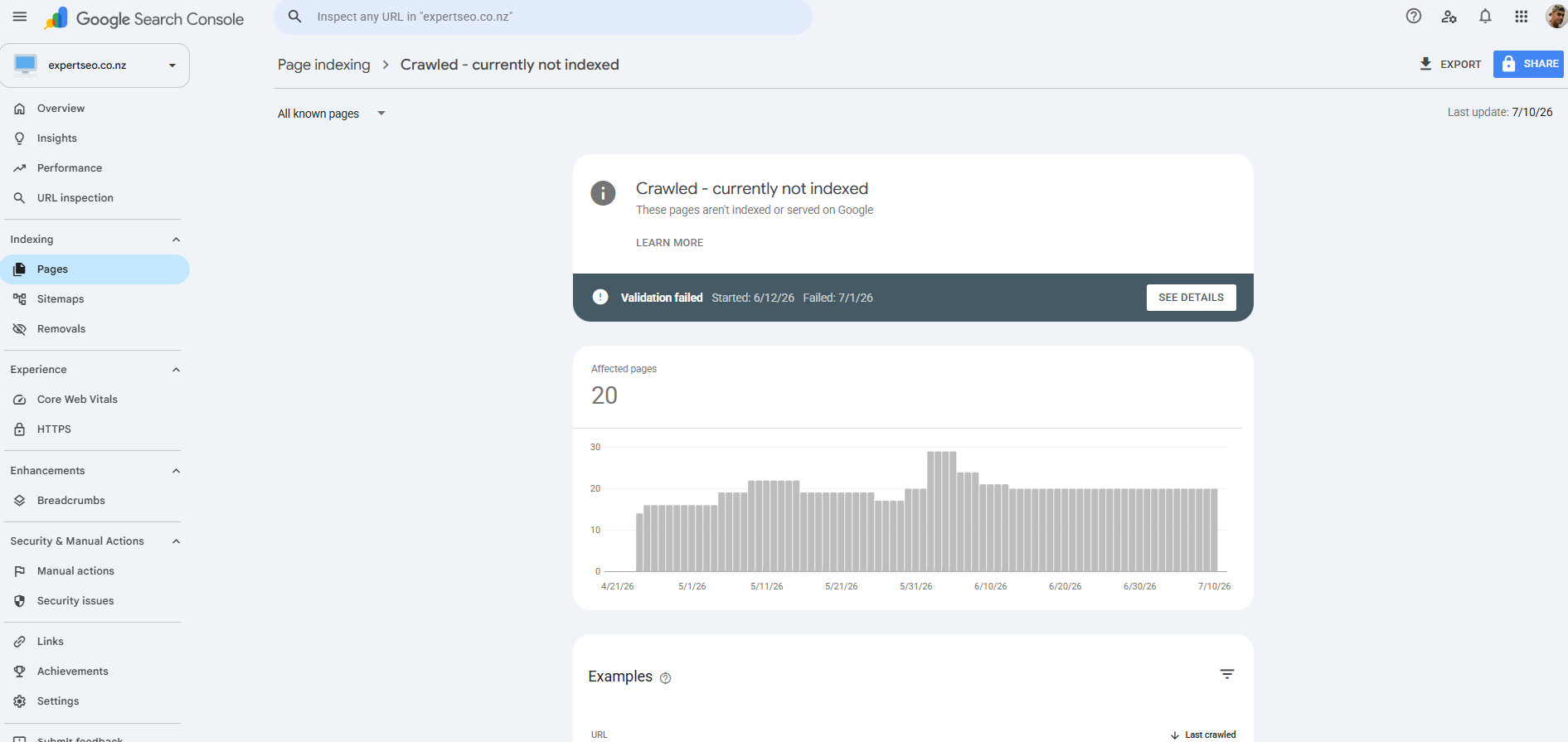
- Crawled – currently not indexed — Google looked at the page and decided it wasn’t worth keeping. This is the single best thin-content signal in any tool, and it’s free.
- Discovered – currently not indexed — Google knows the page exists and hasn’t bothered fetching it.
- Duplicate without user-selected canonical — Google found a near-identical page and picked one.
- Duplicate, Google chose different canonical than user — you nominated a canonical and Google overruled you.
Click into each, export the URL list. That’s your starting pool, and it comes straight from Google rather than from a third party’s guess.
Here’s our own site as of this month: 20 pages sitting in “Crawled – currently not indexed.”
That’s not a crisis, and it’s worth saying so — a chunk of those are pages that were never meant to rank. But it’s the list I’d start from, and it took about four clicks to get.
Step 3 — Get word counts across the whole site
Download Screaming Frog, enter your domain, hit Start. When the crawl finishes, go to the Internal tab, filter to HTML, and sort by the Word Count column ascending.
The free version caps at 500 URLs, which covers most NZ business sites comfortably. Past that you’ll need the licence or you can crawl in sections by subfolder.
One warning: Screaming Frog counts template text too, so a page showing 400 words might have 120 words of actual content wrapped in a nav, a sidebar and a footer. Treat the number as a sorting device, not a verdict.
Step 4 — Layer in traffic
Open GA4, or Search Console’s Performance report, and pull page-level sessions or clicks for the last 90 days.
Not 28. A seasonal business will burn you on a short window — pull a tourism operator’s numbers in a quiet month and half the site looks dead. If you’re doing SEO for a Queenstown business, a 28-day window in May tells you almost nothing about what that page does in December.
Now cross-reference. A page that’s thin and has had four sessions in three months is a real candidate. A page that’s thin and pulls 300 sessions a month is doing a job you don’t understand yet — leave it alone until you do.
Step 5 — Check what’s pointing at the page
Run the site through Ahrefs Site Explorer or Semrush and look at referring domains per URL.
A thin page with referring domains pointing at it is never a delete. Someone linked to that page. Deleting it throws away authority you’d have to earn all over again — and earning it back is a lot harder than rewriting a page.
Step 6 — Flag it against the thresholds
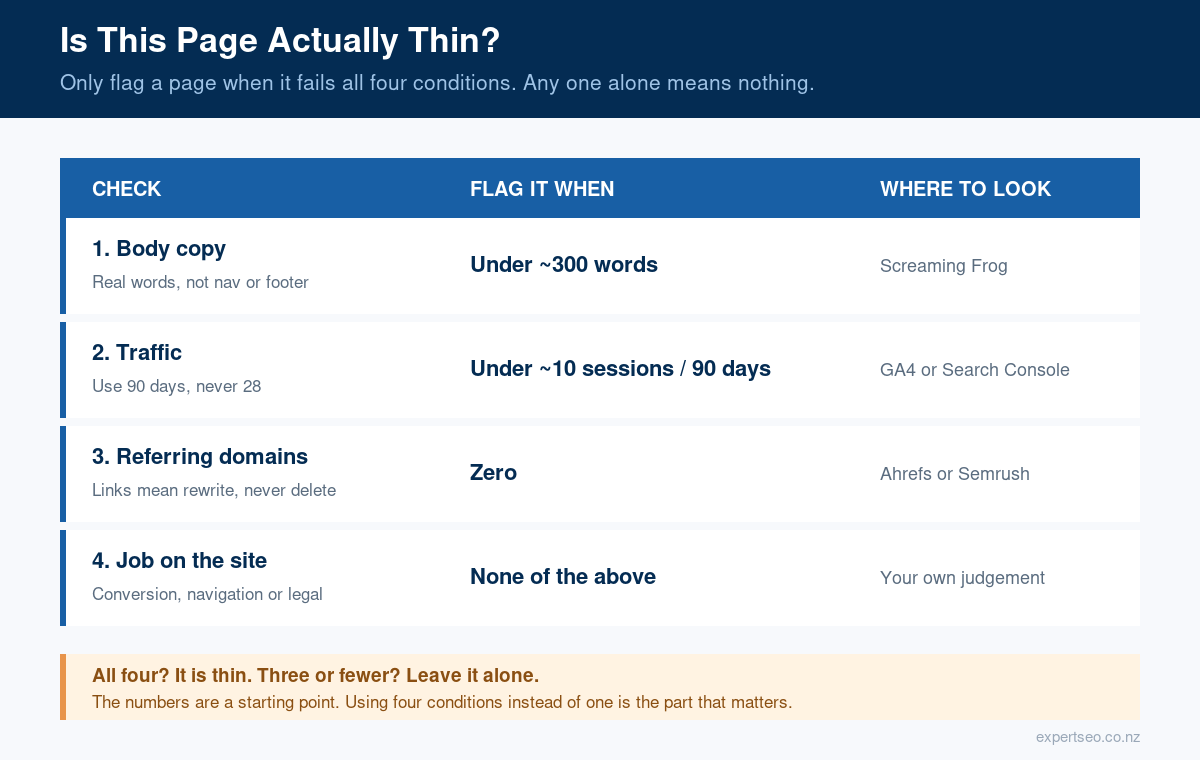
Now put it together. Flag a page only when it clears all four conditions:
| Condition | Threshold |
|---|---|
| Genuine body copy | Under ~300 words (excluding nav, sidebar, footer) |
| Traffic | Under ~10 sessions in the last 90 days |
| Referring domains | Zero |
| Job on the site | No conversion role, no navigational role, no legal requirement |
Those numbers are a starting point, not scripture — a 250-word page answering one narrow question properly should never be flagged, and you’ll adjust the traffic figure depending on the size of your site.
The point isn’t the exact numbers. It’s using four conditions instead of one, which is where every “your site has 40 thin pages” tool report goes wrong.
Step 7 — Read the flagged pages
This is the part no tool does, and it’s the part that matters.
Open each flagged page and ask one question: would I send this to a customer who asked me this exact thing?
If yes, the tool was wrong. If you’d feel a bit embarrassed, the tool was right.
A full SEO audit covers a lot more than this, but for thin content specifically, those seven steps are the whole job.
How to Fix Thin Content
There are only six things you can do with a thin page. Pick one per page, and pick it on the evidence you gathered — not on how you feel about the page.
Improve it
Trigger: the topic is worth ranking for and this is the right page to do it.
Improving doesn’t mean adding words. It means adding the things that were missing: the actual steps, the real example, the specific numbers, the screenshot of the thing you’re describing. If you can add 400 words without adding any new information, you’re padding, and you’ve made it worse.
Consolidate it
Trigger: several thin pages circling the same topic.
Merge them into the strongest URL — usually the one with links or the most traffic — and 301 the rest to it. Take the best material from each, don’t just staple them together.
This is the fix that moves rankings most often, because it solves cannibalisation and thinness in one move.
Take four thin posts circling the same subject, none of them ranking, and merge them into one properly built page. It’s common for that single URL to pull more than the four managed between them — because Google finally has one obvious answer to rank instead of four half-answers competing.
That kind of jump comes easier than it should when you’re doing SEO in Auckland against competitors who’ve never audited anything.
Rewrite it
Trigger: the topic is still relevant but the content is out of date.
Different job from improving. Improving adds depth to something correct. Rewriting replaces something that’s now wrong. Keeping content fresh is a genuine ranking consideration for topics that change — and changing the date without changing the content is a trick Google sorted out years ago.
Noindex it
Trigger: the page has to exist for users but has no business in search results.
Thank-you pages. Filtered product views. Thin tag archives that WordPress generated without asking. Internal search results.
Add <meta name="robots" content="noindex, follow"> and let it keep passing link equity internally while dropping out of the index. Don’t block these in robots.txt instead — a blocked page can’t be crawled, so Google never sees the noindex tag.
Redirect it
Trigger: the page is dead weight, but it has referring domains or residual traffic.
301 it to the closest genuine match. Not the homepage — a redirect to an irrelevant destination gets treated as a soft 404 and you lose the value anyway.
Delete it
Trigger: no links, no traffic, no topic worth keeping, no user need.
Last resort, and only after the other five have been ruled out.
A 410 (gone) is a slightly cleaner signal than a 404 when you’re certain the page is never coming back, though John Mueller has said the practical difference between the two is minimal. Either is fine — don’t lose an afternoon over it.
When you’ve only got 40 pages, not 4,000
Nearly all pruning advice online is written for enterprise sites. Somebody deletes 14,000 pages, traffic climbs 23%, and that becomes the case study everyone quotes.
That advice is actively dangerous on a small site.
If you’ve got 40 pages and you delete 10, you’ve removed a quarter of your surface area — including long-tail queries you never knew you ranked for, because you never looked past the top 20 keywords.
On small sites the maths is different: improve and consolidate beat delete almost every time.
The version I’d run on a 40-page site: consolidate the overlaps, improve anything with a pulse, noindex the WordPress junk, and only delete pages that are genuinely dead on all four conditions. Usually that’s three or four pages, not ten.
Deleting is also the one move you can’t undo cheaply. On a small site it’s worth getting a second pair of eyes — a colleague who knows the business, or an SEO consultant — before you pull anything permanently.
How this differs by site type
Ecommerce. Your thin content is product variants with identical copy, category pages with a heading and a grid, and manufacturer descriptions copied across the whole catalogue.
Canonicalise variants to the parent product, write 100 genuine words on the categories that matter, and rewrite descriptions for your top sellers first. Most of the work in ecommerce SEO is fixing this at template level rather than page by page.
Service businesses. Yours is near-duplicate location pages and service pages that describe the service without ever explaining it.
A page like “Refinancing” that runs 180 words and says refinancing can save you money is thin — the same page with the actual criteria, the numbers, and a worked example is a genuine asset.
That’s most of what separates the mortgage brokers who rank from the ones who don’t, and it’s the single biggest lever in SEO for mortgage brokers.
Blogs and content sites. Yours is tag archives, author archives, old news posts with no lasting value, and early articles written before you knew what you were doing. Noindex the archives, consolidate the early stuff, keep the news if it’s genuinely referenced.
What to Do After You Fix Thin Content
Changes don’t count until Google recrawls, and Google recrawls on its own schedule.
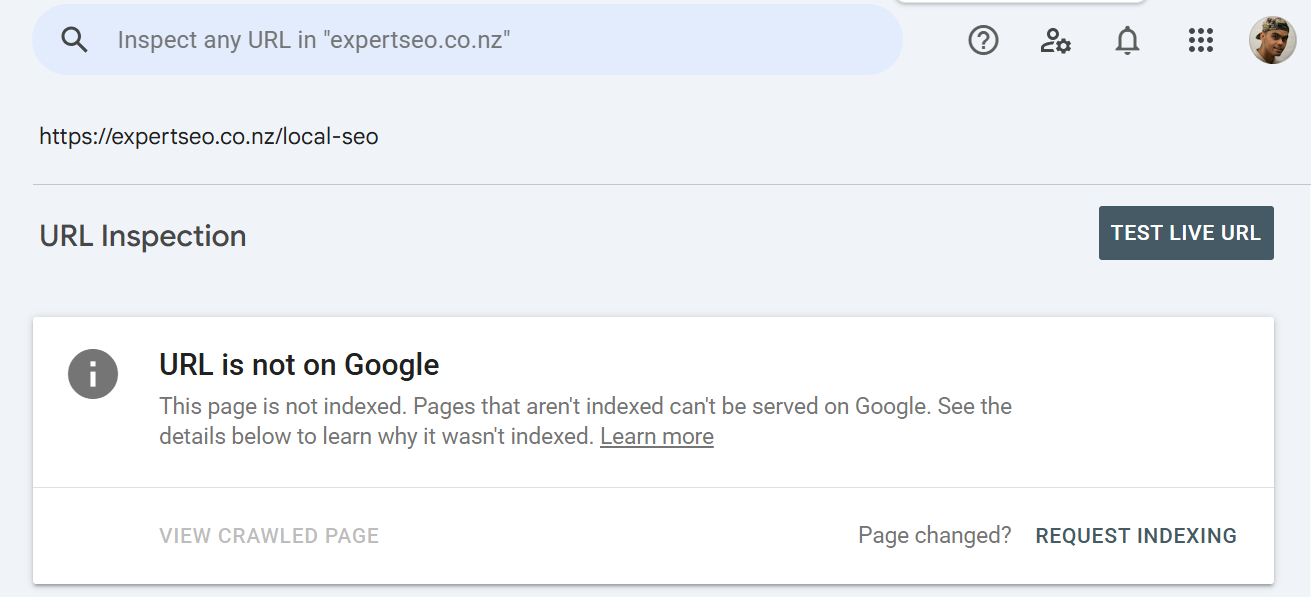
For the pages that matter, push it: URL Inspection in Search Console, paste the URL, click Request Indexing. It’s rate-limited to a handful a day and it isn’t a queue-jump — it’s a nudge. Use it on your five most important fixes, not all 200.
Then resubmit your sitemap after any batch of deletions or redirects, so Google gets a clean picture of what’s still there.
Now watch the right number. Everyone stares at the deleted pages. The number that should move is impressions and clicks on the surviving pages — the consolidated URL, the improved page. If those don’t lift, the merge didn’t work and you need to look at the content again rather than waiting longer.
Realistic timeframes, since almost nobody gives them:
- Recrawl: days to a few weeks, depending on how often Google visits your site.
- Measurable movement: usually 4 to 12 weeks.
- Full recovery from a core-update-scale hit: months, and it may need another core update to land. Helpful Content signals now live inside the core systems, so there’s no scheduled release to wait for.
The trap to avoid: making forty changes in one week and then having no idea which one did anything. Batch your changes, and leave enough time between batches to actually read the result.
How to Stop Creating Thin Content
You stop creating thin content by building your process around the four things a model structurally cannot fake.
Everything above this section is treating the symptom — the cause is a production process that publishes the first draft.
AI made content cheap to produce and no cheaper to make good. That’s the whole shift.
The tool got fast, the standard didn’t move, and so we got volume.
Write from things you’ve actually done
This is the one no prompt can generate.
Here’s mine. Around 85% of the businesses that come to me have been burnt by a previous web design or SEO agency.
Which means before I do a single piece of work, half my job is rebuilding someone’s belief that SEO works at all. They don’t need convincing that I’m good — they need convincing that the whole category isn’t a scam.
You can’t get that out of ChatGPT. It’s not in the training data, because it never happened to anyone but me.
Every business has a version of this. The thing you’ve noticed after doing something two hundred times. Put that in the article and you’ve written something nobody can copy.
Take the instruction all the way down
This is the difference between average content and what I’d call golden-star content, and it’s easiest to see side by side.
Here’s how most NZ agencies handle reviews in a blog post:
“It’s good to get reviews.”
True, useless, and something the reader could have guessed before they arrived.
Here’s the same topic done properly:
What a review actually is: a public rating on a platform Google reads.
Where they count, in order:
- Google Business Profile — reviews here feed directly into local pack rankings. This is the one that matters.
- Industry directories — second, and worth doing once you’re set up on Google.
- Facebook — barely moves the needle for search.
How to get them on autopilot:
- Open your Google Business Profile and grab the review link under Ask for reviews.
- Run that link through any free QR generator.
- Put the QR code on your invoices and the side of your van.
- Send the link by SMS within an hour of finishing the job — while the customer is still pleased with you, not three weeks later in a newsletter.
- One follow-up if they don’t reply. Then leave it alone.
- Reply to every review you get, including the bad ones. The reply is public, and the next customer reads it.
Same topic. Completely different article.
One of those is a sentence. The other is a system somebody can run on Monday.
That’s the standard, and it’s the reason a proper content brief matters more than the writing itself — the depth gets decided before anyone starts typing.
Use stories, analogies and real numbers
You can explain the same idea in maths or in colour, and colour is what people remember.
“Crawl budget is a finite resource allocated per domain” is accurate and instantly forgettable.
“Googlebot only visits for so long, and every minute it spends on your thank-you page is a minute it didn’t spend on the page you actually want ranking” is the same fact with a picture attached.
There’s a side benefit worth knowing: those are also the lines that get quoted. When AI Overviews or ChatGPT pull from a page, they tend to lift the clean, concrete explanation rather than the abstract one.
Have an actual opinion
Models hedge by design. Ask one whether you should delete thin content and you’ll get “it depends on your specific situation.”
That’s why an opinion is unfakeable. Saying “on a site under 100 pages, deleting is almost always the wrong call, and I’d consolidate first every single time” is a position. It can be argued with. That’s what makes it worth reading and worth citing.
And the last piece, sitting under all four: editing is not the final step, it’s most of the job.
Publishing the first thing a model gives you is exactly how a site ends up with forty pages that all say the same nothing — and how a business ends up in my inbox wondering why traffic died.
It’s worth saying that this approach works.
HealthVI went from zero to over 20,000 monthly organic visitors on nothing but genuinely useful content.
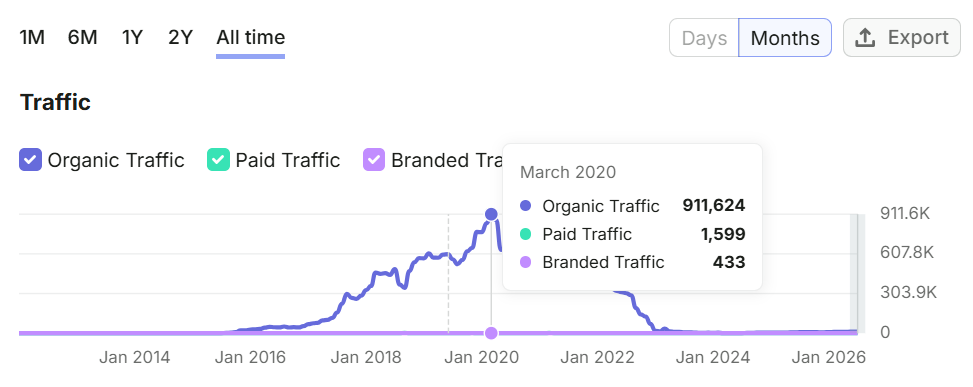
A sleep site I handled content and SEO for peaked at 911,624 organic visits a month across 433,000+ keywords, with 14,000 of them sitting in the top three.

Those pages are still being cited by AI tools today, years later. None of it was volume; all of it was depth.
Final Thoughts
The mistake I watch people make over and over is fixing thin content by adding words to it.
They get the audit report, see “under 300 words,” and go away and write another 500. The page is now 800 words of the same nothing. It doesn’t move, and they conclude the whole exercise was pointless.
Here’s the thing nobody says out loud though: thin is a moving target.
There’s no fixed line where a page stops being thin. Google is judging your page against the other results for that query — so when the rest of the internet gets deeper, your page gets thinner without you touching it.
That’s what’s actually happening right now. AI didn’t just make bad content cheap; it raised the floor on what “enough” looks like, because the baseline article on every topic is now competent. Competent used to be a differentiator. It’s table stakes.
So if it were my money, I’d publish less and go further on each one.
Ten pages that genuinely exhaust their topic will beat sixty that skim. They’re cheaper to maintain, they don’t cannibalise each other, and they don’t quietly become thin in eighteen months when the bar moves again.
That’s the whole game now: fewer swings, harder contact.
Thin Content: FAQ
What is thin content in SEO?
Thin content is any page that gives the reader little or no value — content made primarily for search engines rather than for people. It's judged on what the page delivers, not how long it is, so a short page that answers a question properly is fine while a long page that circles the same point is thin.
What word count counts as thin content?
There isn't one. Google states in its own documentation that it has no preferred word count. Instead of a length rule, flag a page only when it fails four conditions at once: under roughly 300 words of genuine body copy, under about 10 sessions in 90 days, zero referring domains, and no conversion, navigational or legal role on the site.
Is there a Google thin content penalty?
Rarely. A true penalty is a manual action — a human reviewer at Google applies it and you'll see a notice in Search Console under Security & Manual Actions. What almost everyone actually experiences is algorithmic demotion: no notice, no message, your pages just quietly stop ranking.
How do I check my site for thin content?
Start in Search Console: check Manual actions, then open Indexing → Pages and export anything marked "Crawled – currently not indexed" or flagged as a duplicate. Cross-reference those URLs against word counts from a crawler like Screaming Frog, 90 days of traffic from GA4, and referring domains from Ahrefs or Semrush. Then read the pages that fail on all four.
Does deleting thin content improve SEO?
Sometimes, but it's the last resort. Consolidating several thin pages into one strong page usually works better, because it fixes cannibalisation and thinness in a single move. Never delete a page that has referring domains or residual traffic — redirect it instead. On sites under about 100 pages, consolidating almost always beats deleting.
Is AI content automatically thin content?
No. Google's Search Quality Rater Guidelines apply the Lowest rating to content made with little effort, originality or added value — whether a human or an AI wrote it. The tool isn't the problem. AI content becomes thin when it's published without first-hand experience, real detail or a genuine point of view added to it.
Does thin content affect AdSense approval?
Yes. Insufficient or low-value content is one of the most common reasons AdSense applications get rejected. Google wants to see original, substantial pages before it will place ads on a site, so a handful of short or duplicated posts will usually fail review.
How long does it take to recover from thin content?
Expect Google to recrawl within days to a few weeks, and measurable movement in roughly 4 to 12 weeks. Recovery from a core-update-scale hit can take months, because the Helpful Content system now sits inside Google's core ranking systems rather than running as a separate scheduled update.