You’ve done the keyword research. Three hundred terms sitting in a spreadsheet, sorted by volume, colour-coded, the lot. And you’re still staring at it with no clue which page each one is meant to live on.
That gap is what a keyword map fills.
A list tells you what people search. A map tells you where each of those searches belongs on your site: which page targets it, what that page’s job is, and how it connects to everything else.
Without one, you guess. And guessing is how you end up with three half-finished pages all chasing the same term, none of them ranking.
This guide walks through exactly how to build a keyword map, including the living one running behind every page on this site. By the end you’ll be able to take that messy list and turn it into a plan Google can actually follow.
What Is Keyword Mapping?
Keyword mapping is the process of assigning every keyword you want to rank for to a specific page on your site: one page, one topic, one primary keyword.
The map itself is just a document, usually a spreadsheet. Each row is a page, and each column records something about it: the URL, the primary keyword, the secondary keywords it also covers, the search intent, the volume, the difficulty.
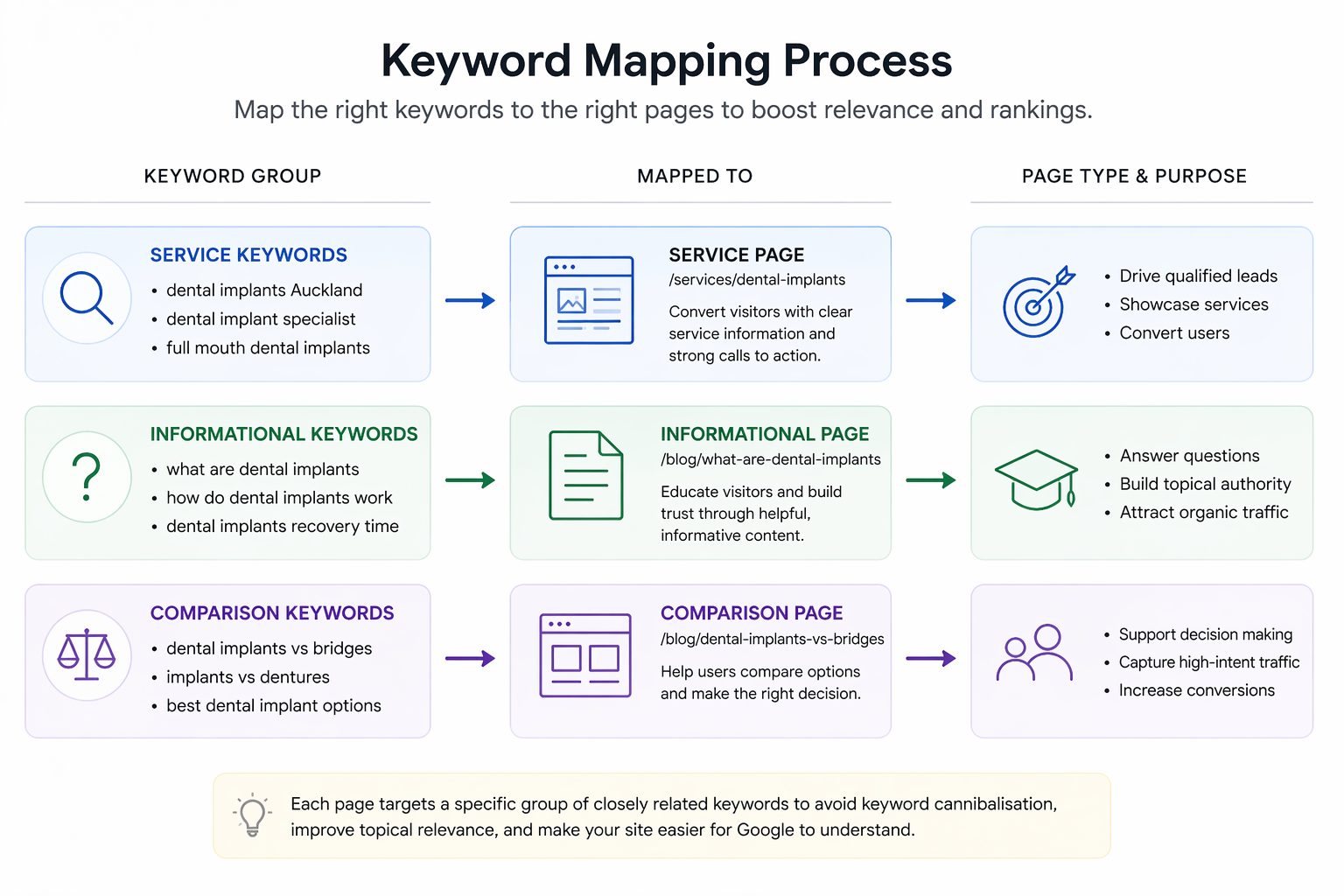
Picture it like a seating chart for a wedding. Every guest (keyword) has one table (page) where they belong.
Sit the same guest at three tables and the whole night turns to chaos, which is more or less what you do to Google when three pages target the same term.
The golden rule sits underneath all of it: one page, one topic, one primary keyword. Break that rule and you create the exact problem mapping exists to prevent.
Why Keyword Mapping Matters
A keyword map does four jobs at once: it gives your site a logical structure, it hands you a content plan, it powers your internal linking, and it stops your own pages competing with each other.
Start with structure. When every page has one clear job, Google can see how your site fits together: which pages are the big pillar topics and which are the supporting detail. That clarity is what topical authority is built on.
Then there’s the content plan.
A finished map shows you every page you’ve got, every page you’re missing, and what each one should say. You stop wondering what to write next; the gaps in the map tell you.
It also makes linking your pages together far easier. When you know the topic of every page, you know which ones should connect and what the anchor text should be.
And it kills cannibalisation before it starts, which is worth a section of its own further down.
I learned this the hard way first, then the good way. The good way was HealthVI, a health site I built with my former business partner and SEO mentor, Ian Pribyl, back in 2017.
We grew it from zero to over 20,000 monthly visitors, and the spine of the whole thing was a keyword map: every article had one job, mapped before a word was written. Structure first, content second.

Keyword Mapping vs Keyword Research vs Keyword Clustering
These three get thrown around as if they mean the same thing. They’re actually three steps in a row.
Keyword research is finding the right keywords: digging up every term your buyers actually type. Keyword clustering is grouping the ones that share intent, so terms that mean the same thing get treated as one.
Keyword mapping is the last step: taking those clusters and assigning each one to a page.
Same pipeline, three jobs:
| Step | What it does | What you end up with |
|---|---|---|
| Research | Finds the keywords worth targeting | A raw list of search terms |
| Clustering | Groups terms that share search intent | Tidy clusters, one intent each |
| Mapping | Assigns each cluster to a page | A page-by-page plan |
Skip the clustering step and you’ll map ten near-identical keywords to ten separate pages, which is the express lane to cannibalisation. Cluster first, map second.
How to Build a Keyword Map, Step by Step
Building a map is five steps: gather your keywords, cluster them by intent, assign each cluster to a page, add secondary keywords, then set an action and a status for every row. Here’s how each one works.
Step 1: Gather your keywords
Start with your seed terms, the handful of words that describe what you do. A panel beater might start with “panel beating”, “car dent repair”, and “bumper repair”.
Drop those into a keyword tool (Semrush, Ahrefs, or the free Google Keyword Planner) and it’ll spit out hundreds of related terms.
Search something like “emergency plumber” and you’ll get back a stack of variations you’d never have thought to write down yourself.
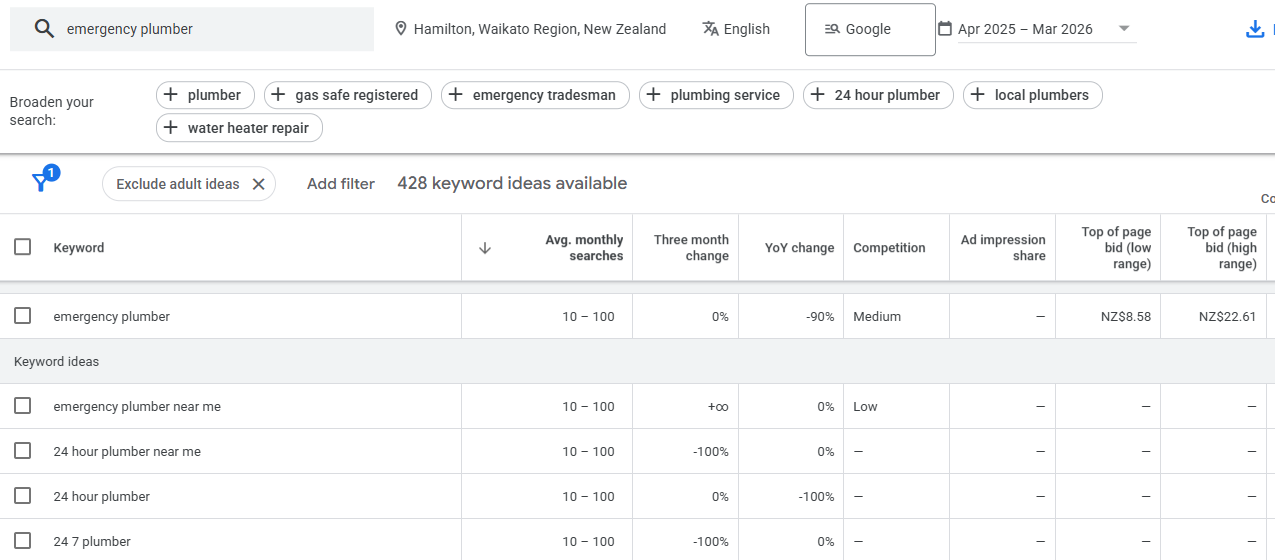
Pull them all into a single list. Don’t filter hard yet; you’re collecting, not deciding.
Step 2: Cluster by shared intent
Now group the terms that mean the same thing. “Car dent repair”, “fix a dent in my car”, and “dent removal cost” share an intent, so they share a page.
The quickest test is to Google two terms and compare the results: if the same pages rank for both, Google sees them as one topic, so you should too.
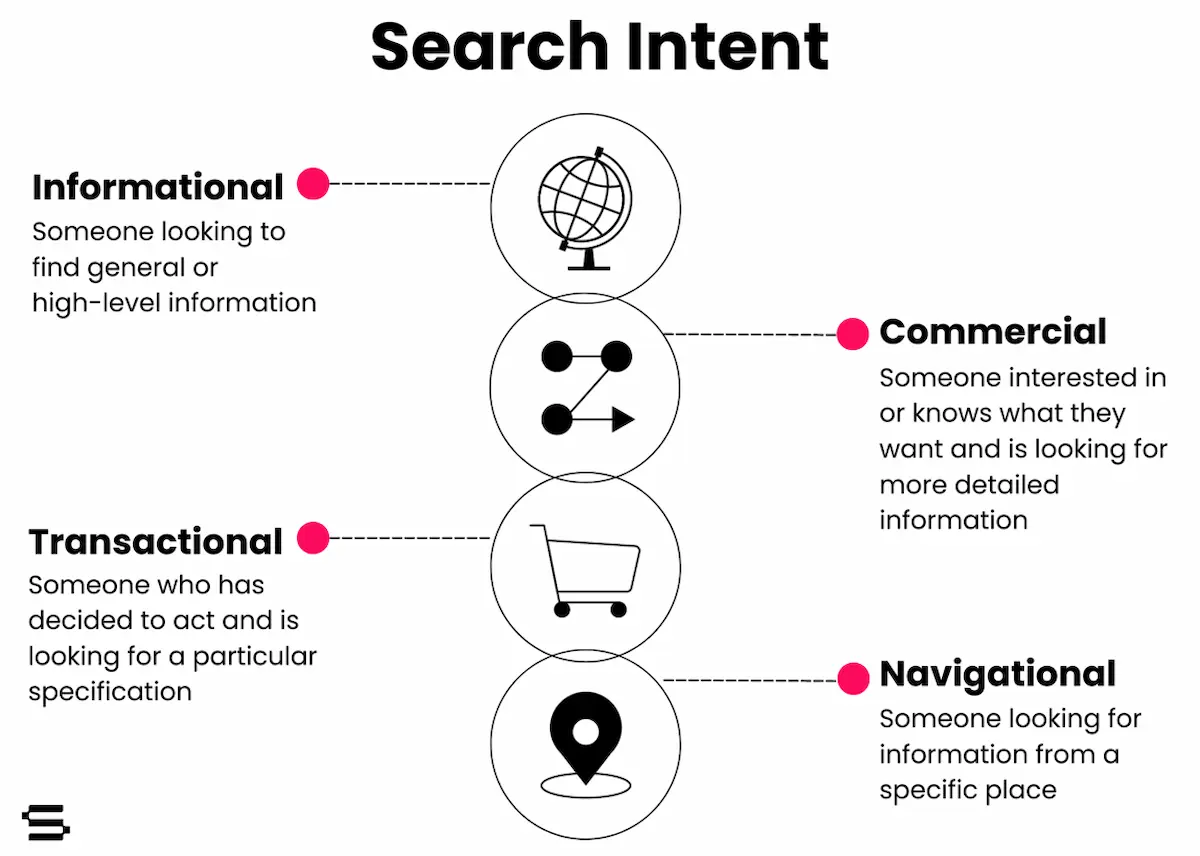
This is also where you sort terms by intent type. There are four (informational, navigational, commercial, and transactional), and which one a keyword falls into decides what kind of page it needs. The next section is all about that.
Step 3: Assign each cluster to one page
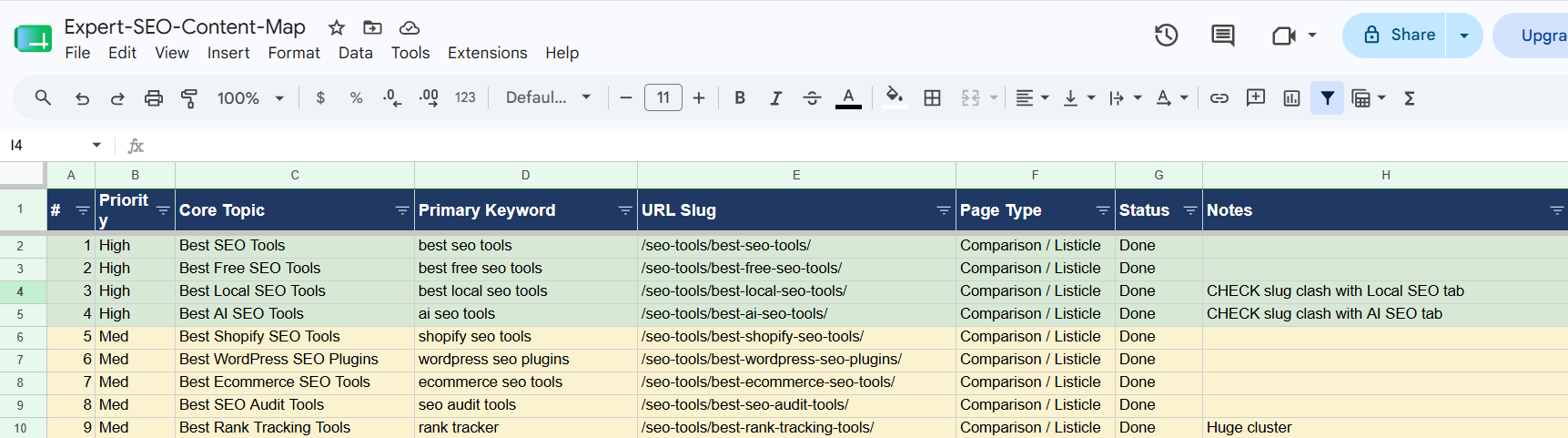
Every cluster gets one page, and one page only. If you’ve already got a page for that topic, drop its URL in the row. If you haven’t, leave the URL blank, because that blank is now a page on your to-build list.
Not sure whether a page already exists? Run a quick site:yourdomain.com search with the topic. If something comes up, you’ve got it. If nothing does, that’s a gap.
Step 4: Add secondary keywords
One page never ranks for just one keyword. Ahrefs studied three million searches and found the average page sitting at number one also ranks in the top 10 for around a thousand other terms (the median is lower, but it’s still in the hundreds).
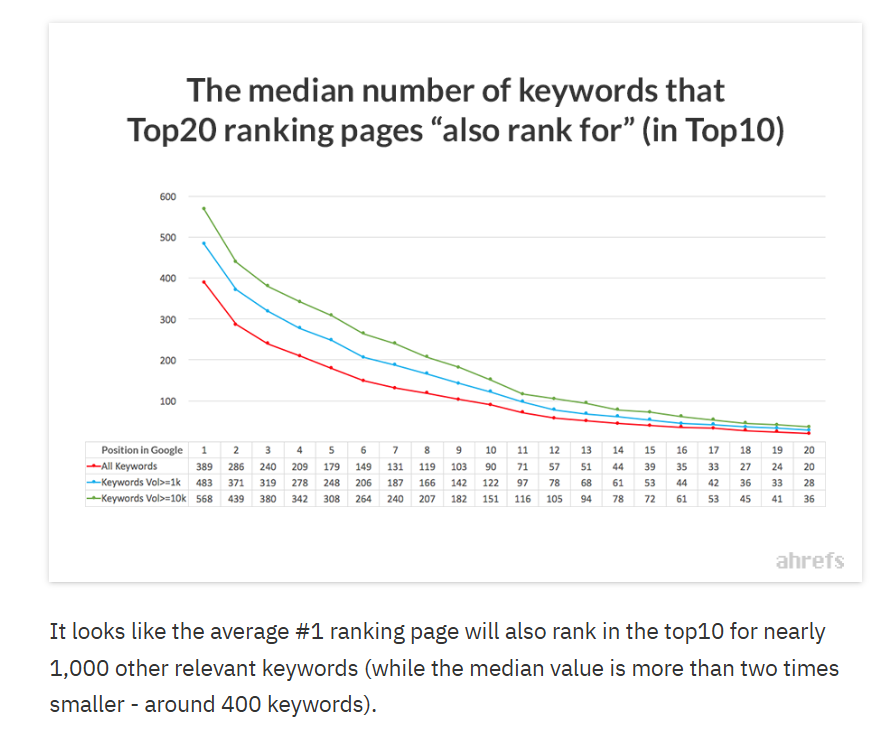
So for each page, list the smaller related terms it should also cover: the long-tail keywords that aren’t worth their own page but belong inside the content. These are your secondary keywords. They get their own column, and they shape what each page actually talks about.
Step 5: Set an action and a status
A map you don’t act on is just a tidy spreadsheet. Give every row an action: create the page, optimise the existing one, leave it as-is, or merge it into another. Then a status (planned, in progress, published) so you can see at a glance where everything’s at.
That’s a complete map. Keywords in, clustered, assigned, fleshed out with secondaries, and a clear next move on every line.
Map Each Keyword to the Right Type of Page
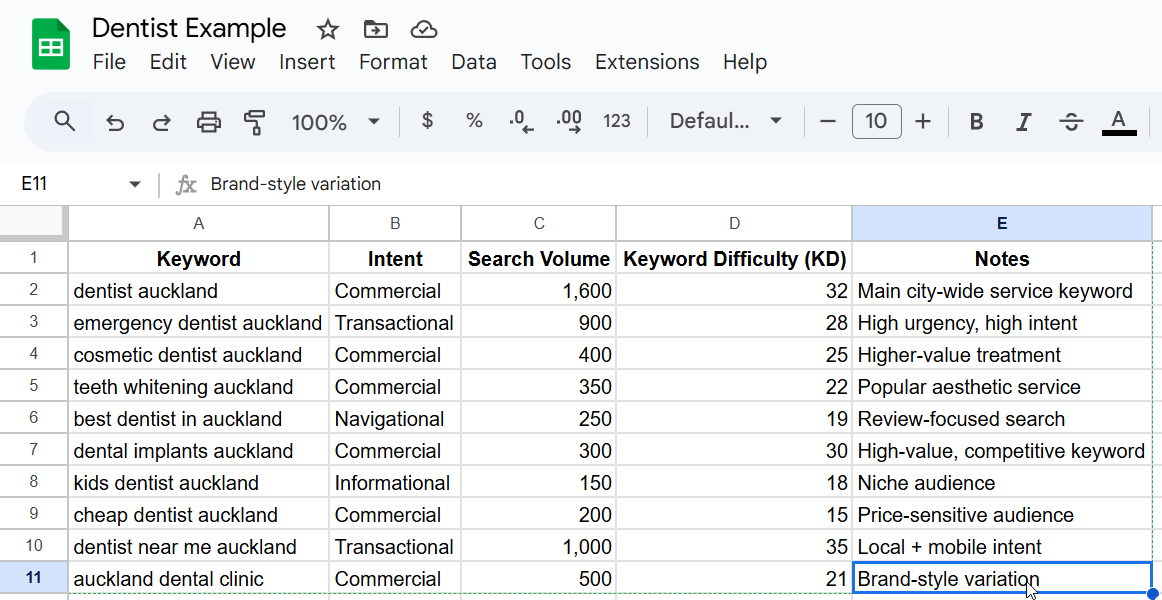
The intent behind a keyword tells you what kind of page it belongs on. Informational terms become blog content; commercial and transactional terms become service or product pages. Map them the wrong way round and the page won’t rank, because it won’t match what the searcher actually wants.
Take SEO for lawyers. Someone searching “what does a conveyancing lawyer do” wants to learn something: informational, so it’s a blog post.
Someone searching “conveyancing lawyer Auckland” wants to hire someone today: commercial, so it belongs on a service page. Same firm, two page types, decided entirely by intent.
And in a market as contested as Auckland SEO, mapping those commercial terms to proper service pages instead of burying them in blog posts is the difference between a page that books work and one that just gets read.
This is the bit most guides hand-wave, so here’s the full breakdown:
| Keyword example | Intent | Page type to map it to |
|---|---|---|
| “how does panel beating work” | Informational | Blog post |
| “best panel beater in Hamilton” | Commercial | Comparison or list-style blog post |
| “panel beater Hamilton” | Commercial | Service or location page |
| “book panel beater Hamilton” | Transactional | Booking or enquiry page |
This split matters more than ever now that AI Overviews lean heavily on informational queries to build their answers; Semrush put the informational trigger rate at around 39% in 2026.
Map an informational term to a clean, direct-answer page and you give it a real shot at being the source Google quotes.

Get this layer right and the rest of your SEO gets easier, because every page is finally pointed at the job it’s built for. Informational pages pull people in and build trust; commercial pages turn that trust into enquiries.
Mapping a Service Business: The Services x Locations Matrix
If you sell services in specific places, your map needs a second dimension. Every service you offer, crossed with every town you serve, and each cell worth targeting becomes its own page.
This is the part no overseas guide covers, because they’re busy mapping coffee beans and gardening blogs. For a Kiwi service business it’s the whole game.
Take a Hamilton plumber. Their services might be general plumbing, drain unblocking, hot water cylinder repair, and gas fitting. Their locations might be Hamilton, Cambridge, and Te Awamutu. Cross them and you get a grid:
| Service / Location | Hamilton | Cambridge | Te Awamutu |
|---|---|---|---|
| General plumbing | plumber Hamilton | plumber Cambridge | plumber Te Awamutu |
| Drain unblocking | drain unblocking Hamilton | drain unblocking Cambridge | drain unblocking Te Awamutu |
| Hot water cylinder repair | hot water repair Hamilton | hot water repair Cambridge | hot water repair Te Awamutu |
| Gas fitting | gas fitting Hamilton | gas fitting Cambridge | gas fitting Te Awamutu |
Not every cell deserves a page. “Dentist Hamilton” has real demand and earns a dedicated page. “Teeth whitening Te Awamutu” might get searched a handful of times a year, so that’s a mention on a broader page rather than a page of its own.
The matrix shows you the full universe of pages you could build; local keyword research tells you which ones are worth it.
Build this grid once and your entire location and service page plan is sitting in front of you. It’s also how SEO for plumbers, sparkies, and every other trade actually scales: not by writing more blog posts, but by covering every service-and-place combination that has people searching for it.
The same logic runs through SEO in Hamilton or any regional market, where depth across services and suburbs beats one thin “services” page every time.
Use Your Map to Find and Fix Cannibalisation
When two rows in your map point different pages at the same primary keyword, that’s keyword cannibalisation, and the map is the fastest way to catch it. Sort by primary keyword, scan for duplicates, and you’ve found your competing pages in about ten seconds.
Here’s why it bites. When two of your pages chase one term, Google can’t tell which to rank, so it often ranks neither well.
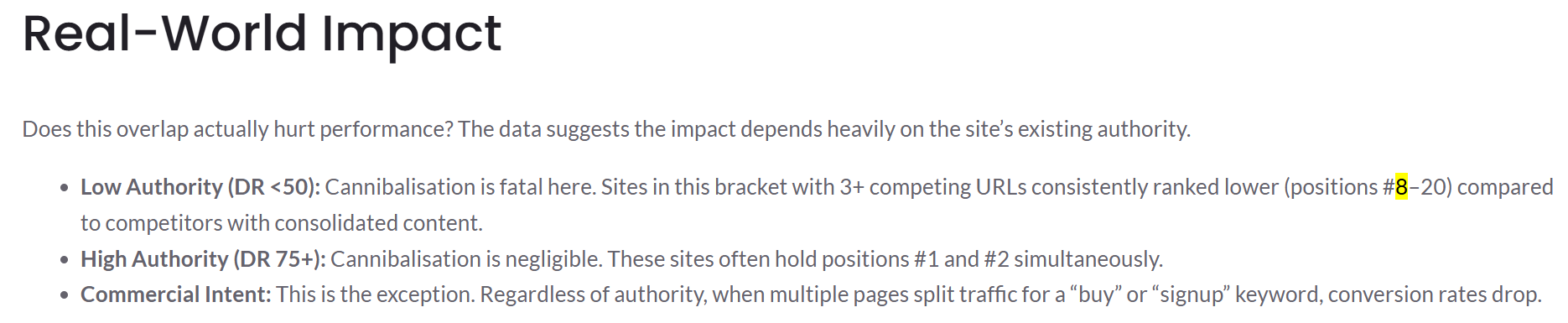
A 2026 study of low-authority sites found that pages with three or more competing URLs for the same keyword consistently landed back at positions 8 to 20, while competitors who’d consolidated sat up the top.
For a smaller NZ site without much domain authority, that’s not a minor wobble; it’s the gap between page one and oblivion.
The fix is a judgment call, with three options:
- Merge the weaker page into the stronger one and 301 redirect it.
- Re-map one of them to a different keyword so they stop overlapping.
- Leave both alone if they genuinely serve different intent (a blog post and a service page can share a term without fighting).
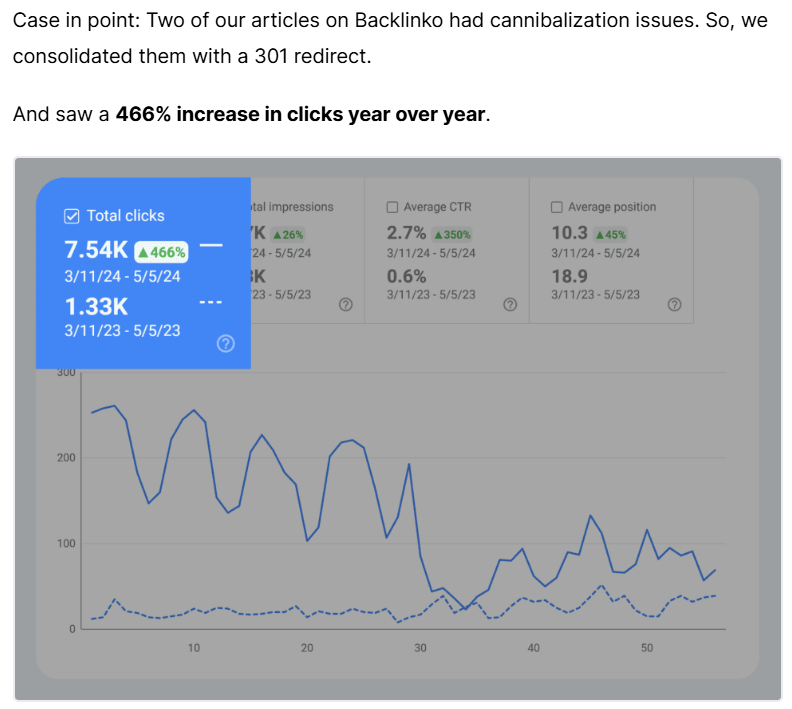
When Backlinko found two of their own articles cannibalising “SEO tools”, they consolidated with a redirect and traffic to the surviving page jumped 466% in eight weeks. One page doing the work of two, done properly.
This is also the single best reason to map an existing site retroactively. Say a Christchurch builder has piled up forty pages over five years with no plan; odds are good a few of them are quietly competing.
Mapping what’s already there surfaces the overlaps, and a proper SEO audit turns that into a fix list.
Some of the quickest wins I’ve found for SEO in Christchurch trades sites, and SEO for builders in particular, came from exactly this: not new content, just untangling the pages already there.
Keep Your Map Alive
A keyword map is a living document, not a launch task you finish once. It tells you what to publish next, what to update, and where the gaps still are.
A map that gets built once and abandoned slowly drifts out of date, and then you stop trusting it.
The fix is simple: revisit it whenever you publish, whenever rankings shift, and at least once a quarter for a proper review. One person owns it. Every new page gets added the moment it goes live.
This is genuinely how the work gets done at our SEO company. The map drives the content calendar, because the next post is whatever the highest-value gap says it should be.
It feeds the internal linking, because the map already knows the topic of every page. It’s the backbone the rest of a proper SEO plan hangs off.
It also keeps every informational page pointed at one clear question, and those are exactly the pages that get pulled into AI answers; brands cited in AI Overviews earn roughly 120% more clicks than uncited ones on the same search.

Here’s the part worth sitting with. This site went from a brand-new domain to outranking NZ agencies with a decade’s head start, inside its first year.
Not because of a trick, but because every page was mapped before it was built, so nothing competed, nothing was wasted, and the whole site pulled in one direction.
Most agencies here have nowhere near the years I spent cutting my teeth against the brutal competition in the United States (humbly), and it still comes down to something this unglamorous: a spreadsheet, kept honest.
When to Map It Yourself vs Hire an SEO
A small site you can map yourself in an afternoon. A forty-page service business across ten towns is a different animal.
If you’ve got a handful of pages, some patience, and a willingness to learn the intent side, do it yourself. This guide has everything you need to start. The map is the one SEO task where the thinking matters more than the tools, and nobody knows your services and your patch better than you do.
Where it earns its keep handing off is scale and stakes.
A big services x locations grid, a site that’s already a tangle of cannibalising pages, or a competitive market where every position is fought over is where professional SEO help pays for itself, because the mapping has to be right before a single page gets built or rebuilt.
Get it wrong at scale and you bake the problems in.
If that’s where you’re sitting, you can hand the whole thing over, or just work with an SEO consultant to get the map right and run the build yourself. Either way, the map comes first. Always has. That’s where we come in.