Key Takeaways
- What it is: Technical SEO is the work of making sure search engines (and now AI) can find, read, and understand your website — the behind-the-scenes plumbing that lets your content rank at all.
- Think of it as your site’s plumbing. Boring, invisible, nobody admires it — but when a pipe bursts, nothing works.
- It sits under the other three types of SEO (on-page, off-page, local). Get it wrong and the best content on your site can still earn nothing.
- The issues aren’t equal. A page that isn’t indexed can never rank. A slow-loading page just ranks a bit lower. Fix them in that order.
- The two tools you’ll reach for most are Screaming Frog (crawls your site the way Google does) and Semrush Site Audit (an ongoing health score with a prioritised fix list).
- Most New Zealand sites I audit don’t have many technical problems — but they have just enough to cause a problem. Usually you’re finding two or three leaks, not rebuilding the house.
What Is Technical SEO?
Technical SEO is the work of making sure search engines and AI can find, crawl, read, and understand your website — the behind-the-scenes plumbing that lets your content rank in the first place.
Think about your house for a second. You’ve got nice furniture, good paint, a kitchen you’re proud of. Nobody walks in and compliments the plumbing. Nobody thinks about the pipes at all.
Until one bursts. Then the pipes are the only thing you care about, because the beautiful kitchen is now underwater.
Technical SEO is the plumbing of your website. On-page and content are the furniture — the stuff people actually see. Technical SEO is the pipework behind the wall making sure everything runs. You don’t notice it when it’s working. You very much notice it when it isn’t.
When people say “back-end” or “infrastructure” or “code,” that’s all they mean: the parts of your website you don’t see as a visitor, but Google does. Your sitemap, your redirects, how your pages link together, whether a page is even allowed to show up in Google. Plumbing.
And it matters more than it sounds, because Google’s own guidance is blunt about it: without a solid technical foundation, even your best content struggles to rank. The content can’t save you if the plumbing’s leaking.
How Search Engines Actually Use Your Site: Crawl, Render, Index, Rank
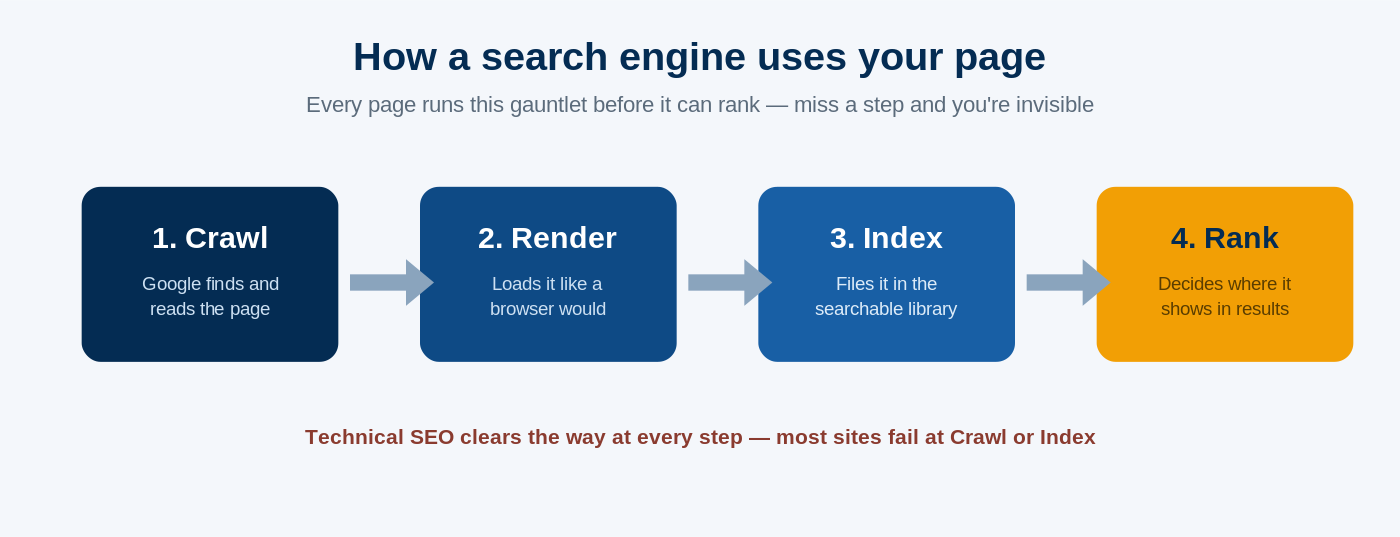
Before a single page of yours can rank, Google has to do four things with it — and technical SEO is about clearing the way at each step.
Here’s the four-step journey every page takes:
Crawl. Google’s bot (Googlebot) arrives and reads the page, following links to find your other pages. Think of it as Google walking through your site.
Render. Google loads the page the way a browser would, to see what’s actually on it — text, images, layout.
Index. Google files the page away in its enormous library of pages it could show people.
Rank. When someone searches, Google pulls from that library and decides what order to show things in.
Miss any step and you’re invisible. If Google can’t crawl a page, it never gets read. If it can’t render, Google might miss half your content. And if a page never gets indexed, it can’t rank at all — no matter how good it is. It’s not in the library, so it can never be picked off the shelf.
That “never indexed” failure is the worst one there is. Hold onto it — there’s a real New Zealand example coming that’ll show you exactly how much it can cost.
Where Technical SEO Fits: The 4 Types of SEO
Technical SEO is one of four types of SEO, and it’s the foundation the other three stand on.
People get these tangled constantly, so here’s the clean version:
| Type of SEO | What it is | Example task |
|---|---|---|
| On-page SEO | Optimising the content and elements on a page | Writing a page that answers “panel beater Hamilton,” setting the title and headings |
| Off-page SEO | Building your site’s authority off your site | Earning backlinks from other websites |
| Technical SEO | Making sure search engines can crawl, index and understand your site | Fixing a page that’s blocked from Google, submitting a sitemap |
| Local SEO | Ranking in location-based searches and the map pack | Optimising your Google Business Profile |
So when the People Also Ask box asks “what’s the difference between technical SEO and SEO?” — technical SEO is SEO. It’s just one slice of what SEO actually is. SEO is the whole pie.
The one that trips people up most is technical vs on-page, because they overlap at the edges. On-page SEO is about making a page good for a search — the right words, the right structure.
Technical SEO is about making sure Google can reach and read that page in the first place. One’s the meal; the other’s whether the kitchen door is unlocked.
And no, a backlink isn’t technical SEO. That’s off-page. Getting that boundary right saves you a lot of confusion when someone’s quoting you for “technical work.”
Why Is Technical SEO Important?
Technical SEO matters because if a search engine can’t crawl or index your page, nothing else you do to it counts. The best page on your website earns nothing if Google can’t see it.
Let me give you a real one.
I audited a New Zealand dental practice a while back. Nice site, good services, competitive area. But their dental implants page — one of the highest-value pages a dental practice can have, the kind of treatment worth thousands per patient — simply wasn’t indexed.
Not ranking badly. Not on page seven. Not in Google at all. A technical issue was quietly telling Google to leave it out, and it had been sitting there invisible for who knows how long.
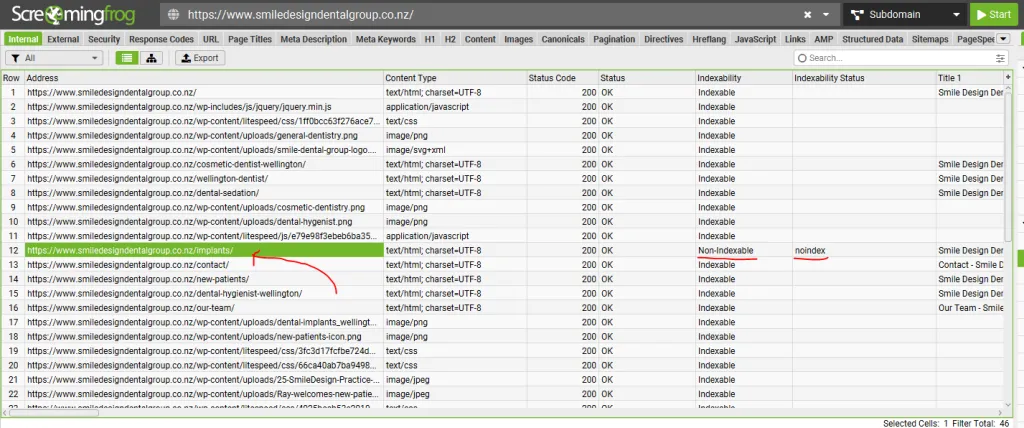
Think about what that costs. Implants are the money treatment. Every month that page sat un-indexed, every “dental implants [their city]” search went to a competitor.
No amount of good copywriting on that page could fix it, because the copy was never the problem. Google was never allowed to see it.
The kicker? A basic technical audit would’ve caught it in about ten minutes. That’s the whole point of technical SEO — it finds the leak before it floods the house.
Now, before you panic and assume your site is riddled with these — here’s the honest bit most agencies won’t tell you.
Most New Zealand websites I audit don’t have many technical problems. But they have just enough to cause a problem.
You’re usually not rebuilding the site. You’re not facing a hundred errors. You’re finding two or three things — a page blocked here, a broken redirect there, a money page quietly de-indexed — and fixing them. A couple of leaks. But a couple is all it takes when one of them is sitting under your most profitable page.
And here’s the flip side — what good plumbing actually does for you.
My own SEO company is on a domain less than a year old. It’s up against NZ agencies that have been building their sites for a decade.
Despite that, it’s ranking for 233 keywords and pulling around $3,500 a month in traffic value in about eight months.
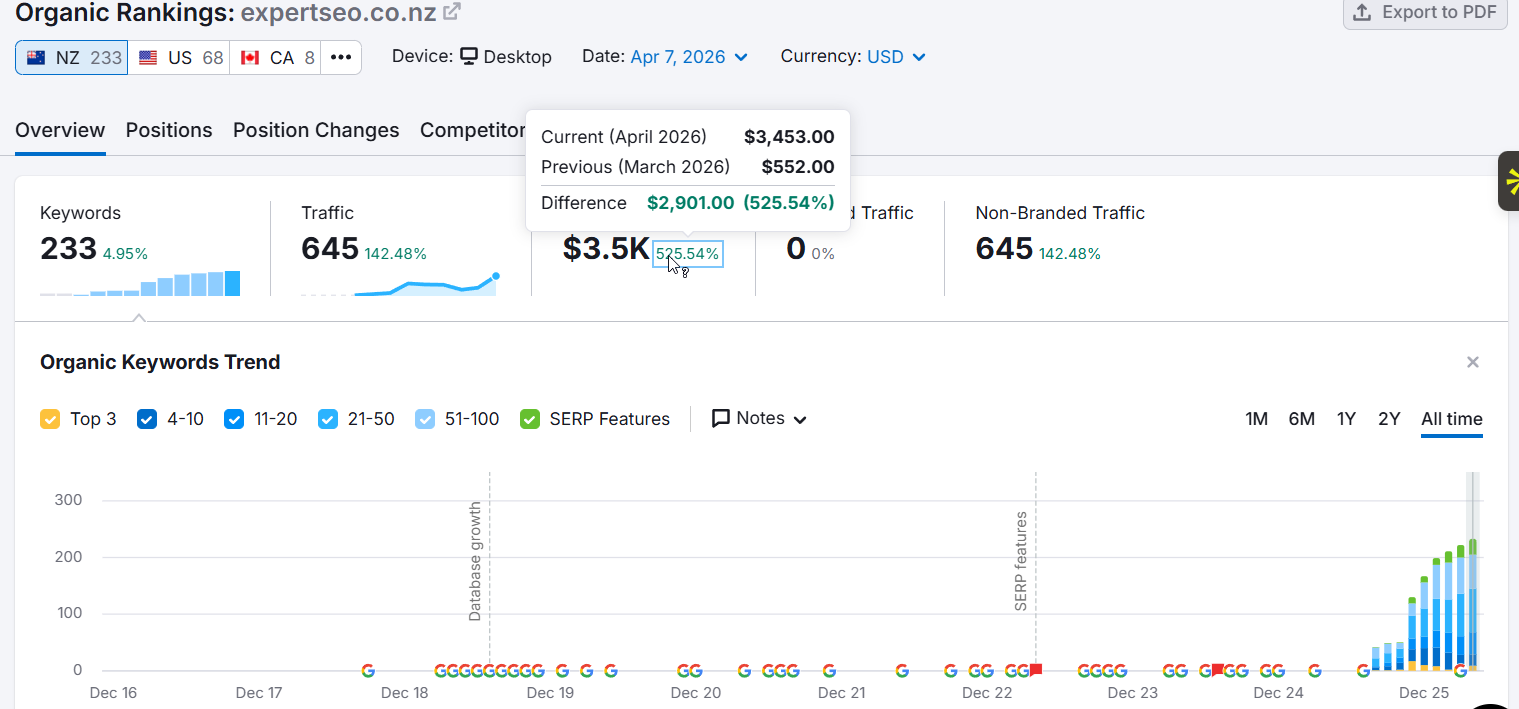
It’s also sitting at a Domain Rating of 36 on a domain that new.

And it’s already being cited in Google’s AI Mode.

None of that happens if the plumbing’s broken. You can’t rank, get cited, and grow that fast on a new domain if Google’s tripping over your site on the way in.
The technical foundation is what lets everything else compound.
It’s the same thing I saw years ago growing a health site, HealthVI, from zero to over 20,000 monthly organic visitors. Great content did the heavy lifting — but only because Google could crawl and index every piece of it cleanly.

And this matters more now, not less. AI search — ChatGPT, Google’s AI Overviews, AI Mode — still needs to crawl and read a clean, well-structured page before it can cite you.
Broken plumbing doesn’t just cost you rankings anymore. It costs you AI visibility too.
The Technical SEO Issues That Actually Cost You Money
Not every technical issue matters equally. This is the single biggest thing every other guide gets wrong — they hand you a flat list of fourteen things to fix and leave you to guess what’s urgent.
So here’s how I actually triage it. Three tiers. Fix them in order.
Tier 1: Can Google See and File Your Pages? (Fix This First)
This tier decides whether you rank at all. Everything here is about crawling and indexing — the first steps in that journey we covered earlier. Get these wrong and nothing else you do matters.
Pages that aren’t indexed. This is the dental implants problem. A page that isn’t in Google’s index can’t rank, full stop. The usual culprits are a stray “noindex” tag left on after a site build, or the page being blocked in your robots file.
How to check: Google Search Console (free) → the Pages report. It lists every page Google has indexed and, more importantly, every one it hasn’t — with the reason.
You’ll see labels like “Crawled – currently not indexed” or “Excluded by ‘noindex’ tag.” That report is the first place I look on any audit.
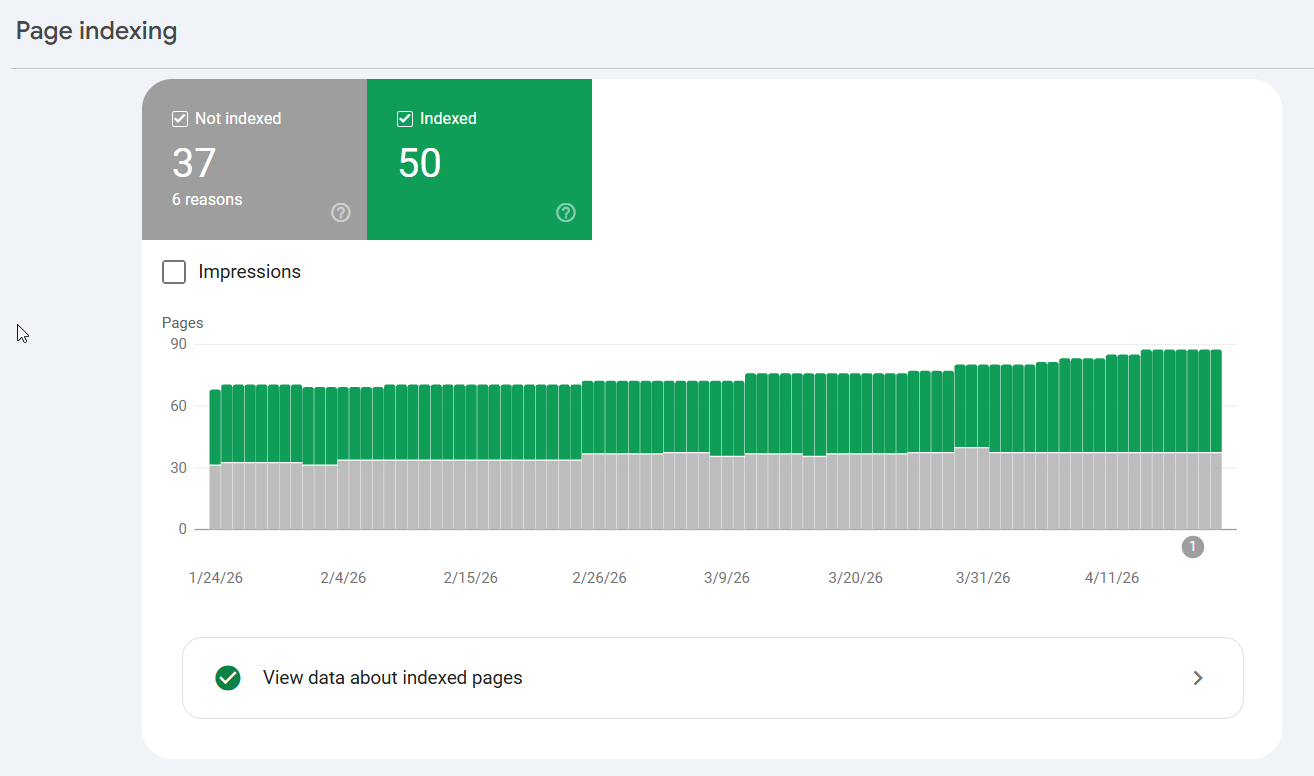
How to fix: remove the stray noindex tag, or unblock the page in robots.txt. Often a five-minute job once you know it’s there.
Who fixes it: you can usually do the checking yourself. The fix sometimes needs a developer if it’s baked into a template.
Robots.txt blocking the wrong things. Your robots.txt file is a small text file that tells Google where it can and can’t go. Handy — unless it’s accidentally blocking a section you actually want ranked. It happens more than you’d think, usually left over from when the site was being built.
Broken internal links and orphan pages. If a page has no links pointing to it from anywhere else on your site (an “orphan”), Google struggles to find it. Broken internal links send both Google and your visitors into dead ends.
One thing you can safely ignore: crawl budget. You’ll read scary articles about it. For a normal NZ business site under about 10,000 pages, it’s a non-issue. If someone’s trying to sell you a “crawl budget optimisation” package for your 40-page plumbing site, that’s a red flag.
Tier 2: Can Google Understand and Value Your Pages?
Once Google can see your pages, this tier helps it understand and rank them properly.
Site architecture and internal linking. How your pages link together forms a map. A clean structure — homepage → main service pages → supporting content — helps Google understand what’s important and how it all connects. A flat, tangled mess of links doesn’t.
Canonical tags and duplicate content. Sometimes the same page exists at several URLs (a classic on Shopify and WooCommerce stores). A canonical tag tells Google “this is the main version, ignore the duplicates.” Without it, Google splits the ranking power across copies, or picks the wrong one.
Structured data (schema). Schema is a bit of code that spells out what your content is — this is a review, this is a product, this is an FAQ — in a language search engines read perfectly. It’s what earns you those rich results (star ratings, FAQs) in the search listings.
It’s also quietly become an AI-visibility play. Schema markup shows up on 61% of ChatGPT-cited pages versus just 25% of standard Google results — the pages AI quotes are far more likely to have it.

You can check your own markup is valid in seconds with the free Schema.org validator.
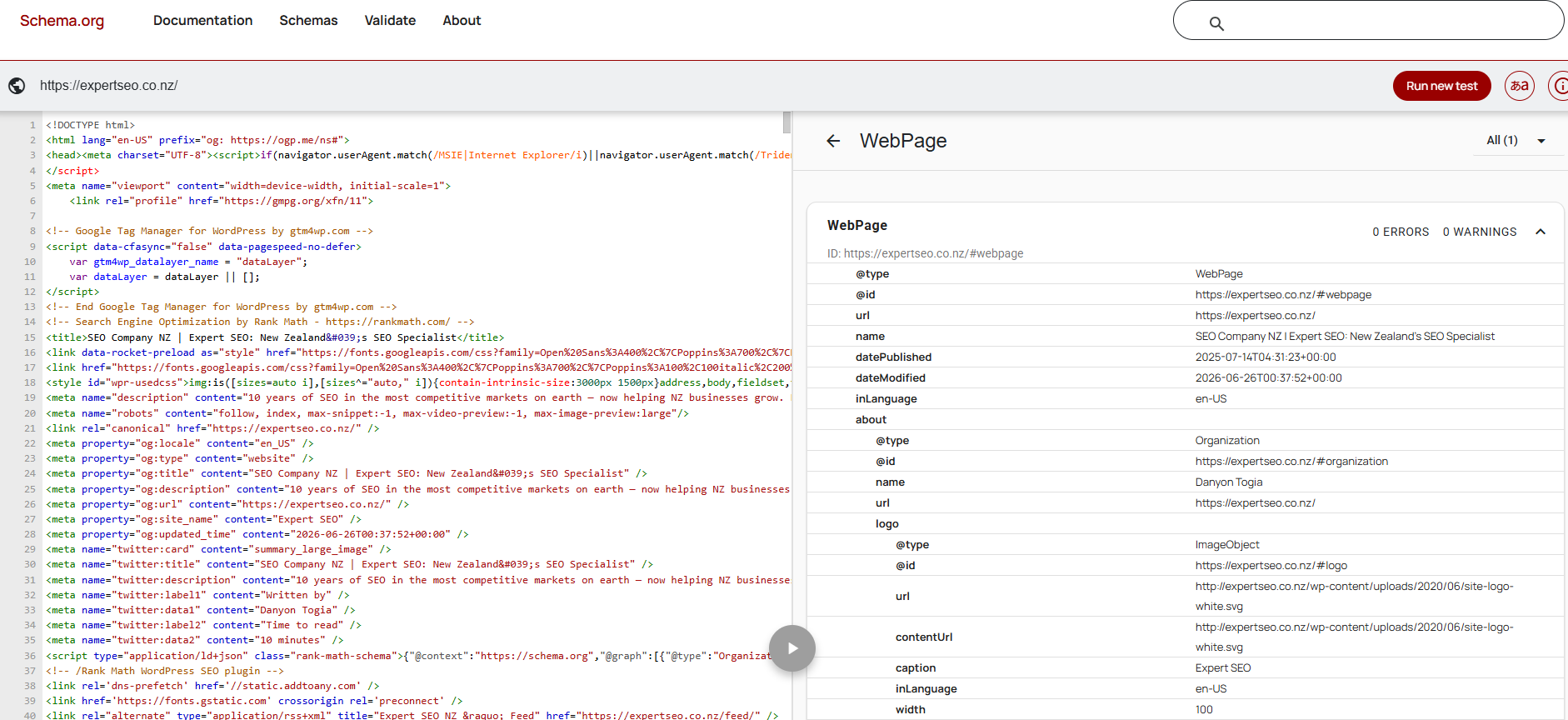
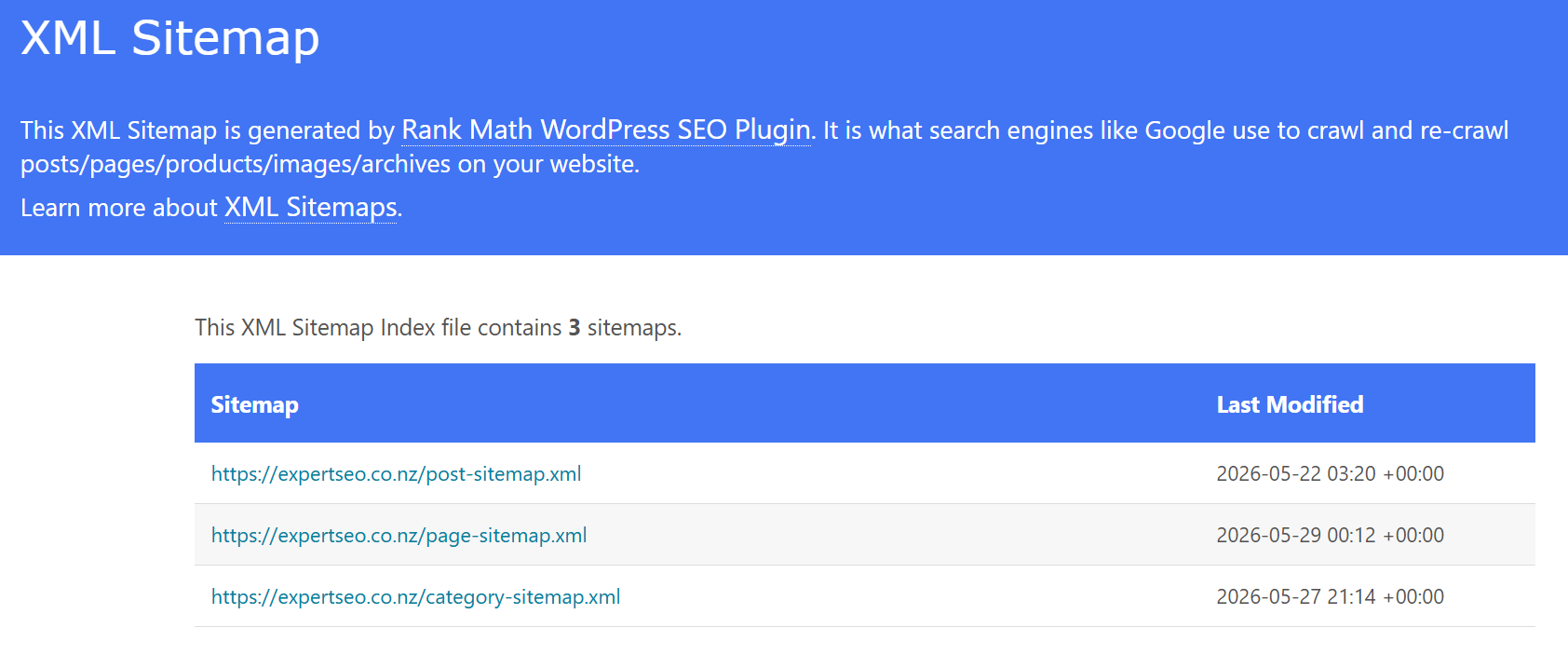
XML sitemap. A sitemap is a list of your important URLs that you hand to Google so it can find everything.
Most NZ sites on WordPress, Shopify or Squarespace generate one automatically — you just need to submit it in Search Console.
Tier 3: Polish (Do This Once Tiers 1 and 2 Are Sorted)
None of this is worthless — but if your money page isn’t indexed, do not spend a Saturday chasing a PageSpeed score. Order matters.
- HTTPS/SSL — the padlock in the browser bar. If your site still shows “Not secure,” that’s worth fixing (and it’s what the “SSL certificate” question in the People Also Ask is about — it solves the not-secure warning).
- Mobile-friendliness — your site displaying properly on phones. Most modern NZ websites handle this out of the box, but it’s worth a look, since the bulk of local searches happen on mobile.
- Redirect chains — when an old URL redirects to another URL that redirects again. Tidy them into single hops.
- Broken external links — links from your site to pages that no longer exist. Minor, but easy to clean up.
Page speed sits here too — but Core Web Vitals gets its own section next, because there’s a mistake doing the rounds that’s worth clearing up.
Core Web Vitals in 2026: LCP, INP and CLS
Core Web Vitals are three metrics Google uses to measure the experience of a page: how fast it loads, how quickly it responds, and how stable it is while loading.
Here’s the current set for 2026:
- Largest Contentful Paint (LCP) — loading. How long until the main content appears. Aim for 2.5 seconds or less.
- Interaction to Next Paint (INP) — responsiveness. How quickly the page reacts when someone taps or clicks. Aim for 200 milliseconds or less.
- Cumulative Layout Shift (CLS) — stability. How much the page jumps around as it loads (you know the feeling — you go to tap a button and an ad shoves it out of the way). Aim for 0.1 or less.
Now here’s the part worth knowing, because it’s a quick way to spot outdated advice.
First Input Delay (FID) is dead. Google replaced it with INP on 12 March 2024. If you land on a “technical SEO” guide in 2026 still teaching FID as a Core Web Vital — and some big, well-known ones still do — you’re reading advice that’s over two years out of date.
It’s a handy test for whether a source is current.

Two honest points about Core Web Vitals. First, you can check yours free in about thirty seconds at PageSpeed Insights or in the Core Web Vitals report inside Search Console. Second — don’t lose your head over it.
Core Web Vitals is a real ranking factor, but a minor one. A page that loads a touch slow will still outrank a fast page that answers the question better. Don’t let a red speed score scare you into ignoring the Tier 1 stuff that actually decides whether you rank.
How to Run a Basic Technical SEO Audit Yourself
You don’t need to be a developer to run a first-pass technical audit. Google Search Console plus a crawl of your own site will surface almost every issue that actually matters — for free or close to it.
Here’s the exact process I’d follow.
Step 1: Start With Google Search Console (Free)
If you do nothing else, do this. Search Console is Google telling you, in its own words, how it sees your site.
Set it up (it’s free), then open the Pages report under Indexing. This shows you what’s indexed and what’s not — and the reasons. Read the not-indexed labels carefully:
- “Crawled – currently not indexed” — Google saw it but chose not to index it. Often a quality or duplicate signal.
- “Discovered – currently not indexed” — Google knows it exists but hasn’t crawled it yet.
- “Excluded by ‘noindex’ tag” — you’re actively telling Google to leave it out. This is the one that hid the dental implants page.
If a page you care about is in that not-indexed list, you’ve found a Tier 1 problem. Start there.
Step 2: Crawl Your Site With Screaming Frog
This is the first of the two tools you’ll use most. Screaming Frog is a crawler — it walks your entire site the way Googlebot does and reports back everything it finds. The free version crawls up to 500 URLs, which covers most NZ small-business sites comfortably.
Point it at your domain, let it run, and it’ll surface:
- Pages that can’t be indexed (there’s the dental fault again — a crawl catches it instantly)
- Broken internal and external links
- Redirect chains
- Missing page titles and meta descriptions
- Orphan pages nothing links to
This is the single most useful hour you can spend on your own site’s technical health. You’re seeing exactly what Google sees when it walks through the door. (That dental implants page from earlier? This is the tool that caught it.)
Step 3: Use Semrush Site Audit for the Ongoing Health Check
The second core tool. Where Screaming Frog is a deep one-off crawl, Semrush Site Audit gives you a site health score out of 100 and — the bit that matters — a prioritised list of issues, sorted by severity.
It tells you what to fix first instead of leaving you to guess.
It’s the one I’d run monthly. Set it going, and it re-checks the site and flags anything new that’s crept in — a page that dropped out of the index, a redirect that broke, a batch of new errors after a site update.

Step 4: Turn It Into a To-Do List, In Order
Now you’ve got output from three sources. Don’t try to fix everything. Sort what you found into the three tiers:
- Tier 1 first — anything about indexing or crawling. Money pages not indexed, important sections blocked. Fix these this week.
- Tier 2 next — architecture, canonicals, schema, sitemap.
- Tier 3 last — the polish.
Work top down. Nine times out of ten, the thing that’s actually holding you back is sitting in Tier 1, and it’s a smaller fix than you feared.
And when the audit turns up something you’re not comfortable touching — a rendering issue, a bulk redirect job, anything buried in the site’s code — that’s the point to bring in a developer or an SEO consultant. No shame in it. Knowing what’s wrong is most of the battle, even if someone else turns the wrench.
Real Technical SEO Examples
The fastest way to understand technical SEO is to see real faults and what fixing them does. Abstract lists don’t stick; examples do.
The un-indexed money page. The dental implants example from earlier. A high-value page carrying a “noindex” tag, invisible to Google. Fix: remove the tag, request indexing in Search Console. Result: the page can finally rank for the searches that actually bring in patients.
The noindex left on after a rebuild. Incredibly common. When a site’s being built, developers block Google from seeing the work-in-progress. Then launch day comes and someone forgets to switch it back off.
The whole site goes live… and stays invisible to Google for weeks. For an Auckland business in a competitive market, that’s months of leads handed to rivals over one missed tick-box — exactly the kind of thing Auckland SEO services exist to catch.
The Shopify duplicate URL mess. Shopify loves creating multiple URLs for the same product (through its collections structure). Without canonical tags pointing to the main version, Google splits the ranking signals across the copies. Fix the canonicals and you consolidate that power back onto one page.
The redirect chain slowing everything down. An old WordPress site I looked at had URLs redirecting three and four hops deep — page A to B to C to D. Every hop adds delay and bleeds a little ranking power. Tidying them into single, direct redirects cleaned it up immediately.
None of these are exotic. They’re the everyday leaks I find on otherwise healthy NZ sites — the “just enough to cause a problem” issues.
Technical SEO for AI Search
AI search still runs on crawlable, well-structured pages. Technical SEO is how you stay eligible to be cited by AI, not just ranked by Google — and there are a couple of AI-specific traps worth knowing.
The foundation is the same. Before ChatGPT or Google’s AI Overview can quote your page, something has to crawl and read it. Crawlable equals citable. Broken plumbing keeps you out of AI answers the same way it keeps you out of rankings.
Two traps catch people out:
Cloudflare now blocks AI crawlers by default. If your site runs through Cloudflare (a lot do), there’s a decent chance AI crawlers are being blocked from your content automatically. If you want to be visible in AI search, that’s a setting worth checking.
JavaScript-only content can be invisible to AI. Most AI crawlers don’t run JavaScript. If your important content only appears after JavaScript loads — common on some modern site builds — an AI crawler may see a blank page. Keep the content that matters in the actual HTML.
Schema helps here too, which is why it’s worth the effort. It hands machines a clean, labelled version of your content — and as we saw, the pages AI cites are far more likely to have it.
This isn’t theory for me. Expert SEO’s own pages are being cited by name in AI answers about NZ search — on that same under-a-year-old domain.
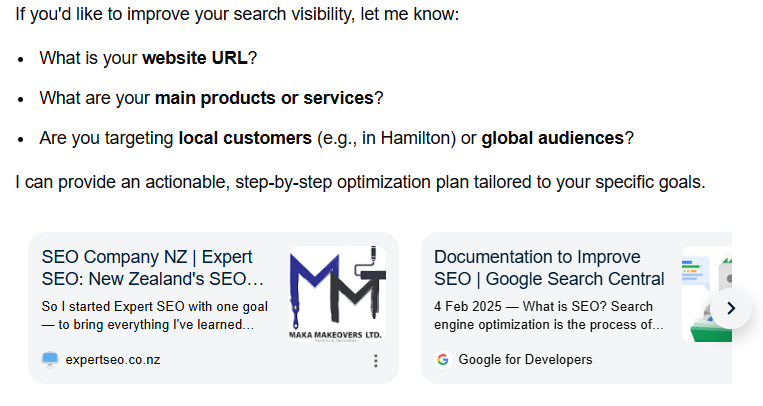
That only happens because the technical setup underneath is clean enough for the crawlers to read every page.
Final Thoughts
If you remember one thing, make it this: technical SEO is your plumbing, and plumbing only gets attention when it leaks.
The mistake I watch NZ businesses make over and over is spending on more content and more backlinks while a Tier 1 leak quietly sinks their best page. It’s like renovating the kitchen while water’s pouring through the ceiling.
More content on a page Google can’t index is more effort earning nothing.
So if it were my money, here’s what I’d do before spending another cent on content: open Search Console, run Screaming Frog, and find out whether Google can actually see your money pages.
Most of the time you’ll find your site is basically healthy — a couple of small leaks, nothing more. But every now and then you find a dental-implants page sitting invisible, and fixing that one thing is worth more than a year of blog posts.
And if you’d rather not crawl your own site at all, that’s what our search engine optimisation services are for — we find the leaks and fix them.
Check the plumbing first. Then go build the beautiful house on top of it.
Technical SEO: FAQ
What are the 4 types of SEO?
The four types are on-page SEO, off-page SEO, technical SEO, and local SEO. On-page is optimising your content and pages, off-page is building authority through backlinks, technical is making sure search engines can crawl and index your site, and local is ranking in location-based searches and the map pack.
What are the 4 pillars (or 5 components, or 3 C's) of SEO?
These are all just different ways of slicing the same thing. Most models come back to the same core: technical foundation, on-page content, off-page authority, and (for local businesses) local signals. Don't get hung up on whether it's "4 pillars" or "5 components" — the work is the same.
Is technical SEO a technical skill?
Partly. Running the audit — checking Search Console, crawling with Screaming Frog — isn't technical and any business owner can learn it. Some of the fixes (editing code, handling bulk redirects, JavaScript rendering) are more technical and are worth handing to a developer or SEO.
Can ChatGPT do SEO?
It can help — drafting content, explaining concepts, suggesting ideas. But it can't crawl your site, read your Search Console, or make the actual fixes. It's an assistant, not the mechanic.
Is SEO dead in 2026?
No — it's shifting, not dying. Google search volume grew over 21% in 2024 even with AI Overviews around, and technical SEO matters more for AI search, not less, because AI still needs crawlable, well-structured pages to cite. The fundamentals haven't changed.
What technical SEO issue can you solve with an SSL certificate?
An SSL certificate enables HTTPS, which secures the connection between your site and its visitors and removes the "Not secure" warning browsers show on unsecured sites. It's a basic trust and security signal.
Are backlinks technical SEO?
No. Backlinks are off-page SEO — they're about building your site's authority from other websites. Technical SEO is about your own site's crawlability and structure.
How long does technical SEO take?
The fixes themselves can be fast — removing a noindex tag or fixing a redirect can be a same-day job. The ranking impact follows once Google re-crawls and re-indexes the page, which can take anywhere from a few days to a few weeks.