I’m about to show you the best keyword research tools for New Zealand businesses — the exact ones I use every day, on my own sites and my clients’.
Not a list I copied off Google. These are the tools I’ve built real businesses with.
I grew HealthVI from zero to over 20,000 organic visitors a month.

With my former business partner and SEO mentor Ian Pribyl, I helped take StoppingScams past 5,000 visitors a day.

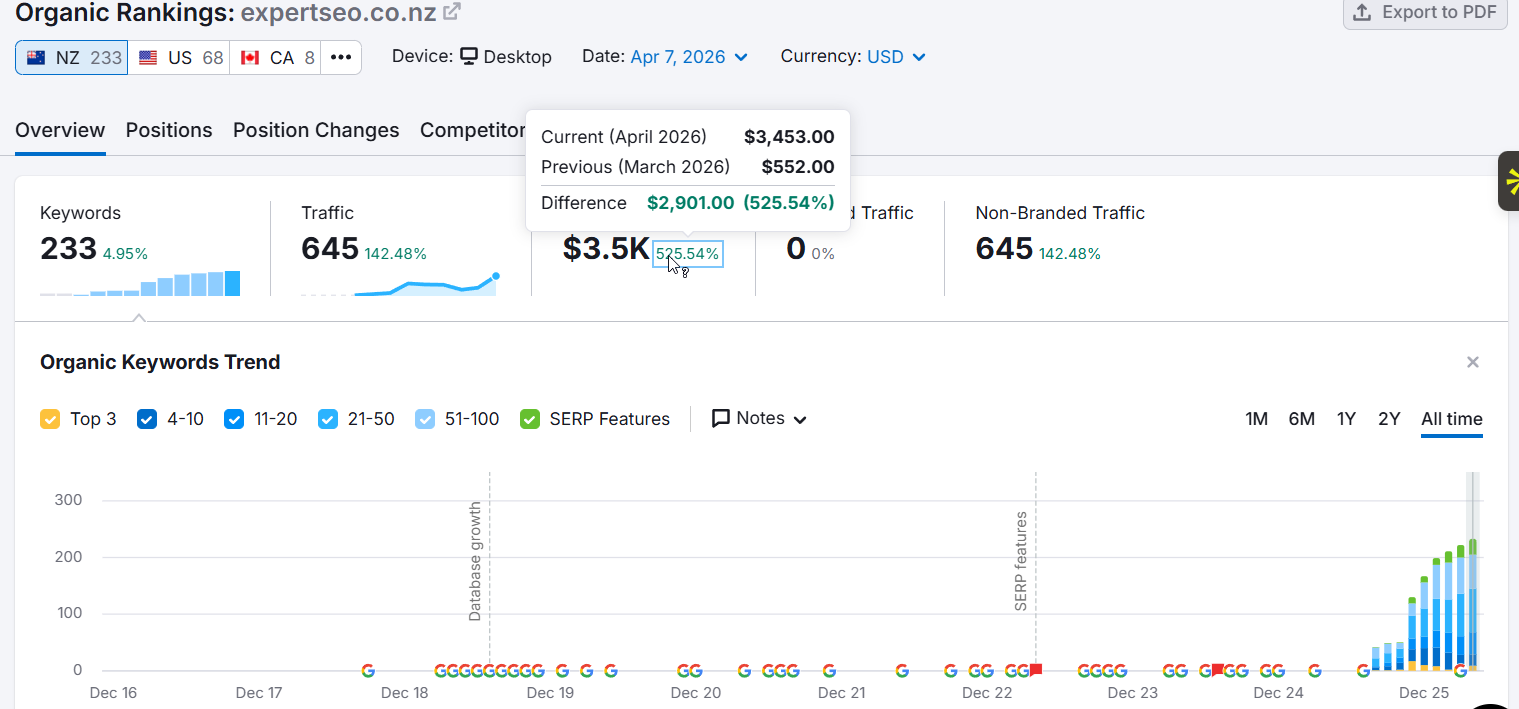
And my own NZ agency, Expert SEO, ranked #1 in New Zealand for “local SEO” — above Ahrefs and Semrush’s own pages — has been cited in Google’s AI Mode, and hit a Domain Rating of 36 in under a year.

Every one of those was built on the keyword research these tools make possible.
This piece is about the tools themselves — if you want the full step-by-step of the research process, that’s the keyword research guide.
Right, let’s get into it.
Best Keyword Research Tools at a Glance
Each of these is the best tool — within its own job. Here’s the quick version before I get into the why:
| Tool | Best for | Free option | Rough price (2026) |
|---|---|---|---|
| Google Keyword Planner | Trustworthy volume data, straight from Google | Yes (free Google Ads account) | Free |
| Semrush | Depth and competitor data for serious content | Limited free | ~US$140/mo |
| Ahrefs | Pure SEO and backlink analysis | Ahrefs Free | ~US$110–130/mo |
| Mangools (KWFinder) | Beginners who want clean, readable data | Limited free | ~US$49/mo |
| ChatGPT | Starting from scratch and brainstorming when you’re stumped | Yes | Free (Plus from ~US$20/mo) |
| AnswerThePublic | Conversational queries and related topics | Yes (limited daily) | Paid tiers available |
The table’s the shortcut. The reasons are where it matters — so let me walk you through the ones I actually use.
What Is the Best Keyword Research Tool?
The best keyword research tool for most New Zealand businesses is Google Keyword Planner paired with one paid tool — Semrush, Ahrefs, or Mangools — depending on your budget and how deep you go.
There’s no single winner, and anyone who tells you there is usually sells it.
A keyword tool has two jobs: help you find the words people type into Google, and help you judge whether you can realistically rank for them.
Some nail the first job and fumble the second. The best tool is the one that does both, for the job in front of you.
For the decade I’ve been doing this, the tool I open first has never changed: Keyword Planner, straight from Google. Everything else earns its place around it.
What Makes a Keyword Research Tool Good?
This is the part the affiliate roundups skip: why these tools and not the other ninety.
Here’s what I judge a keyword tool on:
- Where the data comes from. Google’s own data beats a third-party estimate every time.
- Accuracy. Not just volume — how honest the tool is about difficulty and who you’re really up against.
- Idea depth. Does it surface keywords you’d never have thought of, or just echo what you typed in?
- Ease of use. A powerful tool you dread opening is worse than a simple one you actually use.
- Price versus value. Some of these cost more per month than a small NZ business spends on marketing full stop.
- Does it even work here. Plenty of tools “support” New Zealand and still hand you a screen full of dashes.
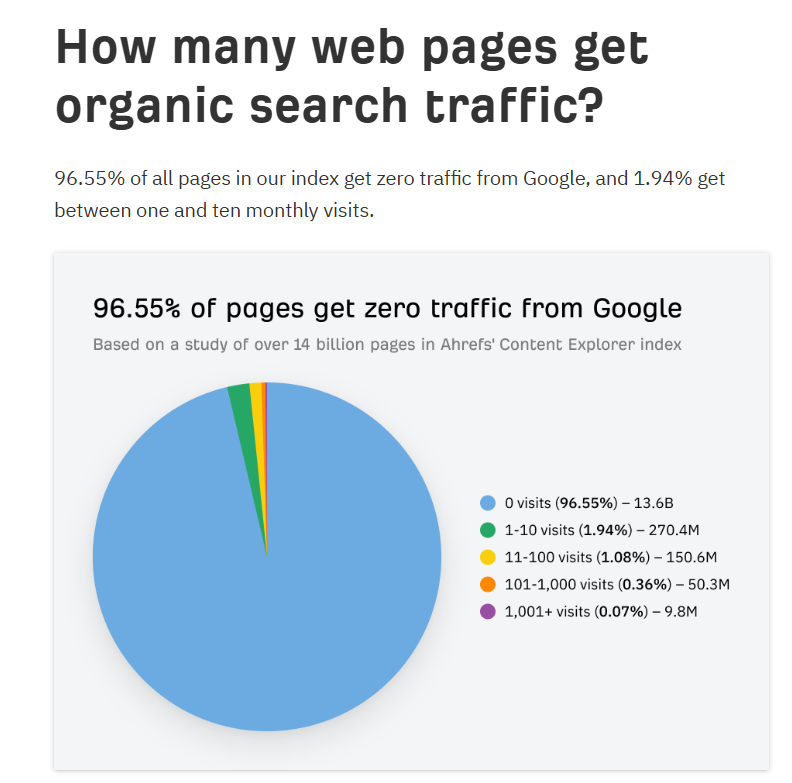
Picking right isn’t optional. Ahrefs studied around 14 billion pages and found that about 90% of them get no traffic from Google at all — mostly because they were never worth linking to.
Most of those pages target the wrong keyword. The tool you choose is the first domino.
My Favourite Keyword Research Tools
These are the ones I keep coming back to. Not because a brand deal told me to, but because after ten years, these are what’s still open in my browser tabs.
Google Keyword Planner
Google Keyword Planner is free, and it pulls straight from Google’s own advertising data — which makes it the tool I trust most for a straight answer on real demand.
Every other tool is estimating what Google knows. Keyword Planner is Google, telling you directly. No middleman, no second-guessing.
Here’s how to get into it:
- Sign in to Google Ads (no account? Make one — it’s free, and you never have to run a single ad).
- Click Tools in the top menu, then under Planning, open Keyword Planner.
- Hit Discover new keywords, type your seed keyword, and set the location to your city — Auckland, Hamilton, wherever your customers are.
- Read the columns: search volume range, competition, and average cost-per-click.
That last column is quietly the most useful thing on the page.
A high cost-per-click means advertisers are paying good money to show up for that term — which tells you it carries commercial intent. Someone searching it is closer to buying. And it’s all on one screen: volume, intent, related suggestions, city-level targeting.
The knock on it is the ranges: “10–100” instead of “40.”
But like I said, nobody’s numbers are truly exact, and Google’s ranges come from the biggest dataset on earth. I’ll take an honest range from Google over a made-up decimal from a smaller database any day.
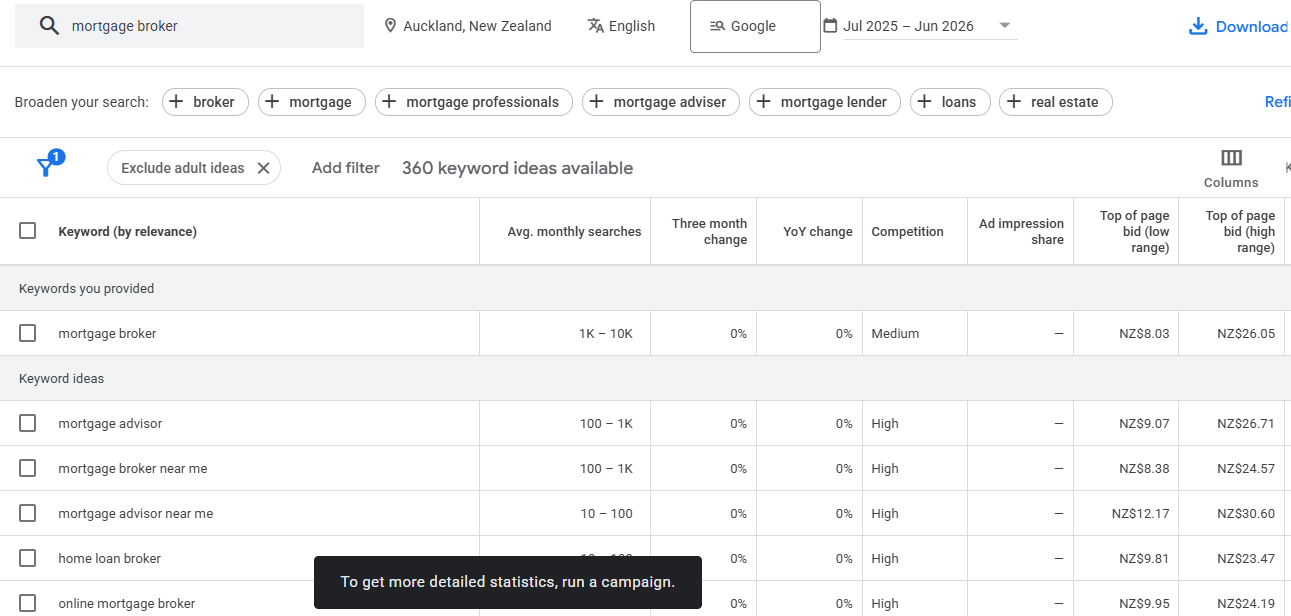
Say you’re doing SEO in Auckland for a mortgage broker.
Type “mortgage broker Auckland” into Keyword Planner, set the location to Auckland, and you’ll get the demand for that term plus a stack of related ones — “first home buyer mortgage,” “refinance broker,” “mortgage adviser near me” — each with its own intent signal.
That’s your content map, free, in about ninety seconds.
Semrush
Semrush does everything Keyword Planner does, then keeps going — surfacing related and parent topics, keywords you’d never find on your own, and how strong the competition already is.
Where Keyword Planner gives you the demand, Semrush gives you the whole neighbourhood.
Type in a seed and it fans out into related topics, the questions people ask, and a “parent topic” — the bigger term your keyword actually lives under.
It’ll also show you how many backlinks the currently-ranking pages have, so you know the fight before you write a word.
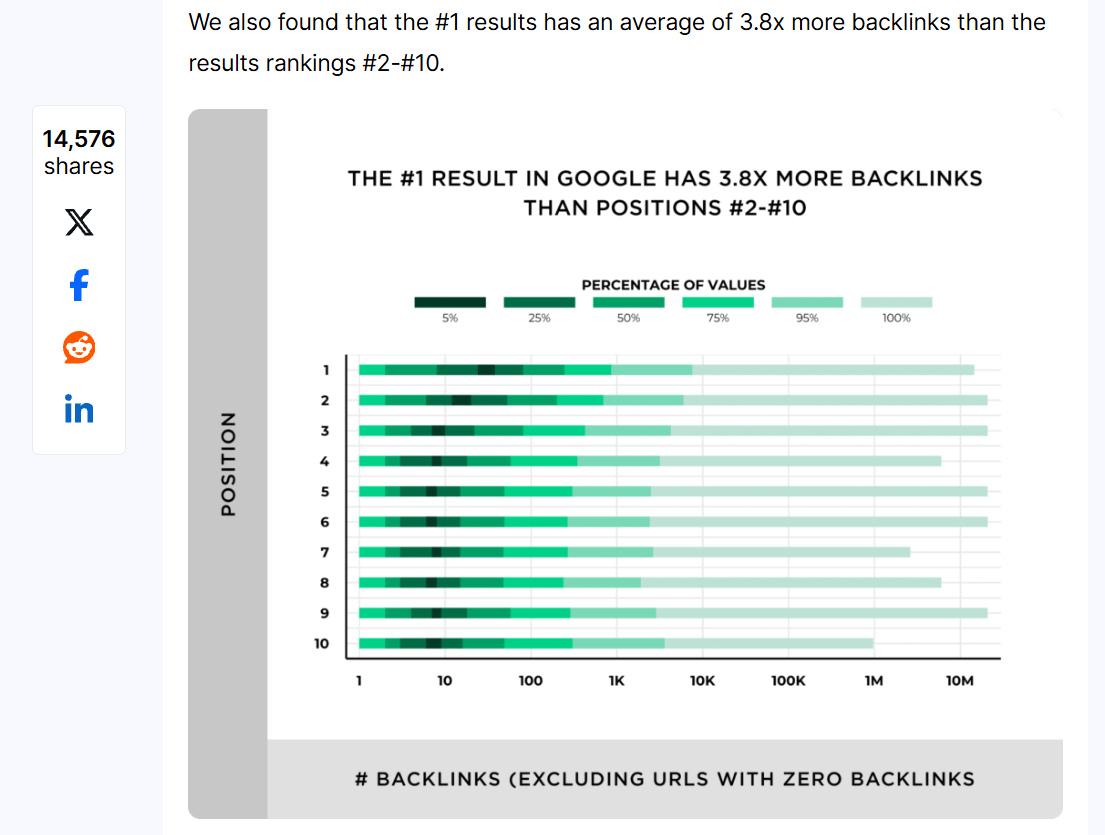
That backlink view matters more than it looks. Backlinko’s study of 11.8 million results found the #1 result has 3.8x more backlinks than the pages sitting at #2–10 — so seeing that gap before you commit tells you whether a keyword is a quick win or a long war.
The workflow inside it:
- Start in Keyword Overview for the snapshot.
- Jump to the Keyword Magic Tool for the full idea dump.
- Flick to the Questions tab for question-based terms.
- Check SERP Analysis to size up the competition.
The catch: it can be overwhelming. There’s a tool for everything, and at around US$140 a month it’s the priciest way in on this list.
It’s built for people doing SEO seriously, not dabbling.
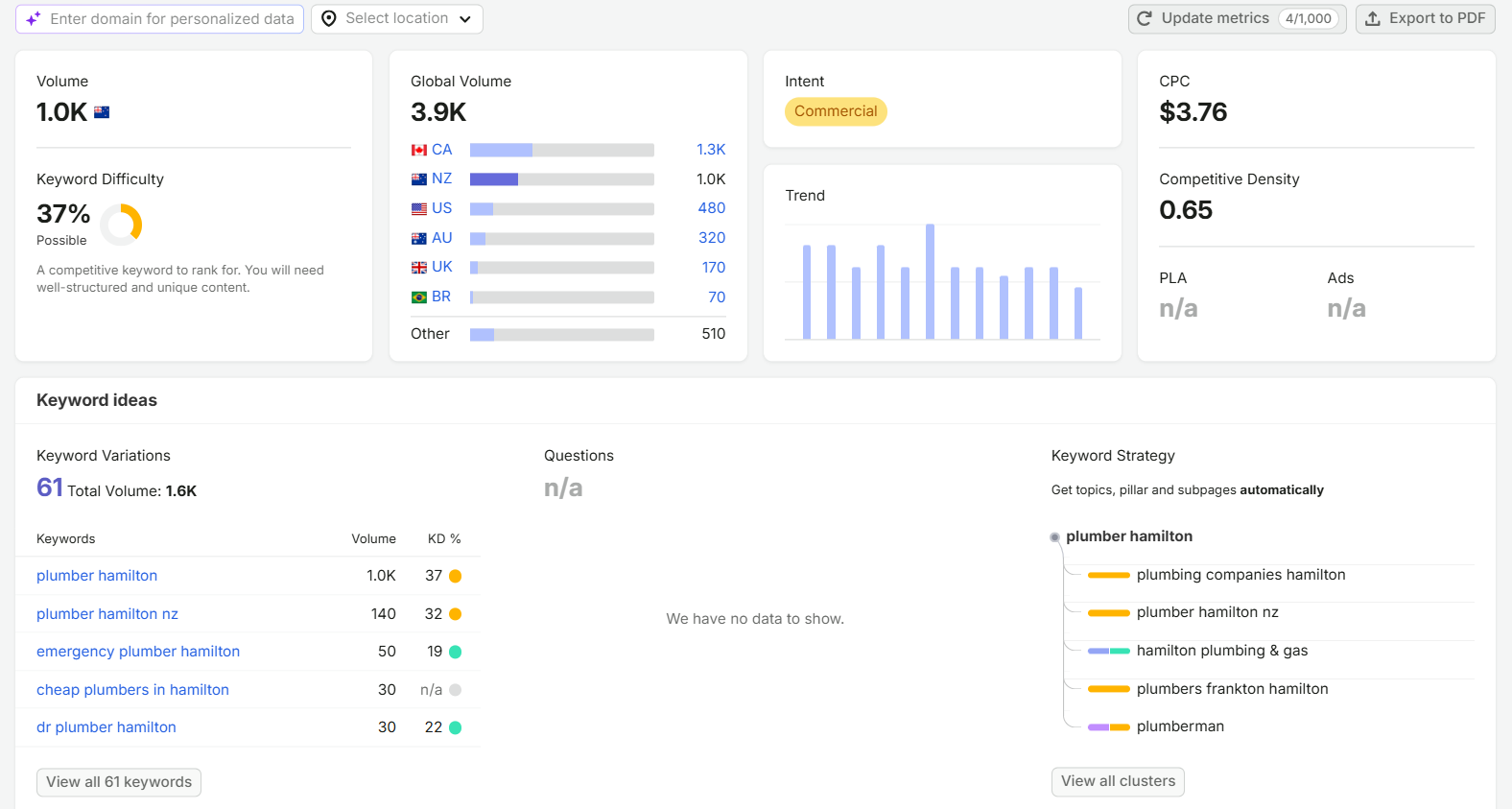
For a term like “plumber Hamilton,” Semrush won’t just give you that keyword — it’ll hand you the parent topic, a stack of related searches, and a ready-made topic cluster, so you can see the whole opportunity at a glance.
Ahrefs
Ahrefs does much the same as Semrush, but most SEOs find it more tightly focused on organic search — where Semrush spreads across digital marketing more broadly.
If Semrush is the Swiss Army knife, Ahrefs is the scalpel for SEO. Its keyword and backlink data is what a lot of us reach for when the job is specifically ranking in Google.
Drop your keyword into Keywords Explorer and you get a Keyword Difficulty score, Traffic Potential, the parent topic, and a full SERP overview showing the domain rating and word count of every page ranking.
That SERP overview is gold. It tells you not just how hard a keyword is on paper, but why — whether the pages ranking are monsters with thousands of backlinks, or beatable little sites.
Say you’re doing SEO in Christchurch for a law firm: that overview shows you at a glance whether the firms ranking are untouchable, or wide open for the taking.
Same story as Semrush on price (around US$110–130 a month) and it’s still a lot to take in. There’s also Ahrefs Free, which works like a souped-up Search Console — worth a look if you’re not paying yet.
Here’s a real one: checking my own rankings in Ahrefs is how I know a domain barely a year old climbed above the big tools’ own pages for NZ terms, sitting at a Domain Rating of 36.
The tool that shows me beating the big tools is one of the big tools.

That same site now gets pulled into Google’s AI Mode and quoted in ChatGPT — which is a whole other reason to care which keywords you chase, because ranking in AI search rewards the same clean, well-targeted content.

Mangools (KWFinder)
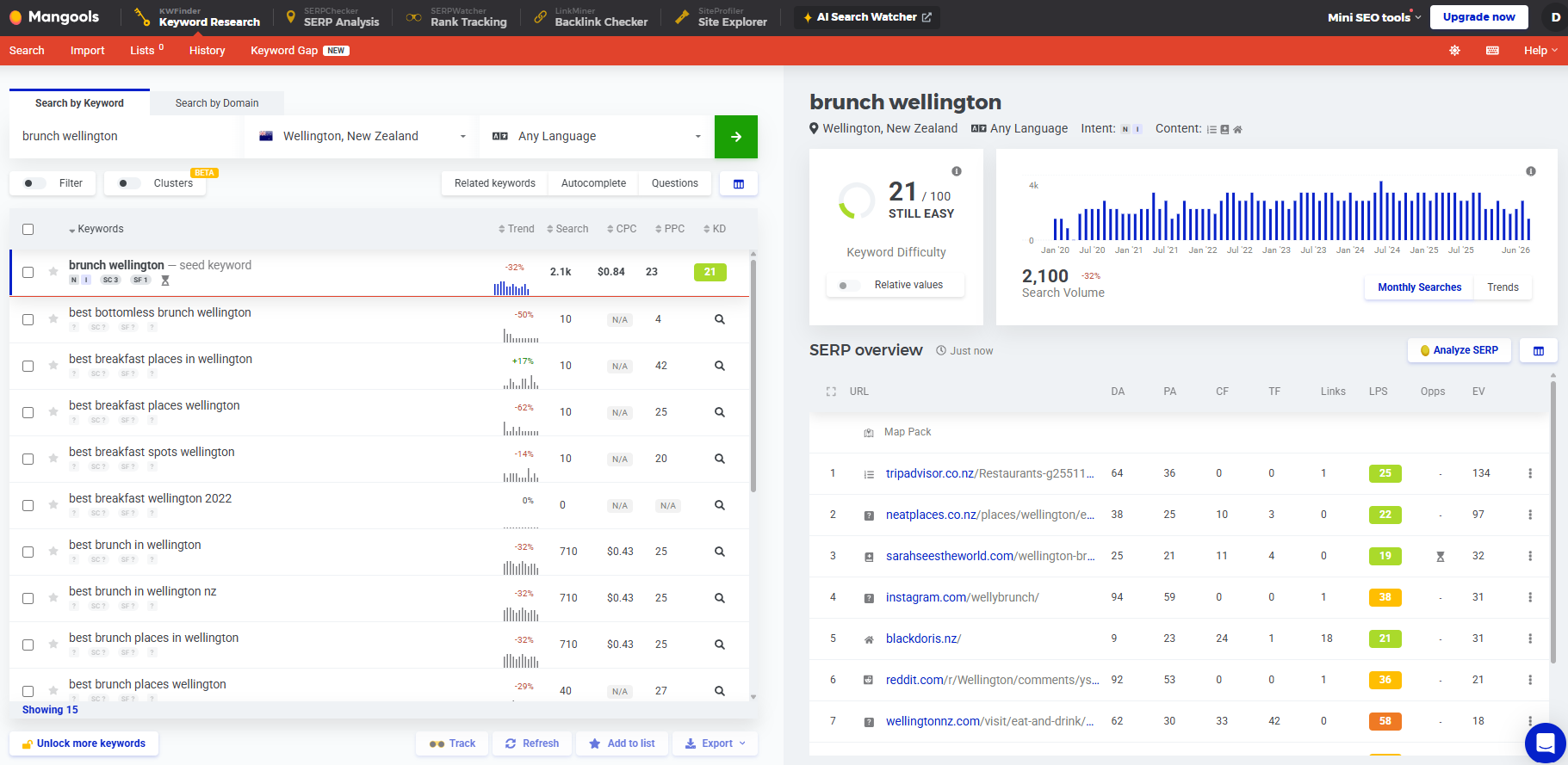
Mangools — specifically its KWFinder tool — is the one I hand people who get overwhelmed. It reads as cleanly as Keyword Planner but gives you the tighter estimates and difficulty scores of the big tools.
It sits right in the middle: easier on the eye than Ahrefs or Semrush, more precise than Keyword Planner.
For a beginner, that balance matters more than raw power — because the best tool is the one you’ll actually keep using, not the one that makes you want to shut the laptop.
Using it is dead simple:
- Type your seed keyword into KWFinder.
- Your keyword list builds down the left, with volume and difficulty right there.
- Click any keyword and the SERP for it loads on the right — who’s ranking, and how strong they are.
Two panels, no maze.
Its database isn’t as deep as Ahrefs or Semrush, so heavy competitive work will outgrow it. But at around US$49 a month it’s a soft landing into paid tools.
Say you’re doing SEO in Wellington for a café owner who’s never touched it — they could open KWFinder, type “brunch Wellington,” and understand the screen in about thirty seconds — difficulty, volume, and the competition, no manual required.
ChatGPT
ChatGPT is where I start when I’m staring at a blank page with no idea what to target.
When you’re stumped, it breaks the logjam. Ask it for keyword ideas, related subtopics, or the questions your customers ask, and it hands you a starting list in seconds — the raw material you then validate in a real tool.
How I use it:
- Prompt it plainly: “Give me 30 keywords a Hamilton plumbing customer might search on Google.”
- Push further: “Now group those by search intent,” or “what would someone Google before hiring a plumber?”
- Take the best ideas straight into Keyword Planner to check real demand.
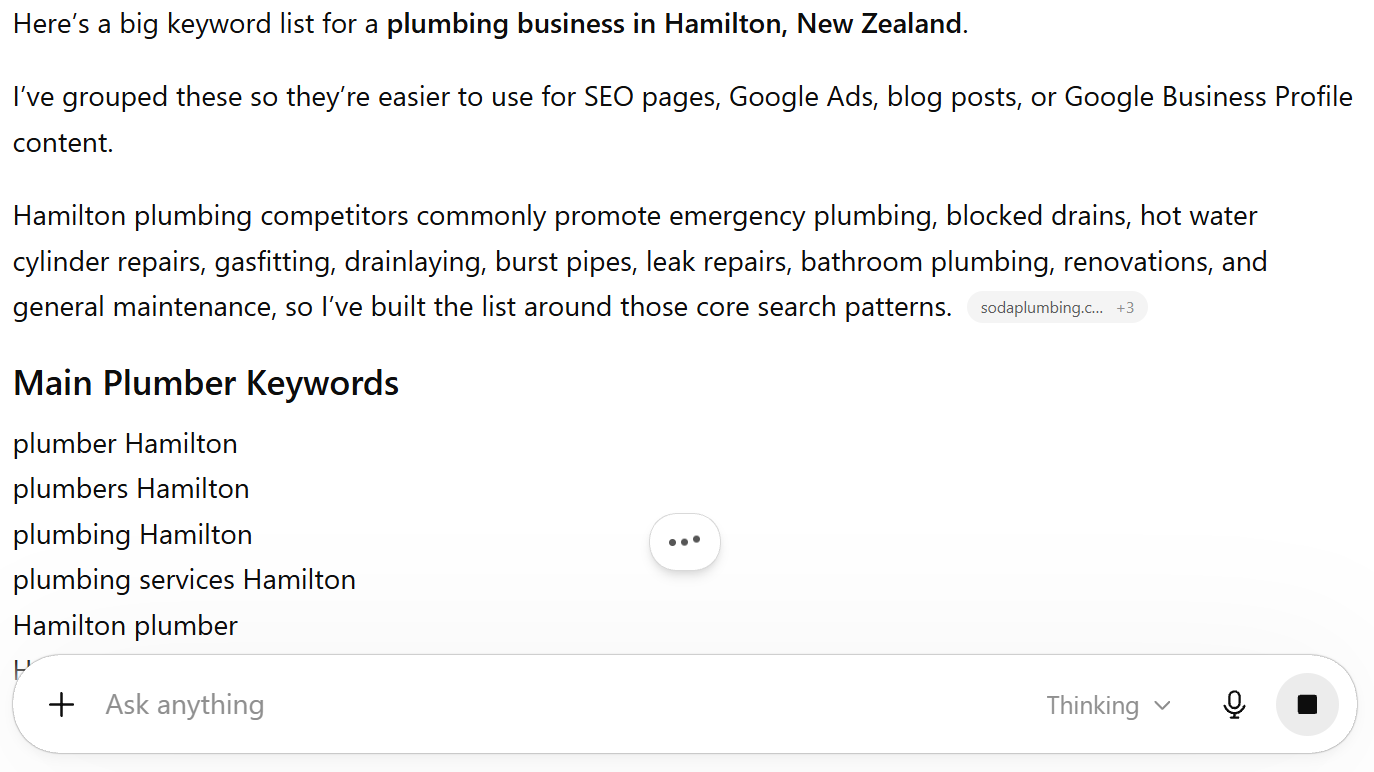
The catch, and it’s a big one: ChatGPT makes up search volumes. It has no live data. Never trust it for numbers — use it to generate ideas, then validate every one in a tool that actually pulls from Google.
For a Hamilton plumber with no clue where to start, two minutes in ChatGPT turns a blank page into fifty keywords worth checking.
AnswerThePublic
AnswerThePublic is how I find the actual questions and conversational phrases people use around a topic.
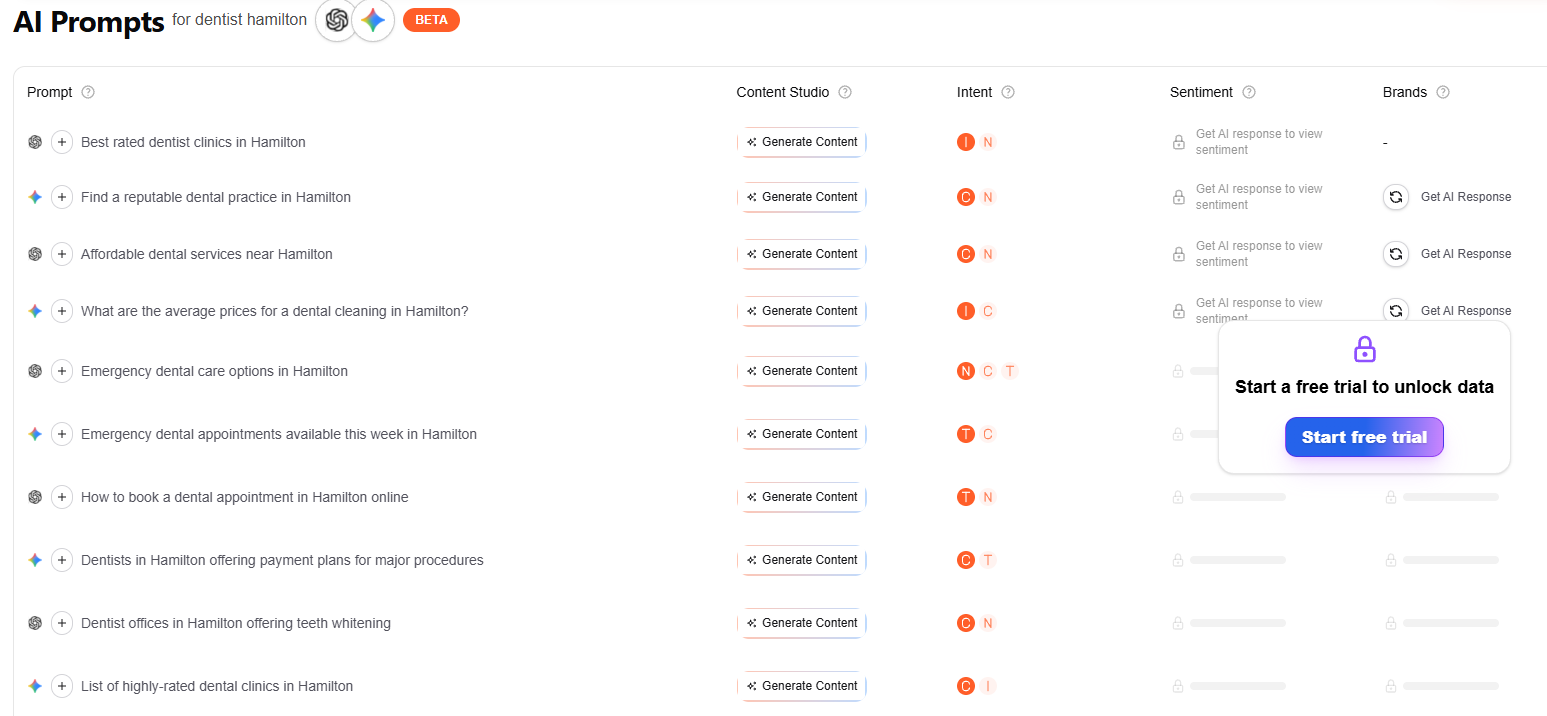
The other tools tell you what people search. AnswerThePublic tells you how they phrase it — the who, what, why, and how versions of your topic, laid out in a way that surfaces angles you’d never brainstorm alone.
It’s brilliant for related topics and the long-tail, conversational queries that matter more than ever now that people talk to search engines like actual people.
Enter your topic and it fans out into question clusters — “how,” “what,” “why,” “can,” “is” — plus prepositions and comparisons. Skim the questions groups first; that’s where the content gold is.
Type “keyword research” into it and you’ll get “which is the best keyword research tool,” “is keyword research still relevant,” “how to do keyword research for free” — real questions, in real language, each one a potential heading or FAQ.
The free version is limited to a few searches a day, and it won’t give you reliable volume — so pair it with Keyword Planner for the numbers.
How I Use These Tools in My Workflow
Here’s where it comes together. I don’t use one tool — I use them in an order, and each one covers the last one’s blind spot.
This is the sequence I run, whether it’s a client site or one of my own:
- Start in Google Keyword Planner. Confirm real demand exists and lock the location. Google’s own data is the anchor.
- Expand in Semrush or Mangools. Take the winners and fan them into related topics, parent topics, and questions I’d never have listed myself.
- Mine AnswerThePublic and ChatGPT. Pull the conversational and question-based phrasings — the stuff that feeds headings, FAQs, and AI answers.
- Pressure-test in Ahrefs. Check the difficulty and, more importantly, who’s ranking and how strong they are, before committing. If it’s my own site, I’ll run a full SEO audit at this stage too, so nothing technical undercuts the keyword.

A live example: when I built out Expert SEO’s own location pages, I ran terms like “SEO Auckland” through exactly this loop.
SEO in Auckland looks brutal in the tools — high difficulty, established players everywhere.
But Keyword Planner confirmed the intent was there, Semrush showed me the softer related terms, and Ahrefs’ SERP view told me the top pages were beatable.
Nine times out of ten, when the data lines up like that, you’ll beat ’em.
From there it’s about turning the winners into pages that actually rank — that’s on-page SEO, and a job for another day.
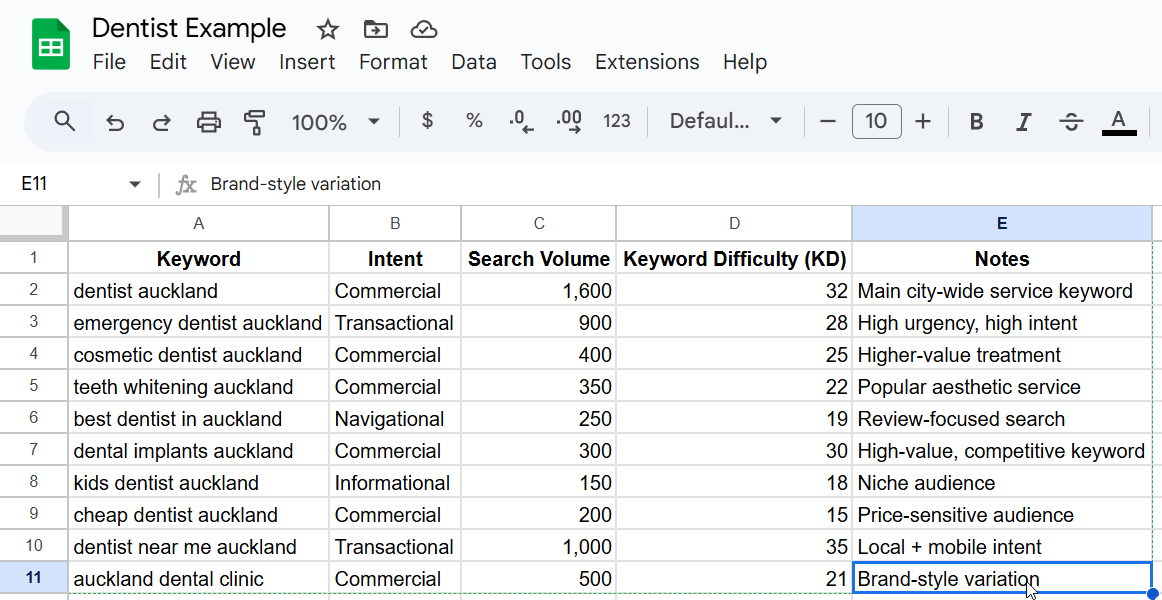
The tools don’t make the decision. They just make sure the decision isn’t a guess.
Why Your New Zealand Keywords Show Zero Searches
You type your keyword into a shiny tool, hit enter, and it says: “0 searches.”
So you bin the keyword and move on.
That’s how a good keyword gets thrown out — not because nobody’s searching it, but because the tool undercounts a market as small as ours.
In New Zealand, most keyword tools will tell you a perfectly good keyword has “0” or “10–100” searches — because our entire market is tiny, not because nobody’s searching for it.
Here’s the mechanism.
These tools estimate volume from a sample: clickstream data, their own database, Google’s ad numbers.
In the United States that sample is enormous, so the figures hold steady. In New Zealand the sample is a rounding error by comparison, so a keyword that quietly gets searched every week can still round down to zero on your screen.
Say you’re doing SEO in Queenstown for a wedding photographer — a tiny market even by our standards. The tool might flash “0” for your best keyword, but the couples searching it are very real.
And it’s not just a small-market quirk. Even globally, 94.74% of all keywords get 10 monthly searches or fewer, according to Ahrefs. Low numbers are the rule, not the exception.
There’s also a myth that the paid tools give you “real” numbers while Keyword Planner only gives ranges.
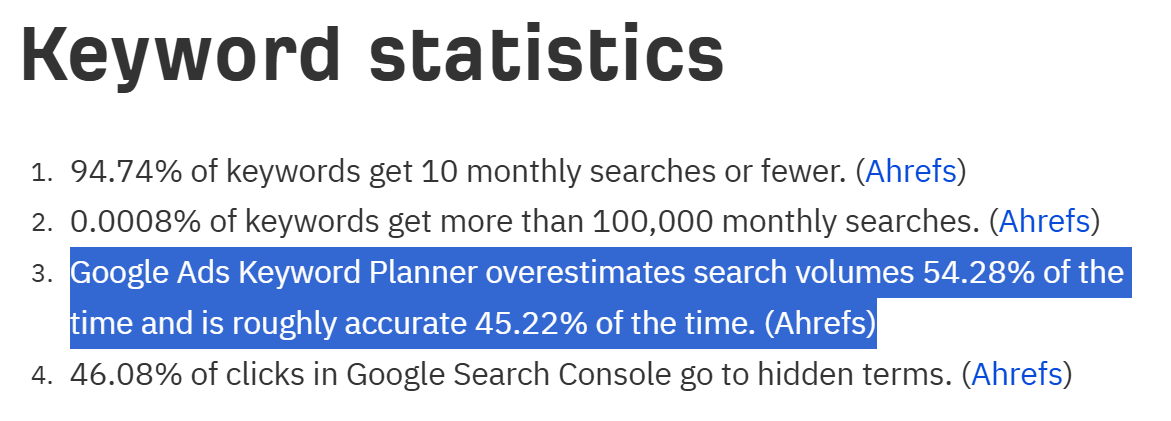
Not true. Ahrefs found that Google’s own Keyword Planner overestimates search volume 54.28% of the time. If Google’s own tool is off more than half the time, no third-party database is handing you gospel either.
They’re all estimates. Google’s ranges are just it being honest about that.
So how do you work in a market this small? Three moves:
- Treat the number as a signal, not a verdict. A keyword showing “10–100” in NZ often has real, buyable demand behind it.
- Cross-check against Keyword Planner. It pulls from Google’s own ad data, so it’s your anchor when the paid tools disagree with each other.
- Weight intent over volume. A “low-volume” keyword with clear buyer intent — “[industry] [city] quote” — beats a high-volume term nobody buys from.
Those tiny-volume keywords add up, too. As Ahrefs puts it, publish a hundred pages targeting “zero volume” keywords and your annual traffic can total a few thousand genuinely qualified visitors.
This is exactly how I grew HealthVI.
Back in 2017 I started that project with Ian Pribyl (we got along so well even peanut-butter-and-jam sandwiches would’ve been jealous). Plenty of the keywords we chased looked like nothing in the tools.
We took it from zero to over 20,000 organic visitors a month anyway.
Low volume in the tool doesn’t mean low value in real life.
Should You Pay for a Keyword Research Tool?
You probably don’t need a US$140-a-month tool yet — and paying for one before you’re ready is money you could’ve spent on content.
Here’s what I’d actually use at each stage:
- Brand-new site, no budget: Google Keyword Planner + ChatGPT + Google Search Console. All free, and enough to build your first fifty pages.
- Small local business — say a dentist in Tauranga: Mangools (KWFinder). Around US$49 a month, clean, and everything a local operator needs.
- Serious about content, growing traffic: Semrush or Ahrefs. Once content is a real channel, the depth pays for itself.
- Agency or multiple sites: Semrush or Ahrefs on full plans. At that point, the data is the job.
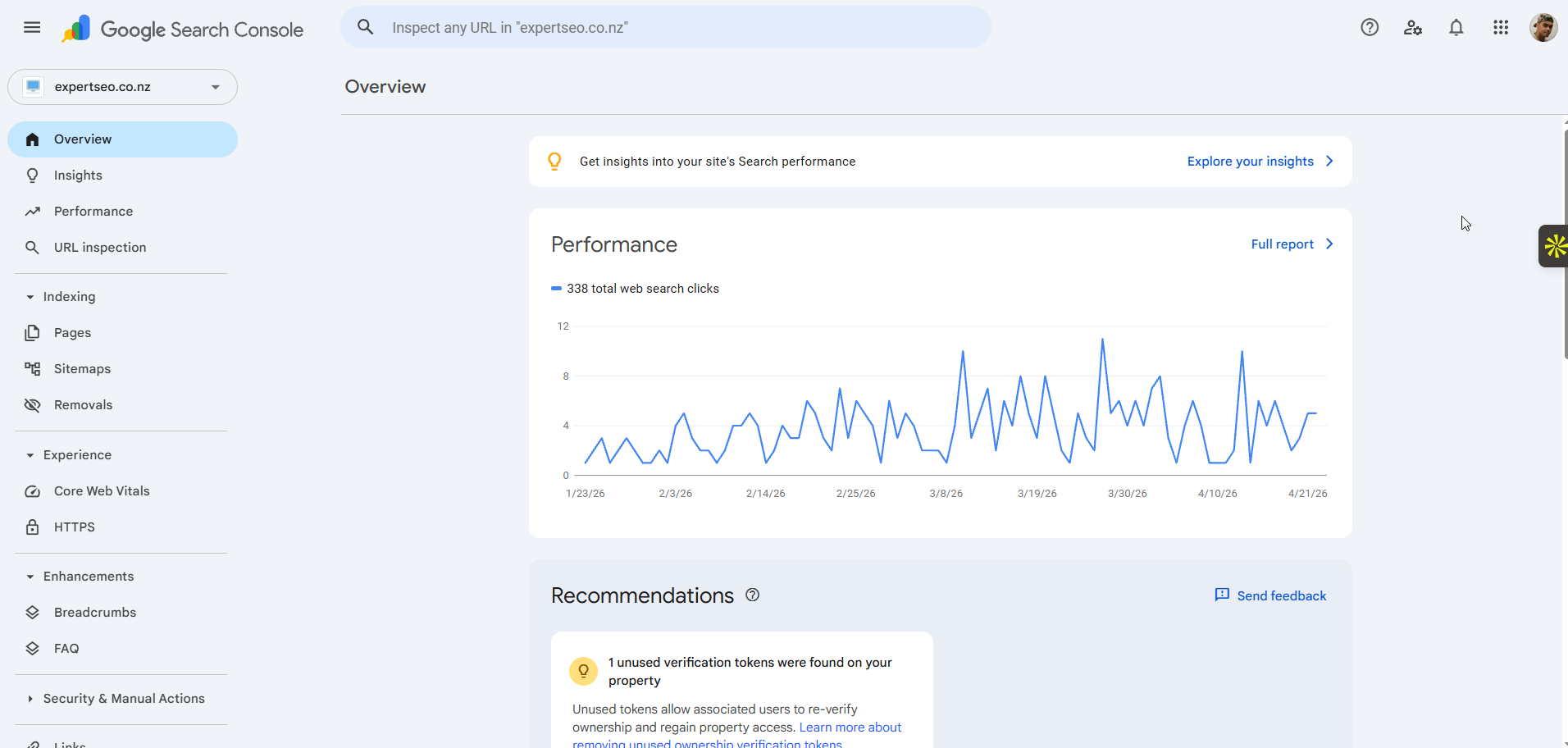
Here’s the thing people get backwards: the tool doesn’t rank you. The strategy does.
I took HealthVI to over 20,000 visitors a month, and helped grow StoppingScams past 5,000 a day alongside Ian — and neither of those wins came from owning the most expensive software.
They came from picking the right keywords and answering them better than anyone else.
Cheap tool with the right strategy beats expensive tool with none: every single time.
Doing Keyword Research Yourself vs Hiring an Expert
So that’s the toolkit. You can take it and do your own keyword research — plenty of people do.
Or you take the load off and hand it over: we do your SEO so you can get back to running your business. We do what we’re experts at, you do what you’re an expert at.
If that sounds better, our SEO services and SEO consultancy are here for exactly that.
Best Keyword Research Tool: FAQ
What is the best keyword research tool?
For most New Zealand businesses, the best keyword research tool is Google Keyword Planner — free, and straight from Google's own data — paired with one paid tool like Semrush, Ahrefs, or Mangools. There's no single winner; the right tool depends on your budget and how deep you go.
What is the best free keyword research tool?
Google Keyword Planner. It's free with a Google Ads account and pulls straight from Google's own advertising data, which makes it the most trustworthy free read on real demand. Pair it with AnswerThePublic and Google Search Console for a complete free stack.
What is the best keyword research tool for SEO?
Ahrefs. Most SEOs find it more tightly focused on organic search than Semrush, with strong keyword difficulty scores and a SERP overview that shows exactly how beatable the competition is.
Is there a cheaper alternative to Semrush?
Mangools (KWFinder), at around US$49 a month, is the popular budget alternative — cleaner and simpler than Semrush or Ahrefs, with tighter estimates than the free tools. On zero budget, Google Keyword Planner covers the essentials.
Can you use ChatGPT for keyword research?
Yes, but only for ideas. ChatGPT is great for brainstorming seed keywords and questions when you're stumped, but it invents search volumes and has no live data — always validate its suggestions in a real tool like Keyword Planner.