Search “best on-page SEO tools” and check who wrote the top results.
Several of them are published by the tool companies themselves, quietly placing their own product at number one.
The lists run to ten or fifteen tools, most of which you’ll never open twice.
Here’s the honest version instead.
These are the on-page SEO tools I actually use to run my own SEO company and optimise pages for clients across New Zealand.
Most of them are free. You need about four of them, not fifteen.
By the end of this you’ll know exactly which ones to use, what to skip, and how each one fits into a real workflow.
What On-Page SEO Tools Actually Do (And What They Don’t)
On-page SEO tools find what’s holding a page back and tell you how to fix it. They don’t do the fixing for you. That part is still your job.
This matters more than it sounds.
A lot of people install a plugin, see a checklist, and assume the tool is doing the SEO. But the tool isn’t doing the SEO for you.
It points at the problems — a missing meta description, a thin paragraph, a heading in the wrong order, an image with no alt text — and leaves the fixing to you.
What these tools check covers the core of on-page SEO: your title and meta description, where your keyword appears, heading structure, internal links, content depth, image optimisation, and page speed signals.
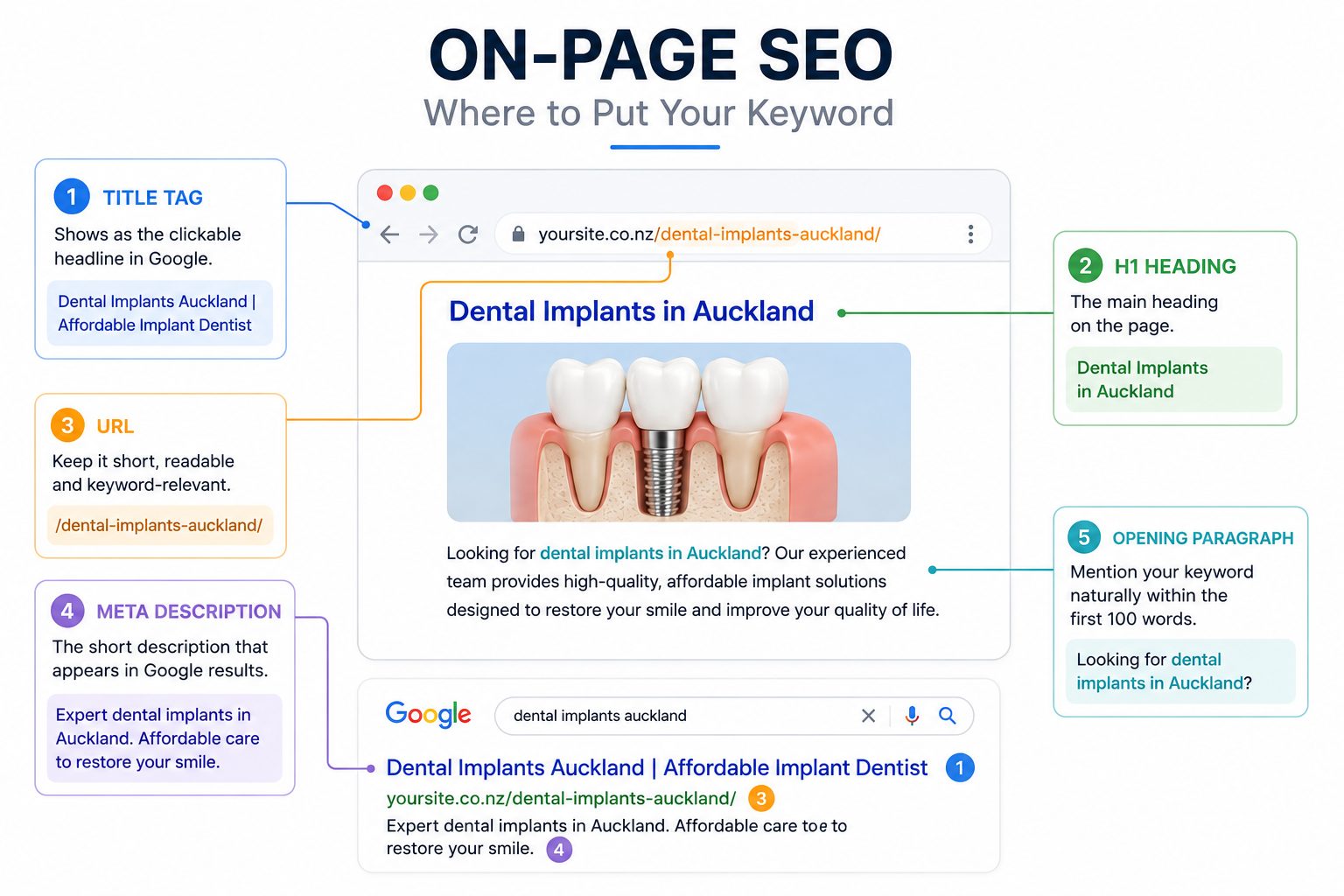
Good tools flag the gaps, but it’s your workflow that closes them.
That gap between “flagged” and “fixed” is the whole reason this matters. According to Ahrefs’ study of around 14 billion pages, 96.55% of pages get no organic traffic from Google at all.

Tools help you land in the small percentage that does — but only if you act on what they show you.
The Honest Minimum Stack (You Need About Four Tools)
For on-page SEO you really only need four things: an on-page checker, a crawler, Google Search Console, and one keyword and content tool. Everything else is a nice-to-have.
Here’s the short version before we go deep on each:
- An on-page plugin or checker — grades a single page as you write (I use Rank Math)
- A crawler — finds on-page issues across your whole site at once (Screaming Frog)
- Google Search Console — shows the exact queries each page ranks for, free
- A keyword and content tool — tells you what to cover to beat what’s ranking (I use SEMrush)
That’s the stack behind Expert SEO ranking for competitive terms and earning Google AI Overview citations within six months, on a domain less than a year old, against NZ competitors with a decade’s head start. Four tools, most of them free or close to it.
If you want the wider category beyond on-page, I’ve covered the full set of SEO tools separately.
For optimising individual pages, though, the four above are the core.
The Best On-Page SEO Tools, by Job
Rather than rank tools one to fifteen, it’s more useful to group them by the job they do. Here’s each job, the tool I reach for, and how I actually use it.
On-Page Optimisation: Rank Math
A plugin like Rank Math gives you a live on-page checklist inside your editor — title, meta description, keyword usage, headings, and internal links — scored as you write.
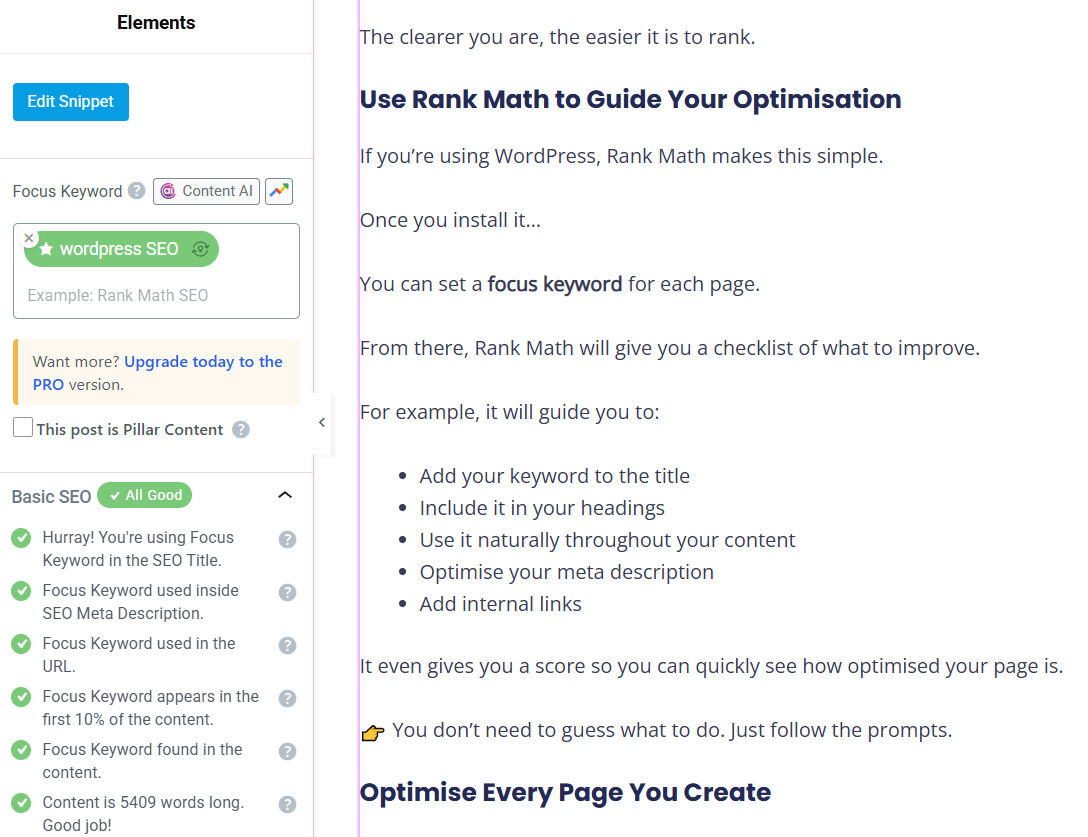
This is the tool I open most. As I draft a page, Rank Math checks whether the focus keyword is in the title, the first paragraph, the URL, a subheading, and the image alt text, then flags anything missing. It’s the fastest way to catch the basic on-page mistakes before a page goes live.
The detail worth getting right is your title. Backlinko found that titles between 40 and 60 characters get an 33.3% higher click-through rate than titles outside that range, mostly because they don’t get cut off in the results.

Rank Math shows you a live pixel preview, so you can see exactly where Google will truncate it before you hit publish.
One platform note, because this is the single tool here that depends on where your site lives.
I use Rank Math on WordPress, and Yoast or AIOSEO do the same job if you prefer them.
If you’re on Shopify or Wix, the built-in SEO panels cover titles and meta descriptions fine, but they fall short on schema control and bulk editing — so you’ll lean harder on the crawler and Search Console to fill those gaps.
This is exactly where the WordPress-only “best tools” roundups leave Shopify and Wix owners stranded.
On-Page Auditing: Free Checkers and SEMrush
Auditing tools crawl a page and score its optimisation, flagging missing meta tags, thin content, broken links, and weak heading structure.
Free checkers like SEOptimer, Seobility, and Cocolyze are fine for a quick one-page health check — paste a URL, get a graded report in seconds. They’re handy when you want a fast second opinion on a single page.
SEMrush’s On-Page SEO Checker goes further, pulling ideas from your actual ranking competitors and your Search Console data rather than scoring the page in isolation.
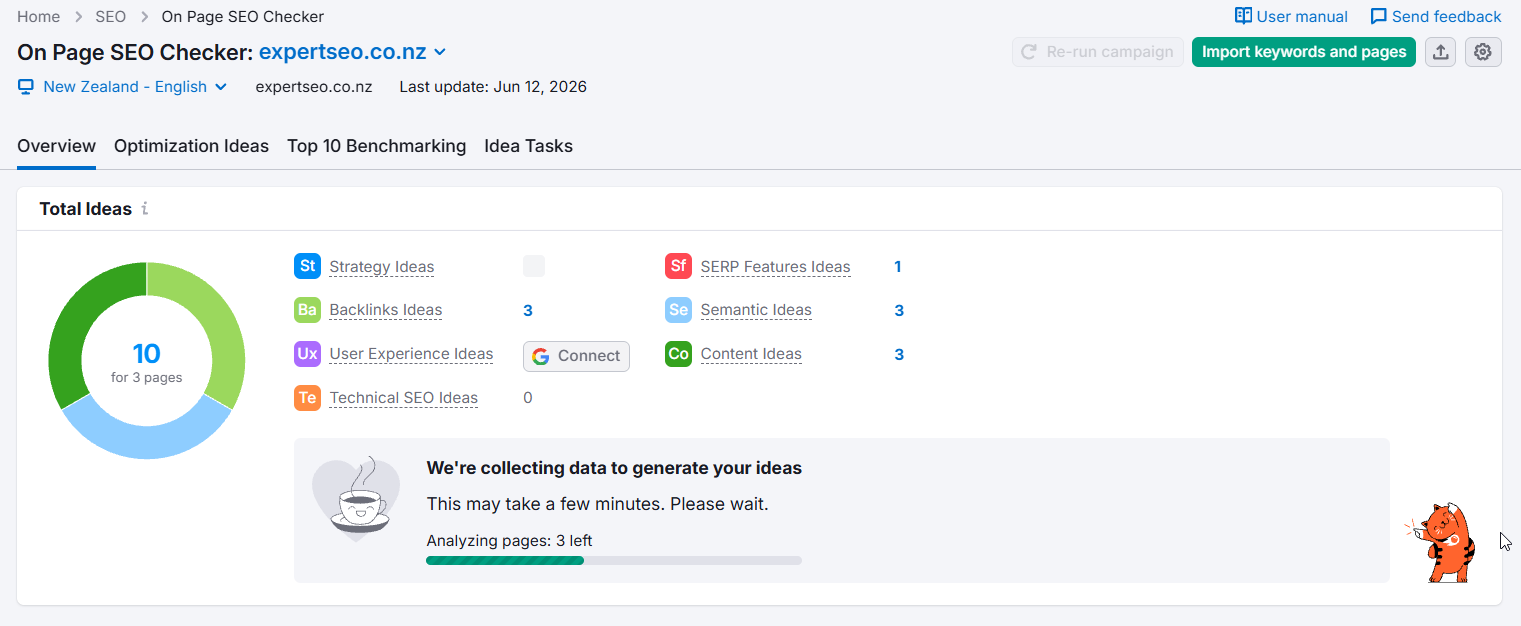
Either way, treat the score as a starting point, not a verdict. A page can score well on a checker and still be missing the one thing that actually decides the ranking.
If you’d rather have the whole thing checked properly, across every page rather than one at a time, that’s exactly what a site audit is for.
Technical Crawling: Screaming Frog
Screaming Frog crawls your entire site and surfaces on-page issues at scale — missing titles, duplicate meta descriptions, broken links, redirect chains, and pages with no internal links pointing to them.
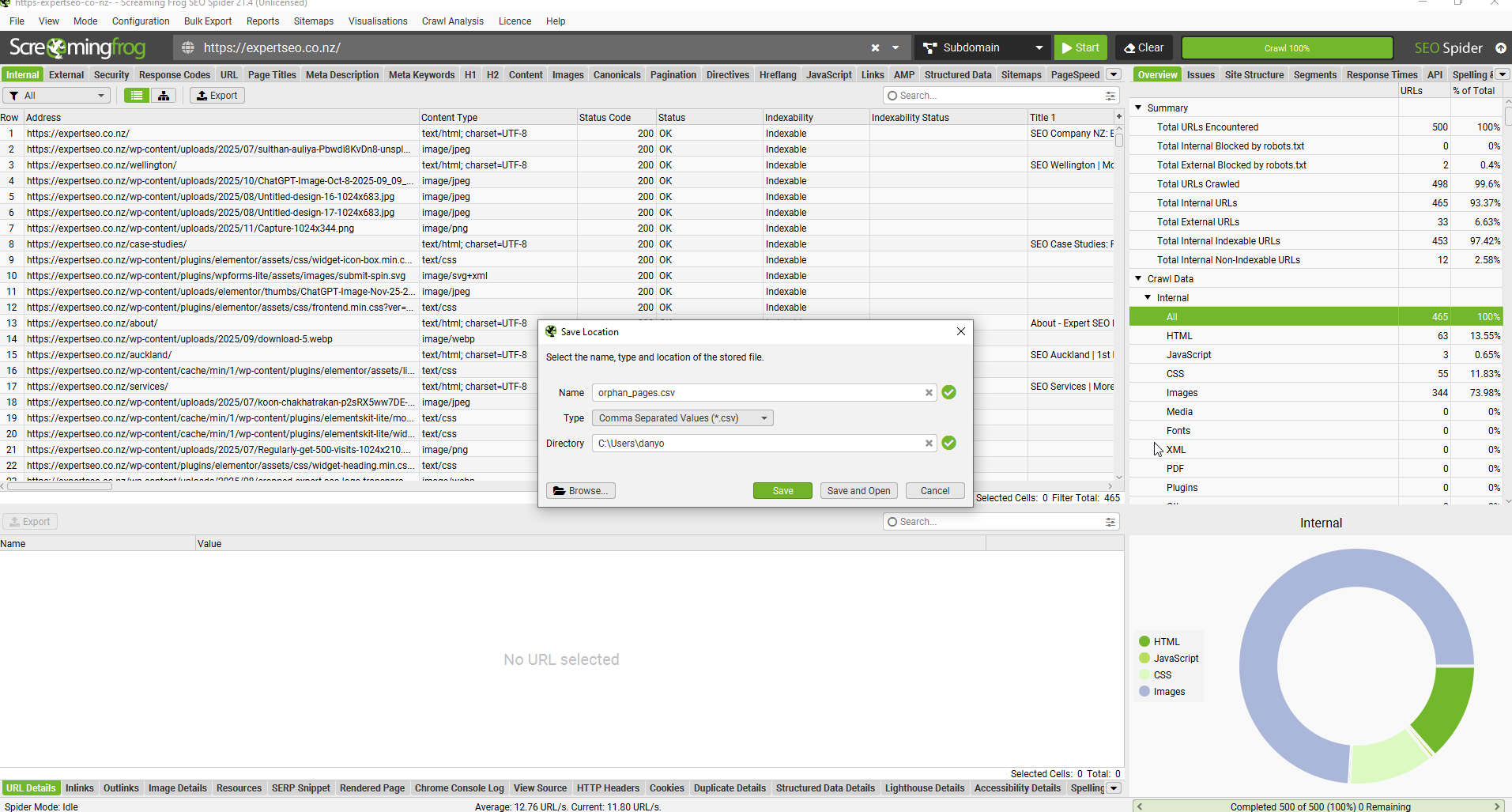
This is the tool the SEO community keeps recommending, and for good reason. On the main “on-page SEO tools” Reddit thread, the top answer is simply “Screaming Frog.”
It’s a desktop crawler, and the free version handles up to 500 URLs, which covers most New Zealand small-business sites completely.
Say you’re a physio in Hamilton targeting your main keyword “sports injury rehab.”
You might run a crawl and in a couple of minutes, discover pages that have duplicate meta descriptions and other issues from the technical side of SEO that you’d never spot clicking through page by page.
It’s also where you catch the title-tag gaps that quietly cost clicks.
Ahrefs found that 7.4% of top-ranking pages have no title tag at all — and when that happens, Google writes its own, usually worse than what you’d have written yourself.
The Free Essentials: Google Search Console
Google Search Console is the most valuable on-page tool you’ll ever use, and it’s completely free. It shows the exact queries every page already ranks for, which tells you precisely what to optimise each page toward.
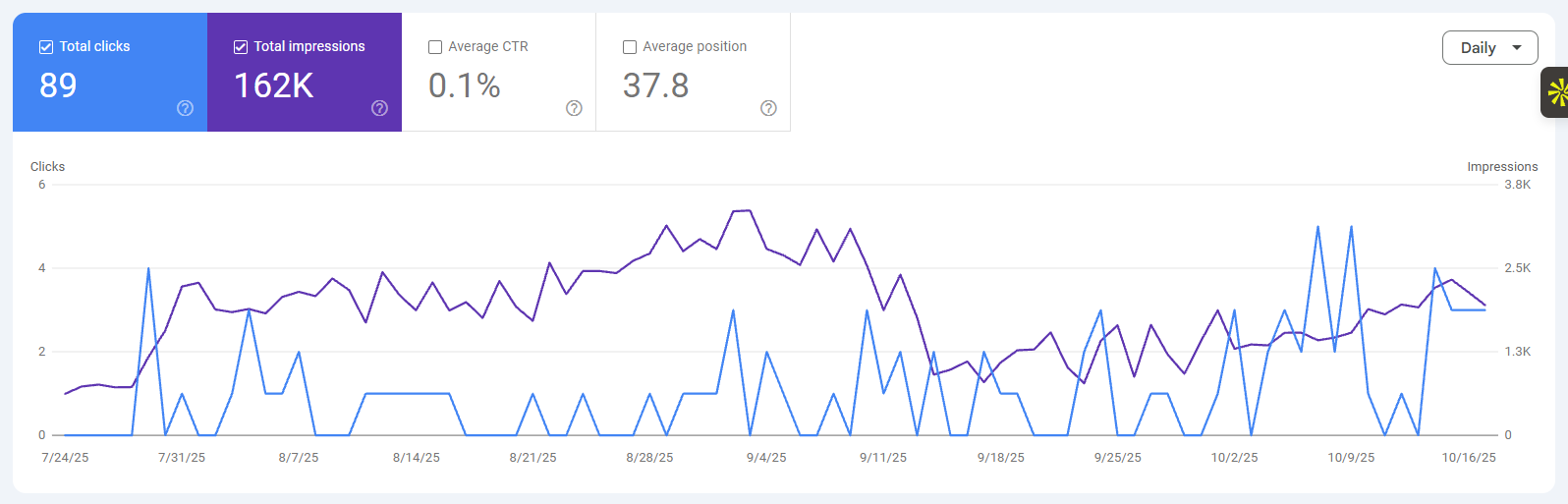
Most people use Search Console to check if they’re indexed and stop there. The real value is in the Performance report. Filter to a single page — say a builder’s services page targeting Christchurch — and you’ll see every query it’s getting impressions for, its average position, and its click-through rate.
That’s a direct map of what the page is nearly ranking for, and where a small on-page tweak can push it up a few spots.
Position is worth chasing because the drop-off is steep. Backlinko’s analysis of millions of results found the top organic result averages a 27.6% click-through rate, versus 2.4% at position ten.

Moving a page from the bottom of page one toward the top is where on-page work pays off.
Pair Search Console with PageSpeed Insights for the speed side.
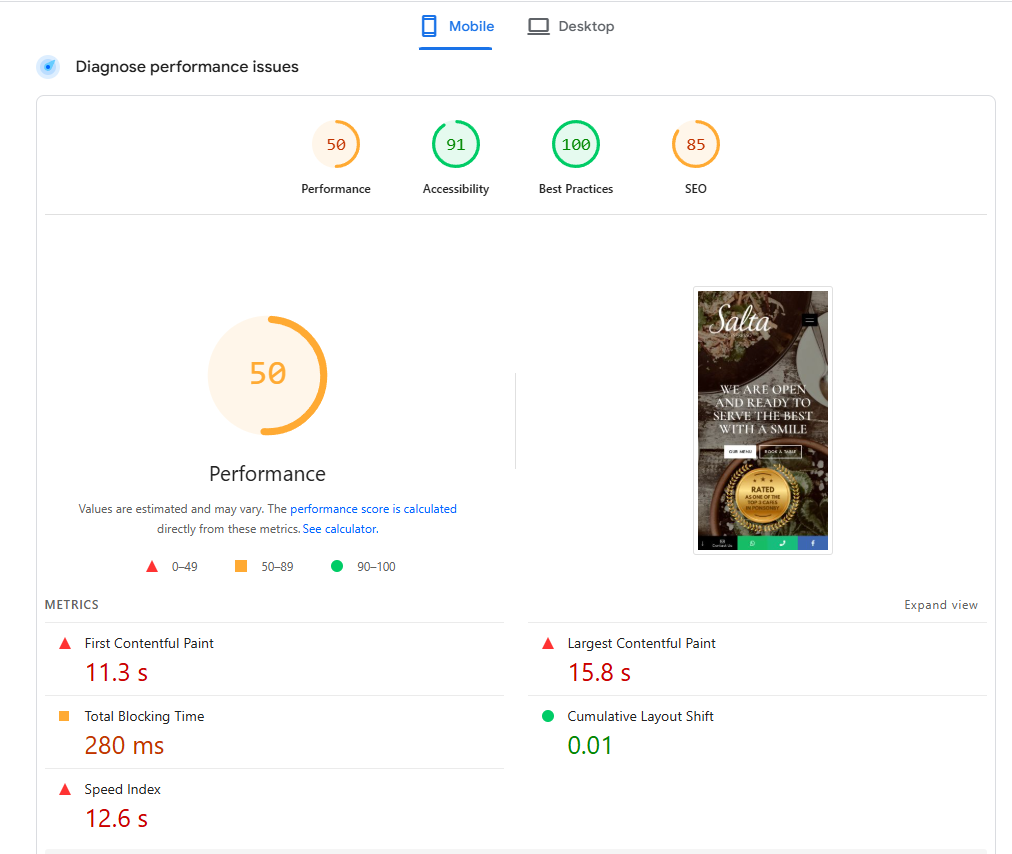
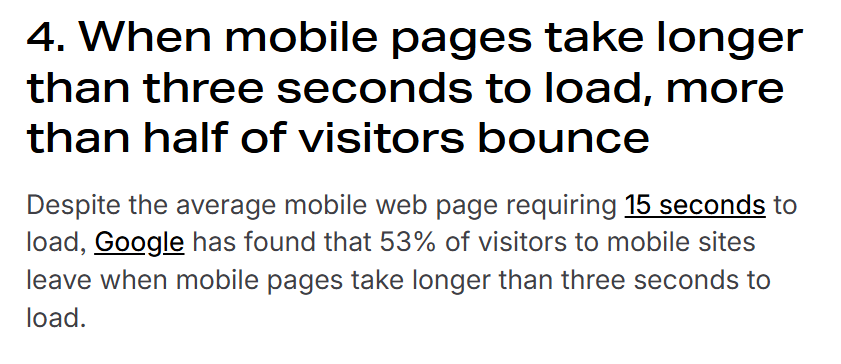
Speed is genuinely an on-page factor: Google’s own research found that as load time goes from one to three seconds, the chance of a visitor bouncing rises sharply, and 53% of people abandon a page that takes longer than three seconds.
For New Zealand sites serving mobile users on patchy rural connections, that’s not a rounding error.
AI-Extraction Checking: Is Your Page Built to Be Cited?
A newer job has appeared: checking that your page is structured so AI Overviews and ChatGPT can extract and cite it.

That means clear question-and-answer blocks, clean headings, and direct answers near the top of each section.
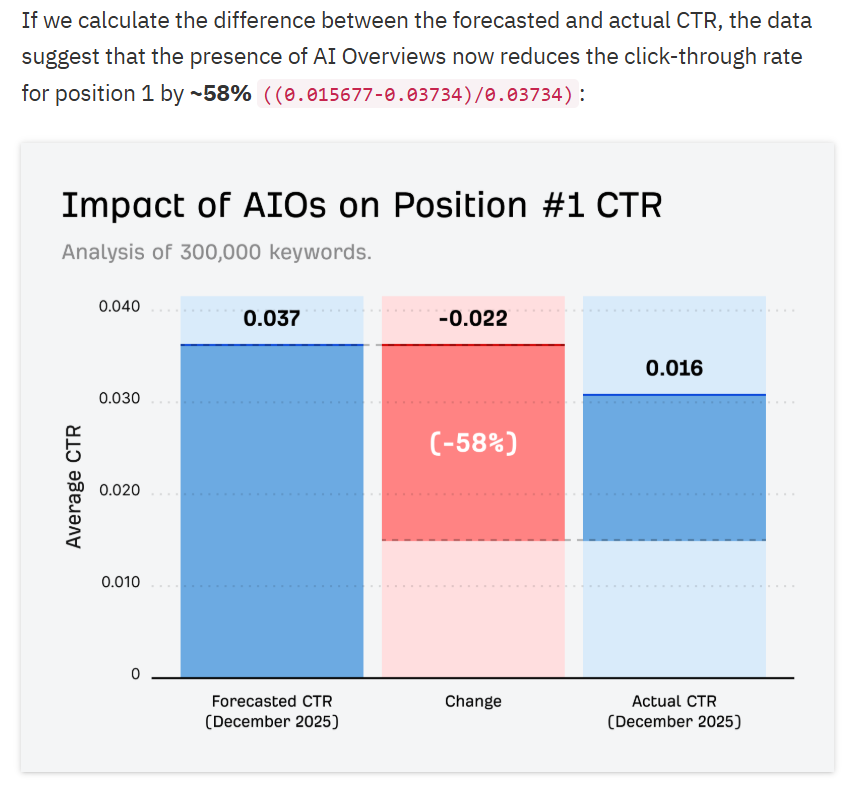
This matters because the results page is changing. Ahrefs found that AI Overviews are linked to a 58% lower click-through rate for the top organic result, so being the source the AI quotes is becoming as valuable as ranking first.
There’s no single perfect tool for this yet, so I check it manually: does each section open with a direct answer, are the headings clear, would a machine know exactly what this page says.
ChatGPT itself is useful here, but as a research assistant, not an autopilot. It’s great for finding the questions people ask and pressure-testing your structure.
It can’t handle ranking in AI search for you, and anyone selling it as a one-click solution is overselling.
Free vs Paid: What’s Actually Worth Paying For
Start free, and pay only when a specific bottleneck justifies it. Most New Zealand small businesses can run a complete on-page workflow without spending a cent.
A genuinely capable free stack looks like this:
Rank Math (free version), Screaming Frog (free up to 500 URLs), Google Search Console, and PageSpeed Insights. That covers writing optimised pages, auditing your whole site, and tracking what’s working.
You move to paid when you hit one of three walls: you’re producing content at volume and need the content optimisation to be faster, you need competitor keyword data at depth — more likely when you’re fighting for a crowded term in Auckland — or you’re managing enough pages that manual tracking stops scaling.
That’s when a tool like SEMrush earns its subscription. Until then, paying for overlap with tools you already have for free is just burning money.
The Green-Score Trap
A 100/100 score in Rank Math or Yoast does not mean you’ll rank. It means the page is technically tidy.
This trips up almost everyone at some point.
The score checks whether you’ve ticked the on-page boxes: keyword in the title, decent length, an image with alt text, a meta description — all useful checks.
But none of it measures whether your page is more relevant or more useful than the nine pages already ahead of you.
I’ve seen pages with a perfect score sit on page three, and pages scoring 70 outrank them, because the 70 covered the topic better and matched intent more closely.
Use the score as a floor, not a finish line. Hit green, then ask the harder question the tool can’t answer: is this genuinely the best result for that search?
How I Use These Tools on a Real NZ Page
Here’s the exact order I run these tools when optimising a single page for a New Zealand client. The tools matter less than the sequence.
- Search Console first. I pull the page’s existing queries to see what it’s already nearly ranking for. That decides the target.
- Analyse the top results. I search the keyword and read the top three pages, using SEMrush to confirm what they cover that I don’t.
- Draft and check live. I write the page with Rank Math open, clearing the on-page checklist as I go.
- Crawl to spot-check. A quick Screaming Frog run confirms the title, meta, and internal links are clean and nothing’s broken.
- Recheck after indexing. A week or two later, Search Console shows whether impressions and position are moving, and what to tweak next.
That loop is the whole SEO process, and it’s the same one behind growing a separate site, HealthVI, from zero to over 20,000 monthly visitors inside a year. There’s no secret tool here, just the right ones used in the right order.
When to Do It Yourself vs Hire an Expert
You’ve got two honest options here. Take the DIY route with this guide and the free stack above — for a lot of New Zealand businesses, that’s genuinely enough. Or, if you’d rather not learn five tools and run that loop on every page, hand it over.
If you want the strategy mapped out without giving up execution, that’s where an SEO consultant comes in.
And if you’d rather skip the learning curve entirely, our done-for-you SEO handles the lot, wherever in the country you’re based. Either way, most of these tools are free, so there’s never been a better time to start.