

Picture two near-identical NZ websites selling the same thing.
One loads in just over a second and shows up when people search Google Images. The other drags, eats data, and is invisible in image search.
Same content and the same offer — the only real difference is what each one did with its images.
That gap is image SEO. It sits on every SEO checklist as a single line — “optimise your images” — with almost no explanation of what that actually means or whether it’s worth your time.
This guide fixes that. You’ll get the full method, step by step, with New Zealand examples throughout, plus an honest call on which parts actually matter for a site your size.
By the end, you’ll be able to optimise every image on your site so your pages load faster, rank in Google Images, and get picked up by AI.
What Is Image SEO?
Image SEO is the process of optimising the images on your site — their file names, formats, sizes, and descriptions — so search engines and AI tools can find, understand, and rank them, and so your pages load faster.
It does two jobs at once.
The first is helping the page rank: fast-loading, well-described images make the whole page stronger in Google’s eyes.
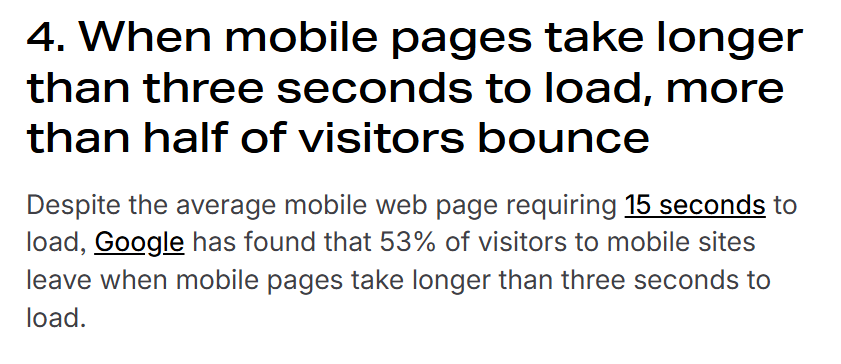
The second is helping the image itself rank: showing up in Google Images, in the image pack on a normal search, and in visual search.
If you’ve heard the term “photo SEO,” that’s the same thing — there’s no difference between optimising a photo and optimising an image for search.
The mistake most people make is thinking image SEO means slapping some alt text on and moving on.
Alt text matters, but it’s one of nine things that actually move the needle.
Done properly, image optimisation is one of the underrated parts of on-page optimisation that lifts your speed, your accessibility, and your visibility all at once.
Why Is Image SEO Important?
Images are usually the heaviest files on a web page, which makes them the single biggest lever you have on load speed.
And load speed feeds straight into rankings, conversions, and whether AI tools surface you at all.
Here’s the proof.
On most mobile pages, the largest element on the screen is an image — around 73% of them, according to the latest HTTP Archive Web Almanac.
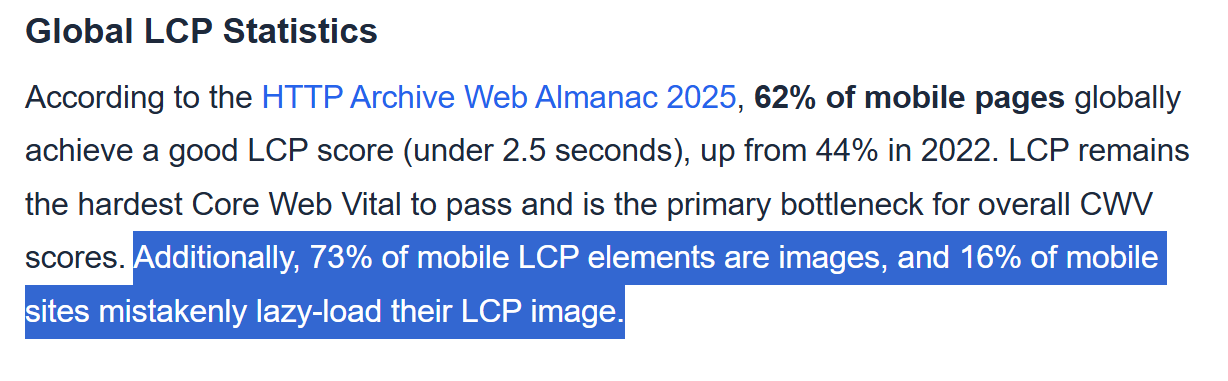
That largest element is what Google measures for Largest Contentful Paint, one of its Core Web Vitals.
In plain terms: if your hero image is a bloated 3MB file, your page feels slow, and Google notices.
The fix is dramatic. Google’s own next-gen format, WebP, produces files that are 25–34% smaller than JPEG at the same quality.

When YouTube switched its thumbnails to WebP, it saw 10% faster page loads. That’s the kind of win you get from one format change.

Speed is only half of it. Google Images is a real traffic source most NZ businesses ignore.
People search visually far more than they realise, and that behaviour is accelerating — Google Lens now handles roughly 20 billion visual searches every month, and Google calls it one of the fastest-growing query types on search.

Then there’s accessibility, which most guides treat as an afterthought.
Alt text is what screen readers read aloud to blind and low-vision users. It’s also a genuine problem online: more than half of the top one million home pages have images with missing alt text.
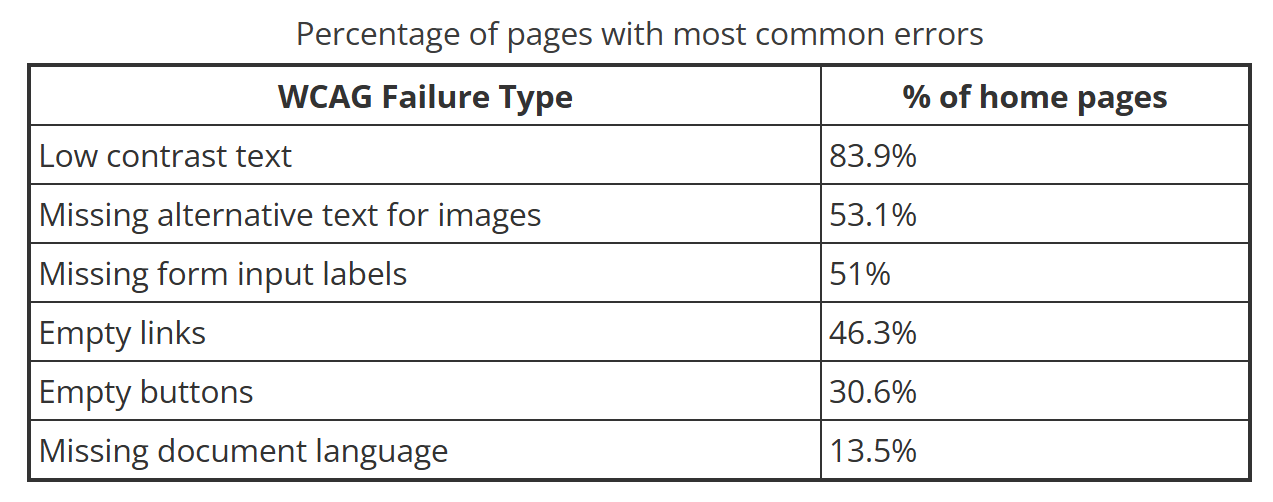
For a New Zealand business, getting this right does more than help SEO. It makes your site usable for everyone, which is the right thing to do regardless of rankings.
I’ve seen the speed side matter at scale.
We grew a health site, HealthVI, from zero to over 23,000 monthly organic visitors.

It was image-heavy — product reviews, comparison shots, the lot — and if those images hadn’t been optimised, the speed hit alone would have dragged the whole thing down.
It’s worth doing on most pages, though you don’t need all nine steps on every image — the final section covers which ones to prioritise. First, here’s the full method.
How to Optimise Images for SEO, Step by Step
Good image SEO comes down to a short routine you repeat every time you add an image. Get these nine things right and you’ve beaten the vast majority of sites in your market.
1. Start with the right image
Use a relevant, high-quality image that matches the content — and where you can, use your own rather than stock.
A real photo of your team, your work, or your product beats a generic stock photo every time, both for trust and for search.

Place it near the text it relates to. An image sitting next to relevant words is easier for Google to understand, and it ranks better for the terms that surround it.
For example, on the menu page for a café in Hamilton, a real photo of the actual flat white you serve does more than a stock coffee cup ever will.
2. Name the file properly
Rename the file before you upload it, using plain words that describe what’s in it. hamilton-mobile-coffee-cart.jpg tells Google exactly what the image shows. IMG_4321.jpg tells it nothing.
This is the easiest win in image SEO and the one people skip most.
Once a file is uploaded with a useless name, fixing it is a hassle, so build the habit of naming it at the source. Lowercase, words separated by hyphens, no spaces, keyword included only where it’s natural.
A photographer uploading wedding shots should name them auckland-wedding-photographer-ceremony.jpg, not DSC0098.jpg.
That single habit is a real chunk of how photography SEO works, because the whole business lives in image search.
3. Choose the right format
WebP should be your default. It gives you smaller files than JPEG or PNG at the same quality, which directly improves load speed.
Convert your images with a free tool like Squoosh before upload, or let a plugin handle it.
Use the others when they fit: JPEG for large photos where WebP isn’t an option, PNG when you need a transparent background, and SVG for logos and simple icons because they stay sharp at any size.
4. Resize to the dimensions you’ll display
Stop uploading a 4000-pixel-wide image to show it at 600 pixels. The browser still has to load the entire original, so you’re forcing visitors to download data they never see.
Resize the image to roughly the size it appears on the page. If your blog displays images at 800px wide, there’s no reason to upload anything close to 3000px. This one change often halves a page’s weight on its own.
5. Compress the file
Once it’s sized correctly, compress it so it’s served as small as possible without looking worse.
Squoosh, TinyPNG, or a WordPress plugin like ShortPixel will do this in seconds.

Set the plugin once and it compresses everything you upload from then on, automatically.
While you’re at it, stripping the EXIF data (the camera and location metadata baked into photos) shaves off a little more weight.
6. Serve responsive images
Responsive images let the browser load a smaller version of an image on a phone and a larger one on a desktop, instead of serving the same heavy file to everyone.
This is handled by the srcset attribute. If you’re on WordPress, it’s done for you automatically — you don’t need to touch the code.
7. Set width and height
Always specify the image’s width and height. When the browser knows how much space an image will take before it loads, it reserves that space, so your text doesn’t jump around as the page loads.
That jumpiness is called layout shift, and it’s another Core Web Vital Google measures. Setting dimensions is part of the technical side of SEO that quietly protects your scores.
8. Write alt text that describes the image
Alt text is the written description of an image, read aloud by screen readers and used by search engines to understand what the image shows. Write it as if you were describing the picture to someone who can’t see it.
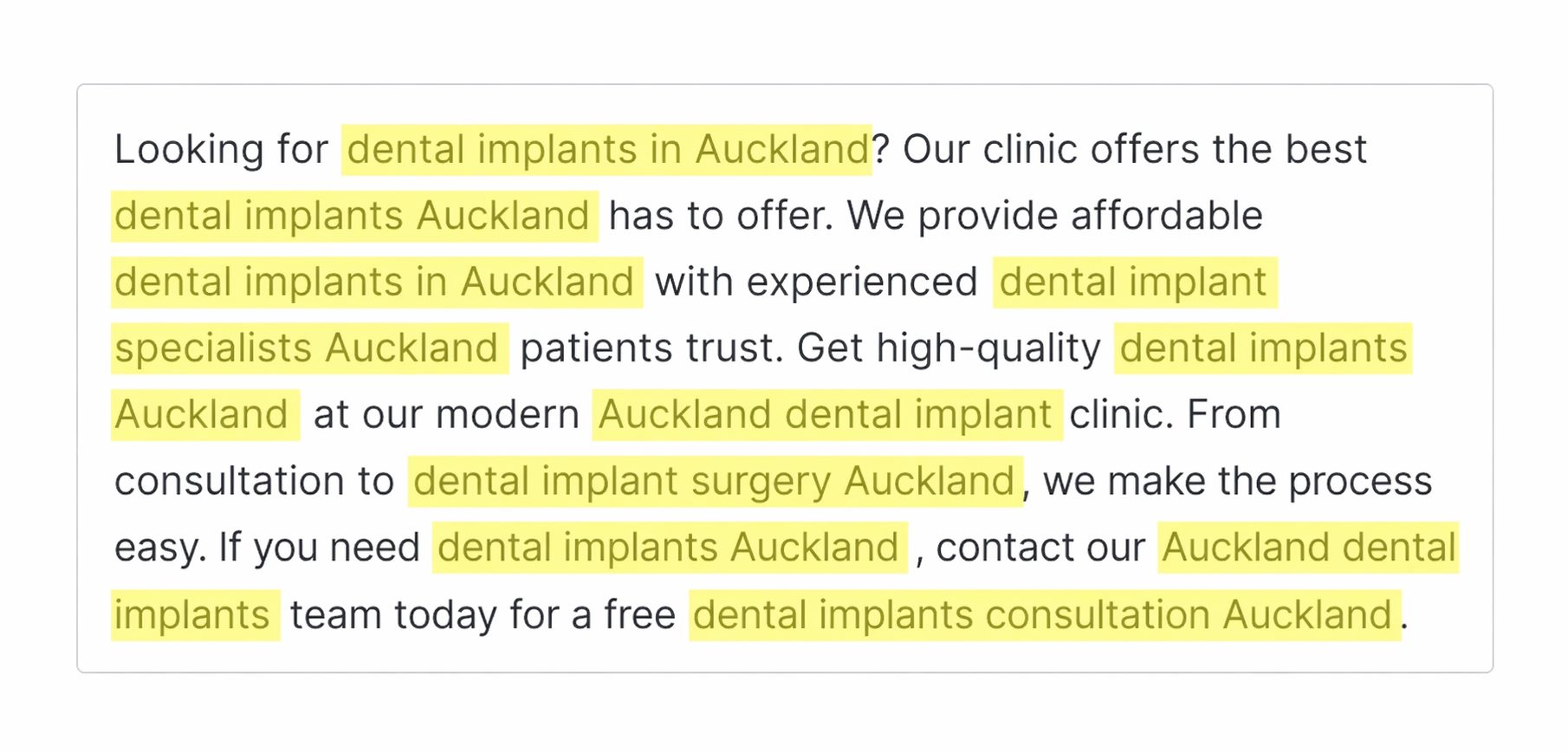
“Dentist checking a patient’s teeth in a Tauranga clinic” is good alt text. “dentist dentist Tauranga dentist near me” is keyword stuffing, and it hurts you.
Include your keyword only when it genuinely fits the description.
Not every image needs alt text. Purely decorative images — a background flourish, a divider line — can have empty alt text so screen readers skip them. Save your descriptions for images that actually carry meaning.
9. Add a caption where it helps
Captions are the text that sits directly under an image. People scan captions when they skim a page, so they’re useful for the images that matter most.
You don’t need one on every image — only where it adds something for the reader. Don’t add a caption purely for SEO.
Run those nine steps and the bulk of image SEO is done. The next sections cover the extras that push it further.
Structured Data, Social Cards and Image Sitemaps
Once an image is optimised, three add-ons help it get found and displayed properly.
Structured data is code that tells Google more about your image, which can earn it a richer listing in image search — a product badge, a recipe label, and so on.
On WordPress, plugins like Rank Math and Yoast add a lot of this for you.

OpenGraph tags control the image that appears when someone shares your page on Facebook, LinkedIn, or in a message. Without them, social platforms grab a random image or none at all. With them, you choose exactly what shows.
Image sitemaps help Google discover images it might otherwise miss, especially ones loaded by JavaScript. Most SEO plugins include your images in your XML sitemap by default, so this is usually handled the moment you install one.
How Images Get You Into AI Overviews and Visual Search
Image SEO is no longer just about Google Images.
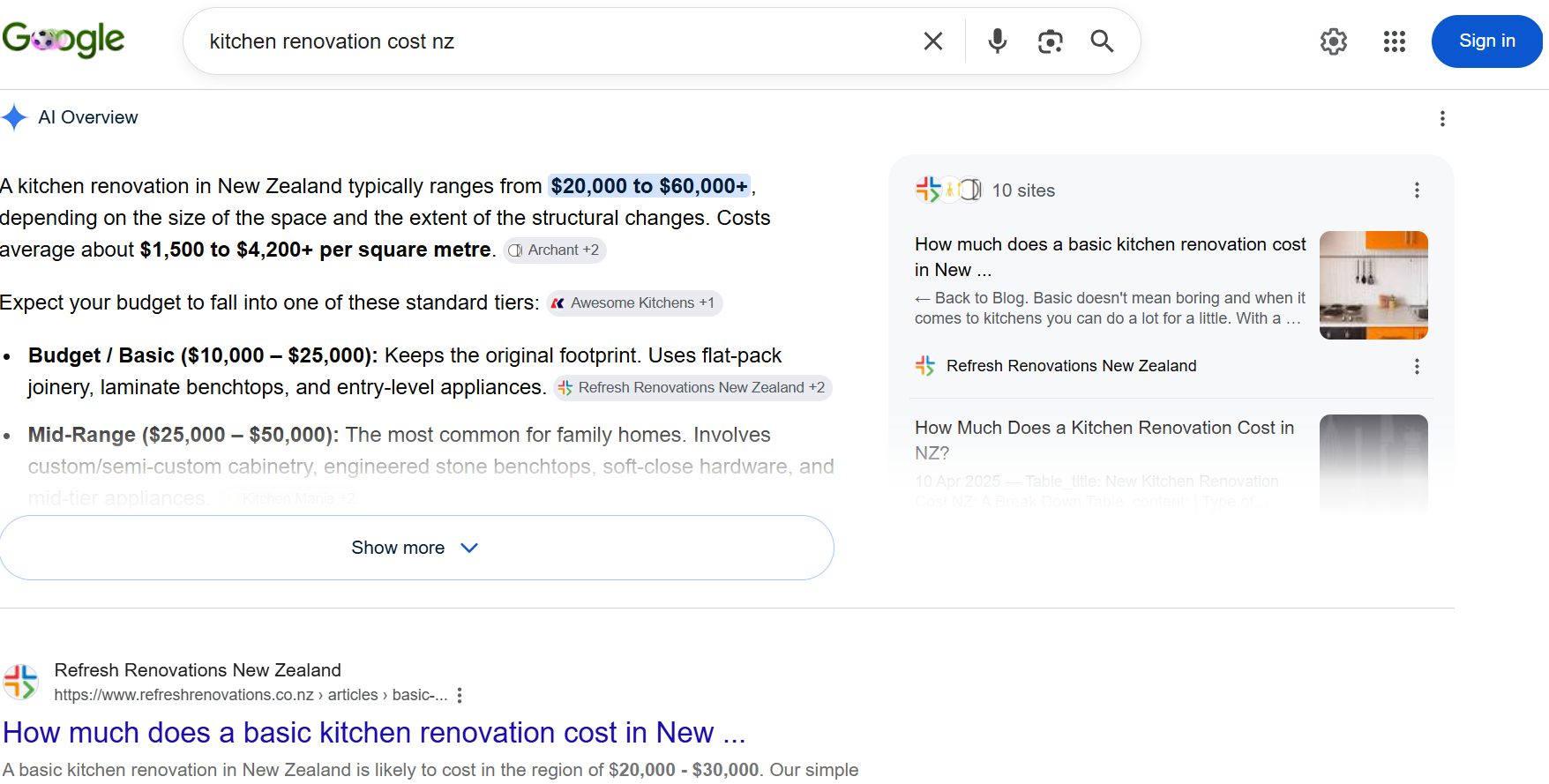
Well-optimised, well-described images are what AI Overviews pull thumbnails from and what Google Lens matches when someone points their camera at the world.
This is the part competitors skip, and it’s where the opportunity is.
When Google’s AI Overview answers a question, it often shows images alongside the text — and it chooses those images based on how clearly they’re described and how relevant the surrounding content is.
The exact same alt text, file naming, and context that help traditional image SEO are what make an image eligible to appear in an AI answer.
Visual search is the other half.
When someone uses Google Lens to search with a photo — a plant, a product, a building — Google matches it against images it understands.
If your images are properly described and indexed, you’re in that pool. If they’re called IMG_4321.jpg with no alt text, you’re not.
The strategy for ranking in AI search with images is the same strategy that wins everywhere else: descriptive alt text, clear file names, relevant surrounding text, structured data, and genuine, high-quality originals. There’s no separate trick.
I’ve watched this play out on our own site. Our SEO company is on a New Zealand domain less than a year old, competing against agencies with a decade’s head start.
It’s already earning AI Overview citations and ranking for 233 NZ keywords worth around $3,453 a month in organic traffic — all non-branded, no paid ads.

A smaller, newer site can absolutely win these surfaces. It wins on relevance, not domain power, and your images are part of that relevance.
Image SEO for Local NZ Businesses and Google Business Profile
If you run a local business, your images matter in two places: your website and your Google Business Profile. Most local businesses optimise neither.
On your Business Profile, photos do real work. Listings with good, regularly updated photos get more views and more clicks to the website, because people want to see the actual premises, the team, and the work before they call.

Upload real photos often — your storefront, your staff, finished jobs — not a single logo from three years ago. This is one of the underrated levers in ranking in the map pack.
On your website, geo-relevant naming and alt text help. A builder showing off completed work should name those files deck-builder-cambridge-before-after.jpg and describe them properly.
For SEO for builders, those job photos are some of the strongest content on the site, and naming them by location and job type lets them show up when locals search.
Be honest about what this does, though. Image optimisation supports your local visibility — it doesn’t replace the fundamentals.
Reviews, an accurate profile, and proper local SEO do the heavy lifting. Optimised images make all of it work a little harder.
The Best Tools for Image SEO
You don’t need many tools for this. A few cover the whole job.
For compressing and converting, Squoosh and TinyPNG are free and browser-based, and ShortPixel runs automatically inside WordPress.
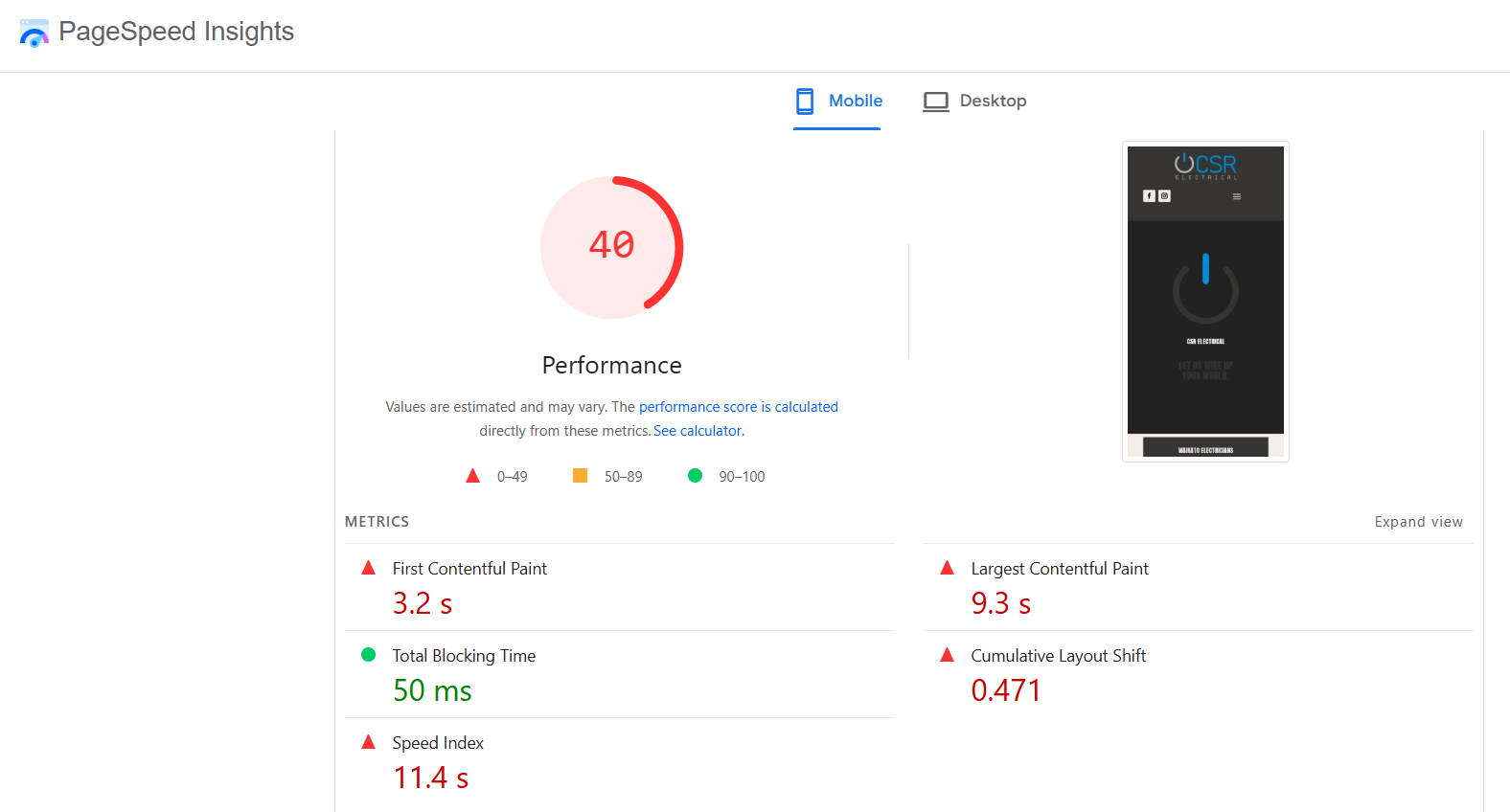
For auditing an existing site, Screaming Frog crawls every page and flags missing alt text and oversized images in one go, and Google’s PageSpeed Insights shows you which images are slowing a page down.
For measuring results, Google Search Console reports how much traffic your images pull from image search — completely free.
Common Image SEO Mistakes
Most image SEO problems come from the same short list. Fix these first.
- Uploading full-resolution images. A 4MB photo shown at thumbnail size is the most common cause of a slow page.
- Empty, duplicated, or keyword-stuffed alt text. All three are common, and all three undercut both accessibility and rankings.
- Useless file names.
IMG_4321.jpgwastes the easiest ranking signal you have. - Wrong format. A PNG used for a photo is usually several times larger than it needs to be.
- No width and height set. This causes layout shift and drags down your Core Web Vitals.
- Alt text on decorative images. Background flourishes don’t need descriptions — they just clutter the experience for screen reader users.
If you only audit one thing across your whole site, run a crawl for missing alt text and oversized images. An SEO audit usually surfaces these image issues fast, and they’re some of the quickest wins you’ll find.
How to Measure Your Image SEO
You can see image SEO working in two free places, so you’re never guessing.
The first is Google Search Console.
Go to Performance, then filter the search type to Image. That shows you exactly how many impressions and clicks your images are pulling from Google Images. Watch it climb as you optimise.
The second is your Core Web Vitals. Run a page through PageSpeed Insights before and after you compress and resize its images, and you’ll see the Largest Contentful Paint score improve. That’s the speed gain made visible.
Give it time. Like the rest of SEO, image results compound rather than appear overnight. A few weeks to a few months is realistic, depending on how often Google recrawls your site.
What’s Actually Worth Your Time
For a small New Zealand site with limited hours, ignore most of this list and do three things: compress your images, name them properly, and write real alt text.
That’s the 80/20. Those three cover speed, crawlability, and accessibility, and they take minutes once you’ve built the habit.
The nice-to-haves — structured data, image sitemaps, an image CDN — are worth doing once your basics are solid, and a good SEO plugin handles most of them for you anyway.
The “only if it applies” extras, like product image schema for ecommerce SEO or a regular Google Business Profile photo cadence for local businesses, depend entirely on your situation.
And keep the whole thing in perspective.
At New Zealand search volumes, image SEO is a supporting play that compounds — not a traffic silver bullet.
It’s one of the details that lets a smaller, more relevant site out-rank bigger competitors, the same way SEO in Auckland gets won on depth and relevance rather than raw domain power.
Do the three basics on every page, the extras where they pay off, and move on.
If you’d rather not think about any of this, that’s a fair call too. You can get professional SEO services to handle it across your whole site, or work with an SEO consultant to sort it once and learn the system yourself.
Either way, the routine above is what good image SEO looks like.