
How to Get Your Website to the Top of Google (NZ Guide 2026)
-
 Danyon Togia

You’ve got a website. It looks good. But when you search for what you do on Google, you’re nowhere to be found.
Meanwhile, your competitors are sitting right there at the top — picking up the calls, the enquiries, and the customers that should be coming to you.
If that sounds familiar, the fix isn’t as complicated as you might think.
This guide breaks down the how to get your website to the top of Google, what actually works in 2026, and a clear plan you can follow — whether you’re doing it yourself or thinking about hiring someone.
What “The Top of Google” Actually Means in 2026
Getting to the top of Google used to mean one thing: ranking number one in the search results.
In 2026, the results page looks completely different — and there are now several ways your business can show up right at the top.
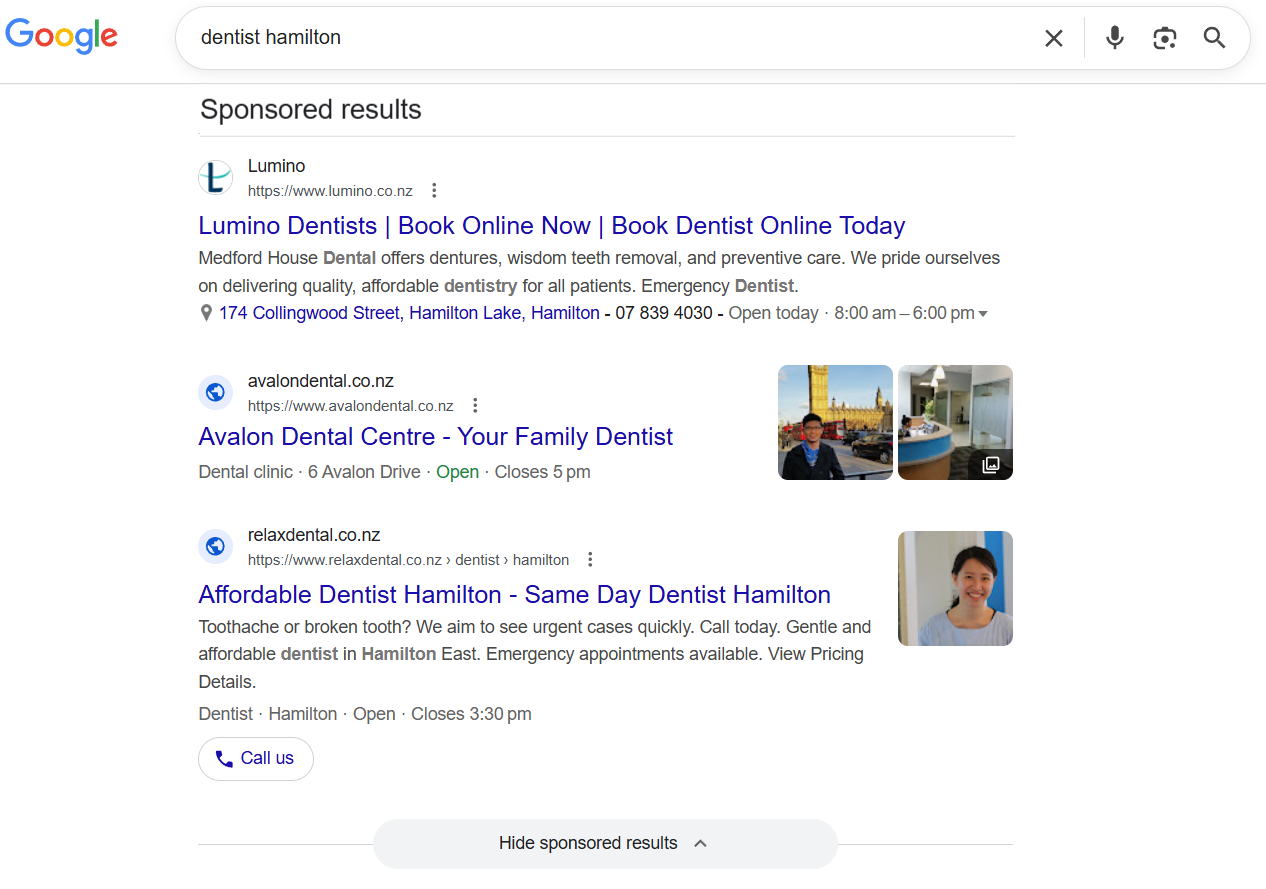
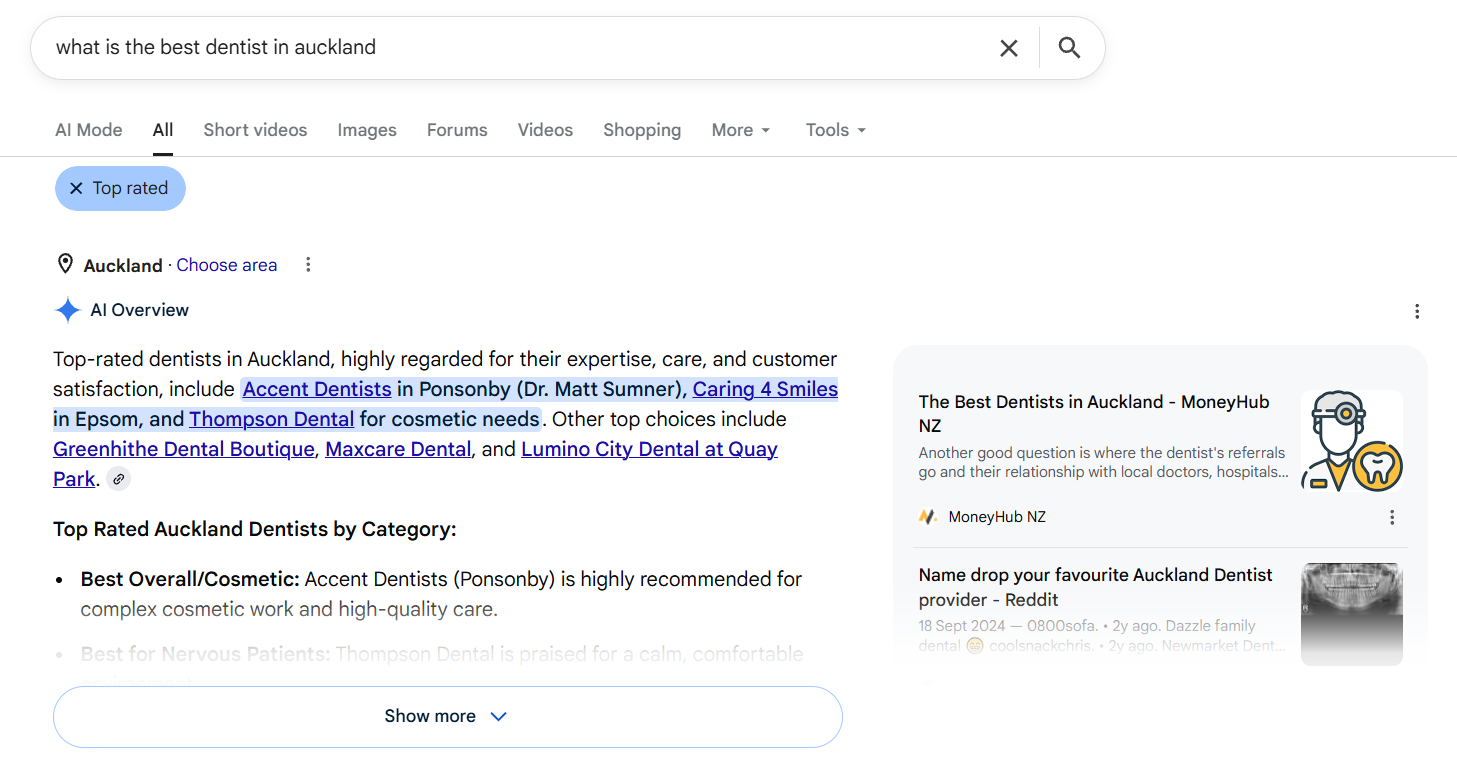
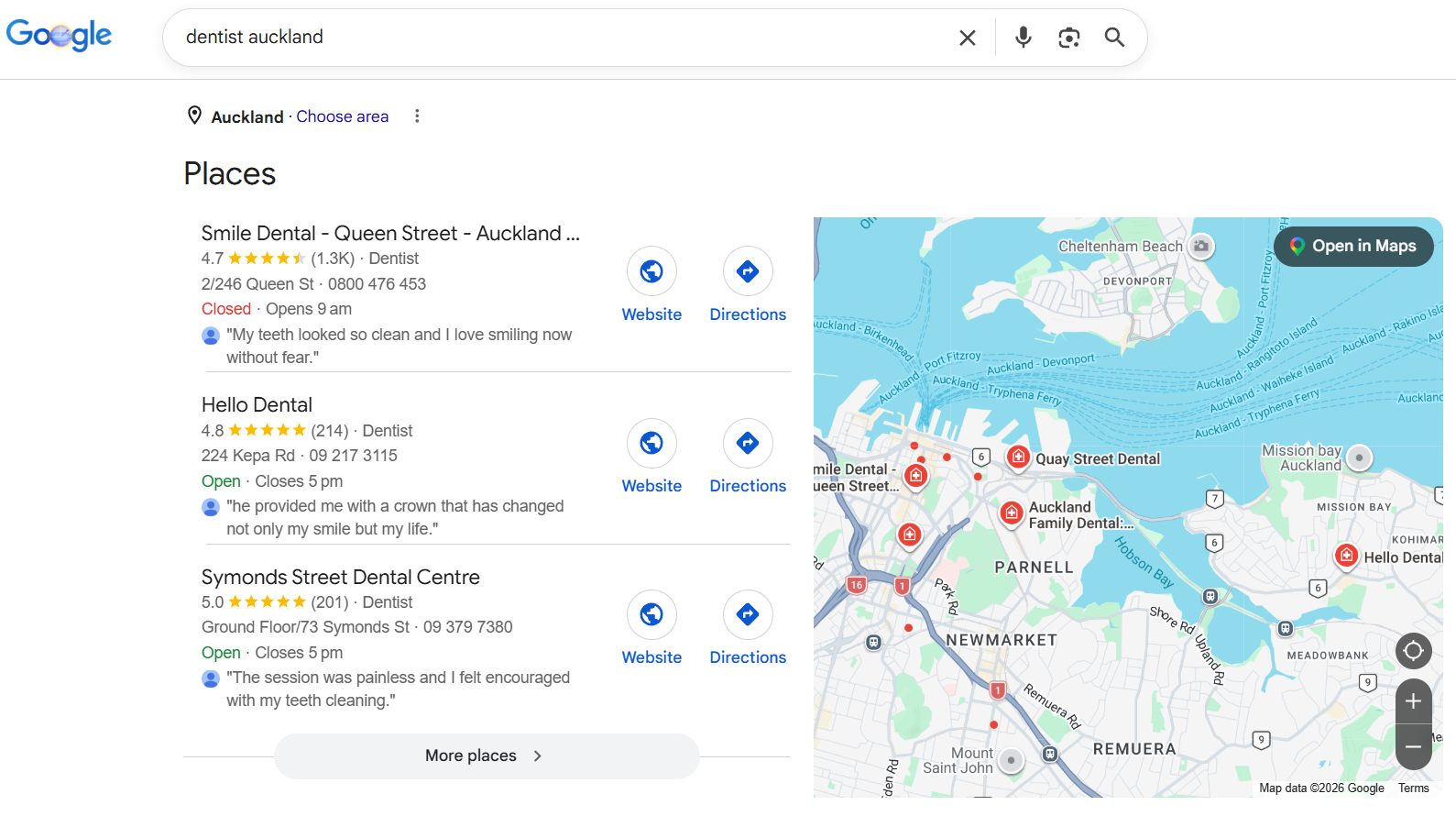
Here’s what a typical Google results page looks like when someone searches for a service in New Zealand:
Google Ads sit at the very top. These are paid listings marked with a “Sponsored” label. You pay every time someone clicks.
AI Overview comes next on many searches. This is Google’s AI-generated summary that pulls information from various websites and displays it directly in the results.
The Map Pack shows three local businesses with a map. If you serve a specific area, this is where a huge chunk of your clicks come from.
Organic results are the traditional “blue link” listings underneath. These are the results you earn through SEO — and they’re free.

Below that, you’ll see People Also Ask questions, video results, and related searches.
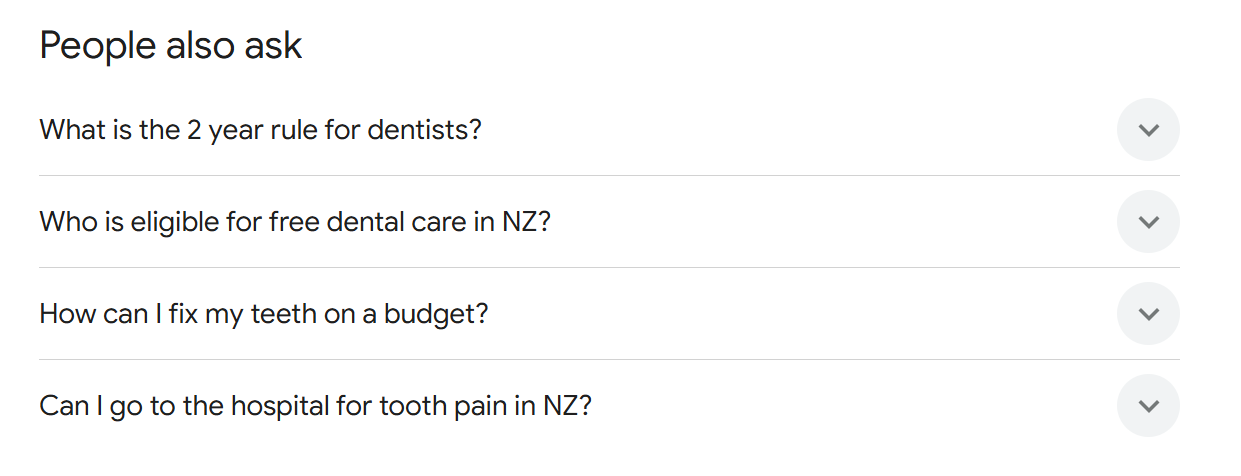
The point is this: “the top of Google” isn’t just one spot anymore. There are multiple ways to show up, and the smartest businesses are targeting more than one.
There are three main paths to get there:
| Method | Speed | Cost | Longevity | Best For |
|---|---|---|---|---|
| Google Ads | Instant | Ongoing cost per click | Stops when you stop paying | Quick visibility, testing demand |
| Google Business Profile | Weeks to months | Free to set up | Lasts as long as you maintain it | Local businesses |
| SEO | 3–12 months | Time (DIY) or monthly fee (agency) | Compounds over time | Long-term growth |
Most businesses should be doing at least two of these. Let’s break each one down.
Google Ads — The Fastest Way to the Top
The fastest way to appear at the top of Google is to pay for it.
Google Ads lets you bid on specific keywords so your website shows above everything else with a “Sponsored” label. Someone searches “plumber Hamilton,” your ad appears right at the top, and you pay when they click.
It works immediately. You can have traffic coming to your site within hours of setting up a campaign.
The average cost per click sits around $5.26, though it varies a lot by industry. A dentist might pay $8–$12 per click, while a café might pay $1–$2.
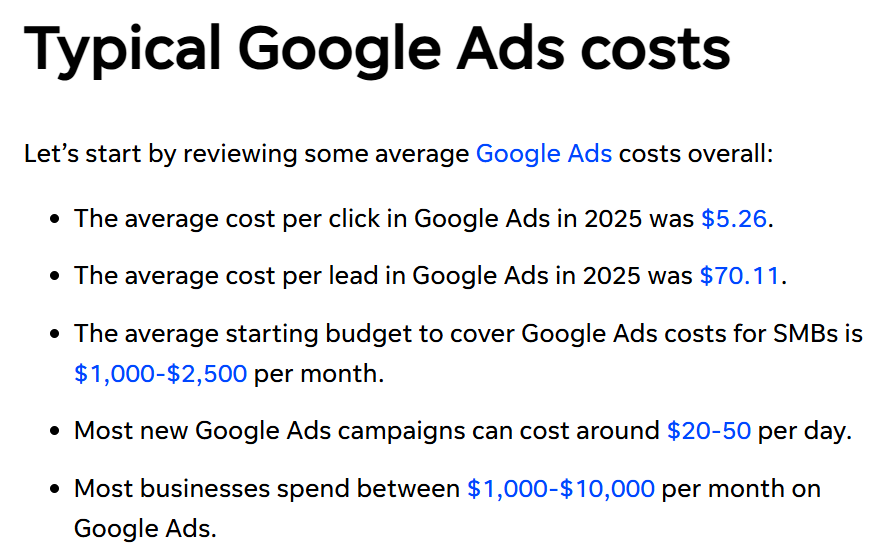
Google Ads makes sense when you’re launching a new business and need visibility fast. It’s also useful for testing whether a keyword actually converts before investing in SEO, or for running a time-sensitive promotion.
The catch is simple: the moment you stop paying, the traffic stops. It’s a tap you turn on and off — there’s no long-term asset being built.
That’s why most businesses use Google Ads alongside SEO — not instead of it.
Google Business Profile — How to Show Up in Local Searches
If you serve customers in a specific area, your Google Business Profile is one of the most important things you can set up.
It’s how you show up in Google’s map pack — those three business listings with the map that appear near the top of local searches. When someone searches “dentist Auckland” or “plumber near me,” the map pack is often the first thing they see.
And the best part: it’s completely free.
How to Set Up Your Profile
Search for “Google Business Profile,” create an account, and claim your listing.
If your business already has a listing (Google sometimes creates them automatically), claim it so you can control the information.
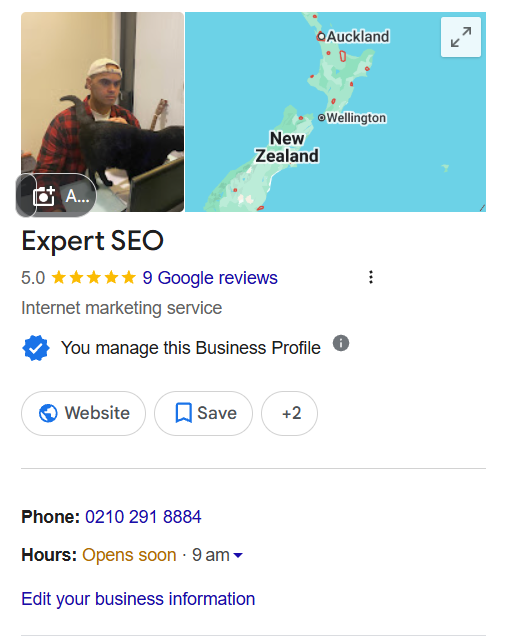
Fill in everything properly:
Your exact business name, address, and phone number. These need to match what’s on your website and everywhere else online.
Your website URL, opening hours, and business category. Choosing the right category matters because it helps Google understand what your business actually does.
Add photos of your business, your team, and your work. Profiles with photos get significantly more engagement than those without.
Why Reviews Matter
Reviews are one of the strongest signals Google uses to decide who shows in the map pack.
The businesses that consistently rank at the top of local searches usually have one thing in common: a steady stream of genuine reviews.

The key is to make it systematic. After every job or appointment, send the customer a direct link to leave a Google review. If they don’t, follow up once. Keep it simple — one ask, one link, one follow-up.
You don’t need hundreds of reviews overnight. You just need to be collecting them consistently.
What Google Looks At
Google decides who shows in the map pack based on three main factors:
Relevance — how well your profile matches the search. This is where your business category and description matter.
Distance — how close you are to the person searching. You can’t control this, but you can make sure your address is accurate.
Prominence — how well-known and trusted your business is. This is where reviews, backlinks, and mentions on other websites come in.
Get these right, and you give yourself a strong shot at appearing in the map pack for your area. There’s more to local SEO than this, but these fundamentals are where every local business should start.
SEO — How to Get to the Top of Google and Stay There
SEO (Search Engine Optimisation) is how you get your website to rank in Google’s organic results — the non-paid listings below the ads and map pack.
It works differently from Google Ads. Instead of paying for each click, you earn your position by making your website the best possible answer to what someone is searching for.
The process is straightforward: Google sends out crawlers that scan websites across the internet.
When it finds your pages, it stores them in its index. Then, when someone searches for something, Google’s algorithm decides which pages from its index are the most relevant and trustworthy — and ranks them accordingly.
SEO takes longer than paying for ads. But once you rank, the traffic is free and it keeps coming. And unlike ads, search engine optimisation compounds over time. The more you invest in it, the stronger your results become.
Here are the five steps we use in our SEO services to making it work.
Step 1 — Find the Right Keywords to Target
Keyword research is finding what your potential customers are actually searching for on Google so you can create pages that match that demand.

A solid SEO strategy starts here. If you skip it, everything else is guesswork.
Start with the services or products that make you money, combined with the locations you serve. If you’re a plumber in Hamilton, your core keywords might be:
- plumber Hamilton
- emergency plumber Hamilton
- hot water cylinder repair Hamilton
The easiest way to find these is to brainstorm everything a customer might search to find your business, then validate those keywords using Google Keyword Planner (free with a Google Ads account).
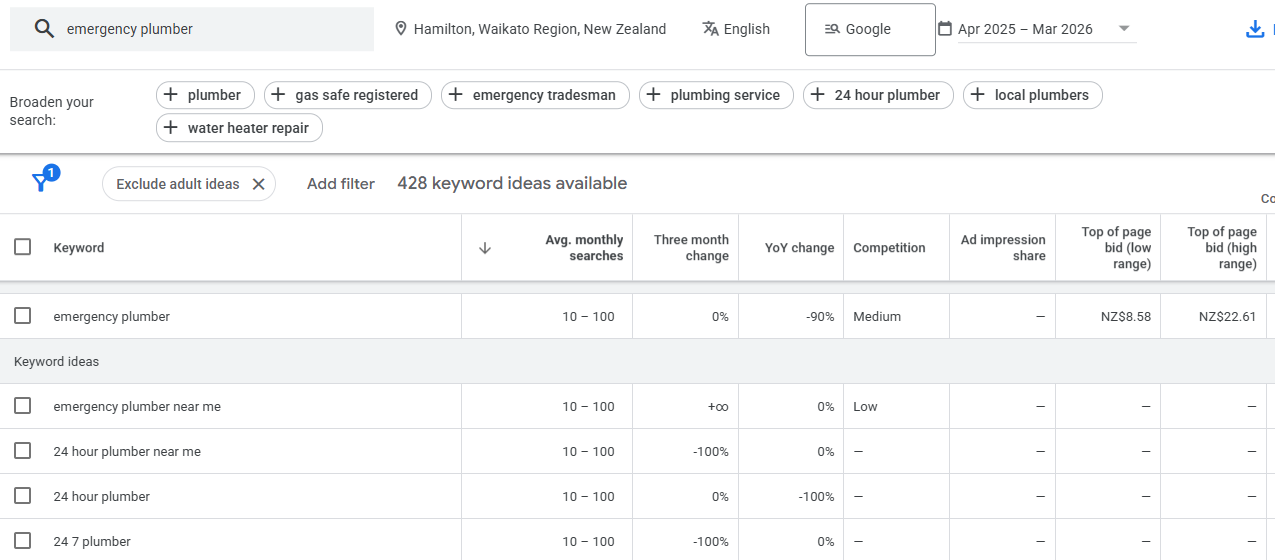
Understand the Difference Between Buying and Learning Keywords
Not all keywords are equal. Some people are ready to buy. Others are just looking for information.
| Keyword | What They Want | What to Create |
|---|---|---|
| plumber Hamilton | Hire a plumber | Service page |
| how to fix a leaking tap | Learn how to do it themselves | Blog post |
| best plumber Hamilton reviews | Compare options before choosing | Service page with reviews |
This matters because you need to match the type of page to what the person actually wants. Google won’t rank a blog post for “plumber Hamilton” — it wants to show service pages for that search.
The simplest way to check intent is to Google the keyword yourself and look at what’s already ranking. If you see service pages, create a service page. If you see blog posts, create a blog post.
Step 2 — Create Content That Deserves to Rank
Google ranks the pages that best answer the searcher’s question.
If you want to rank, your content needs to be better than what’s already showing up — clearer, more helpful, and backed by real proof.
Before you write anything, search your target keyword and look at the top five results.
Ask yourself:
- What are they doing well?
- What are they missing?
- What could I explain more clearly?
- What real examples or proof can I add that they don’t have?
Better doesn’t mean longer. It means more useful.
For a service page, that might mean clearly explaining what you do, who you serve, what the process looks like, and why someone should choose you — backed by real reviews, photos of your work, and clear pricing (or at least a pricing guide).
For a blog post, it means giving step-by-step instructions someone can actually follow, using real examples, and covering the topic thoroughly enough that the reader doesn’t need to visit any other website.
This approach is exactly how I grew a health website called HealthVI from zero to over 20,000 monthly visitors in under a year.

The strategy was simple — find what people were searching for, look at what was already ranking, and create something genuinely more useful. No tricks, just better content.
Step 3 — Set Up Your Pages So Google Knows What They’re About
On-page SEO is about giving Google clear signals so it knows exactly what your page covers and when to show it in search results.
Your target keyword should appear naturally in a few key places:
Title tag — this is what shows up as the clickable headline in Google’s results. Include your keyword and make it compelling enough to click. For example: “Plumber Hamilton | Fast, Reliable Plumbing Services.”
H1 heading — the main heading on the page itself. This should clearly state what the page is about.
URL — keep it short and include the keyword. Something like /plumber-hamilton/ works well. Avoid long, messy URLs like /page?id=123&category=services.
Meta description — the short text that appears under your title in Google results. Include your keyword and give people a reason to click through.
Opening paragraph — mention your keyword naturally within the first few sentences.
Structure the rest of the page with clear H2 and H3 headings that break the content into logical sections. This makes it easier for both Google and the reader to understand what you’re covering.
The key word here is “naturally.” Don’t jam your keyword into every sentence. If it reads awkwardly, you’ve gone too far. Google is smart enough to understand context — you don’t need to force it.
Step 4 — Make Sure Your Website Actually Works Properly
Technical SEO is like checking under the hood of your car. Even if your content is great, a slow or broken website will hold you back.
There are four things to get right here:
Make Your Site Fast
If your pages take more than a few seconds to load, people leave — and Google notices. Compress your images before uploading them (large images are the most common cause of slow sites). If you’re on WordPress, install a caching plugin like WP Rocket.
You can check your site speed using Google PageSpeed Insights — just enter your URL and it will tell you what needs fixing.
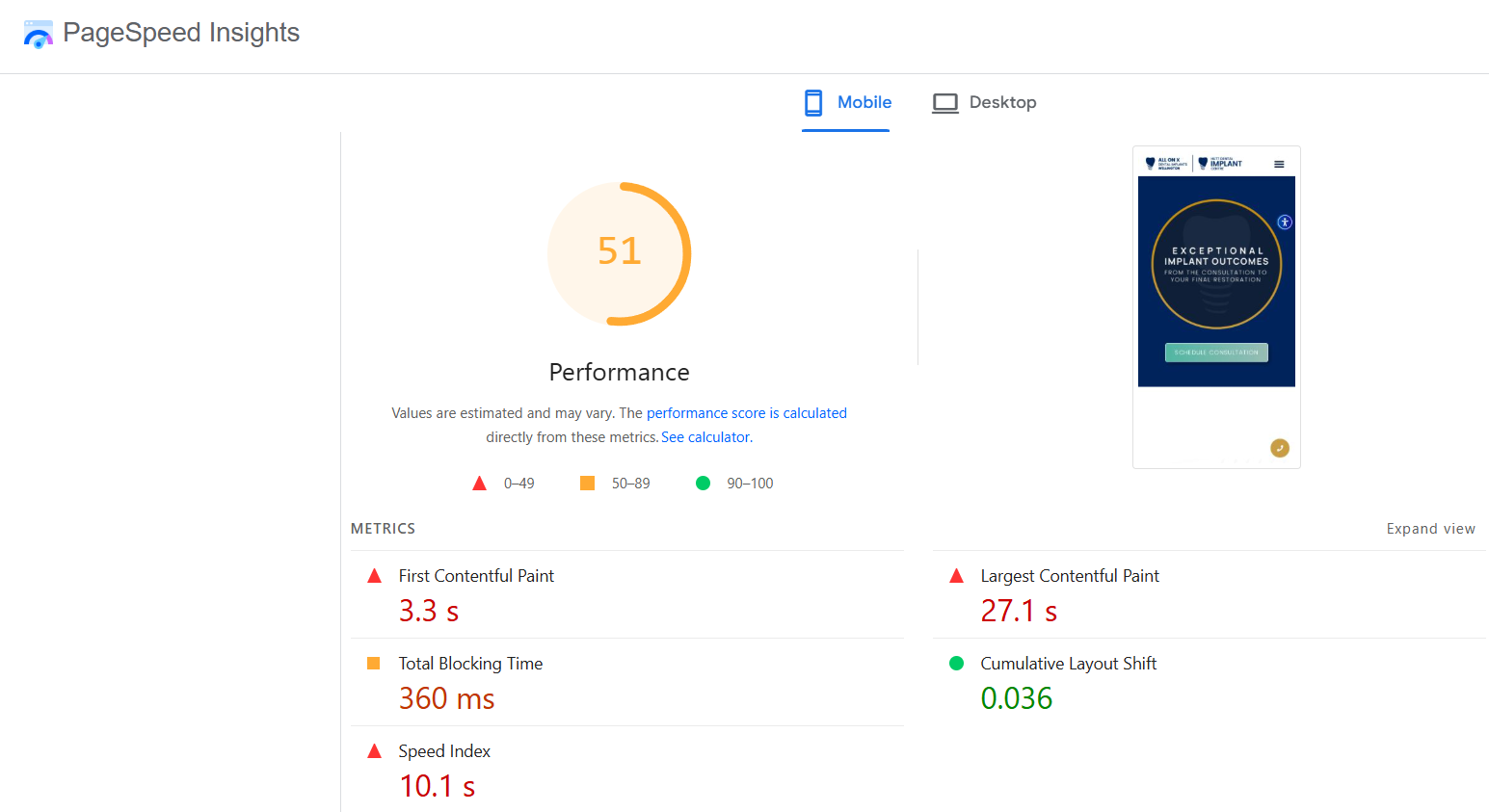
Make Sure It Works on Mobile
Over 60% of web traffic globally now comes from mobile devices.
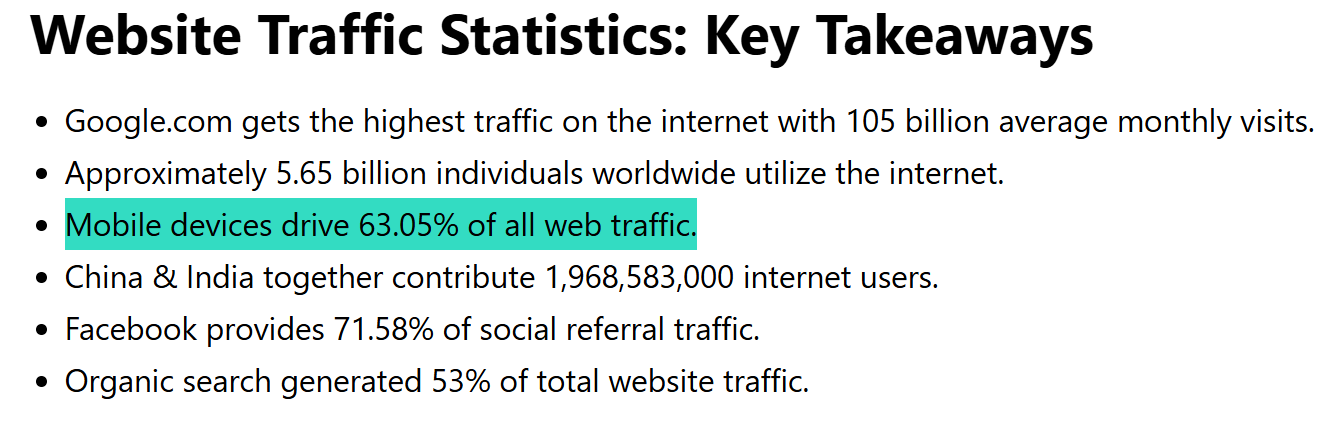
Google uses the mobile version of your site for ranking, so if your site is hard to use on a phone — text too small, buttons too close together, layout breaking — it will struggle to rank.
Open your website on your phone and click through the main pages. If anything feels difficult to use, fix it.
Set Up Google Search Console
Google Search Console is a free tool that shows you how Google sees your website. It tells you which pages are indexed, what keywords you’re showing up for, and whether there are any errors.
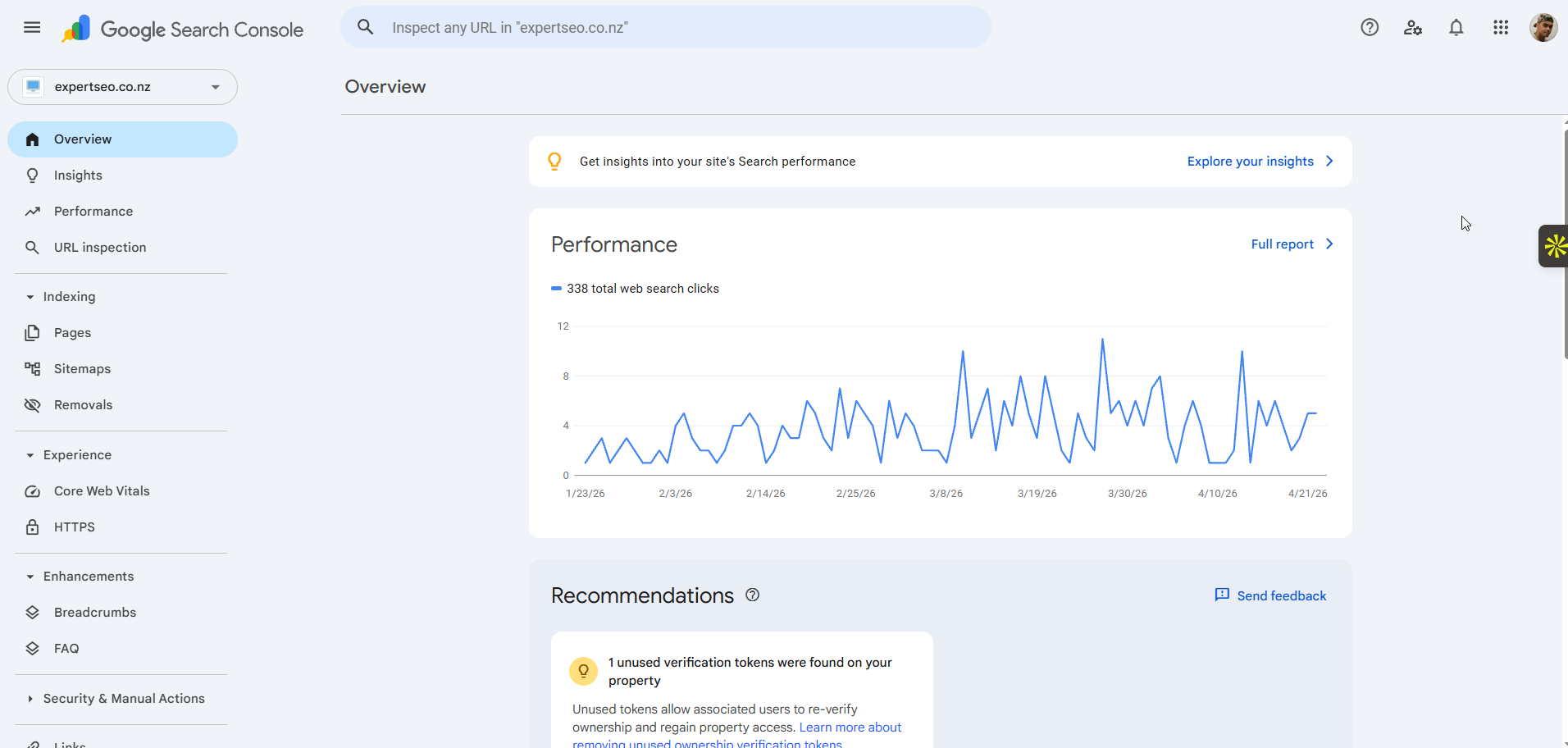
Set it up by going to Google Search Console, adding your website, and verifying that you own it. Then submit your sitemap (most website platforms generate one automatically — it’s usually at yourdomain.com/sitemap.xml).
This is also how you can request Google to crawl specific pages. If you’ve published a new page and want Google to find it quickly, submit the URL through Search Console.
Fix Broken Links and Errors
Broken pages (404 errors) waste Google’s time and create a bad experience for visitors. Use a free tool like Screaming Frog to crawl your site and find any broken links or errors. Fix them or redirect them to the most relevant live page.
Step 5 — Build Authority with Links from Other Websites
Backlinks are links from other websites pointing to yours. They’re one of the strongest ranking signals in Google because they act as third-party proof that your content is worth ranking.
Think of it like word-of-mouth referrals. Building links from other websites signals to Google that your site is credible and trustworthy.
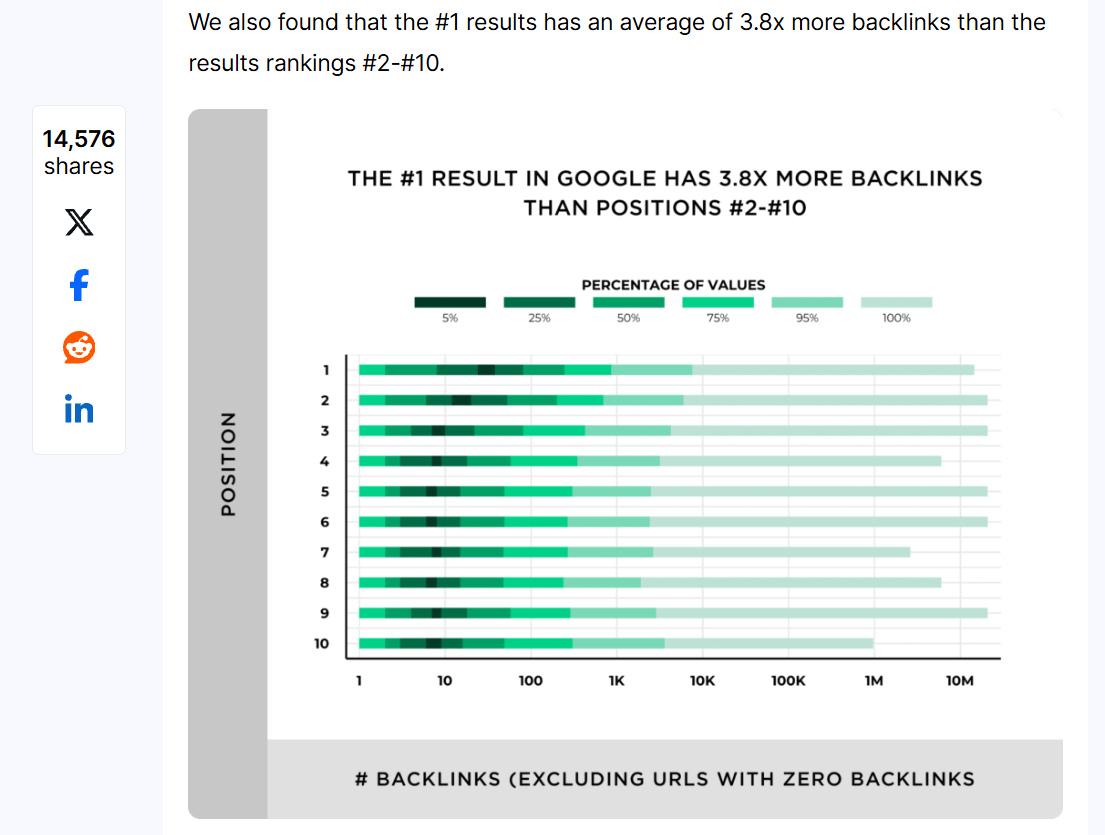
The data backs this up. The top result on Google has, on average, 3.8 times more backlinks than pages ranking in positions two through ten.
What Makes a Good Link
Not all links are equal. A link from a relevant, reputable website is worth far more than dozens of links from random, low-quality sites.
For NZ businesses, focus on links from local directories, industry associations, local news sites, business partners, and relevant NZ blogs.
How to Get Links
Get listed on relevant NZ directories. Start with the easy wins — local business directories, industry-specific listings, and your local chamber of commerce.
Build local partnerships. If you sponsor a local sports team, collaborate with another business, or work with a supplier, there’s often an opportunity to get a link from their website.
Create content worth linking to. If you publish a genuinely useful guide, local resource, or data-backed article, other sites are more likely to reference it. This is how we’ve earned links to our own content — by creating something genuinely more useful than what’s out there.
Avoid cheap link packages. If someone offers you 100 backlinks for $50, run the other way. Spammy links can actually hurt your rankings. Focus on quality over quantity.
Why Your Website Isn’t Ranking on Google (And How to Fix It)
If your website isn’t showing up on Google, it’s almost always one of these issues — and most of them are fixable.
Your site isn’t indexed. Google literally can’t see it. Check Google Search Console to confirm your pages are being indexed. If they’re not, submit your sitemap and request indexing.
You’re targeting the wrong keywords. Or no keywords at all. If your pages don’t match what people are actually searching for, Google has no reason to rank them. Go back to Step 1 and do the keyword research.
Your content is too thin. A 200-word service page with no real information isn’t going to outrank a competitor who has a detailed, helpful page covering the same topic. Add depth, examples, and proof.
Your site is too slow or broken on mobile. Check PageSpeed Insights and fix what it flags. This is often one of the quickest wins.
You have no backlinks. If no other website links to yours, Google has no external signal that your site is trustworthy. Start building links using the methods in Step 5.
You’re competing against sites with years of authority. If you’re a brand new website trying to rank for a highly competitive keyword, it’s going to take time. Focus on less competitive, longer-tail keywords first and build from there.
How Long It Actually Takes to Get to the Top of Google in NZ
For most New Zealand businesses, expect to see early signs of traction within three months. Real, meaningful rankings and traffic usually take six to twelve months of consistent work.
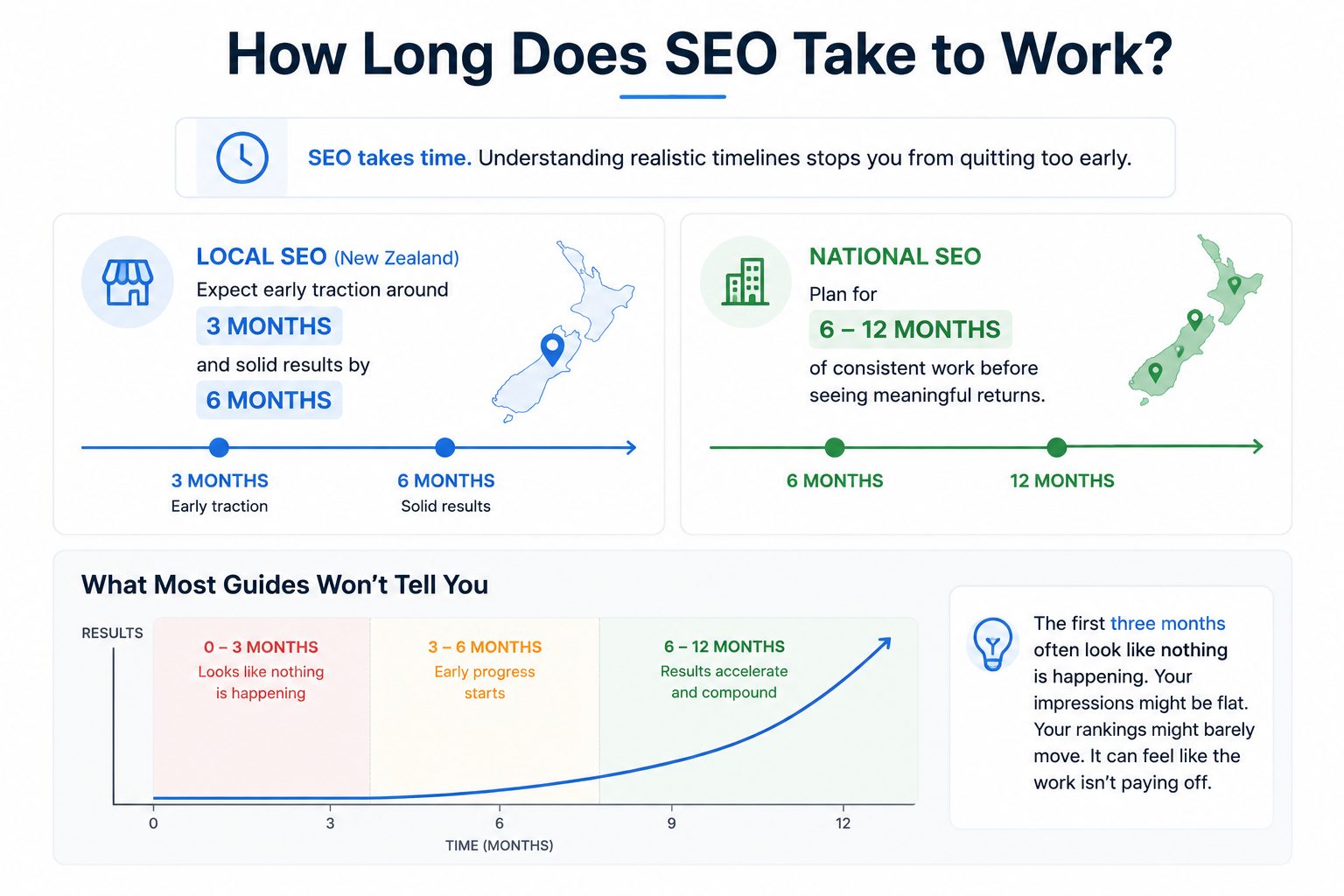
Local SEO tends to move faster. If you’re targeting your local area with a well-optimised Google Business Profile and a solid website, you can often see map pack results within three to six months.
National or competitive keywords take longer. If you’re going after broader searches with established competitors, expect six to twelve months before you see significant movement.
Here’s something nobody tells you: the first three months of SEO usually look like nothing is happening. You’re doing the work — setting up Search Console, publishing content, optimising pages — but the rankings and traffic haven’t caught up yet. This is normal. Google needs time to crawl, index, and evaluate your content.
The businesses that win at SEO are the ones that keep going through this phase. SEO compounds. Every piece of content, every link, every improvement stacks on top of the last one. At some point, the momentum kicks in and results start accelerating.
My own SEO company, Expert SEO, is a perfect example. It’s competing against businesses that have been building their websites for up to 10 years.
Despite that, it’s already ranking for competitive keywords and gaining traffic consistently — because we followed this exact process and stayed consistent.

How Much It Costs to Get to the Top of Google in NZ
What you’ll spend depends on which path you take and whether you do it yourself or hire someone.
Google Ads costs money per click. In NZ, the average CPC is around $3.24 NZD, but competitive industries like law or dentistry can be significantly higher. Most businesses spend at least a few hundred dollars per month on ads.
DIY SEO is free in dollar terms, but it requires a significant time investment. You’ll need to learn the process, do the research, create content, and build links yourself. It’s absolutely doable, but expect to spend several hours per week.
Hiring an SEO agency in NZ typically ranges from a few hundred to several thousand dollars per month, depending on your goals and competition level. More competitive industries and national campaigns cost more.
The way to think about it: SEO is an investment with compounding returns. Industry data shows that well-executed SEO campaigns deliver a median ROI of around 748%:
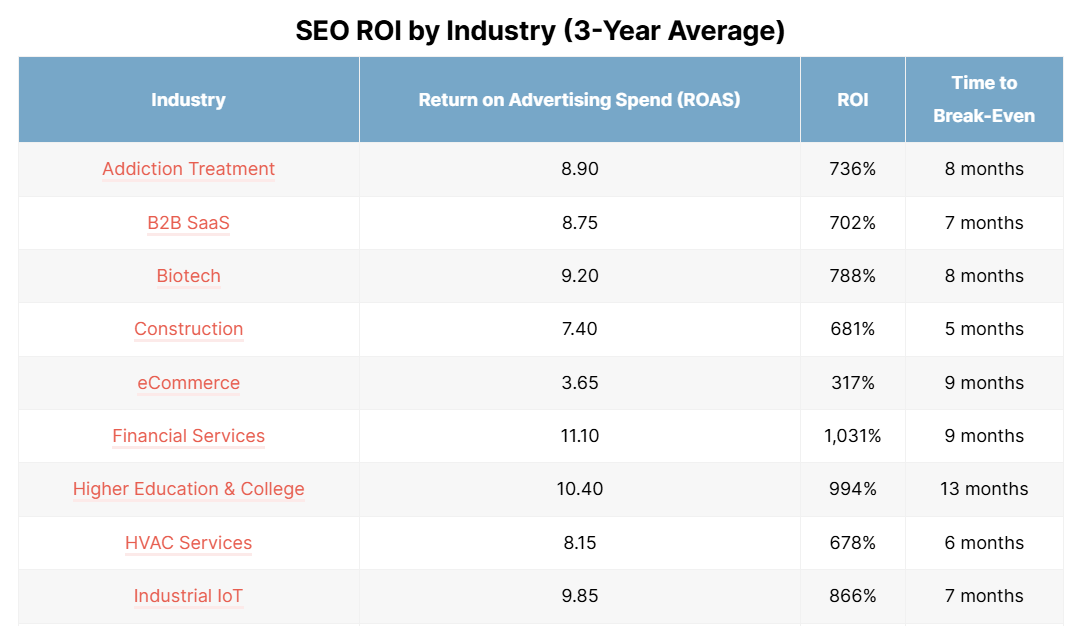
The cost per lead from organic search averages roughly $31 compared to $198 for paid advertising.

The traffic keeps coming without a cost per click, which means the longer you invest, the better the return.
When to Do It Yourself vs Hire an SEO Expert
You can absolutely do this yourself. This guide gives you everything you need to start.
DIY makes sense if you have the time to learn and implement, if your budget is tight, and if you’re willing to put in consistent effort over several months.
Hiring an expert makes sense if you’re in a competitive niche and need a proper strategy, if you’re time-poor and would rather focus on running your business, or if you want faster, more predictable results.
If you do hire someone, look for an agency or consultant who can show real results (not just promises), explains what they’re doing in plain language, and focuses on long-term growth rather than shortcuts.
Red flags include guaranteed rankings (nobody can guarantee a specific position on Google), unusually cheap packages (good SEO takes real work), and agencies that won’t explain their process.
We help businesses across New Zealand get to the top of Google and stay there. That includes:
- SEO Company Auckland
- SEO Company Hamilton
- SEO Company Tauranga
- SEO Company Wellington
- SEO Company Christchurch
- SEO Company Queenstown
If you’re happy to DIY, use this guide and work through it properly. If you want it done right and done faster, that’s where we come in.
How to Get Your Website to the Top of Google: FAQ
Is SEO Dead in 2026?
No. SEO has evolved, but it’s far from dead. AI platforms like ChatGPT and Google AI Overviews are changing how people search, but they still pull their answers from well-optimised websites. If anything, creating clear, well-structured, authoritative content matters more now than ever — which is exactly what AI SEO is built around.
Can You Pay to Be at the Top of Google?
Yes — Google Ads lets you pay for the top spot. But those results are labelled as “Sponsored,” and the traffic stops the moment you stop paying. SEO earns you a position that lasts without ongoing ad spend.
How Do I Get Google to Show My Website in Search Results?
Set up Google Search Console, submit your sitemap, and make sure your pages aren’t accidentally set to “noindex.” Once Google knows your site exists and can crawl it, your pages will start appearing in search results.
What's the Difference Between Google Ads and SEO?
Google Ads is paid — you pay every time someone clicks your ad, and it stops working when your budget runs out. SEO is earned — you optimise your website to rank organically, and the traffic is free once you get there. Most businesses benefit from using both.
Do I Need a Blog to Rank on Google?
Not necessarily. Service pages can rank for commercial keywords without a blog. But blog content helps you capture informational searches, build topical authority, and strengthen your overall site. Over time, a blog becomes a powerful traffic and lead generation tool.