You’ve probably been told that schema markup is now essential for getting found by AI.
Add it, the advice goes, and ChatGPT and Google’s AI Overviews will start citing your business.
The largest controlled study on that exact question found something different.
When researchers tracked nearly 1,900 pages that added schema and measured what happened to their AI citations, the needle barely moved.
So schema is worth doing. Just not for the reasons most of the internet is selling you. And a lot of the advice out there is now a full year out of date, still telling you to add markup that Google switched off in May 2026.
This guide cuts through all of it. You’ll get a straight answer on what schema markup actually is, what it does and doesn’t do in 2026, which types still earn results, and exactly how to add the ones that matter — without breaking your search listings.
What Is Schema Markup?
Schema markup is code you add to your website that tells search engines exactly what your content is — a product, a business, a recipe, an article — in a format they can’t misread.
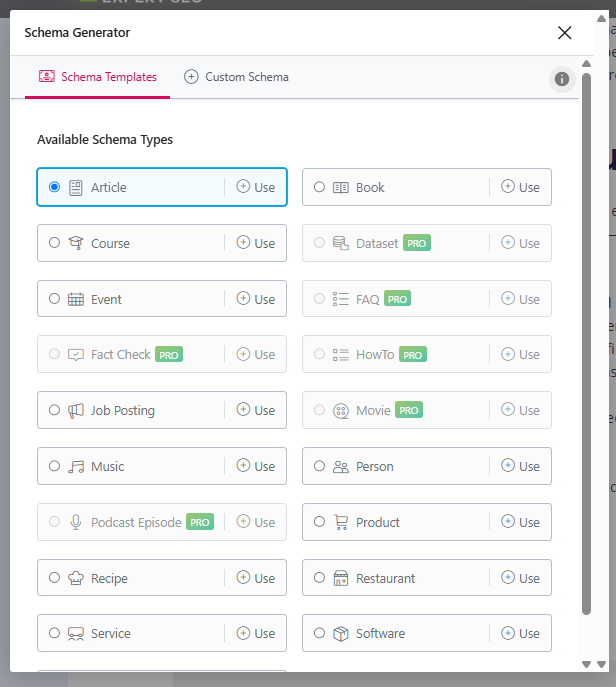
Think of a web page the way Google first sees it: a wall of text and images it has to interpret. It can usually work out the gist, but it’s guessing. Schema removes the guesswork. It’s like sticking a clear label on every drawer of a filing cabinet instead of making someone open each one to figure out what’s inside.
The vocabulary comes from Schema.org, a shared standard backed by Google, Microsoft, Yahoo and Yandex.
The format Google recommends is JSON-LD — a small block of code that sits in your page’s HTML without changing anything a visitor sees.
Here’s what a basic block looks like for a business:
{
  "@context": "https://schema.org",
  "@type": "Organization",
  "name": "Expert SEO",
  "url": "https://expertseo.co.nz",
  "logo": "https://expertseo.co.nz/logo.png",
  "email": "danyon@expertseo.co.nz",
  "sameAs": [
    "https://www.youtube.com/@expertseo",
    "https://x.com/expertseo"
  ]
}
That’s it. A human never sees it. Google reads it and knows, with zero ambiguity, the name of the business, its website, its logo and its official social profiles. No interpreting required.
What Schema Markup Actually Does — and What It Doesn’t
Schema doesn’t make Google rank you higher. What it does is make you eligible for rich results and help search engines understand your content with more confidence.
That distinction matters, because most articles blur it. Schema markup is not a ranking factor. You can’t bolt it onto a thin, low-authority page and expect to climb. Google has said this directly for years.
What schema does do is real and worth having:
- It earns rich results. Star ratings, prices, event dates, recipe cook times — those enhanced listings you see in search are powered by structured data. They make your result bigger and more clickable.
- It sharpens entity understanding. Schema tells Google precisely who you are, what you sell and how your pages relate. That clarity feeds into how confidently Google connects your brand to the things it should rank for.
- It makes you eligible for SERP features that plain pages simply can’t access.
This is part of the technical side of SEO — the behind-the-scenes signals that help search engines process your site cleanly. It supports good content. It doesn’t replace it.
I’ll give you proof from my own business. Expert SEO is a young domain competing against NZ agencies with a decade’s head start, and it’s earning Google AI Overview citations and ranking inside its first year.

Schema is on the site and it helps. But the citations came because the content is genuinely the most useful answer and the site has built real authority — not because of a code block.
Schema was the support act, never the headliner.
Will Schema Markup Get You Cited by AI? What the Data Actually Says
Adding schema to your pages will not, on its own, get you cited more by ChatGPT or Google’s AI Overviews. The biggest controlled study on this found almost no effect.
This is the claim worth slowing down on, because it’s everywhere right now. NZ agencies are selling schema as “not optional” for AI visibility, the technical foundation that supposedly makes everything else possible. The data doesn’t back that up.
Here’s where the confusion starts. Ahrefs analysed six million URLs and found that pages cited by AI were almost three times more likely to have JSON-LD schema than pages that weren’t.
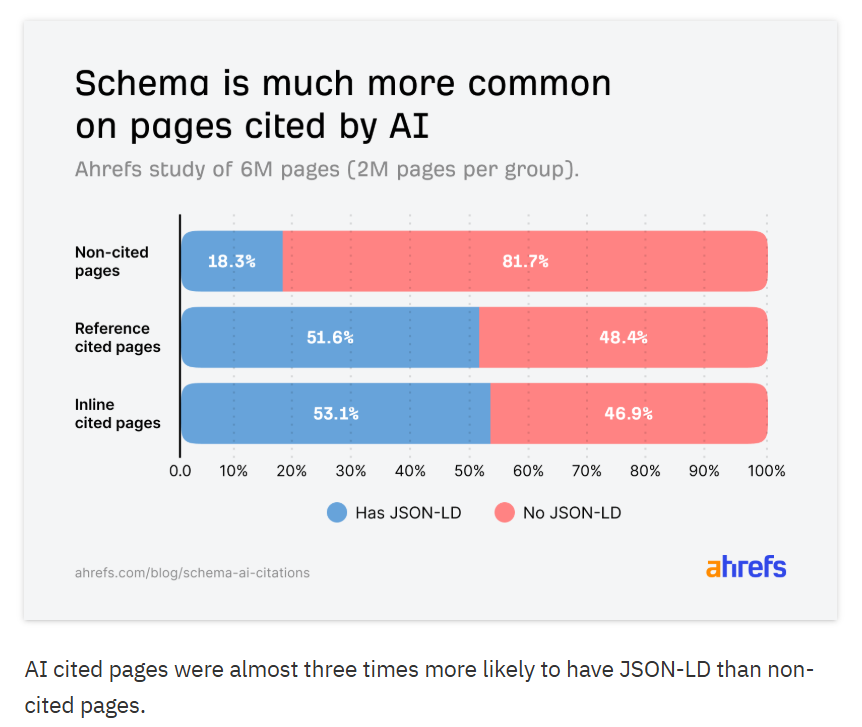
That stat gets passed around as proof. But it’s correlation, not cause. Schema tends to live on better-maintained, more sophisticated sites — and those same sites already publish stronger content, earn more links, and do everything else that gets a page cited. Schema was riding the wave, not creating it.
So Ahrefs ran a second, tighter study to isolate the effect. They tracked 1,885 pages that added JSON-LD over seven months, matched them against 4,000 control pages, and measured what happened to citations across Google AI Overviews, AI Mode and ChatGPT.
The result: adding schema produced no meaningful uplift on any platform.

AI Overviews actually dipped 4.6%, while AI Mode and ChatGPT moved so little the change was indistinguishable from random noise.
Google says the same thing from the other direction. Its own AI features guidance states there’s no special schema markup required to appear in AI Overviews or AI Mode — structured data just needs to match what’s visible on the page.
The honest takeaway: add schema for rich results and clean entity signals. If you’re adding it purely because someone promised it’s an AI shortcut, you’ve been sold a story the evidence doesn’t support.
What actually gets you cited by AI is the same thing that always worked — genuinely useful content on a trusted site.
Which Schema Types Still Earn Results in 2026 (and Which Are Now Invisible)
Some schema types still produce visible results in Google. Others were quietly retired and now do nothing for Search — including the FAQ markup half the internet still tells you to add.
This is where out-of-date advice costs you. If you follow a guide written in 2023, you’ll spend an afternoon adding markup that Google no longer shows. Here’s the current state of play.
| Schema type | Status in 2026 | Worth adding? |
|---|---|---|
| Product | Live — prices, ratings, availability | Yes (ecommerce) |
| Review / AggregateRating | Live — star ratings | Yes |
| LocalBusiness | Live — business info, hours | Yes (local) |
| Event | Live — dates, venue | Yes (if relevant) |
| Breadcrumb | Live — navigation path | Yes |
| Article | Live — supports News/Discover | Yes (blogs) |
| Recipe | Live — cook time, calories | Yes (food sites) |
| Video | Live — video rich results | Yes (if relevant) |
| FAQ | Removed May 2026 | No visible benefit |
| HowTo | Desktop only since 2023, deprecated | No |
The FAQ change is the big one, because FAQ schema was one of the most over-used tags in SEO. The timeline is worth knowing.
In August 2023, Google restricted FAQ rich results to authoritative government and health sites and limited HowTo results to desktop.
Then in 2025 it pulled several more structured data types from search results. Finally, as of 7 May 2026, FAQ rich results stopped appearing in Google Search entirely, with the Search Console report and Rich Results Test support being dropped in June 2026 and API support in August.

The nuance: FAQPage is still a valid Schema.org type, and Google says you can leave existing FAQ markup in place — it won’t cause problems, it just won’t produce anything visible.
If you’ve still got an FAQ section on your page because it genuinely helps readers, keep it. Just don’t expect the dropdown in search, and don’t add it fresh chasing a feature that’s gone.
The Schema Types Worth Your Time
You don’t need 800 schema types. Most NZ businesses need three or four, chosen by what they actually do.
Schema.org lists over 800 types, but Google only supports a handful for rich results. Here’s how to pick.
Organization (every site)
This is the baseline. Organization schema tells Google your business name, logo, website and official social profiles.
It strengthens how Google connects everything published under your brand. Every site should have it, and it usually only needs to sit on your homepage.
LocalBusiness (any business with a location or service area)
If you serve customers in a specific place, LocalBusiness schema is the one that earns its keep. It tells Google your name, address, phone, hours and the area you cover. Use the most specific subtype that fits — Plumber, Electrician, HairSalon, ProfessionalService — because the subtype itself is a relevance signal.
A dental practice should mark up as Dentist and a building company as HomeAndConstructionBusiness, rather than the generic LocalBusiness. This is a core part of local SEO and the section below walks through a real NZ example.
Product (online stores)
If you sell products, this is non-negotiable. Product schema surfaces price, availability and review stars right in the search result, and it’s increasingly how products get pulled into Google Shopping and AI shopping tools.
Incomplete product data means incomplete visibility. For an online store SEO setup, this is the single highest-value markup you can add.
Article (blogs and news)
Article schema helps Google show better titles, images and dates for your blog posts, and tells it more explicitly what each piece is about. If you publish content, add it.
A quick mapping so you know what fits you:
- Local service business (a mortgage broker, a café, a plumber) → Organization + LocalBusiness
- Online store → Organization + Product + Breadcrumb
- Blog or content site → Organization + Article + Breadcrumb
A NZ Local Business Schema Walkthrough
Here’s exactly what LocalBusiness schema looks like for a real New Zealand business, using details you can swap for your own.
This is the markup pattern Expert SEO uses — a Cambridge-based business serving Hamilton and the wider Waikato.
{
  "@context": "https://schema.org",
  "@type": "ProfessionalService",
  "name": "Expert SEO",
  "image": "https://expertseo.co.nz/logo.png",
  "url": "https://expertseo.co.nz",
  "telephone": "+64-21-029-18884",
  "email": "danyon@expertseo.co.nz",
  "address": {
    "@type": "PostalAddress",
    "addressLocality": "Cambridge",
    "addressRegion": "Waikato",
    "postalCode": "3432",
    "addressCountry": "NZ"
  },
  "areaServed": [
    { "@type": "City", "name": "Hamilton" },
    { "@type": "City", "name": "Cambridge" },
    { "@type": "AdministrativeArea", "name": "Waikato" }
  ],
  "openingHours": "Mo-Fr 09:00-17:00",
  "priceRange": "$$"
}
Walk through it field by field:
- @type uses
ProfessionalService, the specific subtype, not the genericLocalBusiness. - telephone is in full international format. Use your real local number — a proper 07, 09 or 03 line where you can, not an 0800 number.
- address sits at locality level. If you run a service-area business from home, you don’t need to publish a street address. Mark up your city and region, and let
areaServedcarry the rest. - areaServed is doing the heavy lifting for a business that travels to clients. List the cities and regions you genuinely cover.
The detail most NZ businesses get wrong: the information in your schema has to match what’s on your website and your Google Business Profile exactly — same name, same number, same address.
That consistency — NAP consistency — is itself a local ranking signal, and conflicting markup undermines it.
What Schema Your CMS Already Adds (and Why It’s Usually Not Enough)
If you’re on WordPress, Shopify or Squarespace, you almost certainly have some schema already — it’s just usually incomplete.
This trips people up. They add a plugin, assume the job’s done, and never check what’s actually being output. Here’s the reality for the common platforms:
- WordPress with Yoast or Rank Math adds basic Organization, website and Article schema automatically. It’s a solid start but rarely covers Product, LocalBusiness subtypes or anything specific to your business.
- Shopify generates basic Product and Organization markup out of the box, but the depth varies by theme, and key fields are often missing or generic.
- Squarespace and Wix add some structured data automatically, with limited control over what and how.
The gap is almost always the same: the defaults are generic, and the high-value fields — your specific LocalBusiness subtype, complete Product data, your real service area — get left blank.
Before you add anything new, find out what’s already there. Which brings us to checking.
How to Check What Schema You Already Have
Before adding anything, check what’s already there using Google’s Rich Results Test and the Schema.org validator — both free.
Two tools do the job:
- Google’s Rich Results Test — paste your URL and it shows which schema types Google detects and whether you’re eligible for rich results. Note that since the May 2026 changes, it no longer reports on FAQ.
- The Schema.org validator — paste a URL or code and it flags every error and warning in your markup.
For quick spot checks as you browse, a free browser extension that surfaces schema on any page is handy.
Run your key pages through one of these before and after any change. If your markup is broken, conflicting or missing entirely across a larger site, that’s the kind of thing a proper site audit catches systematically rather than page by page.
How to Add Schema Markup to Your Site
There are three ways to add schema, from easiest to most control. Most NZ businesses should start with the first.
Option 1: A plugin (easiest)
If you’re on WordPress, SEO on WordPress is simplest through Rank Math or Yoast. Both let you set Organization and LocalBusiness details in a settings panel, then apply Article or Product schema per page with a dropdown — no code. For most small businesses, this covers everything you need.
Option 2: A generator, then paste (more control)
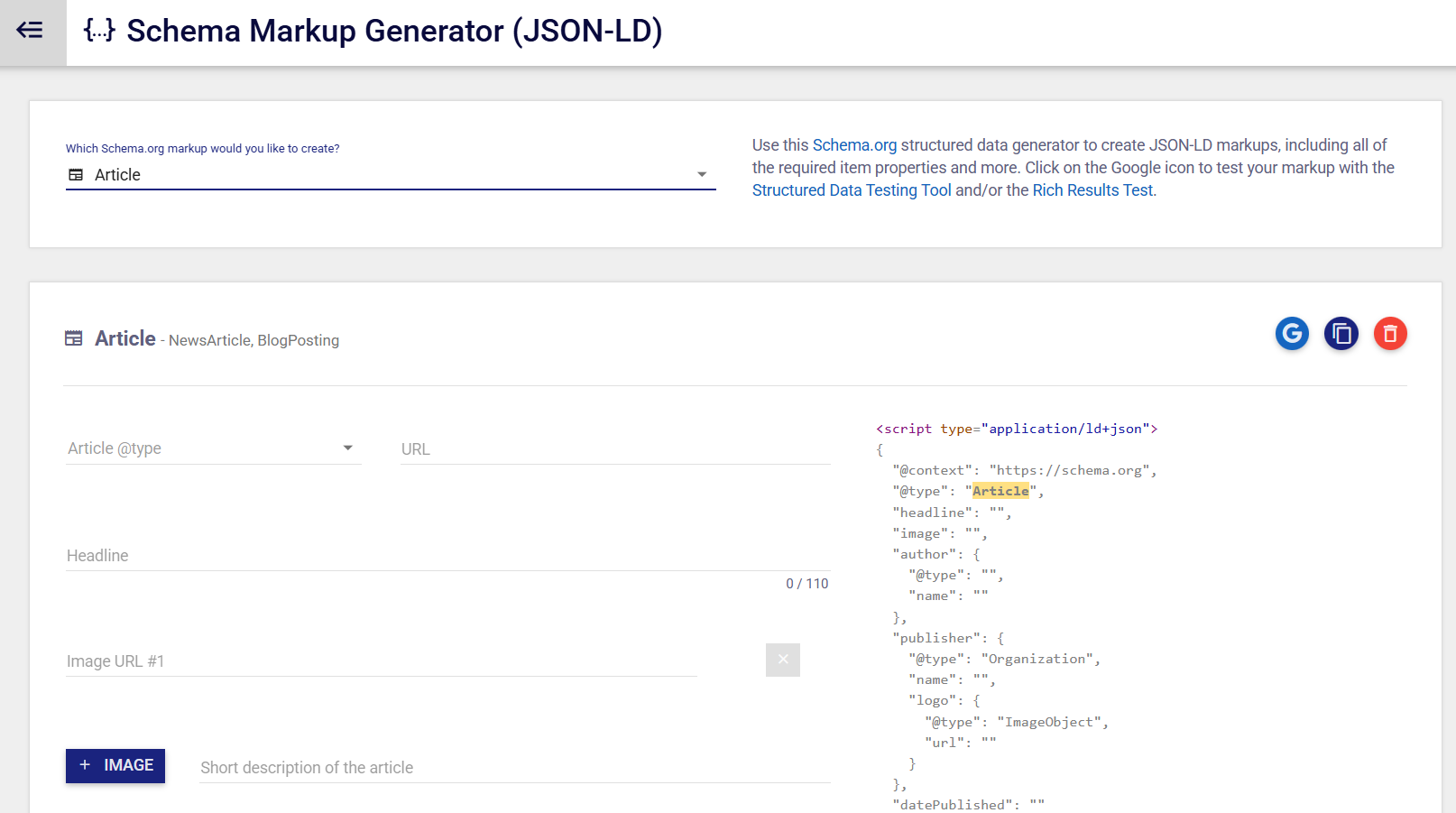
For types your plugin doesn’t handle well, use a free generator like the one from TechnicalSEO or Merkle. You fill in a form, it spits out clean JSON-LD, and you paste that block into your page’s header or via Google Tag Manager. This is the sweet spot for adding a specific LocalBusiness or Event block without touching much code.
Option 3: Hand-written JSON-LD (full control)
Writing the JSON-LD yourself, like the examples above, gives you total control over every field. It’s the route for anyone comfortable with code or working with a developer. Drop the script into the <head> of the relevant page and you’re done.
Whichever route you pick, the code goes in JSON-LD format in your page’s HTML. You don’t sprinkle it through the visible content — it’s a single block search engines read separately.
The Mistakes That Get Your Schema Ignored
Google ignores — and sometimes distrusts — schema that doesn’t match what’s on the page. These are the mistakes that waste the effort.
- Marking up content that isn’t visible. Google’s guidelines are explicit: structured data must match the content shown to users. Claiming a 5-star rating in schema that doesn’t appear on the page can get the markup ignored or flagged as spam.
- Copying generic JSON-LD without changing the values. A copied block with someone else’s business name or placeholder ratings is worse than no schema. Every field has to be true and yours.
- Over-marking everything. You don’t need schema on every element of every page. Mark up what matters — your business, your products, your articles — and leave the rest.
- Leaving abandoned FAQ or HowTo schema. It won’t hurt you, but it does nothing now. If you’re cleaning up, it can go.
Bad schema is genuinely worse than none, because it teaches Google to trust your markup less.
Should You DIY Schema or Hire an Expert?
If you’re adding Organization or a single LocalBusiness block, do it yourself. If your markup is broken, conflicting, or sprawling across an ecommerce catalogue, that’s where it pays to get help.
Schema sits in that awkward middle ground — simple enough to start, fiddly enough to get wrong at scale.
A café owner in Wellington can add LocalBusiness schema in an afternoon with a plugin and a generator.
An online store with 2,000 products and conflicting markup from three different apps is a different job, and broken Product schema there can quietly cost real sales.
If you’re at the point where schema is one piece of a bigger search problem, working with an SEO consultant who can audit the whole picture beats patching it yourself.
And if you’d rather hand the lot off, SEO services takes schema, technical fixes and content off your plate entirely. Either way, the markup is only ever worth as much as the content and authority underneath it — so that’s where the real work lives.